Currently, breadcrumbs and outline don't show anything when having a notebook open. We should come up with a way how this should work and then implement this.
 jrieken
All 17 comments
Agreed. While implementing Folding for cells, I actually reinvented the algorithm for markdown outlines again: finding # headers and use them as folding ranges. I'm wondering the outline for a notebook document is a mix of
- Markdown headers
- Outline for the active cell, which is provided the language
Showing outlines for every cell is a no-op IMHO as it requires creating text models for each cell.
 rebornix
on 17 Apr 2020
rebornix
on 17 Apr 2020
Yeah, that's the challenge here. We can have markdown define the "root structure" of outline but should happen with code cells? Showing outline for them will be expensive because models need to be created - which might already happen anyways when a smart language service is at work... We could differentiate between static outline and dynamic outline
- static outline (in the panel and breadcrumbs): Show the structure as defined by markdown headings
- dynamic outline (quick outline, breadcrumbs picker): Show the outline of the current cell - be it markdown or code
jrieken
on 17 Apr 2020
Not sure if this is useful information or not but for R Markdown notebooks the R language server provides the outline for the whole document, markdown and code chunks included.
 andycraig
on 17 Apr 2020
andycraig
on 17 Apr 2020
@andycraig useful! can you point me to more information about this?
jrieken
on 20 Apr 2020
@jrieken Here's a screenshot of an R Markdown (.Rmd) file. Note that the markdown headings and the function definitions in the code chunks are shown in the outline. The R language server is providing the symbols for both.
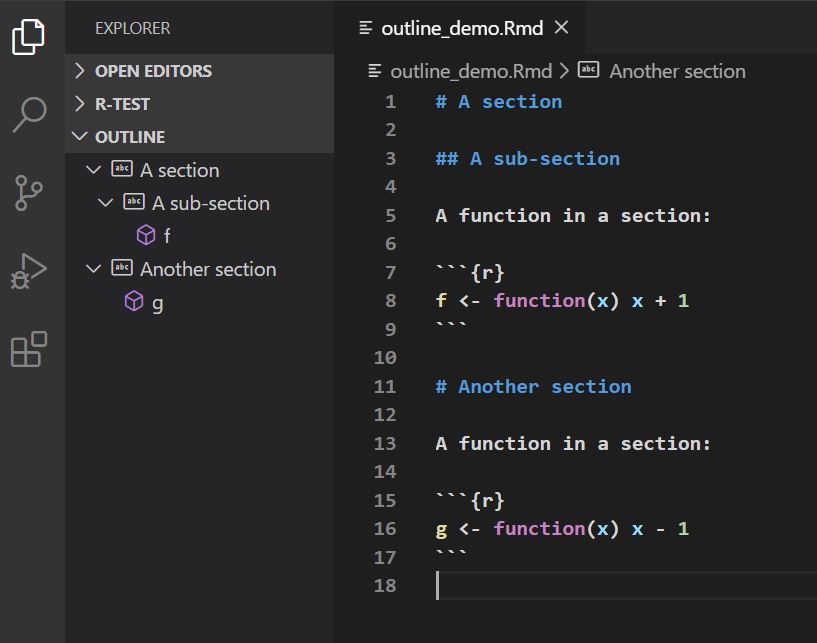
The editor panel shows how R Markdown files are currently displayed in VS Code. The new VS Code Notebook seems like it will probably be a good fit for them. The point I wanted to highlight is that depending on the language server, it may already be providing symbols for the markdown as well as the code.
CC @renkun-ken, who implemented the handling of markdown in the R language server (as well as a lot of other features).
andycraig
on 20 Apr 2020
Thanks @andycraig for introducing me to this discussion.
One thing to notice is that R language server is implemented in R and works for other editors that support LSP and thus is not designed specifically for VSCode.
Generally, I think mixing markdown outline and document symbols look natural and is easy for users to adopt and work with.
 renkun-ken
on 20 Apr 2020
renkun-ken
on 20 Apr 2020
@renkun-ken, @andycraig Thanks for the update here. What you propose makes much sense - IMO the markdown outline should always work like that. Still, this item is specifically about notebook editors that don't show all text but markdown cells, code cells, and output (as shown below) and we wonder if a slightly different navigation is wanted
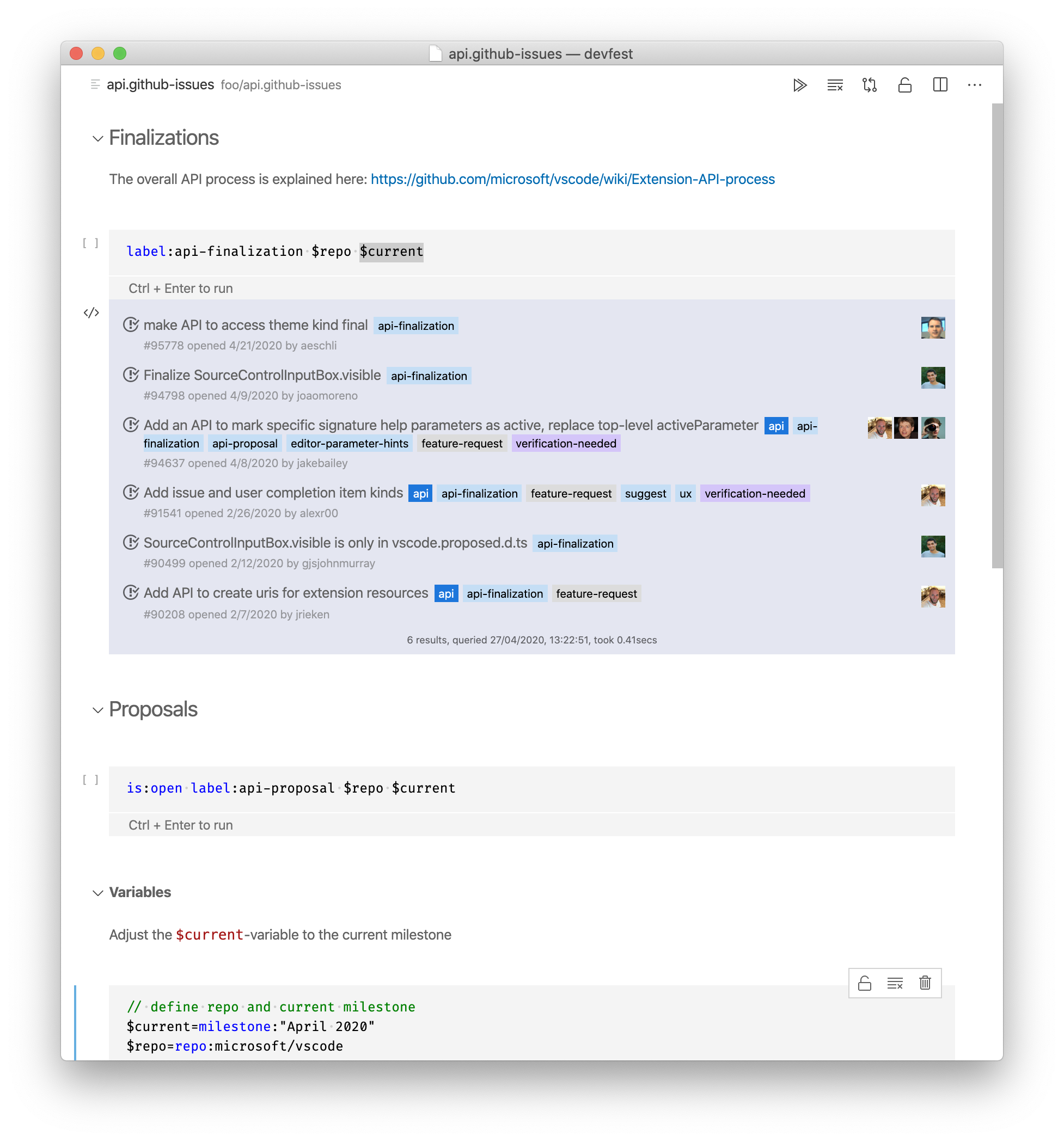
What we are prototyping (!) to to is have an outline per notebooks that driven by markdown section headers and then have outline within each cell. The former should help you navigate quickly to a certain cell, the latter should help to navigate within a large cell. We we will also investigate to have a combined view of both (but due to time constraint not in the first version)
jrieken
on 27 Apr 2020
I have now pushed a change that makes quick outline work for notebooks. This is different from classic document symbols and should be compared with a table of contents.
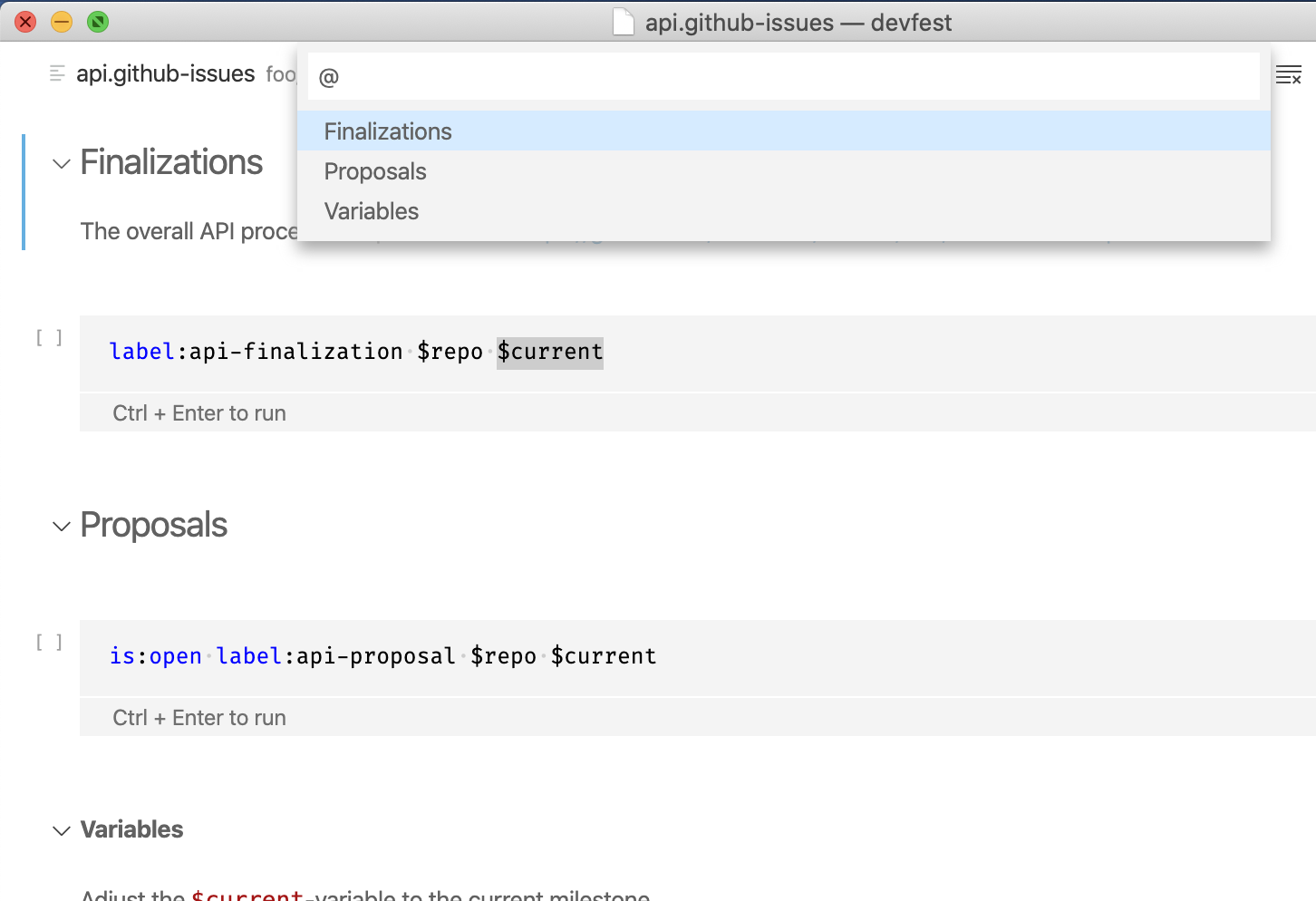
@bpasero fyi this required some changes in gotoSymbolQuickAccess.ts but things did fit nicely into the existing "do something when not having a code editor"-flow.
@roblourens The settings editor could also try to hook into this. That would provide some proofing of the toc-provider-concept and IMO be a neat feature
To wrap up (for this milestone): We now do have quick outline/navigation for notebooks but there are more open questions
- How does this apply to breadcrumbs and the outline-tree. Both are different because they are stable (e.g listen to change events) and are selection-sensitive?
- How does this work when mixing toc entries and classic document symbols?
jrieken
on 27 Apr 2020
@jrieken saw the change, I wonder if the ITableOfContentsProvider should live somewhere more generic where it can also be used by breadcrumbs and outline view because imho they require the exact same information.
And then, once we have such a thing, I wonder if document symbols should just be one "TOC" provider variant. As such, the quick outline would only operate on your new registry and not go to document symbols (since this is shared with standalone editor, the registry would need to live in platform).
Btw one thing to still adopt is support for navigating into symbols from quick open when you type <notebook name>@<notebook symbol>. Again, I think doing everything via the same registry would probably be the best going forward (current code for this feature lives here).
 bpasero
on 27 Apr 2020
bpasero
on 27 Apr 2020
I wonder if the ITableOfContentsProvider should live somewhere more generic where it can also be used by
Yeah - this should probably be some workbench service to which provider register and with with other work. I wanted to keep the change local because we don't actually know if the feature itself is in its final state or not.
And then, once we have such a thing, I wonder if document symbols should just be one "TOC" provider variant.
I don't see much value in that. TOC is concept of the workbench only (nothing like that standalone editor land) and it would throw us back into the two implementations world
jrieken
on 27 Apr 2020
Btw one thing to still adopt is support for navigating into symbols from quick open when you type
@ .
For some reason this doesn't even open the notebook but the underlying file itself. Not sure why that is. Maybe missing to intercept the open request?
jrieken
on 27 Apr 2020
@jrieken that sounds like a bug to me, we open the editor here, maybe you could check why it would not open your notebook:
bpasero
on 27 Apr 2020
It does open (when nothing is open yet). I think you are off the hook but there is something wrong with how notebooks use the working copy service. Tho, since the anything handler uses document symbol this doesn't really work then. Needs some deeper thought next milestone, let's first validate this overall approach
jrieken
on 27 Apr 2020
We have now table of contents that always for a notebook, using markdown headings and the first non-empty line of code cells. Calling is done for now and waiting for user feedback before moving on.
@bpasero wrt the table of contents provider that I have added, we have https://github.com/microsoft/vscode/issues/97095 which I am going to use to further purse this
jrieken
on 14 May 2020
to verify:
- open a notebook like GH issues notebook
- make quick outline shows two kind of entries: markdown headers, the first non-empty line of code cells
- make sure quick outline can be triggered via keyboard no matter where focus is
- make sure quick outline can be triggered via F1
jrieken
on 29 May 2020
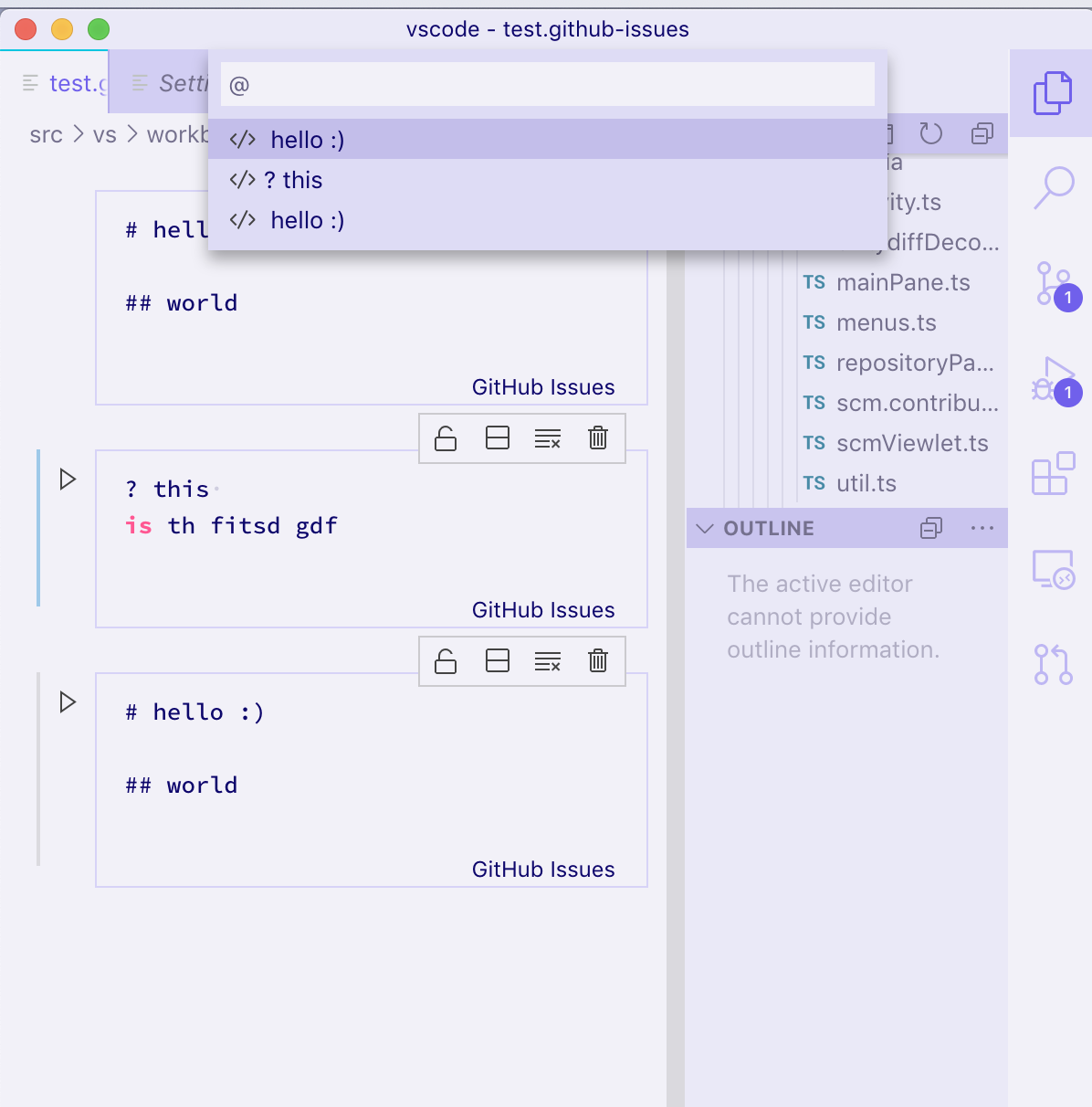
Finding that Go to Symbol in Editor shows the correct outline information, but the outline pane is empty?
 JacksonKearl
on 4 Jun 2020
JacksonKearl
on 4 Jun 2020
but the outline pane is empty?
Yeah, we don't yet want to rewrite the whole outline that's why for now it is just quick outline.
jrieken
on 4 Jun 2020
Related issues
 lukehoban
·
3Comments
lukehoban
·
3Comments
 villiv
·
3Comments
villiv
·
3Comments
 biij5698
·
3Comments
biij5698
·
3Comments
 curtw
·
3Comments
curtw
·
3Comments
 v-pavanp
·
3Comments
v-pavanp
·
3Comments
Most helpful comment
It does open (when nothing is open yet). I think you are off the hook but there is something wrong with how notebooks use the working copy service. Tho, since the anything handler uses document symbol this doesn't really work then. Needs some deeper thought next milestone, let's first validate this overall approach