Vscode: VSCode terminal doesn't allow/request permissions to access media devices
- VSCode Version: 1.44.0
- OS Version: Max OSX Catalina 10.15.2
Steps to Reproduce:
- Run this python script in the VSCode terminal which needs access to the camera:
import cv2

cam = cv2.VideoCapture(0)
print(cam.isOpened())
cam.release()
The result will be Abort trap: 6. This also occurs if you try to run the debugger.
The script does work in the Mac Terminal and iTerm.
This is likely because vscode does not have permissions to access the camera. There is no way to force vscode to appear in the Mac permissions (Security & Privacy -> Privacy -> Camera), such that it cannot be enabled by the user.
Does this issue occur when all extensions are disabled?: Yes
 jvanheugten
All 25 comments
(Experimental duplicate detection)
Thanks for submitting this issue. Please also check if it is already covered by an existing one, like:
![vscodebot[bot] picture](https://avatars2.githubusercontent.com/in/2406?v=4&s=40) vscodebot[bot]
on 12 Apr 2020
vscodebot[bot]
on 12 Apr 2020
(Experimental duplicate detection)
Thanks for submitting this issue. Please also check if it is already covered by an existing one, like:
Probably both issues have similar origin, namely camera permissions are not set for vscode.
jvanheugten
on 12 Apr 2020
@jvanheugten your assumption is correct. But if your macOS terminal app got the permissions to access camera, then any process spawned from it should get that. I am unable to reproduce the crash with the terminal from inside code after I grant the terminal access to camera.
Can you share a video demo ?
 deepak1556
on 14 Apr 2020
deepak1556
on 14 Apr 2020
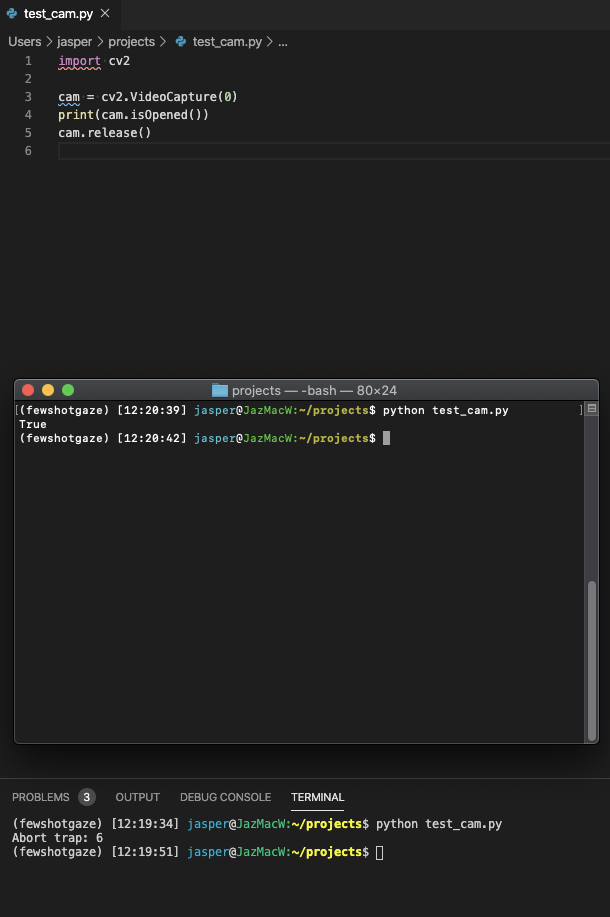
Here is a simple demonstration. Mac OS Terminal shows the correct result, but terminal in VSCode does not.
Does VSCode spawn a emulated terminal? If MacOS thinks it is VSCode that spawns it, I would expect a permission request to access the camera, but that never happens. My privacy settings do show that Terminal has access to the camera, but there is no way to add VSCode to that list.
jvanheugten
on 14 Apr 2020
Have your restarted code after giving your macOS terminal access to camera ? Otherwise code wouldn't pick up the privilege for the terminals it opens.
Does VSCode spawn a emulated terminal?
@Tyriar how do we spawn terminals on macOS ?
I tried the following steps and it seems to work , https://streamable.com/zsa8ro
My privacy settings do show that Terminal has access to the camera, but there is no way to add VSCode to that list.
Yes you can't do that at the moment, because code doesn't carry the entitlement that requests access to camera. I am looking to avoid adding this unless necessary, but for the current use case through the terminal things should work the way it is.
deepak1556
on 14 Apr 2020
Yes, I've restarted vscode a couple of times. I'll try uninstalling and reinstalling it from scratch tomorrow.
jvanheugten
on 14 Apr 2020
@deepak1556
 Tyriar
on 15 Apr 2020
Tyriar
on 15 Apr 2020
I just completely uninstalled VSCode and re-installed it and restarted my computer. The problem is still there.
I even deleted everything according to similar paths here: https://stackoverflow.com/questions/42603103/how-to-completely-uninstall-vscode-on-mac
jvanheugten
on 15 Apr 2020
Just ran VSCode as administrator:
sudo /Applications/Visual\ Studio\ Code.app/Contents/MacOS/Electron
Then my terminal in VSCode will run as root and the program executes as normal.
Of course, that is not a real solution though, but it shows some permissions are not handled correctly.
jvanheugten
on 15 Apr 2020
Thanks for the context, based on https://github.com/microsoft/vscode/issues/95062#issuecomment-614044993 since we execvp, macOS tcc utility will consider the permissions of the parent process instead of the forked process.
But I am still confused why it wasn't an issue with my setup, moving this next milestone for further investigation.
deepak1556
on 15 Apr 2020
Similar issue exists with access to the microphone via Pythoh. In both cases it seems that the VSCode terminal is not requesting permissions from MacOS. I say this because if you run the same CLI command via the built-in MacOS Terminal app then permissions are requested and everything works as it should.
Proposed solution: update VSCode terminal to request permissions from MacOS.
 jelling
on 27 Apr 2020
jelling
on 27 Apr 2020
@jelling thanks for the report. the root cause is same. I have updated the bug title.
deepak1556
on 27 Apr 2020
I tried all those step but doesn't working
 MHDFahz
on 6 May 2020
MHDFahz
on 6 May 2020
I am having the same issue the python code runs without issue from terminal which is able to request the appropriate permissions. VSCode however does not request permissions as expected.
The line
cap = cv.VideoCapture(0)
generates the output
OpenCV: not authorized to capture video (status 0), requesting...
yet there is no request
 becting
on 8 May 2020
becting
on 8 May 2020
However, when I start VS Code from terminal, it works.
becting
on 8 May 2020
However, when I start VS Code from terminal, it works.
Thanks for confirming @becting , thats the only workaround available for now.
As I have outlined earlier
The underlying issue is the way macOS TCC responsibility chain works, for ex: if you launch some application from macOS Terminal.app directly, TCC will determine Terminal.app to be the responsible process for the purpose of permission prompts, rather than the launched app itself. Unless the app is started through the LaunchServices (Finder/Open) the permission prompts will be attributed to the parent process that started it.
In VSCode, the builtin terminal is launched in a process forked from the main app, so any application launched without the use of launchservices from the terminal will have their permissions attributed to VSCode app which currently doesn't obtain the media device permission, and hence you are seeing the issue mentioned.
So to workaround,
- kill all your running instances of VSCode including any helper process, verify with Activity Monitor
- make sure macOS Terminal.app has media permissions
- start VSCode from Terminal.app
codeorcode-insiders - Scripts run from the VSCode terminal that required media access should now work
@jelling @MHDFahz can you verify the above workaround ?
deepak1556
on 8 May 2020
Yes, it works when executing with code from Terminal.
jvanheugten
on 8 May 2020
@jvanheugten
Here is my steps.
- os: Catalina 10.15.5
1, There's a sqlite3 db file(TCC.db) in this path:
~/Library/Application Support/com.apple.TCC/
2, Insert a row to table access, like this:
INSERT INTO access VALUES('kTCCServiceMicrophone','com.microsoft.VSCode',0,1,1,NULL,NULL,NULL,'UNUSED',NULL,0,1590575788);
3, Check the permission(Security & Privacy -> Privacy -> Microphone)
4, Restart vscode
Cheers! 🍺🍺🍺
 DamonQin
on 27 May 2020
DamonQin
on 27 May 2020
Not working
MHDFahz
on 27 May 2020
Yes, it works when executing with
codefrom Terminal.
Are you running VSCode as root?
I did that and VSCode stopped updating. I don't think that we've got a solution for that yet.
 Caldeira777
on 29 Jul 2020
Caldeira777
on 29 Jul 2020
Did anyone find a solution for this?
 Untitleddotpy
on 7 Aug 2020
Untitleddotpy
on 7 Aug 2020
I just install sox via brew command line and then prompt me to add Terminal to microphone access Privacy setting. And then python code is work now. And I just running it from VS Code. It's OK too.
 HaoHoo
on 10 Aug 2020
HaoHoo
on 10 Aug 2020
Try to update the folder permissions recursively with: chmod -R 777 folder
 guilhermeandraschko-vakt
on 11 Sep 2020
guilhermeandraschko-vakt
on 11 Sep 2020
I have the same issue and it's circumvented by running code from Terminal, but still not fixed when I open VScode normally.
 AlCash07
on 11 Sep 2020
AlCash07
on 11 Sep 2020
+1 it would be great for VScode to simply request permissions on Mac, so that we don't have to do this workaround.
 fandy
on 28 Oct 2020
fandy
on 28 Oct 2020
Related issues
Tyriar
·
204Comments
 fabiopicchi
·
192Comments
fabiopicchi
·
192Comments
 ozsay
·
247Comments
ozsay
·
247Comments
 hsdk123
·
263Comments
hsdk123
·
263Comments
 niagr
·
246Comments
niagr
·
246Comments
Most helpful comment
Thanks for confirming @becting , thats the only workaround available for now.
As I have outlined earlier
So to workaround,
codeorcode-insiders@jelling @MHDFahz can you verify the above workaround ?