Vscode: Quick Heal AV quarantines extensionHostProcess.js in VS Code installation
- VSCode Version: 1.440
- OS Version: Windows 10 Pro
Steps to Reproduce:
- Open any project which has git initialized.
- You'll notice that the git toolbar is unable to detect it and ask to initialize repository(which is already initialized)
Does this issue occur when all extensions are disabled?: No
Message like this appears:-

 sumitparakh
All 15 comments
Just noticed that most of the things are not working in this version

sumitparakh
on 10 Apr 2020
Probably #94807.
Are you using AV software? If yes, which one? Any sign of it having messed with VS Code files?
 gjsjohnmurray
on 10 Apr 2020
gjsjohnmurray
on 10 Apr 2020
I'm using Quick Heals. But it works better with 1.43
sumitparakh
on 10 Apr 2020
Did Quick Heals quarantine or delete a VS Code file when you updated to 1.44 and tried using it?
gjsjohnmurray
on 10 Apr 2020
It was blocking extensionHost file. I've excluded it from Virus detection list and it is working now.
sumitparakh
on 10 Apr 2020
It was blocking extensionHost file. I've excluded it from Virus detection list and it is working now.
@gjsjohnmurray @sumitparakh I have removed vs code from quick hill av pro virus detection but still same problem
 Abhay123png
on 10 Apr 2020
Abhay123png
on 10 Apr 2020
@Abhay123png That's weird.
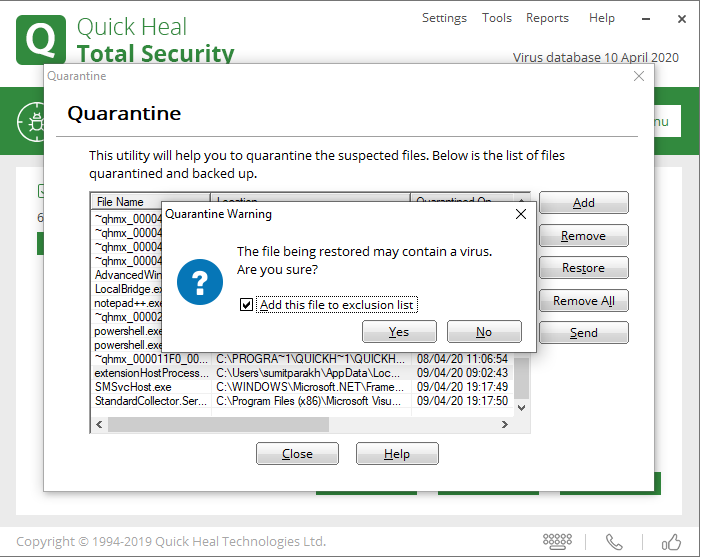
This is how i excluded this file (check screenshot) and it worked. Make sure that after excluding this file, you restart extension host or try to reinstall vscode again.
sumitparakh
on 10 Apr 2020
@Abhay123png That's weird.
This is how i excluded this file (check screenshot) and it worked. Make sure that after excluding this file, you restart extension host or try to reinstall vscode again.
I use quick heal av pro and I added like this : - https://cdn.discordapp.com/attachments/610131188086079519/698081818137591868/IMG_20200410_133711.jpg
Abhay123png
on 10 Apr 2020
@Abhay123png Before excluding this file. Do following things in the same order:-
1) Close vscode
2) Restore that file from Quick Heal (needs to be done)
Open "Quarantine & Backup"
Click View Files
Search extensionHostProcess.js in the list
Select that file and click Restore.

3) Add that file to exclusion list(which you've already done).
sumitparakh
on 10 Apr 2020
@Abhay123png Before excluding this file. Do following things in the same order:-
- Close vscode
- Restore that file from Quick Heal (needs to be done)
Open "Quarantine & Backup"
Click View Files
Search extensionHostProcess.js in the list
Select that file and click Restore.
- Add that file to exclusion list(which you've already done).
Thanks dude , It worked for me
@sumitparakh @gjsjohnmurray
Abhay123png
on 10 Apr 2020
It was blocking extensionHost file. I've excluded it from Virus detection list and it is working now.
But how to do it sir!!! Will you please give me steps..
 Sjaynish
on 11 Apr 2020
Sjaynish
on 11 Apr 2020
i think you have some antivirus....
if you have quick heal total security then
go to the quick heal
->file folders
->exclude file folder from scanning
->add file i.e C:Users (user file name e.g- hp...etc) AppDataLocalProgramsMicrosoft VS CoderesourcesappoutvsworkbenchservicesextensionsnodeextensionHostProcess.js
->save changes...
It is working perfectly....
 Malaya2184
on 11 Apr 2020
Malaya2184
on 11 Apr 2020
Same problem with vscode 1.44.1 update
 SaparaBoy
on 15 Apr 2020
SaparaBoy
on 15 Apr 2020
Thanks for the solution.
 rayeesh1986
on 20 Apr 2020
rayeesh1986
on 20 Apr 2020
Thank you :)
 varunvenky99
on 15 May 2020
varunvenky99
on 15 May 2020
Related issues
 mrkiley
·
3Comments
mrkiley
·
3Comments
 DovydasNavickas
·
3Comments
DovydasNavickas
·
3Comments
 vsccarl
·
3Comments
vsccarl
·
3Comments
 villiv
·
3Comments
villiv
·
3Comments
 chrisdias
·
3Comments
chrisdias
·
3Comments
Most helpful comment
It was blocking extensionHost file. I've excluded it from Virus detection list and it is working now.