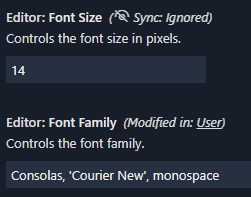
Vscode: The sync ignored icon looks off in settings
93801
Version: 1.44.0-insider (user setup)
Commit: d7d1147d6b764a48b789000c03088ee9afabcd8a
Date: 2020-03-31T08:23:56.446Z
Electron: 7.1.11
Chrome: 78.0.3904.130
Node.js: 12.8.1
V8: 7.8.279.23-electron.0
OS: Windows_NT x64 10.0.18362
It looks a little strange as it's straight surrounded by slanted text.

Why is sync special that it gets an icon there compared to other annotations?
 Tyriar
All 9 comments
Yeah, I agree I think having the icon there in settings looks odd
 sana-ajani
on 31 Mar 2020
sana-ajani
on 31 Mar 2020
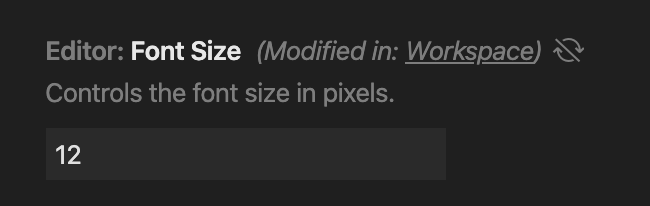
@misolori @sandy081 should we switch this to just an icon with a tooltip, like in the extension viewlet?
 roblourens
on 1 Apr 2020
roblourens
on 1 Apr 2020
Yeah.. just icon makes sense.
 sandy081
on 1 Apr 2020
sandy081
on 1 Apr 2020
So it would look like this (no italics):
 misolori
on 2 Apr 2020
misolori
on 2 Apr 2020
should we switch this to just an icon with a tooltip, like in the extension viewlet?
Is it possible this tooltip could be a bit more detailed than just "Sync: ignored"? A few people have asked my why this is showing up against Dart settings (things like SDK paths) so I don't think it's very clear to the average user what this means (for most, it's not relevant).
 DanTup
on 21 Apr 2020
DanTup
on 21 Apr 2020
Adding a tooltip with a few more words would make sense. Just something like "This setting is not synced"?
roblourens
on 26 Apr 2020
@roblourens the most recent person to ask me about it had no idea about VS Code's setting sync, so interpreted this as meaning the setting wasn't being applied from the file into the current VS Code session.
Maybe something like "This setting is not synced to other machines/remotes" and/or a link to https://code.visualstudio.com/docs/editor/settings-sync?
DanTup
on 27 Apr 2020
Should we only show it when sync is enabled? Alternatively it could have a link to the turn on sync command?
Tyriar
on 27 Apr 2020
Should we only show it when sync is enabled
Oh, definitely that. I was thinking that was the case but I think I show it when sync _can_ be enabled.
roblourens
on 28 Apr 2020
Related issues
 borekb
·
3Comments
borekb
·
3Comments
 DovydasNavickas
·
3Comments
DovydasNavickas
·
3Comments
 mrkiley
·
3Comments
mrkiley
·
3Comments
 sijad
·
3Comments
sijad
·
3Comments
 omidgolparvar
·
3Comments
omidgolparvar
·
3Comments
Most helpful comment
Is it possible this tooltip could be a bit more detailed than just "Sync: ignored"? A few people have asked my why this is showing up against Dart settings (things like SDK paths) so I don't think it's very clear to the average user what this means (for most, it's not relevant).