Vscode: Backticks incorrectly render as diacritical marks on editor
- VSCode Version: 1.43.1
- OS Version: 5.5.10-arch1-1 (Arch linux)
Keyboard is US INTL with dead keys
Duplicate of https://github.com/microsoft/vscode/issues/64034 (closed, unresolved)
Steps to Reproduce:
- Open a file in VS code
- Type TWICE the backtick touch (under ESC), you get : ` (Expected behavior)
- Type ONCE the backtick touch, then a letter such as 'e', you get : è (Expected behavior)
- Type TWICE the backtick touch, you get : ` ; then type ONCE a letter such as 'e',
You should get : `e, you get: è
This is very annoying while trying to write markdown, but seems to happen in any kind of files.
Another problem: this creates a weird fake spacing on the right, look at the cursor in the following animated gif:
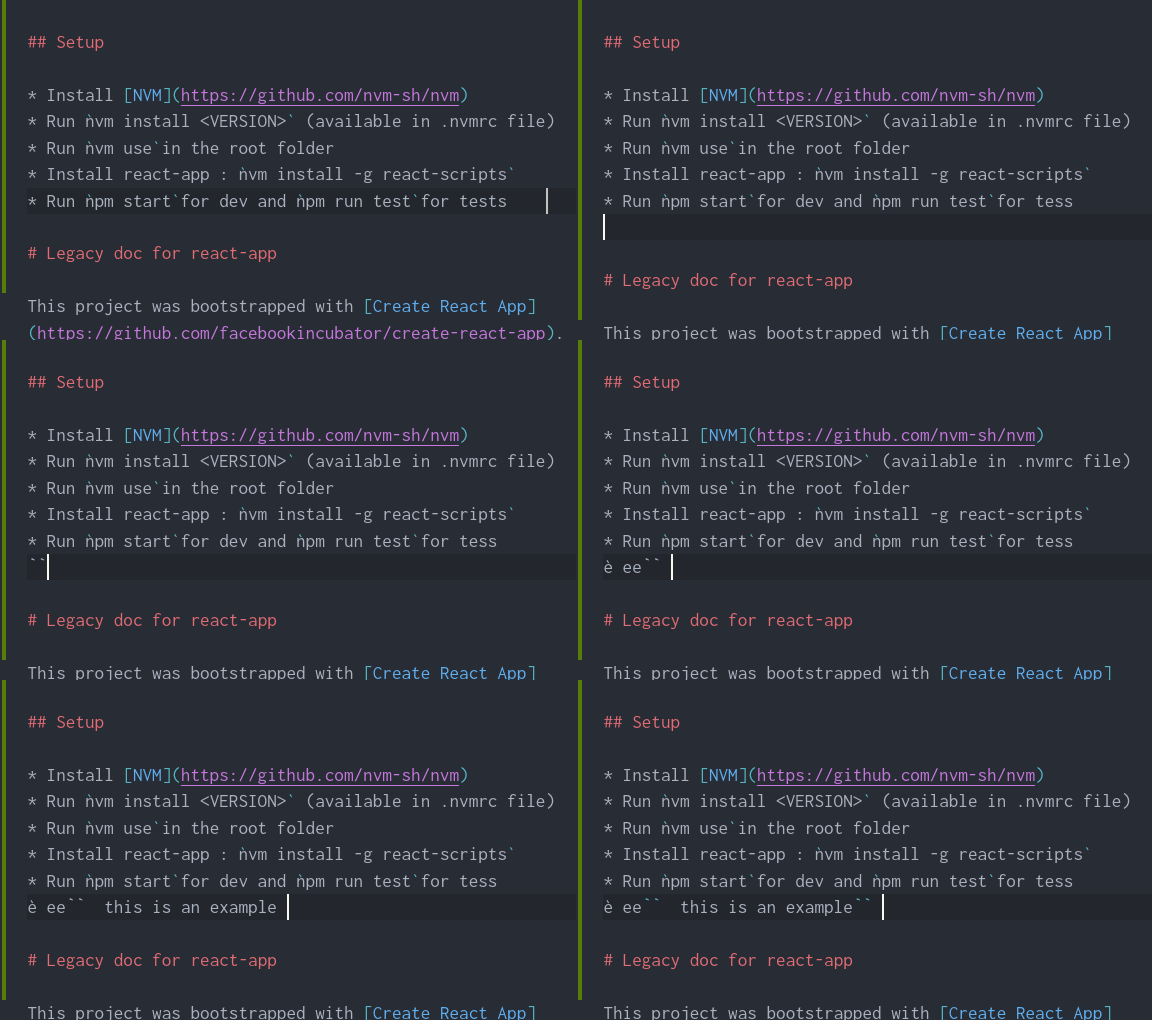
Note that Markdown is still rendered correctly. with markdown preview. File is rendered correctly with VIM

Does this issue occur when all extensions are disabled?: Yes
 Samuelfaure
All 7 comments
Well if you know this is a duplicate then please close this issue
 sportshead
on 27 Mar 2020
sportshead
on 27 Mar 2020
The previous issue is closed and can not be reopened. I also add more details here, which might be useful.
Samuelfaure
on 27 Mar 2020
Same issue happening with v1.45.0 on macOS 10.14.6
 yougotwill
on 14 May 2020
yougotwill
on 14 May 2020
I would really enjoy this bug being fixed, I've been writing a lot of javascript and the backticks are essentials.
Samuelfaure
on 14 May 2020
This is not a bug in vscode, but rather a case of using a locale with "dead keys".
When using a locale with dead keys you must press back tick+space to get a single back tick, as typing back tick only is considered a modifier key, and depending on what you type next you will either get a back tick + a letter or a letter with diacritic marks.
Here is an excellent description of how dead keys work: https://askubuntu.com/questions/56560/what-exactly-is-meant-by-eliminate-dead-keys.
Edit: The spacing to the right is a bug, and it doesn't happen on the Mac.
 davidolrik
on 25 Jul 2020
davidolrik
on 25 Jul 2020
Same issue happening with v1.45.0 on macOS 10.14.6
Also confirmed my issue wasn't VSCode related it was due to Inconsolata Nerd Font.
yougotwill
on 26 Jul 2020
I DO use inconsolata nerd font. I guess that's it for the bug. Thanks !
Samuelfaure
on 27 Jul 2020
Related issues
 VitorLuizC
·
3Comments
VitorLuizC
·
3Comments
 sirius1024
·
3Comments
sirius1024
·
3Comments
 chrisdias
·
3Comments
chrisdias
·
3Comments
 v-pavanp
·
3Comments
v-pavanp
·
3Comments
 shanalikhan
·
3Comments
shanalikhan
·
3Comments
Most helpful comment
I DO use inconsolata nerd font. I guess that's it for the bug. Thanks !