Issue Type: Bug
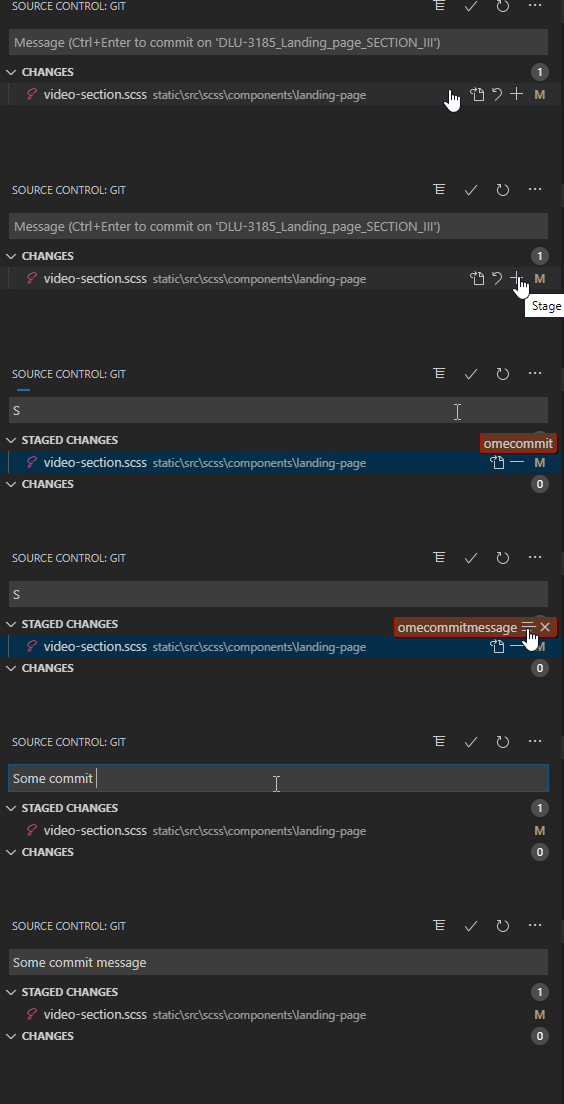
Recently the commit message input started to loose focus while I'm typing the message, usualy right after I add the files to the commit. If I keep typing it start to filter the files filter. It's pretty annoying :)
VS Code version: Code - Insiders 1.43.0-insider (5996fb81591e92fd0c547dc45e3f0350026d5962, 2020-03-06T23:17:52.931Z)
OS version: Windows_NT x64 10.0.19041
System Info
|Item|Value|
|---|---|
|CPUs|Intel(R) Core(TM) i7-8565U CPU @ 1.80GHz (8 x 1992)|
|GPU Status|2d_canvas: enabled
flash_3d: enabled
flash_stage3d: enabled
flash_stage3d_baseline: enabled
gpu_compositing: enabled
multiple_raster_threads: enabled_on
oop_rasterization: disabled_off
protected_video_decode: enabled
rasterization: enabled
skia_renderer: disabled_off_ok
video_decode: enabled
viz_display_compositor: enabled_on
viz_hit_test_surface_layer: disabled_off_ok
webgl: enabled
webgl2: enabled|
|Load (avg)|undefined|
|Memory (System)|19.82GB (6.56GB free)|
|Process Argv||
|Screen Reader|no|
|VM|0%|
Extensions (5)
Extension|Author (truncated)|Version
---|---|---
tslint|eg2|1.0.44
dotenv|mik|1.0.1
vscode-docker|ms-|1.0.0
remote-wsl|ms-|0.42.3
vscode-scss-formatter|sib|1.4.3
 nelsonec87
All 11 comments
Same issue experienced since the latest update.
It happens when adding a file using the + and starting to type the commit message.
Focus get lost when the Git view is done with the refresh.
 Romalouz
on 17 Mar 2020
Romalouz
on 17 Mar 2020
Same issue.
Version: 1.43.0 (user setup)
Commit: 78a4c91400152c0f27ba4d363eb56d2835f9903a
Date: 2020-03-09T19:47:57.235Z
Electron: 7.1.11
Chrome: 78.0.3904.130
Node.js: 12.8.1
V8: 7.8.279.23-electron.0
OS: Windows_NT x64 10.0.18363
 jschwanz
on 17 Mar 2020
jschwanz
on 17 Mar 2020
To specify how the bug actually occurs:
- Add files into staging
- Before files are shown in the staging area, start typing the commit message, because it is already in focus for typing
- after the files are added into staging, the focus gets lost and the typed in text is used for search in the commitable files
 DonPavlov
on 19 Mar 2020
DonPavlov
on 19 Mar 2020
Same to me.
Version: 1.43.1 (user setup)
Commit: fe22a9645b44368865c0ba92e2fb881ff1afce94
Date: 2020-03-18T07:01:20.184Z
Electron: 7.1.11
Chrome: 78.0.3904.130
Node.js: 12.8.1
V8: 7.8.279.23-electron.0
OS: Windows_NT x64 10.0.18363
 icharge
on 22 Mar 2020
icharge
on 22 Mar 2020
@DonPavlov yes - these are the exact steps that cause it for me too on:
Version: 1.43.0 (system setup)
Commit: 78a4c91
Date: 2020-03-09T19:47:57.235Z
Electron: 7.1.11
Chrome: 78.0.3904.130
Node.js: 12.8.1
V8: 7.8.279.23-electron.0
OS: Windows_NT x64 10.0.18363
 mck1117
on 25 Mar 2020
mck1117
on 25 Mar 2020
This appears to be a duplicate of #92401. And I agree, it's mildly infuriating.
 pvdstel
on 25 Mar 2020
pvdstel
on 25 Mar 2020
Same here. It's the most annoying thing in history!!! Fix it please....
 arielkuzminski
on 26 Mar 2020
arielkuzminski
on 26 Mar 2020
I also have this problem. I've noticed it happening since version 1.43.0. Before that, I could type my commit message without it ever losing input focus on the message box.
Bug report template
- VSCode Version: 1.43.2 (system setup) - OS Version: Windows_NT x64 10.0.18363 - Commit: 0ba0ca52957102ca3527cf479571617f0de6ed50 - Date: 2020-03-24T07:38:38.248Z - Electron: 7.1.11 - Chrome: 78.0.3904.130 - Node.js: 12.8.1 - V8: 7.8.279.23-electron.0 Steps to Reproduce: 1. Launch Code in a directory with a git repository 1. Make a change i.e. add a new file or edit a file 1. Open the source control tab 1. Stage the changed file 1. Click inside the commit message box 1. Begin typing a commit message before Code has detected the file been staged 1. Observe focus switching to the Changes panel and an active filter now present Does this issue occur when all extensions are disabled?: Yes
 PairedPrototype
on 27 Mar 2020
PairedPrototype
on 27 Mar 2020
Yes, this is a duplicate of #92401. Please go :+1: that one so this gets noticed.
 iansan5653
on 27 Mar 2020
iansan5653
on 27 Mar 2020
IS it fixed or not? or will we have to live with this for the rest of our lives?
 joelharkes
on 29 Apr 2020
joelharkes
on 29 Apr 2020
@joelharkes This is fixed in the latest (March) release.
iansan5653
on 29 Apr 2020
Related issues
 lukehoban
·
3Comments
lukehoban
·
3Comments
 DovydasNavickas
·
3Comments
DovydasNavickas
·
3Comments
 vsccarl
·
3Comments
vsccarl
·
3Comments
 VitorLuizC
·
3Comments
VitorLuizC
·
3Comments
 shanalikhan
·
3Comments
shanalikhan
·
3Comments
Most helpful comment
To specify how the bug actually occurs: