Vscode: Running Save Participants Takes forever to load. Cannot see any error messsages
Hello, I have spent hours trying to figure out this error/bug in vs code. I have deleted my npm packages, restarted vs code, restarted my computer and disabled all my extensions.
The only thing I am able to see is this screenshot. None of my files will save anymore :(
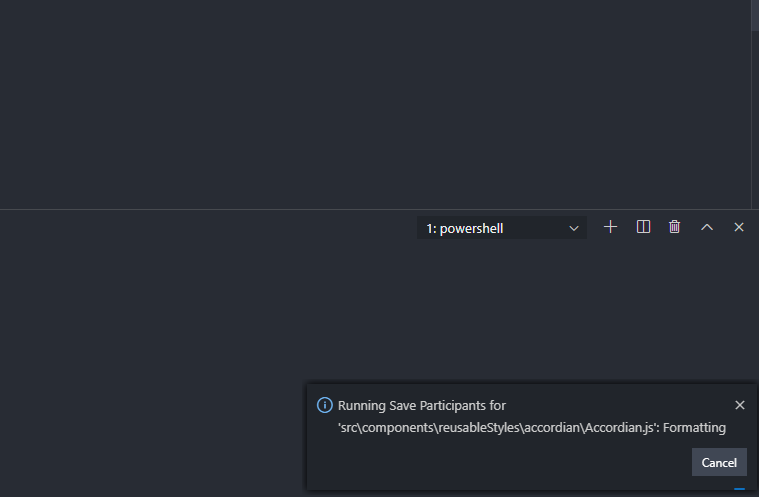
What can I DO!
 arhoy
arhoy
All 22 comments
I'm encountering the exact same issue. First noticed it yesterday after installing the latest update.
Version: 1.42.1
Commit: c47d83b293181d9be64f27ff093689e8e7aed054
Date: 2020-02-11T14:44:27.652Z
Electron: 6.1.6
Chrome: 76.0.3809.146
Node.js: 12.4.0
V8: 7.6.303.31-electron.0
OS: Darwin x64 19.0.0
 jamiecatania
on 18 Feb 2020
jamiecatania
on 18 Feb 2020
This is a formatter that runs during save ("Format on Save" setting). So, this is the question: what formatter extension are you using?
 jrieken
on 18 Feb 2020
jrieken
on 18 Feb 2020
I have the same issue. I'm using Go with "goreturns" as format tool.
EDIT: Tried changing the format tool and disabling "Format on Save" checkbox but it didn't work.
Version: 1.42.1
Commit: c47d83b293181d9be64f27ff093689e8e7aed054
Date: 2020-02-11T14:44:27.652Z
Electron: 6.1.6
Chrome: 76.0.3809.146
Node.js: 12.4.0
V8: 7.6.303.31-electron.0
OS: Darwin x64 19.2.0
 fedekunze
on 18 Feb 2020
fedekunze
on 18 Feb 2020
Experiencing the same issue with gopls. It seems to be independent of the formatter?
 alexanderbez
on 18 Feb 2020
alexanderbez
on 18 Feb 2020
Cmd+shift+P > Developer: Reload with Extensions Disabled worked for me (at least to save files)
fedekunze
on 18 Feb 2020
Developer: Reload with Extensions Disabled worked for me (at least to save files)
That's no surprise. Extensions can participant in saving (format on save, code action on save). We used to kill save-participants after a shorting amount of time (~750ms) but that wasn't sufficient in most cases. In the end you have opt'ed into doing something while saving so we now show that something is happening and we give you the change to cancel . So,
- press cancel when this happens
- disable "format on save" or "code action on save" esp for slow language-extensions
- identify (!) extension and follow-up with the extension author so that their save participants isn't so slow
jrieken
on 18 Feb 2020
I am using Prettier Code Formatter which has 5.2 Million Downloads. I would think way more people would have the same issue, so it could be this extension coupled with some other issue or package that is causing this.
arhoy
on 18 Feb 2020
so it could be this extension coupled with some other issue or package that is causing this.
You are the only one that would know and drilling into this will help - us and/or the prettier team
jrieken
on 19 Feb 2020
Not sure, but looks like I am not the only one experiencing the issue. There is literally no error message or anything I get so it is impossible for me to figure it out. I disabled the prettier extension today and have not seen it come up the whole day.
Looks like a couple ppl above has some issue
arhoy
on 19 Feb 2020
I disabled the prettier extension today and have not seen it come up the whole day.
That's the piece of information. Please contact and let them know that formatting is too slow, e.g taking more than 5 seconds
jrieken
on 19 Feb 2020
I'm experiencing this too, but I'm not using the Prettier extension (though I do have it installed). I'll try to get a repro together, but in the meantime, here are some notes from my quick tests:
- Saving is not always slow.
- Sometimes saving is slow, but not slow enough to cause the "Running Save Participants" notification to appear.
- Sometimes saving _is_ slow enough to cause the "Running Save Participants" notification to appear.
- When disabling both the Prettier and ESLint extensions, saving is fast (because there are no save participants).
- When enabling _only_ the Prettier extension and setting
"editor.formatOnSave": true, saving is fast. - When enabling _only_ the ESLint extension and setting
"editor.formatOnSave": true, saving is fast. - When enabling _only_ the ESLint extension and setting
"editor.formatOnSave": falseand"editor.codeActionsOnSave": { "source.fixAll.eslint": true }, saving is slower.
I can't be sure that the above combination of settings is definitely causing the slowdown because, as I said further above, it's not always slow.
As far as this being caused by a specific extension:
- The latest version of the Prettier extension was released 21 days ago.
- The latest version of the ESLint extension was released 29 days ago.
- I've only been experiencing this issue for the last few days.
This slowdown could be caused by one of those extensions, but it seems like it could be a regression in VS Code since the only thing that changed for me in the last week was VS Code.
Was the editor.codeActionsOnSaveTimeout setting removed in a recent release? I had that in my settings file with a value of 2000ms, but it now says it's an unknown setting. Perhaps saving was timing out previously and now it's waiting until it completes? 🤷♂
Version: 1.42.1 (user setup)
Commit: c47d83b293181d9be64f27ff093689e8e7aed054
Date: 2020-02-11T14:45:59.656Z
Electron: 6.1.6
Chrome: 76.0.3809.146
Node.js: 12.4.0
V8: 7.6.303.31-electron.0
OS: Windows_NT x64 10.0.18362
 reduckted
on 19 Feb 2020
reduckted
on 19 Feb 2020
but it seems like it could be a regression in VS Code since the only thing that changed for me in the last week was VS Code.
Just to be clear: There is no slowdown, the only change is to make slow save participants visible (enabling you to cancel or disable them). Before we would silently (check your log files from old version) cancel/stop participants which caused unpredictable behaviour. This is documented here
https://code.visualstudio.com/updates/v1_42#_handling-slow-save-operations, the underlying issue is here https://github.com/microsoft/vscode/issues/87449
jrieken
on 19 Feb 2020
The challenge here is the lack of information necessary for debugging. Is it possible to log what extension and condition triggered the saving when popping up the error message window?
Many Go extension users reported this issue, and for historical reasons, Go extension uses various tools in addition to the language server (we couldn't find any suspicious pending request from the language server side yet..) - tracking down what is responsible for it, or even whether Go extension is the culprit is currently hard.
 hyangah
on 19 Feb 2020
hyangah
on 19 Feb 2020
The challenge here is the lack of information necessary for debugging. Is it possible to log what extension and condition triggered the saving when popping up the error message window?
Yes, can this please be added? If I recall correctly, when a save participant timed out there would be something listed in the log or the developer tools window that told you what extension triggered the timeout. Now there's no information (that I can find) about what's causes the notification to appear.
reduckted
on 19 Feb 2020
I'm experiencing this too, but I'm not using the Prettier extension (though I do have it installed). I'll try to get a repro together, but in the meantime, here are some notes from my quick tests:
- Saving is not always slow.
- Sometimes saving is slow, but not slow enough to cause the "Running Save Participants" notification to appear.
- Sometimes saving _is_ slow enough to cause the "Running Save Participants" notification to appear.
- When disabling both the Prettier and ESLint extensions, saving is fast (because there are no save participants).
- When enabling _only_ the Prettier extension and setting
"editor.formatOnSave": true, saving is fast.- When enabling _only_ the ESLint extension and setting
"editor.formatOnSave": true, saving is fast.- When enabling _only_ the ESLint extension and setting
"editor.formatOnSave": falseand"editor.codeActionsOnSave": { "source.fixAll.eslint": true }, saving is slower.I can't be sure that the above combination of settings is definitely causing the slowdown because, as I said further above, it's not always slow.
As far as this being caused by a specific extension:
- The latest version of the Prettier extension was released 21 days ago.
- The latest version of the ESLint extension was released 29 days ago.
- I've only been experiencing this issue for the last few days.
This slowdown could be caused by one of those extensions, but it seems like it could be a regression in VS Code since the only thing that changed for me in the last week was VS Code.
Was the
editor.codeActionsOnSaveTimeoutsetting removed in a recent release? I had that in my settings file with a value of 2000ms, but it now says it's an unknown setting. Perhaps saving was timing out previously and now it's waiting until it completes? 🤷♂Version: 1.42.1 (user setup) Commit: c47d83b293181d9be64f27ff093689e8e7aed054 Date: 2020-02-11T14:45:59.656Z Electron: 6.1.6 Chrome: 76.0.3809.146 Node.js: 12.4.0 V8: 7.6.303.31-electron.0 OS: Windows_NT x64 10.0.18362
Yeah same I disabled both the ESLint and Prettier Extension and have not seen it pop up since. Obviously it is not super ideal.
arhoy
on 19 Feb 2020
If anyone on here does find a workable solution please post it to https://stackoverflow.com/questions/60271767/running-save-participants-runs-forever-on-file-save/60292628#60292628 also
arhoy
on 20 Feb 2020
The challenge here is the lack of information necessary for debugging. Is it possible to log what extension and condition triggered the saving
@hyangah Puzzled because there shouldn't be soo many participants running. When users press save we invoke formatters (when enabled) and code actions (when enabled). There is always only one formatter per language and there shouldn't soo many code action providers for go either. Anyways, there are log entries about the extensions that we are invoking:
- F1 > Set Log Level > Trace
- Output > Log (Extension Host)
You will then see things like this (I use eslint-fix-on save and TS format on save)

Which doesn't reveal the provider but the extension. What then the extension does it unknown to us... A mistake that I have seen once or twice is that formatters or code actions, esp. those that invoke external tools, don't work off a working copy but attempt to save the file (while it is being saved) first. That did and will not work.
jrieken
on 20 Feb 2020
The progress message will now also show the name of the extension providing the formatter or code actions and what code action is being applies. The messages also have links that open the settings editor so that save participants can be disabled 👇
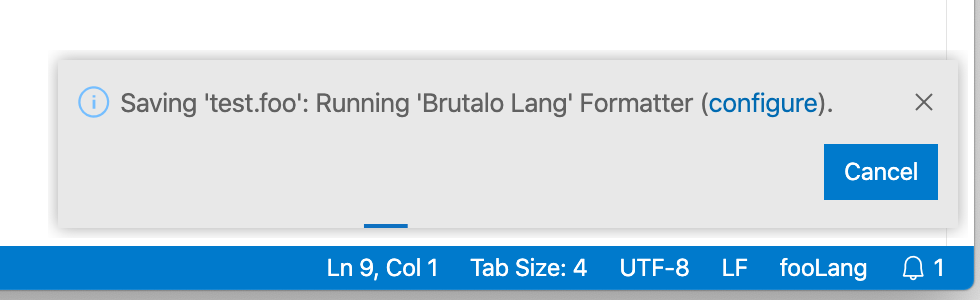
The progress notification also gets an update so that the status bar shows progress when the notification is dismissed. There is no more work planned on our side and it should be much more transparent what's happening and who is in charge. Everyone is encouraged to get in touch with extension authors when they discover that save is slow because of extension participation.
jrieken
on 21 Feb 2020
The progress message will now also show the name of the extension providing the formatter or code actions and what code action is being applies.
That's perfect, thank you!
reduckted
on 21 Feb 2020
Cmd+shift+P >
Developer: Reload with Extensions Disabledworked for me (at least to save files)
Thank you! This worked for me. Although it still came out sometimes, I just clicked 'cancel' and everything worked well.
 GaryLeessang
on 24 Feb 2020
GaryLeessang
on 24 Feb 2020
Same here it broke my dev path everyday .... why did you change that ?
 riderx
on 10 Mar 2020
riderx
on 10 Mar 2020
@riderx What do you think did we change?
jrieken
on 10 Mar 2020
Related issues
 NikosEfthias
·
3Comments
NikosEfthias
·
3Comments
 shanalikhan
·
3Comments
shanalikhan
·
3Comments
 biij5698
·
3Comments
biij5698
·
3Comments
 trstringer
·
3Comments
trstringer
·
3Comments
 curtw
·
3Comments
curtw
·
3Comments
Most helpful comment
The progress message will now also show the name of the extension providing the formatter or code actions and what code action is being applies. The messages also have links that open the settings editor so that save participants can be disabled 👇
The progress notification also gets an update so that the status bar shows progress when the notification is dismissed. There is no more work planned on our side and it should be much more transparent what's happening and who is in charge. Everyone is encouraged to get in touch with extension authors when they discover that save is slow because of extension participation.