Vscode: VSCode attempts to update on quit, fails because it can't delete a folder
Steps to Reproduce:
- Run VSCode when there is an available update
- Quit VSCode, pressing the X button, to trigger an update
I get the following error message:

I tried deleting that folder manually, but I got the following error:

The annoying part is that user IS me. So I followed the steps here to open the ownership of that folder:
I tried them, but both the takeown and icacls commands failed with "Access is denied." on two files:
"C:\Users\myname\AppData\Local\Programs\Microsoft VS Code\resources\app\node_modules.asar.unpacked\vscode-ripgrep\bin\rg.exe"
"C:\Users\myname\AppData\Local\Programs\Microsoft VS Code\resources\app\out\vs\platform\files\node\watcher\win32\CodeHelper.exe"
Upon hitting 'cancel' I got this message:

The end of that log file contained just this:
Feb 14 14:04:08.354 INFO Delete directory recursively: "C:\Users\myname\AppData\Local\Programs\Microsoft VS Code\bin" (attempt 1)
Feb 14 14:04:08.354 INFO Delete directory recursively: "C:\Users\myname\AppData\Local\Programs\Microsoft VS Code\locales" (attempt 1)
Feb 14 14:04:08.354 INFO Delete directory recursively: "C:\Users\myname\AppData\Local\Programs\Microsoft VS Code\resources" (attempt 1)
Feb 14 14:04:09.213 INFO Delete directory recursively: "C:\Users\myname\AppData\Local\Programs\Microsoft VS Code\resources" (attempt 2)
Feb 14 14:04:09.416 INFO Delete directory recursively: "C:\Users\myname\AppData\Local\Programs\Microsoft VS Code\resources" (attempt 3)
Feb 14 14:04:09.869 INFO Delete directory recursively: "C:\Users\myname\AppData\Local\Programs\Microsoft VS Code\resources" (attempt 4)
Feb 14 14:04:10.682 INFO Delete directory recursively: "C:\Users\myname\AppData\Local\Programs\Microsoft VS Code\resources" (attempt 5)
Feb 14 14:04:11.947 INFO Delete directory recursively: "C:\Users\myname\AppData\Local\Programs\Microsoft VS Code\resources" (attempt 6)
Feb 14 14:04:13.759 INFO Delete directory recursively: "C:\Users\myname\AppData\Local\Programs\Microsoft VS Code\resources" (attempt 7)
Feb 14 14:04:16.227 INFO Delete directory recursively: "C:\Users\myname\AppData\Local\Programs\Microsoft VS Code\resources" (attempt 8)
Feb 14 14:04:19.445 INFO Delete directory recursively: "C:\Users\myname\AppData\Local\Programs\Microsoft VS Code\resources" (attempt 9)
Feb 14 14:04:23.507 INFO Delete directory recursively: "C:\Users\myname\AppData\Local\Programs\Microsoft VS Code\resources" (attempt 10)
Feb 14 14:04:28.521 INFO Delete directory recursively: "C:\Users\myname\AppData\Local\Programs\Microsoft VS Code\resources" (attempt 11)
Feb 14 14:10:56.325 INFO Delete directory recursively: "C:\Users\myname\AppData\Local\Programs\Microsoft VS Code\resources" (attempt 1)
Feb 14 14:10:56.388 INFO Delete directory recursively: "C:\Users\myname\AppData\Local\Programs\Microsoft VS Code\resources" (attempt 2)
Feb 14 14:10:56.591 INFO Delete directory recursively: "C:\Users\myname\AppData\Local\Programs\Microsoft VS Code\resources" (attempt 3)
Feb 14 14:10:57.044 INFO Delete directory recursively: "C:\Users\myname\AppData\Local\Programs\Microsoft VS Code\resources" (attempt 4)
Feb 14 14:10:57.856 INFO Delete directory recursively: "C:\Users\myname\AppData\Local\Programs\Microsoft VS Code\resources" (attempt 5)
Feb 14 14:10:59.121 INFO Delete directory recursively: "C:\Users\myname\AppData\Local\Programs\Microsoft VS Code\resources" (attempt 6)
Feb 14 14:11:00.933 INFO Delete directory recursively: "C:\Users\myname\AppData\Local\Programs\Microsoft VS Code\resources" (attempt 7)
Feb 14 14:11:03.402 INFO Delete directory recursively: "C:\Users\myname\AppData\Local\Programs\Microsoft VS Code\resources" (attempt 8)
Feb 14 14:11:06.617 INFO Delete directory recursively: "C:\Users\myname\AppData\Local\Programs\Microsoft VS Code\resources" (attempt 9)
Feb 14 14:11:10.679 INFO Delete directory recursively: "C:\Users\myname\AppData\Local\Programs\Microsoft VS Code\resources" (attempt 10)
Feb 14 14:11:15.693 INFO Delete directory recursively: "C:\Users\myname\AppData\Local\Programs\Microsoft VS Code\resources" (attempt 11)
Feb 14 14:18:54.219 INFO Delete directory recursively: "C:\Users\myname\AppData\Local\Programs\Microsoft VS Code\resources" (attempt 1)
Feb 14 14:18:54.297 INFO Delete directory recursively: "C:\Users\myname\AppData\Local\Programs\Microsoft VS Code\resources" (attempt 2)
Feb 14 14:18:54.500 INFO Delete directory recursively: "C:\Users\myname\AppData\Local\Programs\Microsoft VS Code\resources" (attempt 3)
Feb 14 14:18:54.953 INFO Delete directory recursively: "C:\Users\myname\AppData\Local\Programs\Microsoft VS Code\resources" (attempt 4)
Feb 14 14:18:55.766 INFO Delete directory recursively: "C:\Users\myname\AppData\Local\Programs\Microsoft VS Code\resources" (attempt 5)
Feb 14 14:18:57.031 INFO Delete directory recursively: "C:\Users\myname\AppData\Local\Programs\Microsoft VS Code\resources" (attempt 6)
Feb 14 14:18:58.843 INFO Delete directory recursively: "C:\Users\myname\AppData\Local\Programs\Microsoft VS Code\resources" (attempt 7)
Feb 14 14:19:01.311 INFO Delete directory recursively: "C:\Users\myname\AppData\Local\Programs\Microsoft VS Code\resources" (attempt 8)
Feb 14 14:19:04.529 INFO Delete directory recursively: "C:\Users\myname\AppData\Local\Programs\Microsoft VS Code\resources" (attempt 9)
Feb 14 14:19:08.591 INFO Delete directory recursively: "C:\Users\myname\AppData\Local\Programs\Microsoft VS Code\resources" (attempt 10)
Feb 14 14:19:13.605 INFO Delete directory recursively: "C:\Users\myname\AppData\Local\Programs\Microsoft VS Code\resources" (attempt 11)
Feb 14 14:41:36.729 ERRO Access is denied. (os error 5)
When I try to re-launch after canceling the update I get:
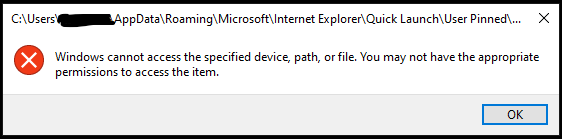
This has happened twice in a row now, and the only solution has been to uninstall and re-install VSCode.
 Grandclosing
All 6 comments
I'm seeing this error as well.
 Simon-Tesla
on 17 Feb 2020
Simon-Tesla
on 17 Feb 2020
For my part, it appears to have been caused by my installation of Malwarebytes Premium. Quitting Malwarebytes allowed the installer to delete the directory and continue the update without any further issues. I'm running Malwarebytes version 4.0.4.49, with update package version 1.0.19326 and component package version 1.0.823.
Simon-Tesla
on 17 Feb 2020
Ah! @Simon-Tesla That might be my issue too - we use Malwarebytes here as well, not sure what version/type. I'm not sure I'd be allowed to stop Malware bytes on this system; I'll look into it...
Grandclosing
on 17 Feb 2020
Wow, re-installation failed because those same files failed to delete. I'll have to either figure out my Malwarebytes issue, or restart my computer.
Grandclosing
on 17 Feb 2020
/duplicate #47841
 joaomoreno
on 18 Feb 2020
joaomoreno
on 18 Feb 2020
Turning off Malwarebytes realtime protections temporarily and hitting retry to the auto-update error message worked for me. Thanks @Grandclosing! 👍
 pfeerick
on 24 Mar 2020
pfeerick
on 24 Mar 2020
Related issues
 VitorLuizC
·
3Comments
VitorLuizC
·
3Comments
 ryan-wong
·
3Comments
ryan-wong
·
3Comments
 omidgolparvar
·
3Comments
omidgolparvar
·
3Comments
 philipgiuliani
·
3Comments
philipgiuliani
·
3Comments
 borekb
·
3Comments
borekb
·
3Comments
Most helpful comment
I'm seeing this error as well.