Vscode: running Save Participants for
- VSCode Version:
- OS Version:
Steps to Reproduce:
1.
2.
Does this issue occur when all extensions are disabled?: Yes/No
 IbrahimCanKALYA
All 17 comments
(Experimental duplicate detection)
Thanks for submitting this issue. Please also check if it is already covered by an existing one, like:
![vscodebot[bot] picture](https://avatars2.githubusercontent.com/in/2406?v=4&s=40) vscodebot[bot]
on 12 Feb 2020
vscodebot[bot]
on 12 Feb 2020
VSCode Version: 1.42.1
OS Version: Windows 10 Home
Steps to Reproduce:
- Inside the body section of a .html document, add a
tag with no particular text.
- Add a tag inside the paragraph that encloses at least 1 word.
- The doc doesn't seem to save anymore and live server enters in a infinite loop if active.
Does this issue occur when all extensions are disabled?: No
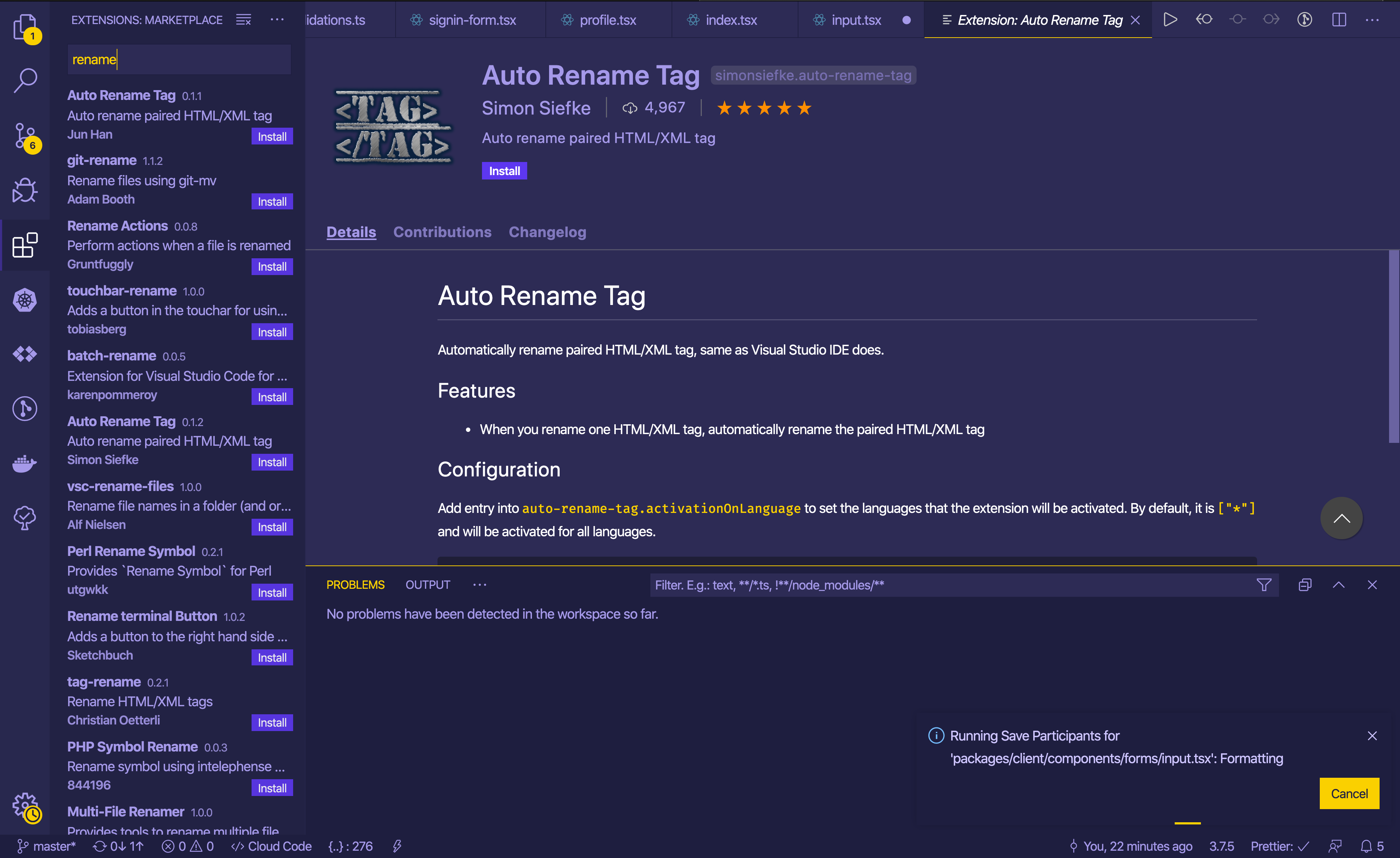
Additional info: the problem stop persisting when the following extension was disabled:
"Auto rename tag" (check the screenshot for more info about the extension).

(Please close again the thread, i'm only loging this info in order to save time of future devs with this issue. Thanks!)
 CodingReaction
on 18 Feb 2020
CodingReaction
on 18 Feb 2020
auto rename tag causing a lot of issues lately.. :'(
 demiro
on 25 Feb 2020
demiro
on 25 Feb 2020
@CodingReaction can confirm, disabling the extension "Auto Rename Tag" immediately solved it for me.
VSCode Version: 1.42.1
OS Version: Arch Linux
Kernel Version: 5.5.5
 nikoksr
on 25 Feb 2020
nikoksr
on 25 Feb 2020
Auto Rename Tag was causing the problem in my case as well.
 Lietsaki
on 25 Feb 2020
Lietsaki
on 25 Feb 2020
Please fix, I am not able to work with this $§"!%"$$%§!
Windows10, Latest version of VS, all extensions disabled.
It seems like the good times are over and there we are again in visual studio hell. Loading, waiting and guessing what it could be;)
 Left4Dev
on 28 Feb 2020
Left4Dev
on 28 Feb 2020
It happened to me and @CodingReaction comment made it fix. Thank you.
 Jihun0109
on 29 Feb 2020
Jihun0109
on 29 Feb 2020
I encounter "Running Save Participants for 'src/styles/global.css': Formatting" when I use HTML in an MDX file. It's seems prettier is having a hard time formatting it, but sometimes can and sometimes can't. And now always takes forever.
 davidkartuzinski
on 29 Feb 2020
davidkartuzinski
on 29 Feb 2020
I encounter "Running Save Participants for 'src/styles/global.css': Formatting" when I use HTML in an MDX file. It's seems prettier is having a hard time formatting it, but sometimes can and sometimes can't. And now always takes forever.
if you have the auto rename tag extension, then disable it. worst case trying restarting your windows or do an nvram reset on your mac
 teds31
on 4 Mar 2020
teds31
on 4 Mar 2020
@teds31 - you're suggestion of restarting the computer seems to be working. I am on mac. I basically restarted everything, and its seems to be behaving. Thank you.
davidkartuzinski
on 5 Mar 2020
I'm seeing this issue on macOS Catalina when saving Go files. I don't have auto rename tag installed and I tried resetting to no avail.
 zebralight
on 6 Mar 2020
zebralight
on 6 Mar 2020
@zebralight I downgraded the Go extension to 0.12.0 and things are working ok again for me. That may be worth a shot.
 rdrgmnzs
on 7 Mar 2020
rdrgmnzs
on 7 Mar 2020
In addition to the issue that files can't be saved anymore, which can be temporarily fixed by clicking the Cancel button inside the running save participants notification, I have had several occurrences of files getting mixed up with the content of another file when doing a Save all. The files that cannot be saved get contaminated with (parts of) the content of files that can.
Removing the Auto Rename Tag extension fixed this problem as well.
 markchagers
on 9 Mar 2020
markchagers
on 9 Mar 2020
Disabling Auto rename tag also fixed this issue for me. Using macOS Catalina.
 andrewbaisden
on 9 Mar 2020
andrewbaisden
on 9 Mar 2020
Got the same issue, without Auto Rename Tag installed, need to investigate issues with other installed plugins though:
 lovekaizen
on 10 Mar 2020
lovekaizen
on 10 Mar 2020
The issue is NOT limited to Auto Rename Tag. I don't use that one. I have a slow problem if I try to run PHP Code Beautifier.
 photocurio
on 10 Mar 2020
photocurio
on 10 Mar 2020
Since I have uninstalled Auto Rename Tag, the problem hasn't occurred for days.
Right now I have tried to import a large (~41k lines) Javascript document into my project and the problem has reappeared.
I have disabled and tested all extensions one by one. The only two extensions where the problem occurred were Prettier and Bracket Pair Colorizer 2, whereas the problem occurred only for a very short time with Prettier and for a very, very long time with Bracket Pair Colorizer 2.
Other extensions, which did not seem to have any negative effects:
nikoksr
on 11 Mar 2020
Related issues
 omidgolparvar
·
3Comments
omidgolparvar
·
3Comments
 DovydasNavickas
·
3Comments
DovydasNavickas
·
3Comments
 VitorLuizC
·
3Comments
VitorLuizC
·
3Comments
 philipgiuliani
·
3Comments
philipgiuliani
·
3Comments
 mrkiley
·
3Comments
mrkiley
·
3Comments
Most helpful comment
VSCode Version: 1.42.1
OS Version: Windows 10 Home
Steps to Reproduce:
tag with no particular text.
Does this issue occur when all extensions are disabled?: No
Additional info: the problem stop persisting when the following extension was disabled:

"Auto rename tag" (check the screenshot for more info about the extension).
(Please close again the thread, i'm only loging this info in order to save time of future devs with this issue. Thanks!)