Vscode: tokenColorCustomizations priorities are wrong (or very confusing)
In the settings editor.tokenColorCustomizations.textMateRules, the scope "variable" has more priority than the (in my opinion) more specific scope "entitiy.name.function". This means that I can't manually assign a color to function names without overwriting the whole variable scope when my theme has set a color set for the variable scope.
- VSCode Version: 1.42.0
- OS Version: Windows_NT x64 6.1.7601
Steps to Reproduce:
- Add the following to settings.json:
"editor.tokenColorCustomizations": {
      "textMateRules": [
          {"scope": ["entity.name.function"],
          "settings": {
              "foreground": "#61AFEF",
          }},
          {"scope": ["variable"],
          "settings": {
              "foreground": "#FF0000",
          }},
      ]
},
- Observe how the
entity.name.functiongets overridden by thevariablescope:

This issue occurs when all extensions are disabled.
I get no errors or warnings.
 RobbertC5
All 9 comments
(Experimental duplicate detection)
Thanks for submitting this issue. Please also check if it is already covered by an existing one, like:
![vscodebot[bot] picture](https://avatars2.githubusercontent.com/in/2406?v=4&s=40) vscodebot[bot]
on 10 Feb 2020
vscodebot[bot]
on 10 Feb 2020
I just noticed, when I open the window and the program is not done loading, during a short moment I get the correct syntax coloring:

But then something finishes loading and the variable scope takes over again:

Notice how the yellow color of this survives, as it has the more specific variable.language, but console does not, as it is in support.class which also gets dominated by variable.
RobbertC5
on 11 Feb 2020
t's the semantic highlighting kicking in.
There was an issue that I fixed that variables that have a callable type should be rendered functions.
That is in the latest insiders. Did taht fix your issue?
If no, can you paste a code example? Or let me know what the hover over getDirectories shows.
 aeschli
on 17 Feb 2020
aeschli
on 17 Feb 2020
I am experiencing the same issue. For example the only way to set color for key in js object literal is to use variable, variable.other or variable.other.property. Those rules override everything else.

Which is highly undesirable.
 Limonische
on 18 Feb 2020
Limonische
on 18 Feb 2020
Yes the semantic classification overrules the TextMate grammar. That's the idea (as the language server knows more about the symbols).
Your example is not really related to the one of this issue. Can you create a new issue and describe what you want to have. You don't like that object keys are the same as properties?
aeschli
on 18 Feb 2020
Your example is not really related to the one of this issue. Can you create a new issue and describe what you want to have. You don't like that object keys are the same as properties?
Yes, exactly. Thank you for explanation, I will create a separate issue.
Limonische
on 19 Feb 2020
In the insiders, functions are highlighted correctly now, thanks for that!
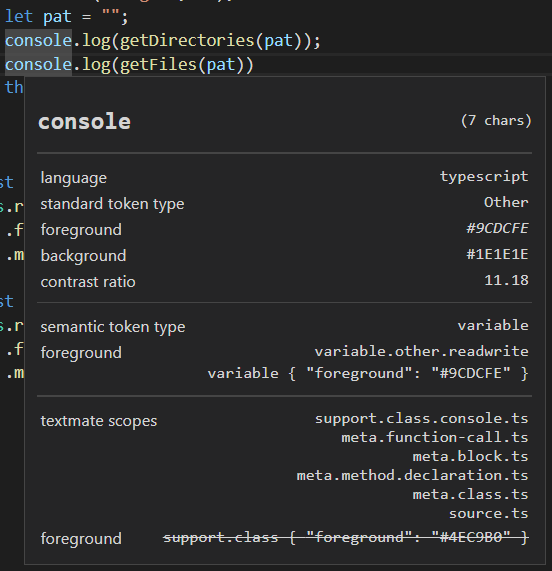
I follow your reasoning that semantic classification knows more than TextMate and should overrule it, but sometimes TextMate is more precise / fine tunable. For example, I think this issue still exists with for example console. TextMate knows console is special (it has support.class or even support.class.console for who wants it), but for semantic classification it's just a variable like the variable pat above it in the screenshot:
RobbertC5
on 19 Feb 2020
Yes, the semantic highlight has no understanding of 'built-in' types.
If you want to file an feature request...
aeschli
on 20 Feb 2020
I created https://github.com/microsoft/vscode/issues/91090 for supporting different rendering of the 'standard' types and variables.
aeschli
on 20 Feb 2020
Related issues
 trstringer
·
3Comments
trstringer
·
3Comments
 sirius1024
·
3Comments
sirius1024
·
3Comments
 NikosEfthias
·
3Comments
NikosEfthias
·
3Comments
 VitorLuizC
·
3Comments
VitorLuizC
·
3Comments
 vsccarl
·
3Comments
vsccarl
·
3Comments
Most helpful comment
In the insiders, functions are highlighted correctly now, thanks for that!
I follow your reasoning that semantic classification knows more than TextMate and should overrule it, but sometimes TextMate is more precise / fine tunable. For example, I think this issue still exists with for example

console. TextMate knowsconsoleis special (it hassupport.classor evensupport.class.consolefor who wants it), but for semantic classification it's just a variable like the variablepatabove it in the screenshot: