Vscode: Allow to type <filename>#<symbol> to see a list of symbols of that file
Right now if I want to open a file to a specific symbol, the workflow is like this:
- Open Command palette
- fuzzy match the filename I want:
reseforrequestReset.js - hit the
→arrow to open that file - At this point I can either type
:10to go to line to of the matched file - If I want to go to a symbol, like a function called
runReset, I need to backspace the whole line and then type@runReset
It would be awesome if we could like rese@run and it would fuzzy match both the filename and the symbol. And rese:10 would open that same file but to line 10.
Some more examples: https://twitter.com/adamwathan/status/1225819393889882112
 wesbos
All 16 comments
(Experimental duplicate detection)
Thanks for submitting this issue. Please also check if it is already covered by an existing one, like:
![vscodebot[bot] picture](https://avatars2.githubusercontent.com/in/2406?v=4&s=40) vscodebot[bot]
on 7 Feb 2020
vscodebot[bot]
on 7 Feb 2020
Not a dupe, but thanks kind botty
wesbos
on 7 Feb 2020
It would be even better if we didn't have to hit the right-arrow at all, and just type rese@runR to get to the runReset function in the requestReset.js file 👍
 adamwathan
on 7 Feb 2020
adamwathan
on 7 Feb 2020
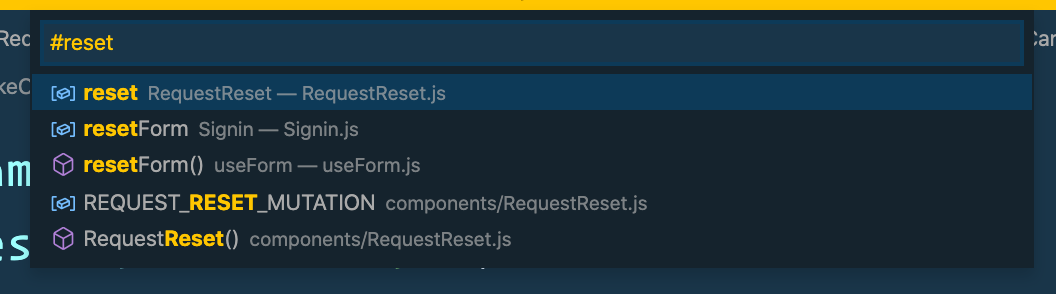
Yeah that is what I'm proposing here - do it all in one go. The command palette already has formatting to show both symbols and filenames, so it seems like they aren't that far off:
wesbos
on 7 Feb 2020
It's interesting but saving one keypress doesn't really seem worth it to me. For example:
current workflow
- Type file name
- Press enter
- Trigger breadcrumbs e.g. (cmd+shift+period)
- Type symbol name
vs
- Type file name
- Type
@ - Type symbol name
And the cost is complexity and losing the ability to search for a file with @ in the query. Not sure it's worth it. And this feature would be basically invisible.
Also for a real Sublime style experience we would need to open the file on focus which is an old issue: https://github.com/microsoft/vscode/issues/8939
 roblourens
on 8 Feb 2020
roblourens
on 8 Feb 2020
 Cmacu
on 10 Feb 2020
Cmacu
on 10 Feb 2020
@wesbos how would this work if there are multiple results matching on file name and you then type @, would it simply goto symbol of the first result you had in the list?
 bpasero
on 14 Mar 2020
bpasero
on 14 Mar 2020
It would show a list, just like it works right now if it matches multiple filenames. All this issue is asking is that we expand the matching algo
wesbos
on 14 Mar 2020
@wesbos to clarify, assume I type openany and get the following 2 results:
openAnythingHandleropenAnyotherHandler
Now I continue and type openany# to show me some symbols. What happens now? We show the symbols of the 2 files combined that matched before?
bpasero
on 14 Mar 2020
Ah! good point - I'd think yes just show all symbols for all matched files. There will obviously be a limit to what can be shown, just like file matching
wesbos
on 14 Mar 2020
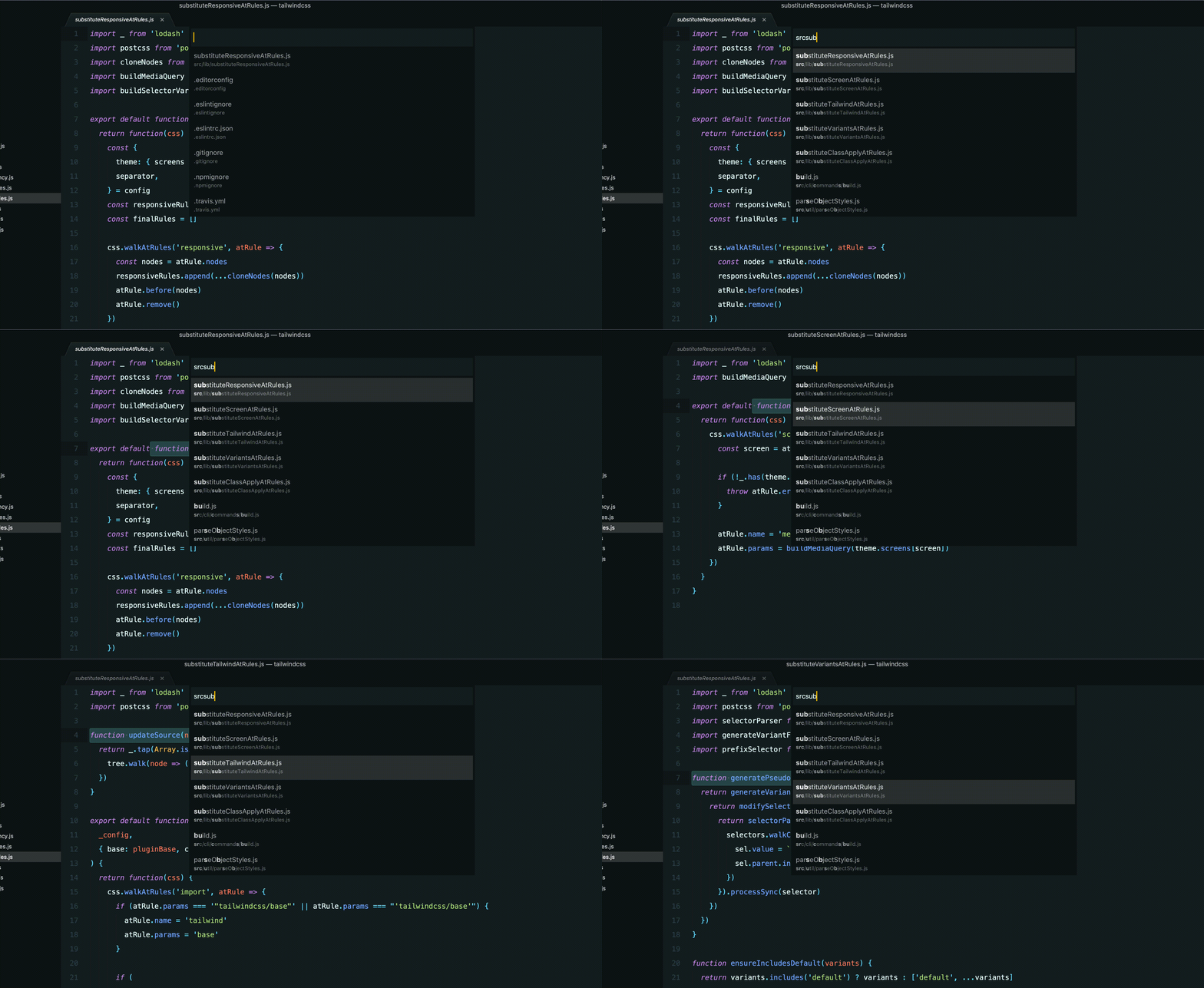
I think it should show the symbols of the selected file, like Sublime does.
adamwathan
on 14 Mar 2020
Yes, that makes more sense to me, thanks a lot for sharing this 👍 . One thing where ST is clearly better is that they show a preview of the file in the background so you can even see the contents without having to open the file first. We have this under https://github.com/microsoft/vscode/issues/8939
bpasero
on 16 Mar 2020
This was the exact behavior I tried to achieve with the GoToAnything plugin linked above:
- search within workspace files
- detect tokens (
@,#,$) that perform symbol lookup within the selected file - preview the currently selected result
- close the preview on Escape (couldn't figure the way for this so instead I just reactivated the original tab)

The implementation is far from perfect, but so far it worked fine for me. I am considering refactoring to improve performance. If the plan is to add something similar to VSCode that would be awesome!
Cmacu
on 16 Mar 2020
The preview tab requires a lot more infrastructure in the workbench to not mess up with the history and layout etc. I like how ST does it by not even opening a tab for the preview editor. We simply do not have such a concept on the workbench editor level yet.
I am sure we can implement this feature without preview tabs btw to begin with.
bpasero
on 16 Mar 2020
Sounds good to me.
The way I use this feature mostly is for quickly browsing the declared functions/methods in the selected file without opening it. Most of the time finding the name of the symbol is more than enough. The preview is just nice add-on at this point.
Another useful feature is being able to copy the name of the highlighted symbol directly from the quick pick.
One thing I was considering is adding the line of code, where the symbol is declared, in the result details section (the second row in each option). Just an idea.
Cmacu
on 16 Mar 2020
Current thinking:
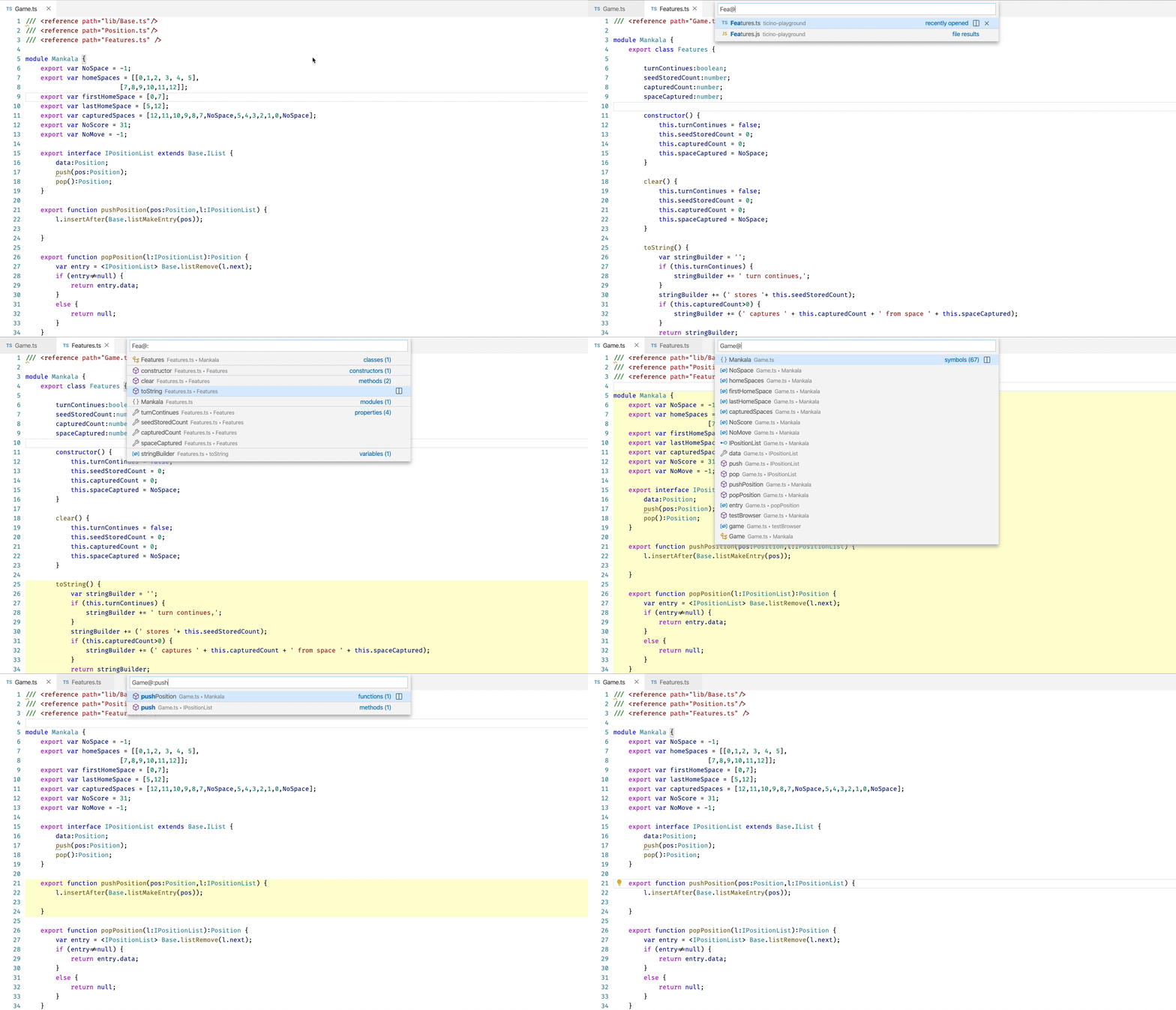
Will be available in tomorrows insider build when you configure "workbench.quickOpen.enableExperimentalNewVersion": true
Some loose ends:
- currently not restoring the view state when you cancel the pick, editors will remain open
- may expand this same solution also when typing an editor number
- currently only supported in the "open anything" picker
It does also work with symbols if you configure "search.quickOpen.includeSymbols": true
bpasero
on 23 Mar 2020
Related issues
 omidgolparvar
·
3Comments
omidgolparvar
·
3Comments
 borekb
·
3Comments
borekb
·
3Comments
 curtw
·
3Comments
curtw
·
3Comments
 sijad
·
3Comments
sijad
·
3Comments
 trstringer
·
3Comments
trstringer
·
3Comments
Most helpful comment
Not a dupe, but thanks kind botty