Vscode: [Insiders]: Typescript Syntax highlight is broken
Issue Type: Bug
- Open typescript file
- See that syntax highlight is broken
However, if I'm switching custom token color for scope: entity then any white token gets color of this customization.
Without token color customization

With token color customization:


VS Code version: Code - Insiders 1.42.0-insider (c4d53a19df8799f5d49a4f49a6900c499e6fa27c, 2020-01-23T06:38:09.164Z)
OS version: Linux x64 5.3.0-26-generic snap
System Info
|Item|Value|
|---|---|
|CPUs|AMD Ryzen 5 2600 Six-Core Processor (12 x 1477)|
|GPU Status|2d_canvas: unavailable_software
flash_3d: disabled_software
flash_stage3d: disabled_software
flash_stage3d_baseline: disabled_software
gpu_compositing: disabled_software
multiple_raster_threads: enabled_on
oop_rasterization: disabled_off
protected_video_decode: disabled_off
rasterization: disabled_software
skia_renderer: disabled_off_ok
video_decode: disabled_software
viz_display_compositor: enabled_on
viz_hit_test_surface_layer: disabled_off_ok
webgl: unavailable_software
webgl2: unavailable_software|
|Load (avg)|1, 1, 1|
|Memory (System)|31.38GB (12.20GB free)|
|Process Argv|--force-user-env --no-sandbox --unity-launch --no-sandbox|
|Screen Reader|no|
|VM|0%|
Extensions (2)
Extension|Author (truncated)|Version
---|---|---
todo-tree|Gru|0.0.166
sass-indented|syl|1.7.3
 limbosounds
All 17 comments
BTW, it became broken within last 10 hours, because yesterday everything was fine
limbosounds
on 24 Jan 2020
Broken syntax highlighting here as well, don't know if it's related to your issue, but here is the error log from chrome dev tools...
ERR Missing color in color map - #000000: Error: Missing color in color map - #000000
    at ColorMap.getId (/Users/Shared/Apps/Visual Studio Code - Insiders.app/Contents/Resources/app/node_modules.asar/vscode-textmate/release/main.js:357:19)
    at resolveParsedThemeRules (/Users/Shared/Apps/Visual Studio Code - Insiders.app/Contents/Resources/app/node_modules.asar/vscode-textmate/release/main.js:323:81)
    at Function.Theme.createFromParsedTheme (/Users/Shared/Apps/Visual Studio Code - Insiders.app/Contents/Resources/app/node_modules.asar/vscode-textmate/release/main.js:381:16)
    at Function.Theme.createFromRawTheme (/Users/Shared/Apps/Visual Studio Code - Insiders.app/Contents/Resources/app/node_modules.asar/vscode-textmate/release/main.js:378:21)
    at Registry.setTheme (/Users/Shared/Apps/Visual Studio Code - Insiders.app/Contents/Resources/app/node_modules.asar/vscode-textmate/release/main.js:3663:51)
    at o.setTheme (file:///Users/Shared/Apps/Visual Studio Code - Insiders.app/Contents/Resources/app/out/vs/workbench/workbench.desktop.main.js:4040:323)
    at C._doUpdateTheme (file:///Users/Shared/Apps/Visual Studio Code - Insiders.app/Contents/Resources/app/out/vs/workbench/workbench.desktop.main.js:4925:634)
    at C._doUpdateTheme (file:///Users/Shared/Apps/Visual Studio Code - Insiders.app/Contents/Resources/app/out/vs/workbench/workbench.desktop.main.js:4932:888)
    at C._updateTheme (file:///Users/Shared/Apps/Visual Studio Code - Insiders.app/Contents/Resources/app/out/vs/workbench/workbench.desktop.main.js:4925:545)
    at C._getOrCreateGrammarFactory (file:///Users/Shared/Apps/Visual Studio Code - Insiders.app/Contents/Resources/app/out/vs/workbench/workbench.desktop.main.js:4924:277)
    at async file:///Users/Shared/Apps/Visual Studio Code - Insiders.app/Contents/Resources/app/out/vs/workbench/workbench.desktop.main.js:4924:625
 markovicdenis
on 24 Jan 2020
markovicdenis
on 24 Jan 2020
The same for pure JavaScript. Also sometimes the highlight returns to normal, secondarily, as if "flickering"
 Tapokj
on 24 Jan 2020
Tapokj
on 24 Jan 2020
One more thing: highlighting is normal initially, when opening VSCode Insiders, but becomes broken after like 1-2 seconds. And after changing the settings of token color customizations it flickers to normal for like 0.5 seconds and becomes broken again :)
limbosounds
on 24 Jan 2020
I've noticed that comment coloring is not applying either when its overridden from the theme normal.
"[Chocolate Ice Cream]": {
            "comments": "#d689b6f6",
        }
I can change the comments color value and nothing changes.
 cpheps
on 24 Jan 2020
cpheps
on 24 Jan 2020
Same for individual Highlightings like e.g. contributed in my extension "Opacc F-Fscript".
before latest update:

after latest update:

 Raydir
on 24 Jan 2020
Raydir
on 24 Jan 2020
Just to explain:
Semantic highlighting comes in once the typescript server is up.
Identifiers are then highlighted based on their actual type: types, interfaces, enums, namespace, parameters instead of just variables.
It's still work in progress and can be turned off with
"editor.semanticHighlighting.enabled": false
@limbosounds The rule
"scope": "entity" is too broad and covers many symbol types: entity.name.type, entity.name.type.interface, entity.name.function. These are used for the semantic tokens.
The Developer: Show Editor Tokens and Scopes shows semantic tokens and the rules that are probed for. I recommend you to make your customisation more specific.
@marchenko-am That's an interesting issue. What theme do you use? Any customisation in the settings? Would you mind fining a new issue if you have more information?
@cpheps Thanks, good catch, fixed by 13dd07b8a811d61b9b1f068a0093be915dff4d0e
 aeschli
on 27 Jan 2020
aeschli
on 27 Jan 2020
@aeschli so, it won't be fixed, lol? It was ok in previous version.
BTW, scope.entity works fine for my theme (Monokai Dimmed) - it replaces all red and dark-red tokens with my color.
limbosounds
on 27 Jan 2020
@limbosounds If you can paste me your source sample then I can investigate more.
But when you configure "scope": "entity" : red that means that you want all types, namespaces & functions to be red. Now with semantic highlighting we actually know that the identifiers and not variables but types, namespaces & functions... That's why things look different.
aeschli
on 27 Jan 2020
@aeschli as you can see in OP, it does not work even without token customization.
I can share you copy-pasted code from screenshot here, if it will help :)
limbosounds
on 27 Jan 2020
@limbosounds Sorry, I didn't realize that 'Without token color customization' is also broken. I don't know your theme. What is the expected result?
Please make sure to update to the latest i-build (1.42.0-insider, 35116fa958d6622df1c31b4d84810b999a858170). There has been some fixes.
aeschli
on 27 Jan 2020
@aeschli In c4b6a6b looks better (token color customizations are switched off, semantic highlight enabled yet):
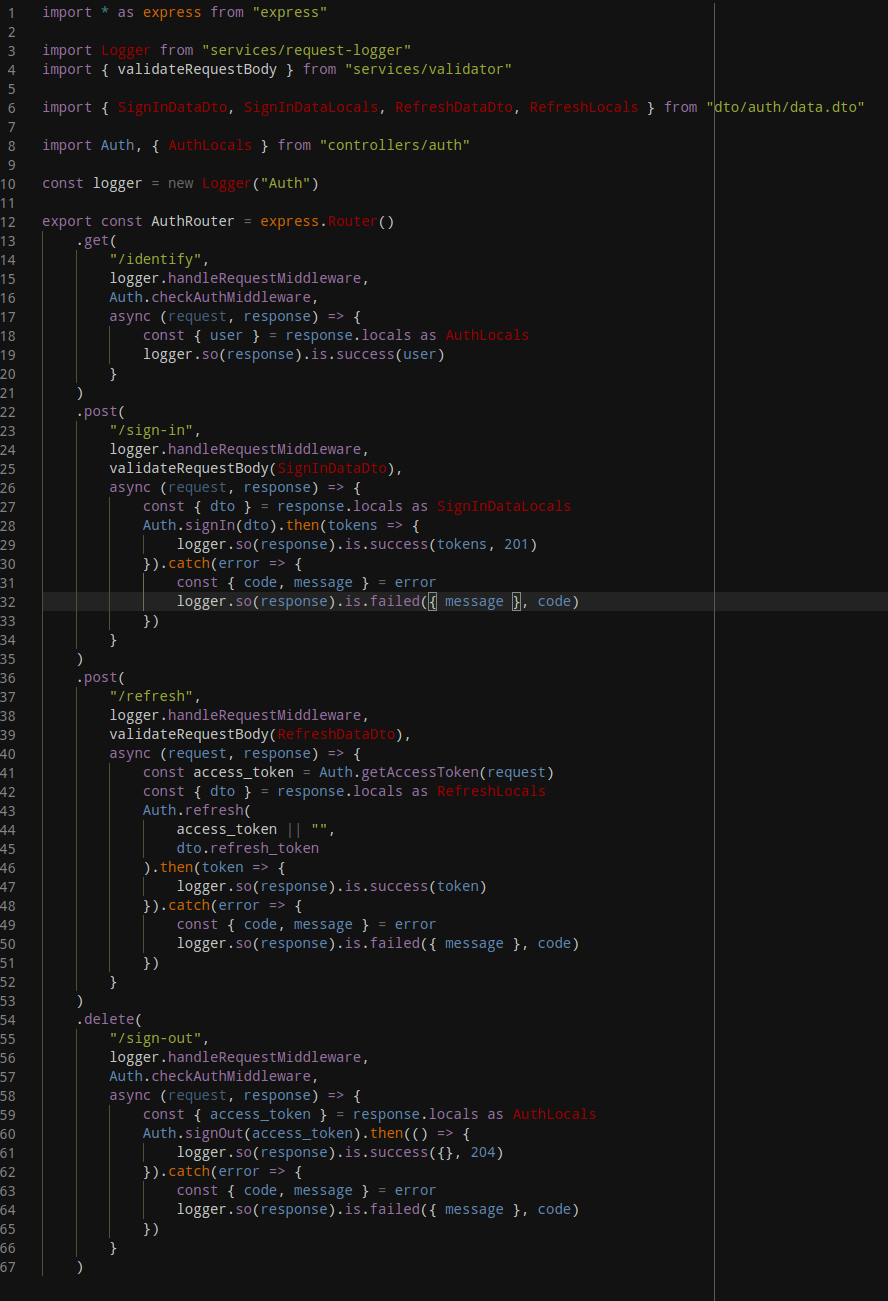
but still some tokens are missing the color, as you can see. The expected result (from stable VSCode):
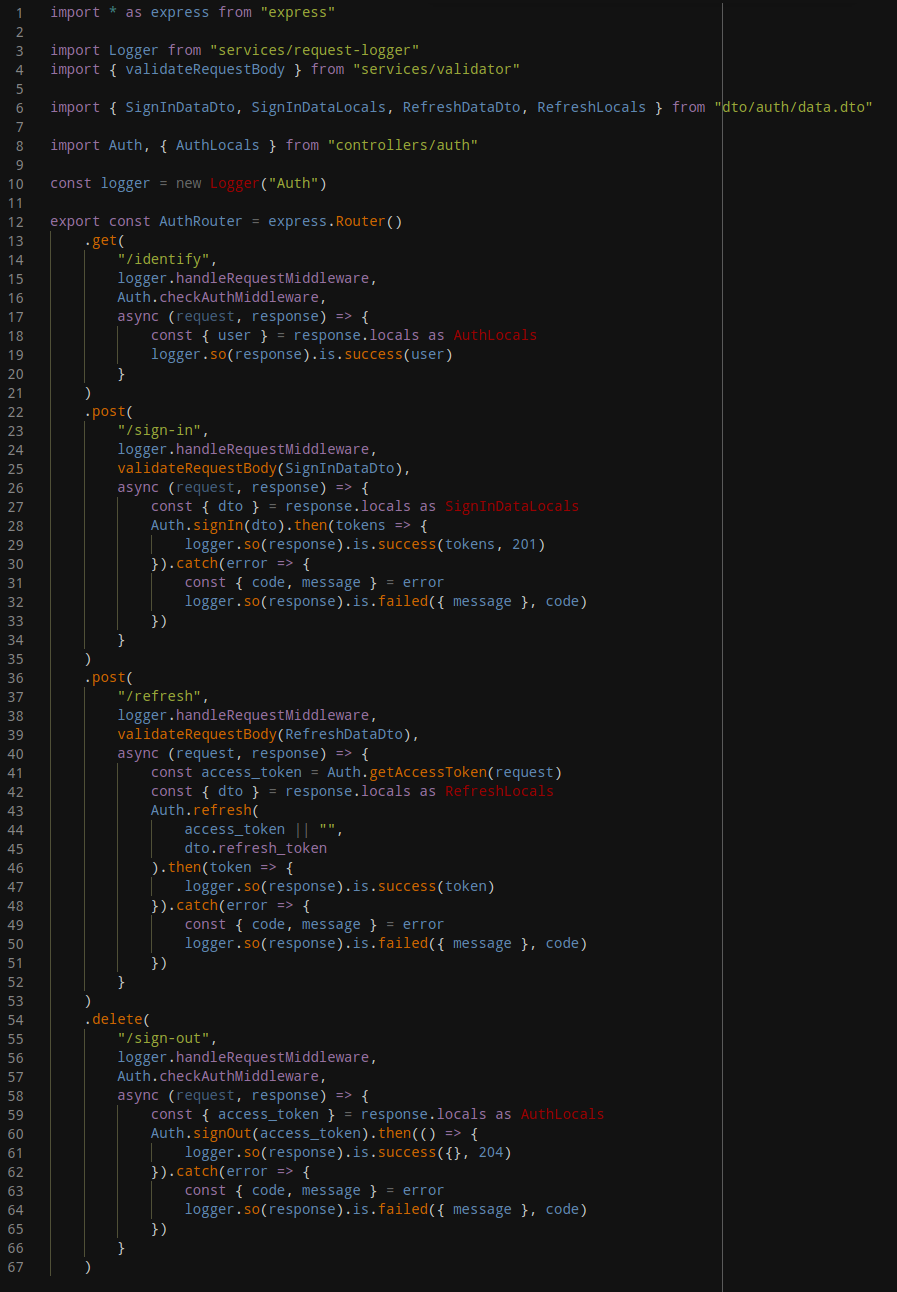
For now I'm waitin' to be able to update, because c4b6a6b is supposed to be the latest available update for now ("There are no currently updates available")
limbosounds
on 28 Jan 2020
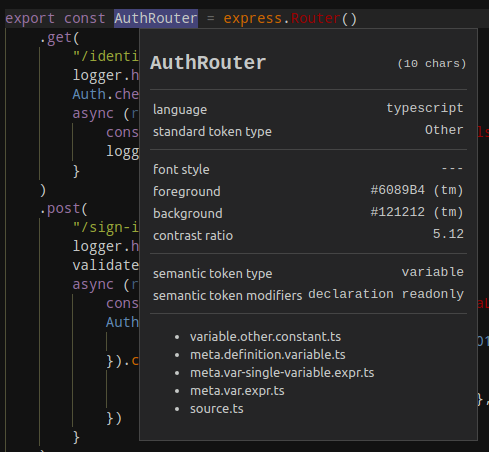
Can you set the cursor on the tokens with the wrong color and use the Inspect Editor Token and Scopes? That helps me to see where the color comes from.
aeschli
on 29 Jan 2020
@aeschli


limbosounds
on 29 Jan 2020
@limbosounds Thanks, that was helpful.
Its bug #89600.
Because the Monokai Dimmed theme has no rule for variable, the bug causes all variables to be rendered white.
Fix is on the way.
aeschli
on 29 Jan 2020
Seems like fixed in be0aca7
limbosounds
on 3 Feb 2020
Cool, thanks for the feedback
aeschli
on 4 Feb 2020
Related issues
 DovydasNavickas
·
3Comments
DovydasNavickas
·
3Comments
 mrkiley
·
3Comments
mrkiley
·
3Comments
 sirius1024
·
3Comments
sirius1024
·
3Comments
 v-pavanp
·
3Comments
v-pavanp
·
3Comments
 trstringer
·
3Comments
trstringer
·
3Comments
Most helpful comment
The same for pure JavaScript. Also sometimes the highlight returns to normal, secondarily, as if "flickering"