Vscode: Webview is unable to load resources while reconstructing after a reload
- VSCode Version: Insiders Version: 1.42.0-insider
-- Commit: 2832fc3c234daeda025f205a862703ba7eee6a10
-- Date: 2020-01-21T11:30:21.087Z
-- OS Version: OSX
Steps to Reproduce:
With CodeStream extension:
- Open the webview
- Reload the window
- CodeStream panel will be blank
- Open webview dev tools
- The console will contain errors like
Failed to load resource: net::ERR_UNKNOWN_URL_SCHEME - Close the blank panel
- Re-open the CodeStream view
- Content should be displayed
With Markdown Preview:
- Open markdown preview for a markdown file
- Reload the window
- Preview panel will display message about an error restoring
EDIT: markdown preview seems fine now
 akonwi
All 33 comments
Can't reproduce this issue in the markdown preview with current VS Code insiders on MacOS 10.15.2
What MacOS version?
 mjbvz
on 21 Jan 2020
mjbvz
on 21 Jan 2020
I'm also on 10.15.2. Oddly enough, I just attempted to reproduce it again with markdown preview and it's working as expected.
akonwi
on 21 Jan 2020
Ok, closing as not-reproducible
mjbvz
on 22 Jan 2020
It's still an issue for the codestream extension though
akonwi
on 22 Jan 2020
How can I easily test that?
mjbvz
on 22 Jan 2020
Just install the extension and the webview should open immediately once installed. If it doesn't, use the CodeStream: Sign in command in the palette. Then reload the window
akonwi
on 22 Jan 2020
I don't see the web view getting restored at all (no errors or anything). Does it have a serializer?
mjbvz
on 22 Jan 2020
Sorry, we just only re-display the webview if you're already logged in. We don't use a serializer.
I've made a video reproducing it. It starts with the webview displayed correctly, I open up the dev tools and inspect the uri for the js we load, then reload the window. On reload, the webview panel is displayed again but left blank and in the webview dev tools, you'll see the error. The requested uri is still correct though. Then I'll close the corrupted webview and re-open it, and it works correctly again.
akonwi
on 22 Jan 2020
I've now also seen this but only when the dev tools were open (on the main VS Code window)
mjbvz
on 26 Feb 2020
I'm seeing this happen pretty often as well. Let me know if there's any info I can get for you

 connor4312
on 19 Mar 2020
connor4312
on 19 Mar 2020
@mjbvz - Has this been attached to a future milestone yet? We're trying to find workarounds on our end but right now this is having a huge impact on our customers' experience.
 planteater
on 25 Mar 2020
planteater
on 25 Mar 2020
No but since you can reproduce this reliably, it would be good if you could try investigating what's going wrong:
Place where we create webview elements: https://github.com/microsoft/vscode/blob/42707865694431c17ba2268e79b32803f0fe98af/src/vs/workbench/contrib/webview/electron-browser/webviewElement.ts#L212
Place where we register the protocol: https://github.com/microsoft/vscode/blob/42707865694431c17ba2268e79b32803f0fe98af/src/vs/workbench/contrib/webview/electron-browser/webviewProtocols.ts#L10
It should wait until the protocol is registered before sending over the html but something is failing (possibly on the electron side)
mjbvz
on 25 Mar 2020
@mjbvz At the point where registerFileProtocol() is called there is no await or callback. The code directly resolves the ready promise:
registerFileProtocol(contents, WebviewResourceScheme, fileService, getExtensionLocation(), getLocalResourceRoots);
this._resolve();
 hrj
on 26 Mar 2020
hrj
on 26 Mar 2020
The registerFileProtocol calls in electron should now be synchronous, see #92138
mjbvz
on 26 Mar 2020
@mjbvz while registerFileProtocol is synchronous, what about the function it calls registerBufferProtocol? it has an async callback with what appears to be some kind of success check. Would this._resolve() need to be called inside registerBufferProtocol's callback? pseudo code below:
registerFileProtocol(contents, WebviewResourceScheme, fileService, getExtensionLocation(), getLocalResourceRoots, () => this._resolve());
export function registerFileProtocol(
    contents: electron.WebContents,
    protocol: string,
    fileService: IFileService,
    extensionLocation: URI | undefined,
    getRoots: () => ReadonlyArray<URI>,
        onRegistered: () => void // new arg
) {
    contents.session.protocol.registerBufferProtocol(protocol, async (request, callback: any) => {
        try {
            const result = await loadLocalResource(URI.parse(request.url), fileService, extensionLocation, getRoots);
            if (result.type === WebviewResourceResponse.Type.Success) {
                                 // new code
                                if (typeof(onRegistered) === 'Function') {
                                     onRegistered();
                                 }
                return callback({
                    data: Buffer.from(result.data.buffer),
                    mimeType: result.mimeType
                });
            }
 bcanzanella
on 26 Mar 2020
bcanzanella
on 26 Mar 2020
This one should also be async now, see https://www.electronjs.org/docs/api/breaking-changes-ns#planned-breaking-api-changes
The other callback (async (request, callback: any)) is the handler for requests themselves once they come in
mjbvz
on 26 Mar 2020
This is one of the changes mentioned in that doc:
The registered or intercepted protocol does not have effect on current page until navigation happens.
Just a hunch: Could it be that navigation is sometimes being triggered before the registration is started? (I couldn't find the relevant code)
hrj
on 27 Mar 2020
We also get this issue with my Dashboard extension, which uses a webview for a custom UI. Reopening the webview solves the problem.
 Kruemelkatze
on 3 Apr 2020
Kruemelkatze
on 3 Apr 2020
This one should also be async now, see https://www.electronjs.org/docs/api/breaking-changes-ns#planned-breaking-api-changes
These planned changes in the API seem to be only enabled when NetworkService is enabled, and it is disabled by default, as per that doc.
I am not familiar with electron and how it is configured. I just did a quick search for NetworkService in this repo and didn't find anything.
@mjbvz Can you confirm whether NetworkService, and hence the proposed API changes, are
enabled in vscode?
hrj
on 3 Apr 2020
Also note that we previously waited on the callback and it did not seem to fix this issue: https://github.com/microsoft/vscode/blob/ed8c0e4e1da0c19868c514cef86e856b3eafb2fa/src/vs/workbench/contrib/webview/electron-browser/webviewProtocols.ts
mjbvz
on 3 Apr 2020
same issue with my extension https://github.com/ConsenSys/vscode-solidity-metrics/issues/1 (https://marketplace.visualstudio.com/items?itemName=tintinweb.solidity-metrics)
mostly happens right after starting vscode. closing the web-view and trying again usually works.
repro:
- launch vscode
- click on a folder and generate solidity metrics
2.1 this collects source code metrics, spawns a web panel, and postMessages data into it.. However, the view fails becauseERR_UNKNOWN_URL_SCHEMEon all thevscode-resource://URI's.
if you cannot reproduce: close (reload) vscode and try again
permanent workaround: pack everything into one HTML file and avoid loadingvscode-resource:// URI's.
Version: 1.43.2
Commit: 0ba0ca52957102ca3527cf479571617f0de6ed50
Date: 2020-03-24T07:34:57.037Z
Electron: 7.1.11
Chrome: 78.0.3904.130
Node.js: 12.8.1
V8: 7.8.279.23-electron.0
OS: Darwin x64 19.4.0

 tintinweb
on 6 Apr 2020
tintinweb
on 6 Apr 2020
Not sure if anyone regressed, in current master, after reloading the window, the webview always runs into Failed to load resource: net::ERR_UNKNOWN_URL_SCHEME error and also the webview doesn't inherit the width from its container elements, thus the inner elements have zero width. Reopening the webview fixes the issue.
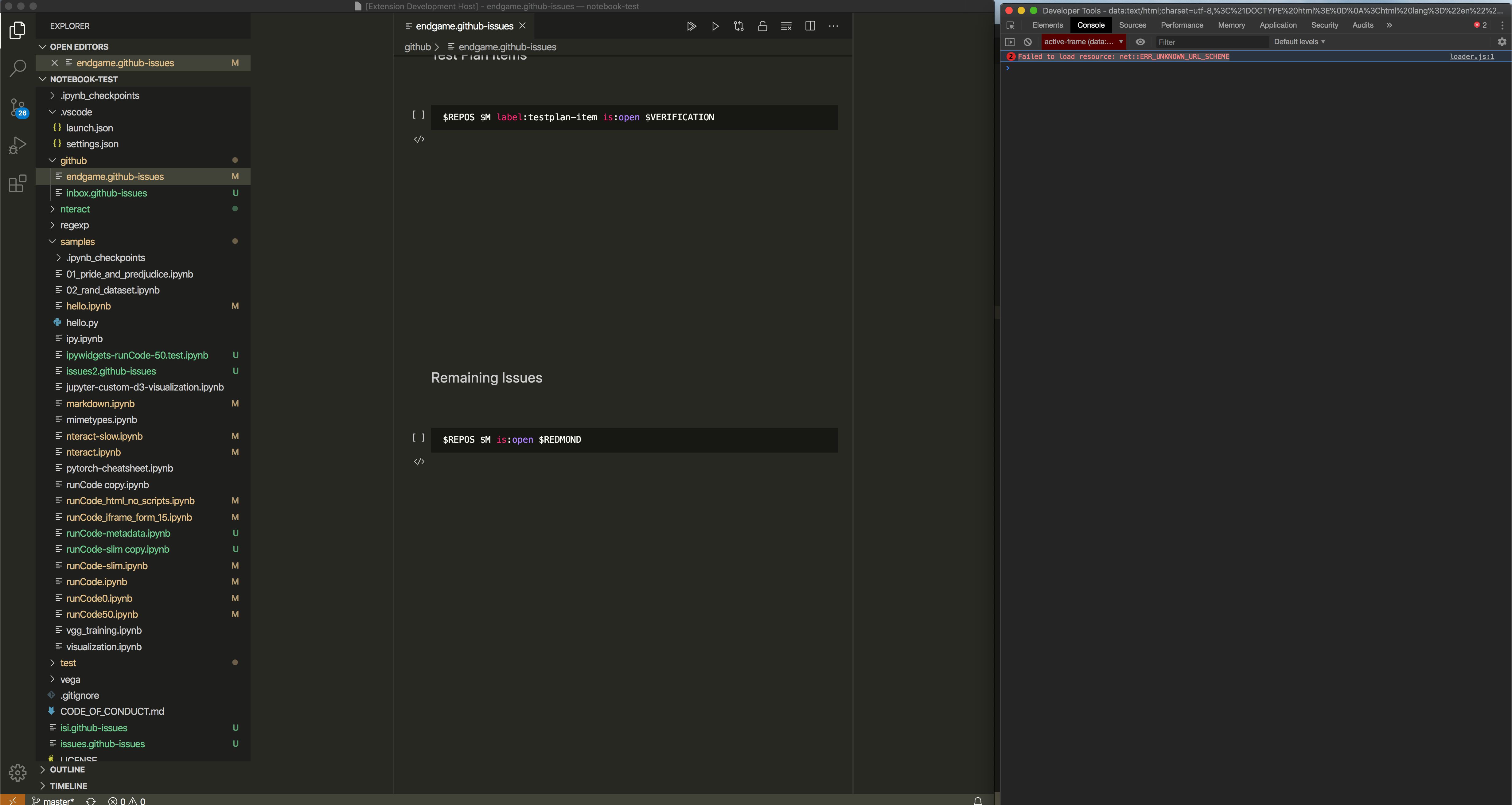
 rebornix
on 10 Apr 2020
rebornix
on 10 Apr 2020
We are currently having this same error in our extension.
Steps to reproduce:
- Open extension and open a webview
- Close VSCode window
- Open VSCode
- Open project
Expected:
- The webview should load properly along with its content
Actual:
- The webview tab opens with garbled up content
Reproducer:

 luispDesktop
on 12 Apr 2020
luispDesktop
on 12 Apr 2020
I have the same issue in Vega Viewer and Geo Data Viewer extensions.
Scirpts and styles loaded via localResourceRoots and vscode-resource: protocol with proper CSP setup no longer reload or load on vscode restart, thus those webivew extensions have broken reloads.
I've been seeing that since February vscode release I believe.
What's the fix?
 RandomFractals
on 18 Apr 2020
RandomFractals
on 18 Apr 2020
I'd also like to see this fixed, but in the mean time, I found two solutions so far. They're only applicable to extension developers. I don't know how to fix it externally for a third party extension yet.
The first one has already been mentioned above; add a compilation step where you inline the entire webview into the source file to avoid using the protocol to begin with. This wasn't an option for me, so I went for the following instead.
You can simply retry launching your webview after a short delay. I have the webview send a "ready" message when loaded, and if it doesn't arrive within a 1 second timeout, I dispose and recreate the webview on the extension side, this time waiting for twice the timeout. From what I can tell, it launches with 100% success rate within 0-2 restarts on my devices. The webview tab does flicker when restarting, but I considered that much better than not starting at all.
 misha
on 20 Apr 2020
misha
on 20 Apr 2020
@misha retry launching is an interesting solution.
I still find both as more of a band-aid workarounds & not very appealing.
@mjbvz are you guys looking to patch this in the next release?
I believe it affects most web view extensions that are beyond a simple web page.
RandomFractals
on 20 Apr 2020
I just noticed the same issue while updating two of my extensions. I'm with VS Code 1.45 Stable and VS Code 1.46 Insiders, on MacOS. Loading on Windows, worked perfectly.
The failed resources are a css and a png file I use. Another _remote_ png loads fine.
But, it only happens when the WebView is loaded at extension's activation, with in my case is defined as activationEvents: *. If I close the WebView and call it again, it works.
It's a bit weird, because I have the same WebView on other extensions and it is working fine. I thought it could be something related to recent updates I made on this Webview, but if I install older versions of the same extension (using the VS Code Extension feature), it also fails.
Just noticed I didn't embrace https://code.visualstudio.com/updates/v1_39#_warning-if-webviews-dont-use-webviewaswebviewuri-for-local-resources yet. I'm still loading local resources using { scheme: "vscode-resource" }. Could it be connected somehow?
I'll try to update, and post here if something new appear.
 alefragnani
on 15 May 2020
alefragnani
on 15 May 2020
Unfortunately, didn't work 😞 .
At first it appeared ok, but after a few retries, the issue reappeared. It's _instable_, at least.
Just out of curiosity, using scheme: "vscode-resource" gives me this:
<img src="vscode-resource:/thePath/vscode-readme.png">
Using asWebviewUri has a slight different syntax:
<img src="vscode-resource://file///thePath/vscode-readme.png">
I hope the above PR should solve this, and be released as an patch to 1.45.
Thank you
alefragnani
on 15 May 2020
@mjbvz does it have to be new vscode-webview-resource protocol?
Even if that pull request fixes things, it would still require all extension authors to update their extensions for the broken vscode-resource loading on reload.
RandomFractals
on 15 May 2020
@RandomFractals Yes. Extensions that use asWebviewUri will just automatically start using the new protocol. The PR also tries to rewrite any hardcoded vscode-resource uris (which have been deprecated for a while since they also don't work on web)
mjbvz
on 15 May 2020
Had to revert this fix due to #98768
Will revisit for June
mjbvz
on 2 Jun 2020
@mjbvz If you need to test with extensions for testing/reproduction, you can use mine. Just create a simple .py file :
print("ok")
and press Ctrl+Alt+B. It should open a web view ( which is a React App ), and the react script sometimes fails to load with Failed to load resource: net::ERR_UNKNOWN_URL_SCHEME error.
 agrawal-d
on 9 Jun 2020
agrawal-d
on 9 Jun 2020
I have not seen this in the last few weeks working on webview debugging or reproduce it as I used to be able to, thus marking verified.
connor4312
on 3 Jul 2020
Related issues
 borekb
·
3Comments
borekb
·
3Comments
 lukehoban
·
3Comments
lukehoban
·
3Comments
 sijad
·
3Comments
sijad
·
3Comments
 shanalikhan
·
3Comments
shanalikhan
·
3Comments
 philipgiuliani
·
3Comments
philipgiuliani
·
3Comments
Most helpful comment
We are currently having this same error in our extension.
Steps to reproduce:
Expected:
Actual:
Reproducer:
