Vscode: Use 'JetBrains Mono' as standard font.
How about using the font from JetBrains (JetBrains Mono) as the standard font?
The font was specially made for coding and will be used in every JetBrains IDE from now on (IntelliJ IDEA, etc.) The font has a full set of features, which are meant to improve the coding experience.


I think it's way better to read, and the ligatures are very useful to me (ligatures are disabled in VSCode by default tho).
For example:

I could explain all the features of the font, but that would take too long.
I would suggest checking out: https://www.jetbrains.com/lp/mono/#key-features
It's also free to use:
JetBrains Mono typeface is available under the Apache 2.0 license and can be used free of charge, for both commercial and non-commercial purposes. You do not need to give credit to JetBrains, although we will appreciate it very much if you do.
Obviously this is just my opinion, but I feel like this font fit's very well into VSCode as it provides a better coding experience (to me).
Feel free to drop your thoughts about this :)
 MarvinJWendt
All 8 comments
There are a lot of very good monospace fonts, some of which are open source. At this time, VS Code does not ship any font for text rendering and simply uses what is installed on the machine. We do so for multiple reasons: to respect the platform defaults, to not over inflate the download size, the avoid licensing issues, etc.
You can write a VS Code extension which ships this specific font with its resources and which uses OS commands to install it, and then change the default of VS Code.
 alexdima
on 20 Jan 2020
alexdima
on 20 Jan 2020
Is anyone writing this extension? It'd be awesome to have.
 mathmul
on 29 Jan 2020
mathmul
on 29 Jan 2020
No need for a extension. The font is open source and free to use everywhere. Just install it on your system and change the settings in VSCode to use the new font.
You can download it from their page: https://www.jetbrains.com/lp/mono/
 mw76
on 31 Jan 2020
mw76
on 31 Jan 2020
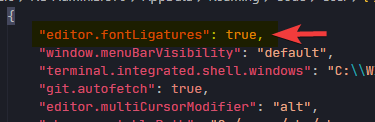
And enable ligatures to use a lot of the font's features:
Instructions ( for another font but process is the same ):
https://github.com/tonsky/FiraCode/wiki/VS-Code-Instructions#manually-editing-settingsjson
 webdevotion
on 3 Feb 2020
webdevotion
on 3 Feb 2020
Can I know how to write the font name properly?
in my settings.json file written as follows:-
"editor.fontFamily": "'JetBrains Mono Regular' , 'Fira Code'",
is it right? how can i change the font properly?
 MuhammadimYusoff
on 3 Feb 2020
MuhammadimYusoff
on 3 Feb 2020
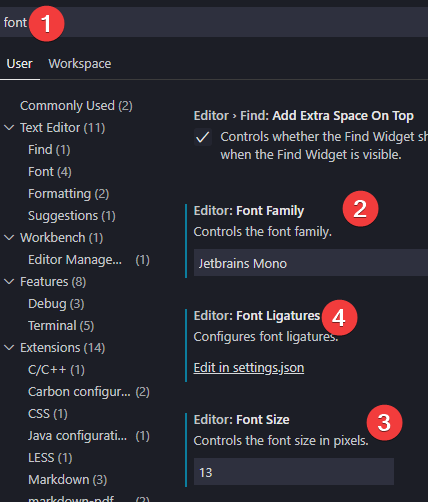
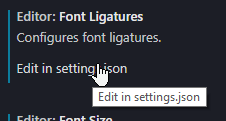
This is my solution
Settings -> Search for font
MarvinJWendt
on 3 Feb 2020
@MuhammadimYusoff This works for me:
"editor.fontFamily": "'JetBrains Mono'"
 Gama11
on 3 Feb 2020
Gama11
on 3 Feb 2020
This is my solution
Settings -> Search for
font
Okay Thank you very much. ✌️
I suppose to use ‘FiraCode’ on my editor and ‘Consolas’ for my terminal (because same font made me confuse between codes and errors).
 MikiSkyxer
on 3 Feb 2020
MikiSkyxer
on 3 Feb 2020
Related issues
 mrkiley
·
3Comments
mrkiley
·
3Comments
 sijad
·
3Comments
sijad
·
3Comments
 shanalikhan
·
3Comments
shanalikhan
·
3Comments
 sirius1024
·
3Comments
sirius1024
·
3Comments
 trstringer
·
3Comments
trstringer
·
3Comments
Most helpful comment
This is my solution
Settings -> Search for
font