Vscode: Search functionality crashes computer every time
Every time I use the search functionality, it crashes my Mac. It's been months since this started happening. It didn't use to happen.
I have disabled all extensions. I have uninstall and reinstall. It keeps happening.
Steps to reproduce:
- Open VS Code.
- It will load my workspace.
- Search a couple of times for different strings, it will crash almost immediately, forcing me to button-shutdown my mac because it's completely frozen.
OS: Mojave 10.14.6 (18G2022)
Thanks,
Julio.
CPUs | Intel(R) Core(TM) i7-7820HQ CPU @ 2.90GHz (8 x 2900)
-- | --
GPU Status | 2d_canvas: enabledflash_3d: enabledflash_stage3d: enabledflash_stage3d_baseline: enabledgpu_compositing: enabledmetal: disabled_offmultiple_raster_threads: enabled_onoop_rasterization: disabled_offprotected_video_decode: unavailable_offrasterization: enabledskia_renderer: disabled_offsurface_control: disabled_offsurface_synchronization: enabled_onvideo_decode: enabledviz_display_compositor: enabled_onviz_hit_test_surface_layer: disabled_offwebgl: enabledwebgl2: enabled
Load (avg) | 8, 2, 1
Memory (System) | 16.00GB (8.93GB free)
Process Argv |
Screen Reader | no
VM | 0%
Extensions: none
Info about VS Code:
Version: 1.41.1
Commit: 26076a4de974ead31f97692a0d32f90d735645c0
Date: 2019-12-18T14:57:51.166Z
Electron: 6.1.5
Chrome: 76.0.3809.146
Node.js: 12.4.0
V8: 7.6.303.31-electron.0
OS: Darwin x64 18.7.0
 julioagueros
All 21 comments
Are you sure it's been months, or did it start more recently? I ask because we have gotten similar issues after the past release.
 roblourens
on 13 Jan 2020
roblourens
on 13 Jan 2020
I have similar issues when searching in the large workspace folder.
Kubuntu 18.04 / VS Code Stable 1.41.1
OS is frozen due to memory consumption. Search eats all my 16 Gb in about 2 minutes.
There is two running processes that consume more memory over time:
user      5501  715 56.8 9310240 9281832 ?     Sl   11:05  15:15 /usr/share/code/resources/app/node_modules.asar.unpacked/vscode-ripgrep/bin/rg --hidden --ignore-case --max-filesize 17179869184 --no-ignore --follow --crlf --fixed-strings --no-config --no-ignore-global --json -- uv5647 .
user      6263  148 14.2 2839108 2322096 ?     Rl   11:07   1:35 /usr/share/code/code /usr/share/code/resources/app/out/bootstrap-fork --type=watcherService
Search was done without any option (Match case etc).
Killing rg process prevents OS from instant freeze and stops the search engine, though watcherService continues to eat memory for some time.
Also watcherService sometimes frees part of its memory during search (I saw a drop from 2.4 Gb to 1.8), but then continues to consume more memory.
 deitry
on 13 Jan 2020
deitry
on 13 Jan 2020
@roblourens it's been happening at least since November 2019. I keep my VS Code updated.
julioagueros
on 13 Jan 2020
Please try disabling search.searchOnType and see whether that helps
roblourens
on 16 Jan 2020
I am having the same problem here, checked the crash report from Console Application on Catalina, didn't see anything related to VSCode.
 yifanchen
on 17 Jan 2020
yifanchen
on 17 Jan 2020
@roblourens OK, I have done so now. I will go back to using VS Code for these days and report back.
julioagueros
on 21 Jan 2020
I am also facing same issue since December in MacBook Pro. It is not always, but once it starts then the issue keeps repeating till i change the workspace. My system crashes and restart is the only way. It is golang workspace.
Version seen in release notes:(it was seen in other vs code versions as well)
November 2019 (version 1.41)
Update 1.41.1: The update addresses these issues.
Mac version: moJave
version:10.14.6 (18G1012)
MacBook Pro (15-inch, 2017)
2.8 GHz Intel Core i7
16 GB 2133 MHz LPDDR3
Tried to disable the search.searchOnType today, so far not crashed. will update again.
Please try to check if there is any issue with copy pasting text with tab chars(starting with tab) in the search bar.
 vivekme
on 22 Jan 2020
vivekme
on 22 Jan 2020
Please try disabling
search.searchOnTypeand see whether that helps
Doesn't work for me. Also tried to disable search.maintainFileSearchCache and start Code with --disable-extensions.
Behavior is the same:
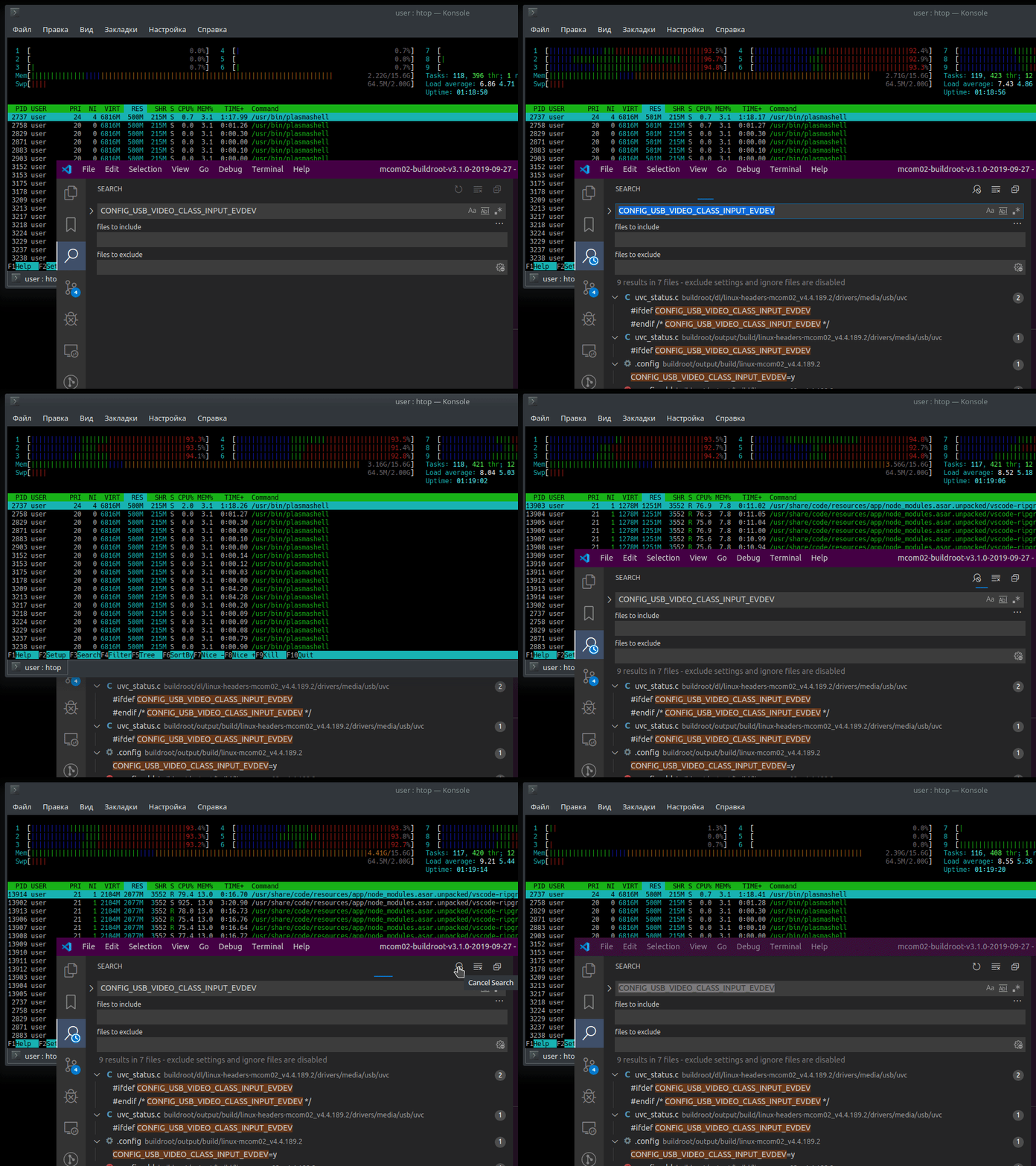
- Open folder with a lot of files (in my case this is custom Buildroot + u-boot build system with locally stored packages used for build.
- Search for string that doesn't come up often (like some
BR2_NEEDS_HOST_UTF8_LOCALE) - if search pattern has many matches, search stops automatically. - Run search. Progress bar continues to run even when it seem that all matches are found.
- If search is not stopped manually, it will consume all of available RAM.
Just a quick screen capture:
deitry
on 23 Jan 2020
I am also having the same issue.
- Version: 1.41.1
- OS Version: macOS Mojave (10.14.6)
- System: MacBook Pro (15-inch, 2016)
Description
System crashes/locks-up when performing search from search pane.
- Network connectivity goes down.
- Not pingable.
- Not reachable via ssh.
- Does not respond to mouse or keyboard input.
Steps to Reproduce
- Navigate to a fairly large directory tree or project
- Open the search pane (CTRL+Shift+F / Command+Shift+F)
- Type in something to search.
- Within 5 seconds, my Mac completely locks up and the fan goes to 100%. I am then forced to hold down the power button.
Additional Troubleshooting
I removed my ~/.vscode and ~/Library/Application\ Support/Code directories and launched a clean instance of VSCode. I opened the directory of an ansible playbook project and tried to search for "get kubectl binary" but before I could even finish typing that, my system completely locked up and the fan ramped up to 100%. Took a pic of it with my phone (since I couldn't take a screenshot) before holding down the power button.
- I performed the steps above on 1.41.1 when it crashed.
- I downloaded 1.40.2 and performed the steps above and got the same result.
- I downloaded 1.39.2 and performed the steps above and could NOT replicate this issue. Even with the "files to exclude" button on or off, I could not get it to crash.
Performing the search with the "files to exclude" button on or off does not have any change in results in any of my tests.
This confirms that this issue is with 1.40.

 JtMotoX
on 26 Jan 2020
JtMotoX
on 26 Jan 2020
I am also able to produce this issue on my 2019 13" Macbook Pro, although it does not lock up as easily. My older 15" locks up within 2-5 seconds every time no matter what I am searching. My newer 13" takes about 1 minute and multiple searches before I can get it to lock up. I then enabled search.maintainFileSearchCache and waited a few minutes just in case there is some caching happening after enabling that. That did not make any difference. My 13" still crashed after a few searches.
JtMotoX
on 26 Jan 2020
@roblourens in my case, I have worked for a bit more than a week without issues after disabling search.searchOnType. I will make sure to report if this changes.
However, I have to mention that I have greatly reduced my workspace to have only a little subset of what I used to have before.
julioagueros
on 27 Jan 2020
I am still having issues even with search.searchOnType disabled. Even if it did solve the issue, it's only a band-aid over the real issue. This issue was/is not present on 1.39 and we did not have to add anything to our settings as a workaround.
JtMotoX
on 27 Jan 2020
I have been using 1.39 for the past few days and have not had this issue. I will just stay on 1.39 until this issue is resolved. In case anybody else needs to get some work done, here is the link to download it:
JtMotoX
on 28 Jan 2020
I have tried upgrading to the latest 1.4x a few times to see if it has been patched and it still hasn't. I have also noticed that it only seems to crash when a previous search is not yet finished. For example, if I turn off the searchOnType and I type something like "searfh" and hit Enter but then realize I had a typo and change it. If I hit Enter on the new search before the previous search finishes, then my Mac will lock up. As long as I let the previous search finish before performing a new search then I am fine. Sometimes I correct my typo and re-run the search without thinking and I lose all my work so this issue is still a pain.
JtMotoX
on 21 Apr 2020
@roblourens
This is a disruptive issue with 100% repro rate. Occurs even after disabling multiple search features like FollowSymlinks, Global Find Clipboard, Maintain file search cache, Include History, Search On Type, Seed with nearest word..etc. Please fix this ASAP.
When I'm searching for something, I'm always scared that this might crash the whole OS if I touch something. I tried it on .45 as well as .39 versions, the issue persists.
It is very easy to reproduce, just open any directory which has many files and directories in it, try searching for something and while the search is in progress, remove a char from the search string and hit enter, crash, macOS restart. This is just one of the flows, similar issues were seen when doing search and modifying something in the search window be it file type, directories or anything.
 HelloWorld3031
on 30 May 2020
HelloWorld3031
on 30 May 2020
If someone with this problem can reproduce this issue outside VS Code with an rg command on their workspace, then I'd be happy to take a look. Just let me know which version of ripgrep you're using.
N.B. I am not a VS Code user, so I can't really help with any aspect there. But if you can isolate it to a problem with a ripgrep command, then I can try to help. (I am the maintainer of ripgrep.)
 BurntSushi
on 30 May 2020
BurntSushi
on 30 May 2020
The same issue is 100% reproducible even after disabling search.searchOnType. The issue moved away from search string type action to files to include /exclude type.
Step to reproduce search any expression with include file filter. After the search just try to change the filter file values. The VS code will freezes. Its a pain and productivity loss during this covid19 time.
Provide an option to disable search on type in include/exclude filter as well
Updated go version:
XX-XXX:$ go version
go version go1.13.11 darwin/amd64
Updated VS Code version:
Update 1.45.1
Possible cleanups tried
- Cleared cache and logs from vs code:
- Removed .vscode
- cd ~/Library/Application Support/Code
- removed all kinds of cache
- session storage
- blob_storage
- logs
Still issue is there , if we try to correct the search filter having any string in the search box. issue will not happen if search box is empty and you change filter chars.
vivekme
on 30 May 2020
I'm running into this issue on Mac OS 10.14.6 with version VS Code version 1.46.0. It literally started today. I've never seen the issue before. I've had to hard reboot my system three times today to regain control of my system. It feels like all processors are at 100% CPU and the fans start running on high.
 gclements-chwy
on 12 Jun 2020
gclements-chwy
on 12 Jun 2020
If someone with this problem can reproduce this issue outside VS Code with an
rgcommand on their workspace, then I'd be happy to take a look. Just let me know which version of ripgrep you're using.
@BurntSushi, I have tried to reproduce this issue with running rg command but no matter how many instance I run at the same time, I cannot get it to cause a crash like VSC.
ripgrep 11.0.1 (rev 973de50c9e)
-SIMD -AVX (compiled)
+SIMD +AVX (runtime)
When I run the search in VSC, I see the following process:
"/Applications/Visual Studio Code.app/Contents/Resources/app/node_modules.asar.unpacked/vscode-ripgrep/bin/rg" --hidden --ignore-case -g !**/.svn -g !**/.hg -g !**/CVS -g !**/.DS_Store -g !**/bower_components -g !**/*.code-search --max-filesize 17179869184 --no-ignore-parent --follow --crlf --fixed-strings --no-config --no-ignore-global --json -- foobar .
I thought maybe the !* may be causing the issue since this is a bash bang function so I removed the search exclusions in VSC which ran rg without the !** but it still crashed.
"/Applications/Visual Studio Code.app/Contents/Resources/app/node_modules.asar.unpacked/vscode-ripgrep/bin/rg" --hidden --ignore-case --max-filesize 17179869184 --no-ignore --follow --crlf --fixed-strings --no-config --no-ignore-global --json -- foobar .
If I open up a lot of terminal sessions and run either of these commands at the same time in all my terminals they take about 3-4 seconds but they all eventually finish without freezing. I also verified that it stops when issuing SIGHUP, SIGINT, SIGQUIT, SIGKILL, or SIGSTOP without any issues.
However, if I open VSC to my ansible playbook directory and search for "foobar" then quickly add a "2" to the end of the search and hit ENTER again, my system freezes after a couple of seconds and I never see the rg process for "foobar2". It's almost like VSC isn't properly stopping the first process and it hangs.
JtMotoX
on 12 Jun 2020
Hey guys, been love VS Code for a while, but this bug suddenly started I think a month ish ago for me? What is this about? Its really hurting my experience with VS Code big time :(
Never knew that now I actually may forced to switch to something else soon if this still not getting fixed. This should really be a high priority fix for VS Code team as its really really hurting the experience by constantly had to restart the machine because code search jam the system time to time too frequent. Is there some sort of stackoverflow cause by some sort of recursive functions? Because its the only thing I can think of when this level of jammies came up.
 achenwei-chwy
on 22 Jun 2020
achenwei-chwy
on 22 Jun 2020
Sorry, no update and I still don't have a theory for what's going on, except that it probably involves starting multiple searches quickly. I am merging this issue into https://github.com/microsoft/vscode/issues/87254
roblourens
on 4 Jul 2020
Related issues
 Tyriar
·
204Comments
Tyriar
·
204Comments
 Brakkar
·
364Comments
Brakkar
·
364Comments
 Perkovec
·
191Comments
Perkovec
·
191Comments
 fabiopicchi
·
192Comments
fabiopicchi
·
192Comments
 misolori
·
282Comments
misolori
·
282Comments
Most helpful comment
Please try disabling
search.searchOnTypeand see whether that helps