Intellisense isn't working. Latest issues are with .netcore 3.1 and omnisharp.
I have .netcore 3.1 SDK installed.
C:\Program Files\dotnet\sdk\2.2.300\Sdks\Microsoft.NET.Sdk\targets\Microsoft.NET.TargetFrameworkInference.targets(137,5): Error: The current .NET SDK does not support targeting .NET Core 3.1. Either target .NET Core 2.2 or lower, or use a version of the .NET SDK that supports .NET Core 3.1.
 Fosol
Fosol
All 14 comments
It's also happened to me, in version 1.41.0
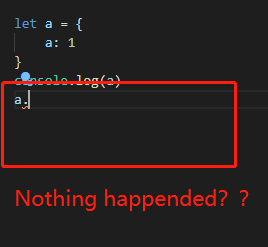
 theajack
on 17 Dec 2019
theajack
on 17 Dec 2019
It disappeared after open vscode for a while.
Then I reinstalled the lower version(1.35.1) of vscode, it works !
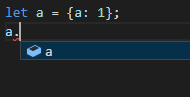
I was so confused about this, and didn't expect it to be a bug!😂
theajack
on 17 Dec 2019
Not working in React as well...

Nothing happens when you press CTRL+Space. Same happens for built-in javascript objects like Number and Arrays...
 aplavsa
on 17 Dec 2019
aplavsa
on 17 Dec 2019
Please file the issue against the OmniSharp extension here: https://github.com/OmniSharp/omnisharp-vscode
 dbaeumer
on 17 Dec 2019
dbaeumer
on 17 Dec 2019
@dbaeumer I don't think this is related to Omnisharp only.
There is some people talking about this problem in React Native too. (As #87151 and @aplavsa stated).
Isn't this passive to reopening?
 Ronkiro
on 17 Dec 2019
Ronkiro
on 17 Dec 2019
@Ronkiro thanks for pointing this out. Reopening...
dbaeumer
on 17 Dec 2019
Seems related to #87034
 givionte
on 17 Dec 2019
givionte
on 17 Dec 2019
Thanks for creating this issue! We figured it's covering the same as another one we already have. Thus, we closed this one as a duplicate. You can search for existing issues here. See also our issue reporting guidelines.
Happy Coding!
![vscodebot[bot] picture](https://avatars2.githubusercontent.com/in/2406?v=4&s=40) vscodebot[bot]
on 17 Dec 2019
vscodebot[bot]
on 17 Dec 2019
This is both (guess work based on information fragments) - it seems that are issues with OmniSharp and/or TypeScript IntelliSense. Hence the dupe of #87034
 jrieken
on 17 Dec 2019
jrieken
on 17 Dec 2019
To fix I had to do the following;
omnisharp.json
{
  "MsBuild": {
    "UseLegacySdkResolver": true
  }
}
global.json
{
  "sdk": {
    "version": "3.1.100"
  }
}
@Fosol Where should I put the files?
 fanzkday
on 18 Dec 2019
fanzkday
on 18 Dec 2019
I put them in the root of my solution.
Fosol
on 18 Dec 2019
@Fosol Where should I put the files?
I have the same problem, did the solution of dear @Fosol worked for you ?
It did not solved my problem.
 zandiarash
on 18 Dec 2019
zandiarash
on 18 Dec 2019
@Fosol 's solution worked for me. Thanx!
@zandiarash
 Tyrcheg
on 5 Jan 2020
Tyrcheg
on 5 Jan 2020
Related issues
 philipgiuliani
·
3Comments
philipgiuliani
·
3Comments
 omidgolparvar
·
3Comments
omidgolparvar
·
3Comments
 sijad
·
3Comments
sijad
·
3Comments
 trstringer
·
3Comments
trstringer
·
3Comments
 biij5698
·
3Comments
biij5698
·
3Comments
Most helpful comment
To fix I had to do the following;
omnisharp.json
global.json