Vscode: Current line number no longer highlighted
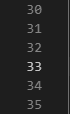
I've upgraded from v1.39.2 to v1.41.0 and I notice that the current line number (i.e. the line where the cursor currently is), is no longer highlighted/bolded.
Screenshots below (in both cases, the cursor was on line 33).
Version 1.39.2:
Version 1.41.0:
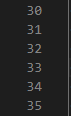
Running on Windows 10.
 Eldaw
Eldaw
All 6 comments
Do your settings include one for editor.renderLineHighlight ?
What color theme are you using?
 gjsjohnmurray
on 12 Dec 2019
gjsjohnmurray
on 12 Dec 2019
No, my settings don't include anything for editor.renderLineHighlight, so that's using whatever is default.
Color Theme: Dark+ (default dark)
Eldaw
on 12 Dec 2019
Please see https://github.com/microsoft/vscode/issues/84772#issuecomment-554053601 as I think yours is a duplicate of this issue.
gjsjohnmurray
on 12 Dec 2019
The default value for rendering line highlight is line, which doesn't highlight the gutter. You can use gutter or all to turn it on.
 rebornix
on 28 Jan 2020
rebornix
on 28 Jan 2020
@rebornix It's not really the same thing though, is it? You've closed this issue too quickly.
With "editor.renderLineHighlight": "all", take a look at a word-wrapped lined, for example. Position your cursor on the 2nd or 3rd wrapped line and tell me if the number in the left gutter (for the physical line) gets bolded.
Also, look at my screenshot for how things were in v1.39.2. There, the physical line number is bolded without the need for the top-and-bottom lines that surround the text to be extended into the left gutter.
Eldaw
on 28 Jan 2020
Let's track this in https://github.com/microsoft/vscode/issues/84772.
rebornix
on 6 Nov 2020
Related issues
 trstringer
·
3Comments
trstringer
·
3Comments
 mrkiley
·
3Comments
mrkiley
·
3Comments
 lukehoban
·
3Comments
lukehoban
·
3Comments
 DovydasNavickas
·
3Comments
DovydasNavickas
·
3Comments
 biij5698
·
3Comments
biij5698
·
3Comments
Most helpful comment
@rebornix It's not really the same thing though, is it? You've closed this issue too quickly.
With "editor.renderLineHighlight": "all", take a look at a word-wrapped lined, for example. Position your cursor on the 2nd or 3rd wrapped line and tell me if the number in the left gutter (for the physical line) gets bolded.
Also, look at my screenshot for how things were in v1.39.2. There, the physical line number is bolded without the need for the top-and-bottom lines that surround the text to be extended into the left gutter.