Vscode: Refactoring documentation contribution point
Problem
Many language/extension implement really cool refactorings, but many users never discover these or figure out how to reliably trigger them.
Proposal
Add a way for an extension to contribute documentation for their refactorings. Our goal here would be to help users reach the documentation and leave the presentation of the documentation up to extensions themselves.
Target UX
Let users explicitly request to see the refactoring documentation from the existing code action refactor menu. This could be as simple as a Learn more entry at the bottom of the refactoring menu.
The learn more action would do the following:
- If we are in a language that only has one refactoring documentation provider, then show that documentation directly
- If we are in a language with multiple refactoring documentation providers, show a quick pick so that users can tell us which documentation they are interested in (this is similar to how our remote documentation works today)
API
Current proposal
The current proposal is the add a documentation field to CodeActionProviderMetadata that let's extension surface a command that shows documentation:
export interface CodeActionProviderMetadata {
    /**
     * Static documentation for a class of code actions.
     *
     * The documentation is shown in the code actions menu if either:
     *
     * - Code actions of `kind` are requested by VS Code. Note that in this case, we always pick the most specific
     *  documentation. For example, if documentation for both `Refactor` and `RefactorExtract` is provided, and we
     *  request code actions for `RefactorExtract`, we prefer the more specific documentation for `RefactorExtract`.
     *
     * - Any code actions of `kind` are returned by the provider.
     */
    readonly documentation?: ReadonlyArray<{ readonly kind: CodeActionKind, readonly command: Command }>;
}
original proposal
I see two possible ways this could be implemented:
Through a contribution point
Create a new documentation.refactoring contribution point that lets extension define a command that shows the documentation:
  "contributes": {
    "documentation": {
      "refactoring": [
        {
          "title": "%documentation.refactoring.title%",
          "when": "typescript.isManagedFile",
          "command": "_typescript.learnMoreAboutRefactorings"
        }
      ]
    },
}
Through a new refactor.documentation code action kind
Define a special code action kind called refactor.documentation. If an extension returns a code action with this kind, then we could surface this using some special UI in the refactor menu
(extensions would be expected to return the refactor.documentation action whenever refactorings are requested)
/cc @kieferrm
/cc @jrieken for api
/cc @misolori for ux
 mjbvz
mjbvz
All 34 comments
@akaroml @DanTup Also interested to hear if this is something you would find helpful for your extensions and if you have and other ideas about how this documentation could be presented
mjbvz
on 12 Dec 2019
I don't know that I have the data to populate this, though the idea sounds good to me.
I think there many other places that exposing docs would be great - I opened https://github.com/microsoft/vscode/issues/71541 previously, but there it was resolved as a dupe of another case that never got a concensus on the fix (which is a shame, because I think it's a tiny change with a large impact for users).
 DanTup
on 12 Dec 2019
DanTup
on 12 Dec 2019
I'm in favor of the contribution point, but both approaches work.
 kieferrm
on 12 Dec 2019
kieferrm
on 12 Dec 2019
While the static contribution point would work perfectly, the refactor.documentation could have more potential by allowing vscode to:
- Specify more context, e.g. the position where the documentation is requested
- Have a special UI to show the documentation, e.g. documentation overlay without switching to another editor tab.
This also allows the language server to generate more precise documentation according to the context.
So I prefer the LSP way.
 akaroml
on 16 Dec 2019
akaroml
on 16 Dec 2019
My preference is for something static but similar to the previous approaches we need to make sure that extensions can provide this - tho the approach seems to have the right amount of indirection for this.
I am wondering if there are synergies with the work we are doing around extensions adding "getting started" or "playground parts" etc?
 jrieken
on 16 Dec 2019
jrieken
on 16 Dec 2019
@DanTup If you have a webpage that documents refactorings, you could link users to that. It doesn't need to be anything fancy to start off, just a list and a quick description of what each refactoring does
@akaroml Good points about the LSP support.
One other consideration with using code actions to return documentation is that other editors would likely not know what to do with the returned Refactor.documentation items besides showing them inline in the code action list (which is probably not what you want)
@jrieken I also like the idea of idea of integrating this with our other documentation exploration but worry that may take a while to finalize. Maybe we should try delivering a scoped solution that only handles code actions so that Java and others can play around with the idea, and then look into how this would fit with our larger documentation/getting started experiences?
mjbvz
on 17 Dec 2019
@jrieken Thank you for bringing up the synergy idea! I do see those three approaches sharing similar goals. As an extension author, I really appreciate the platform providing a clear picture of how those UI elements can work together and serve different use cases!
And here to share some of the challenges and use cases.
Code Actions Challenges
- Visibility/Discoverability
Provide a full list of what's available. AndCodeAction.disabledwill help serve that purpose. - Triggers
We also find it challenging for the users to figure out how a code action could be triggered. E.g. the "Invert Boolean" could be triggered by placing the cursor inside the expression, then the whole expression will be inverted because we infer the biggest possible from the cursor, or, the users can also select a part of the expression, then only the selected part will be inverted.
The challenge here is how we could educate the users about the differences. I think the discussion in this particular issue can help provide a place to document that behavior explicitly.
Getting Started
- Key Binding Challenges
This is so important for experienced users. We have enough key binding extensions but the challenge here is that vscode and other editors/ides do not have 1:1 feature parity and we will have missing keystrokes for sure. And as the love for vscode grows, users would want to learn and adapt to vscode conventions.
One idea here is to let the language extension handle the missing key bindings. For example, users may try F8 to start debugging while it does nothing by default. Then the Java extension could respond by hinting the user "Are you trying to start debugging? To do so, press F5 instead.". - How to challenges
We identify common tasks that users would want to perform and provide documentation accordingly. The challenge here is how users can find them. It's like digging something in a library, and a search based tool can help.
The idea here is to allow an extension to contribute getting started documentation and users can locate those entries by typing some keywords.
Rich Tutorial Experience
Students are a large group in our user base. And tutorials are great for them to learn and practice. Now the best we can do is to show the documentation and an editor side by side. It's already working but it could be even better if the documentation can interact with the editor, and I see that a playground.
@mjbvz Agreed. We'll always happy to try new APIs and see how they work.
akaroml
on 17 Dec 2019
@mjbvz 👍 for moving fast. Circling in @eamodio for some "getting started" ideas that point in a similar direction
jrieken
on 17 Dec 2019
@jrieken I've changed the contribution point proposal to be more generic to better support that:
  "contributes": {
    "documentation": {
      "refactoring": [
        {
          "title": "%documentation.refactoring.title%",
          "when": "typescript.isManagedFile",
          "command": "_typescript.learnMoreAboutRefactorings"
        }
      ]
    },
}
Here's how this is rendered in the editor:

mjbvz
on 8 Jan 2020
@jdneo This is an enhancement to the documentation of refactoring features. Let's try it.
akaroml
on 9 Jan 2020
I'm going to push the following changes:
- Added telemetry on which code actions are applied
- Show the code actions in the top level light bulb menu if any refactoring code actions are returned
The telemetry was added to provide a baseline so that we can understand if documentation entry improves refactoring usage (we have had js/ts specific refactoring telemetry for a long time, but now we can measure other languages/extensions as well). To measure if the documentation entry improves refactoring usage, we probably want to do an A/B test. There are a few options we are interest in comparing:
- Refactoring usage with no documentation entry
- When refactoring documentation is only shown in the
refactormenu - And when refactoring documentation is shown in the lightbulb menu as well
mjbvz
on 14 Jan 2020
@jdneo could you help put this on deck so we can track it?
akaroml
on 15 Jan 2020
@akaroml Sure.
 jdneo
on 15 Jan 2020
jdneo
on 15 Jan 2020
@mjbvz @jrieken I'm thinking that if this cool feature could work together with the refactor preview
The Learn More button is a great getting start point for the users who are new to the code refactoring. As the example of the JS/TS refactoring, the users can open the doc to see the basic concept of the code action and refactoring.

What if the user wants to learn more about one specific refactoring? Maybe we could list multiple document actions in the list for different refactorings, but that could be too noisy to me.
While in the preview UI, since the kind of refactoring is already determined, which might be a good place to put a document entry to let the user lean more details about the triggered refactoring.
jdneo
on 19 Jan 2020
Note: explore moving this into the CodeActionProviderMetadata for Feb
mjbvz
on 3 Feb 2020
fb622a8b83c3f9fb661f7a86ffb89ccb6a2b0581 Changes it so that the documentation actually is pulled from the CodeActionProviderMetaData.
    export interface CodeActionProviderMetadata {
        /**
         * Static documentation for a class of code actions.
         *
         * The documentation is shown in the code actions menu if either:
         *
         * - Code actions of `kind` are requested by VS Code. Note that in this case, we always pick the most specific
         *  documentation. For example, if documentation for both `Refactor` and `RefactorExtract` is provided, and we
         *  request code actions for `RefactorExtract`, we prefer the more specific documentation for `RefactorExtract`.
         *
         * - Any code actions of `kind` are returned by the provider.
         */
        readonly documentation?: ReadonlyArray<{ readonly kind: CodeActionKind, readonly command: Command }>;
    }
Some rational for this change:
This links the documentation to a specific language (and a specific provider). Using the contribution point based approach, we had to use
whenclauses to emulate thisThis pushes the documentation into the API, which should make it more discoverable for extension authors.
Let me know if you have any concerns / thoughts about this new proposal
mjbvz
on 11 Feb 2020
For the PowerShell extension, we show a CodeAction to navigate to the particular linter rule:
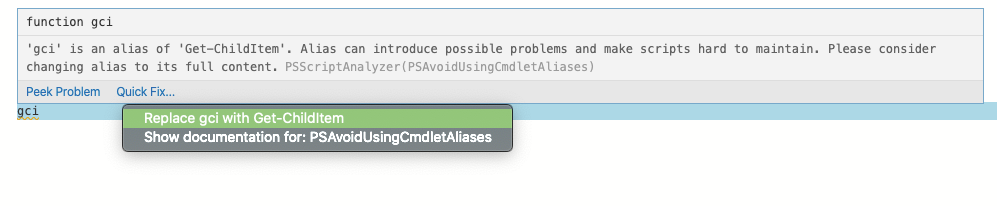
Show documentation for: ...
I don't really see how this could be done client side so I'd want some way to send documentation CodeActions back from LSP.
For us, it'd be really convenient if CodeActionKind had a Documentation option or something like that with the same UI experience as you've already shown.
 TylerLeonhardt
on 13 Feb 2020
TylerLeonhardt
on 13 Feb 2020
@TylerLeonhardt You should be looking at this: https://github.com/microsoft/vscode/issues/11847#issuecomment-578055139. Using a code action to help with a lint-message isn't what we have in mind - you should be using the new Diagnostic#code: { value: string, target: Uri }-api.
This issue is about discoverability. Often refactorings go unnoticed because you have to click the right element to see them, like "extract const" and with this item we want to make all refactorings of a language/extension more discoverable/explorable
jrieken
on 14 Feb 2020
Thanks I've +1'd that. The proposed experience seems more like a "apply this CodeAction for all diagnostics that fall into this Provider".

And I'm wondering if it's best to rather make this strictly about documentation... we make it more generic. "This CodeAction appears every time for this CodeActionProvider"
TylerLeonhardt
on 14 Feb 2020
Hi @mjbvz
I was trying this new contribution point, but the when clause seems not working if I set it to editorLangId == xxx. (The learn more menu item does not show)
Other conditions like isMac works. Is this a bug?
jdneo
on 9 Mar 2020
@jdneo In VS Code, we've update the proposal to use a CodeActionProviderMetadata .documentation property instead of a static contribution. Try using that and let me know if you run into any issues
mjbvz
on 9 Mar 2020
Thank you @mjbvz
In our case, the Java language server will directly return the code actions to the client so we do not have a code action provider at the client side. I tried to registered a dummy provider like following:
export class RefactorDocumentProvider implements CodeActionProvider {
    provideCodeActions() {
        return [];
    }

    public static readonly metadata: CodeActionProviderMetadata = {
        providedCodeActionKinds: [
            CodeActionKind.Refactor,
        ],
        documentation: [
            {
                kind: CodeActionKind.Refactor,
                command: {
                    command: Commands.LEARN_MORE_ABOUT_REFACTORING,
                    title: 'Learn more about Java refactorings.'
                }
            }
        ]
    }
}
No matter I return [] or undefined or [new CodeAction('dummy')] in provideCodeActions(), the document command does not appear in the context menu. Was there anything I did wrong?
_I have set the enableProposedApi to true, the Insider version I use is Version: 1.44.0-insider
Commit: 1876b51870e30e9ba8f35dc0dcfaf49a3799a8ef_
jdneo
on 10 Mar 2020
@jdneo Your provided needs to return one or more code actions of the given type (such as refactoring) for the documentation to show up.
mjbvz
on 10 Mar 2020
Thank you @mjbvz
I've tried to return a valid code action, like return [new CodeAction('dummy', CodeActionKind.Refactor)];, but still cannot see the documentation:
 🤔
🤔
jdneo
on 11 Mar 2020
@mjbvz ping...
I tried the latest Insider today but still cannot see the document command entry in the menu. Not sure if I did anything wrong.
BTW, since in our case, the CodeActions are directly returned from the Language Server, adding a dummy code action provider at client seems wired to me. Still hope that the when clause like editorLangId can work in the contribution point for refactoring document in package.json
Thank you for your time.
jdneo
on 17 Mar 2020
I've update our code action example to show how to use the documentation property: https://github.com/mjbvz/vscode-extension-samples/commit/e4b0a506dd494ab203c0dbe39327a7cf1f97137b

Our eventual goal is to integrate documentation proposal into the language server protocol as well
mjbvz
on 17 Mar 2020
Thank you @mjbvz for the sample. I made a mistake that I forgot to pass the metadata when registering the code action provider. Now everything works great! And the document command can show-up even I return an empty array in the code action provider. Then we can avoid using the contribution point in the package.json.
Thank you for your help!
jdneo
on 17 Mar 2020
Hi @mjbvz, another question about the document: Code actions of kind are requested by VS Code. In this case, VS Code will show the documentation that most closely matches the requested code action kind.
Let's say I have a code action provider defined as below:
export class RefactorDocumentProvider implements CodeActionProvider {
    provideCodeActions() {
        return [];
    }

    public static readonly metadata: CodeActionProviderMetadata = {
        providedCodeActionKinds: [
            CodeActionKind.RefactorExtract,
            CodeActionKind.Refactor,
        ],
        documentation: [
            {
                kind: CodeActionKind.RefactorExtract,
                command: {
                    command: Commands.LEARN_MORE_ABOUT_EXTRACT_REFACTORING,
                    title: 'Learn more about Java extract refactorings.'
                }
            },
            {
                kind: CodeActionKind.Refactor,
                command: {
                    command: Commands.LEARN_MORE_ABOUT_REFACTORING,
                    title: 'Learn more about Java refactorings.'
                }
            }
        ]
    }
}
It won't return any code action. But registered document command for both Refactor and RefactorExtract. When user click the Refactor... in the editor's context menu, which one should be shown?
I tried from my side and found that, even if the code action listed are all RefactorExtract kind(which the code actions are all returned from the language server), VS Code still shows document for Refactor instead of RefactorExtract.
jdneo
on 21 Mar 2020
Some findings:
In the above case, the client code action provider won't return any code action but registered different kinds of document. The real code action is resolved at the Language Server side.
If the refactoring list is popped up by click the Refactoring... in the context menu

Then the refactoring kind of the document will always be CodeActionKind.Refactor.
If the refactoring list is popped up by triggering the keyboard shortcut of command editor.action.codeAction which customized by user, then the refactoring kind of the document will be the kind that user set in args.
jdneo
on 31 Mar 2020
@mjbvz Just noticed the release target update to April release. Does that mean the API will have some changes?
jdneo
on 31 Mar 2020
@mjbvz This change was pushed several times. Can we expect the release in June?
akaroml
on 9 Jun 2020
@akaroml We were kinda waiting for you feedback to know if the proposed API change is sufficient for your need?
jrieken
on 9 Jun 2020
@jrieken I should have pointed out this earlier and @jdneo is from my team and he is the on-point of adopting this new capability. Please check out his comments above.
akaroml
on 9 Jun 2020
@jrieken @mjbvz Just FYI we've already proposed a draft PR for this new API (Attached a gif in that PR).
So far so good! Just one question: When user clicks Refactoring... in the context menu and gets a list of refactorings which are all the same kind (Let's say: RefactorExtract), is it possible for the new API to return RefactorExtract instead of Refactor?
jdneo
on 9 Jun 2020
Related issues
 mrkiley
·
3Comments
mrkiley
·
3Comments
 biij5698
·
3Comments
biij5698
·
3Comments
 vsccarl
·
3Comments
vsccarl
·
3Comments
 VitorLuizC
·
3Comments
VitorLuizC
·
3Comments
 NikosEfthias
·
3Comments
NikosEfthias
·
3Comments
Most helpful comment
I'm going to push the following changes:
The telemetry was added to provide a baseline so that we can understand if documentation entry improves refactoring usage (we have had js/ts specific refactoring telemetry for a long time, but now we can measure other languages/extensions as well). To measure if the documentation entry improves refactoring usage, we probably want to do an A/B test. There are a few options we are interest in comparing:
refactormenu