Vscode: tslintServer.js and tsserver.js has memory leak
the memory allocated to electron_node tslintServer.js keep increasing until all memory used by it.
update:
Then I removed this plugin, then after restart the tsServer.js keep allocating memory.
update 2:
I find I installed tslint deprecated plugin. I uninstall it and install the latest version.
Now the problem became tsserver.js has memory leak
update 3:
I downgrade to vs to:
Version: 1.39.2
Commit: 6ab598523be7a800d7f3eb4d92d7ab9a66069390
There is no memory leak problem in this version.
Bug happened on version:
Version: 1.40.2
Commit: f359dd69833dd8800b54d458f6d37ab7c78df520
Date: 2019-11-25T14:54:40.719Z
Electron: 6.1.5
Chrome: 76.0.3809.146
Node.js: 12.4.0
V8: 7.6.303.31-electron.0
OS: Linux x64 4.9.0-9-amd64
Steps to Reproduce:
unknown, after upgrade to this version, when tslint start work, it keep eat the memory until all memory used.
Does this issue occur when all extensions are disabled?: No
 1011178l
All 35 comments
(Experimental duplicate detection)
Thanks for submitting this issue. Please also check if it is already covered by an existing one, like:
![vscodebot[bot] picture](https://avatars2.githubusercontent.com/in/2406?v=4&s=40) vscodebot[bot]
on 2 Dec 2019
vscodebot[bot]
on 2 Dec 2019
This first is an issue with the old tslint extension, which is deprecated.
For the issue with tsserver, does this reproduce in the latest VS Code insiders build with all extensions disabled?
Also, please follow these instructions to collect performance information. Share the output of code-insiders --status to show the memory usage of tsserver
 mjbvz
on 2 Dec 2019
mjbvz
on 2 Dec 2019
85777
 xiaoxiyao
on 3 Dec 2019
xiaoxiyao
on 3 Dec 2019
The number of issues related to this is growing. This is definitely a VSCode issue. The tsserver.js process is ignoring the new --max_old_space_size parameter and using up as much RAM as possible.
 hyarionh
on 3 Dec 2019
hyarionh
on 3 Dec 2019
I'm experiencing this as well.
 thefran23
on 3 Dec 2019
thefran23
on 3 Dec 2019
I might be having the same issue, I'm not sure if this is it but here's what I see in my console. I do use TSLint since this is an Angular project with TypeScript. I'm using ms-vscode.vscode-typescript-tslint-plugin plugin in my case and that is the new one, not the deprecated one

 ghiscoding
on 4 Dec 2019
ghiscoding
on 4 Dec 2019
Someone please share the output of code-insiders --status before the crash happens but when memory usage is too high
mjbvz
on 5 Dec 2019
$ code --status

Version:          Code 1.40.2 (f359dd69833dd8800b54d458f6d37ab7c78df520, 2019-11-25T14:54:45.096Z)
OS Version:       Windows_NT x64 10.0.18363
CPUs:             Intel(R) Core(TM) i7-6500U CPU @ 2.50GHz (4 x 2592)
Memory (System):  7.44GB (0.51GB free)
VM:               0%
Screen Reader:    no
Process Argv:
GPU Status:       2d_canvas:                     enabled
                  flash_3d:                      enabled
                  flash_stage3d:                 enabled
                  flash_stage3d_baseline:        enabled
                  gpu_compositing:               enabled
                  metal:                         disabled_off
                  multiple_raster_threads:       enabled_on
                  oop_rasterization:             disabled_off
                  protected_video_decode:        unavailable_off
                  rasterization:                 enabled
                  skia_renderer:                 disabled_off
                  surface_control:               disabled_off
                  surface_synchronization:       enabled_on
                  video_decode:                  enabled
                  viz_display_compositor:        enabled_on
                  viz_hit_test_surface_layer:    disabled_off
                  webgl:                         enabled
                  webgl2:                        enabled

CPU %   Mem MB     PID  Process
    0       49   21740  code main
    0       98    3108     gpu-process
    0       30    8920     shared-process
    0      394   12720     window (鈼?dashboard.ts - bi4.0 (宸ヤ綔鍖? - Visual Studio Code)
    0        3    1656       console-window-host (Windows internal process)
    0      901    3792       extensionHost
    0        7    3420         "D:\Program Files\Microsoft VS Code\Code.exe" "d:\Program Files\Microsoft
VS Code\resources\app\extensions\html-language-features\server\dist\htmlServerMain" --node-ipc --clientProcessId=3792
    0       47    9868         electron_node tsserver.js
    0       15   11256         D:\succezIDE\jdk\jdk1.8.0_60\bin\java -Declipse.application=org.eclipse.jdt.ls.core.id1 -Dosgi.bundles.defaultStartLevel=4 -Declipse.product=org.eclipse.jdt.ls.core.product -Dfile.encoding=utf8 -DwatchParentProcess=false -noverify -Xmx1G -XX:+UseG1GC -XX:+UseStringDeduplication -jar
c:\Users\luoxiao\.vscode\extensions\redhat.java-0.54.2\server\plugins\org.eclipse.equinox.launcher_1.5.600.v20191014-2022.jar -configuration c:\Users\luoxiao\.vscode\extensions\redhat.java-0.54.2\server\config_win -data c:\Users\luoxiao\AppData\Roaming\Code\User\workspaceStorage\0356150a0b142033ba83af3b08b6111a\redhat.java\jdt_ws
    0        3    3296           console-window-host (Windows internal process)
    0       58   12336           electron_node local-mysql-succbidev.js
    0        1    2084             console-window-host (Windows internal process)
   74     3088   18648         electron_node tsserver.js
    0        0    9848           electron_node typingsInstaller.js typesMap.js
    0        5   20508         "D:\Program Files\Microsoft VS Code\Code.exe" "d:\Program Files\Microsoft
VS Code\resources\app\extensions\css-language-features\server\dist\cssServerMain" --node-ipc --clientProcessId=3792
    0        7   20584         "D:\Program Files\Microsoft VS Code\Code.exe" "d:\Program Files\Microsoft
VS Code\resources\app\extensions\json-language-features\server\dist\jsonServerMain" --node-ipc --clientProcessId=3792
    0        4    4116       searchService
    0       10   11596       watcherService
    0        2   13588       console-window-host (Windows internal process)
    0        3   15768       "C:\Program Files\Git\bin\bash.exe"
    0        4   17312         "C:\Program Files\Git\bin\..\usr\bin\bash.exe"
    0        1   19724       "C:\Program Files\Git\bin\bash.exe"
    0        5   22372         "C:\Program Files\Git\bin\..\usr\bin\bash.exe"
    0       12   15036     electron-crash-reporter

Workspace Stats:
|  Window (鈼?dashboard.ts - bi4.0 (宸ヤ綔鍖? - Visual Studio Code)
|    Folder (XXX): 0 files
|      File types:
|      Conf files:
|    Folder (XXX): 0 files
|      File types:
|      Conf files:
|    Folder (XXX): 0 files
|      File types:
|      Conf files:
|    Folder (XXX): 0 files
|      File types:
|      Conf files:
|    Folder (XXX): 62 files
|      File types: svg(24) json(9) ts(9) png(6) md(4) gitattributes(1)
|                  gitignore(1) vscodeignore(1)
|      Conf files: package.json(1) tsconfig.json(1) settings.json(1)
|                  tasks.json(1) launch.json(1)
|      Launch Configs: extensionHost(2)
|    Folder (XXX): 449 files
|      File types: ts(291) js(21) json(4) gitignore(1) less(1)
|      Conf files: package.json(1) tsconfig.json(1) settings.json(1)
|    Folder (XXX): 870 files
|      File types: md(456) png(170) gif(31) pptx(8) json(7) js(4) ts(4)
|                  styl(2) yml(1) lock(1)
|      Conf files: package.json(3) tsconfig.json(1) launch.json(1)
|                  settings.json(1)
|      Launch Configs: node(2)
|    Folder (XXX): 3742 files
|      File types: class(1655) java(1372) xml(70) txt(56) properties(22)
|                  svg(16) csv(12) DBF(10) sql(6) png(6)
|      Conf files:
|    Folder (XXX): 15125 files
|      File types: svg(2799) class(1378) json(1241) java(1161) ts(894) md(851)
|                  js(701) png(680) tbl(639) csv(549)
|      Conf files: package.json(149) settings.json(71) gulp.js(1)
|                  tsconfig.json(1) launch.json(1) tasks.json(1)
|      Launch Configs: java(13) node(4) chrome
|    Folder (XXX): 2968 files
|      File types: ibd(635) jar(219) dll(150) jmod(141) pak(112) sdi(105)
|                  md(84) exe(72) dylib(62) so(59)
|      Conf files: tsconfig.json(1) settings.json(1)
I have disabled the tslint plugin. @mjbvz
xiaoxiyao
on 6 Dec 2019
This first is an issue with the old tslint extension, which is deprecated.
For the issue with
tsserver, does this reproduce in the latest VS Code insiders build with all extensions disabled?Also, please follow these instructions to collect performance information. Share the output of
code-insiders --statusto show the memory usage of tsserver
Does this issue occur when all extensions are disabled?: No
1011178l
on 6 Dec 2019
I noticed that the previous version has no problem, and the difference between them is the Electron version. before is Electron 4, and the 1.40.2 use Electron: 6.1.5
could this be a problem?
1011178l
on 6 Dec 2019
Also want to add
For the issue with tsserver, does this reproduce in the latest VS Code insiders build with all extensions disabled?
In order to test this we would need instructions on how to startup and send data to tsserver when all extensions are disabled.
Since the same version of TSLint works fine on the older versions of VSCode, it's highly unlikely it's the extension at fault.
hyarionh
on 6 Dec 2019
maybe we need a feature that limiting the maximum vscode memory usage,
and dump related info for debugging automatically to help the ms team to fix it.
update: I created a feature request for this:
1011178l
on 6 Dec 2019
maybe we need a feature that limiting the maximum vscode memory usage,
Something I noticed is that since 1.40.1 there is a new setting to limit the tsserver in how much RAM it can use (this bug causes it to rapidly exceed any value you set - in my case 20Gb used when set to 300Mb).
If you set it to a low value like 300 you can trigger the problem quicker than with the default of 3000. I wonder if the bug is related to this new setting?
hyarionh
on 6 Dec 2019
@1011178l Do you also have tslint installed? Please share the output of code-insiders --status
mjbvz
on 6 Dec 2019
Hey,
I have recently also have had an issue with this and realized it's due to the tslint extension as disabling it stops my PC from crashing. When it is enabled all 32gb of memory becomes locked up.
My specs are the following:
Version: 1.40.2
Commit: f359dd69833dd8800b54d458f6d37ab7c78df520
Date: 2019-11-25T14:54:40.719Z
Electron: 6.1.5
Chrome: 76.0.3809.146
Node.js: 12.4.0
V8: 7.6.303.31-electron.0
OS: Linux x64 4.19.0-5-amd64
Steps to Reproduce:
Open up a project with tslint enabled and make many code changes for tslint to lint and watch memory usage increase.
Here is code --status moments before mx linux freezing/hanging:
Version:          Code 1.40.2 (f359dd69833dd8800b54d458f6d37ab7c78df520, 2019-11-25T14:54:40.719Z)
OS Version:       Linux x64 4.19.0-5-amd64
CPUs:             Intel(R) Core(TM) i7-6700K CPU @ 4.00GHz (8 x 4201)
Memory (System):  31.33GB (0.25GB free)
Load (avg):       1, 0, 0
VM:               0%
Screen Reader:    no
Process Argv:     --no-sandbox --unity-launch
GPU Status:       2d_canvas:                     enabled
                  flash_3d:                      enabled
                  flash_stage3d:                 enabled
                  flash_stage3d_baseline:        enabled
                  gpu_compositing:               enabled
                  metal:                         disabled_off
                  multiple_raster_threads:       enabled_on
                  oop_rasterization:             disabled_off
                  protected_video_decode:        unavailable_off
                  rasterization:                 disabled_software
                  skia_renderer:                 disabled_off
                  surface_control:               disabled_off
                  surface_synchronization:       enabled_on
                  video_decode:                  unavailable_off
                  viz_display_compositor:        enabled_on
                  viz_hit_test_surface_layer:    disabled_off
                  webgl:                         enabled
                  webgl2:                        enabled

CPU %   Mem MB     PID  Process
    0      128    4549  code main
    0       32    4552     zygote
    0      128    4573     gpu-process
    1      225    4590     window (carousel.component.ts - ideasfil-webapp - Visual Studio Code)
    0      128    4833       extensionHost
    0       64    4877         electron_node tsserver.js
   12    25604    4885         electron_node tsserver.js
    0       64    4924           electron_node typingsInstaller.js typesMap.js
    0      225    4895         /usr/share/code/code /home/george/.vscode/extensions/angular.ng-template-0.900.1/server --logFile /home/george/.config/Code/logs/20191207T193312/exthost1/Angular.ng-template/nglangsvc.log --logVerbosity terse --ngProbeLocations /home/george/.vscode/extensions/angular.ng-template-0.900.1/server --tsProbeLocations /home/george/.vscode/extensions/angular.ng-template-0.900.1 --node-ipc --clientProcessId=4833
    0       96    4896         electron_node server.js
    0       32    5006         /usr/share/code/code /usr/share/code/resources/app/extensions/json-language-features/server/dist/jsonServerMain --node-ipc --clientProcessId=4833
    0       64    4862       watcherService
    0       96    4949     shared-process
    0        0    6096       /bin/sh -c /bin/ps -ax -o pid=,ppid=,pcpu=,pmem=,command=
    0        0    6097         /bin/ps -ax -o pid=,ppid=,pcpu=,pmem=,command=

Workspace Stats:
|  Window (carousel.component.ts - ideasfil-webapp - Visual Studio Code)
|    Folder (ideasfil-webapp): 179 files
|      File types: ts(67) md(15) ttf(14) css(13) html(11) json(9) png(4)
|                  txt(3) js(3) editorconfig(1)
|      Conf files: package.json(1) tsconfig.json(1) tslint.json(1)
|                  webpack.config.js(1)
I'm happy to answer any more questions.
 gsavchenko
on 8 Dec 2019
gsavchenko
on 8 Dec 2019
@1011178l Do you also have tslint installed? Please share the output of
code-insiders --status
Hi I have tslint installed, the latest version. the problem not always happen, but once it happens, it is too late to run any command until there is no memory left, then the system kill the vscode.
I will try to make it, but I see lots of people has the same issue.
Thanks.
1011178l
on 9 Dec 2019
@1011178l Can you check to see if disabling the extension fixes the problem for you
@gsavchenko I still can't reproduce this in simple typescript projects with tslint. Can you share a project where this happens. Also, please test using the latest VS Code insiders builds
mjbvz
on 9 Dec 2019
Hey,
My apologies on the unclear reproduction steps! I have actually attempted to create a minimal version of my project that causes the issue but ended up not being able to reproduce it afterwards. Unfortunately, I haven't had a chance to narrow down the problem yet but I've uploaded the project to a private repo and invited you to collaborate if you want to check it out @mjbvz .
I am able to reproduce by doing the following:
- Add tslint extension
yarn install- Open a file where I can make a lot of linting errors appear
- Repeatedly cause linting errors rapidly (undo/redo)
It seems like it's enough to cause the following:
Version:          Code - Insiders 1.41.0-insider (bef029a9d21904c0085c4e8ef1335d9c33a28fa4, 2019-12-09T15:46:30.310Z)
OS Version:       Linux x64 4.19.0-5-amd64
CPUs:             Intel(R) Core(TM) i7-6700K CPU @ 4.00GHz (8 x 4200)
Memory (System):  31.33GB (2.29GB free)
Load (avg):       1, 0, 0
VM:               0%
Screen Reader:    no
Process Argv:     --no-sandbox --unity-launch
GPU Status:       2d_canvas:                     enabled
                  flash_3d:                      enabled
                  flash_stage3d:                 enabled
                  flash_stage3d_baseline:        enabled
                  gpu_compositing:               enabled
                  metal:                         disabled_off
                  multiple_raster_threads:       enabled_on
                  oop_rasterization:             disabled_off
                  protected_video_decode:        unavailable_off
                  rasterization:                 disabled_software
                  skia_renderer:                 disabled_off
                  surface_control:               disabled_off
                  surface_synchronization:       enabled_on
                  video_decode:                  unavailable_off
                  viz_display_compositor:        enabled_on
                  viz_hit_test_surface_layer:    disabled_off
                  webgl:                         enabled
                  webgl2:                        enabled

CPU %   Mem MB     PID  Process
    0      128    6072  code-insiders main
    0       32    6079     zygote
    0      128    6101     gpu-process
    0      225    6116     window (carousel.component.ts - angular-tslint - Visual Studio Code - Insiders)
    0       96    6334       extensionHost
    0       64    6363         electron_node tsserver.js
   12    23487    6364         electron_node tsserver.js
    0       64    6396           electron_node typingsInstaller.js typesMap.js
    0       32    6453         /usr/share/code-insiders/code-insiders /usr/share/code-insiders/resources/app/extensions/json-language-features/server/dist/jsonServerMain --node-ipc --clientProcessId=6334
    0       64    6349       watcherService
    0       96    6418     shared-process
    0        0    7062       /bin/sh -c /bin/ps -ax -o pid=,ppid=,pcpu=,pmem=,command=
    0        0    7063         /bin/ps -ax -o pid=,ppid=,pcpu=,pmem=,command=

Workspace Stats:
|  Window (carousel.component.ts - angular-tslint - Visual Studio Code - Insiders)
|    Folder (angular-tslint): 184 files
|      File types: ts(68) md(15) css(14) ttf(14) html(12) json(9) png(4)
|                  txt(3) js(3) editorconfig(1)
|      Conf files: package.json(1) tsconfig.json(1) tslint.json(1)
|                  webpack.config.js(1)
on:
Version: 1.41.0-insider
Commit: bef029a9d21904c0085c4e8ef1335d9c33a28fa4
Date: 2019-12-09T15:46:30.310Z
Electron: 6.1.5
Chrome: 76.0.3809.146
Node.js: 12.4.0
V8: 7.6.303.31-electron.0
OS: Linux x64 4.19.0-5-amd64
Let me know if you need more info.
gsavchenko
on 10 Dec 2019
@1011178l Can you check to see if disabling the extension fixes the problem for you
Hi, I downgraded to the previous version, and this problem doesn't exist any more. This problem doesn't always existing on my machine, but when it happens, it's too late to run any additional command because there is no memory any more. So I have to downgrade it to continue my work.
1011178l
on 10 Dec 2019
finally I got the code --status when memery leak happens
lang@lang-debian:~$ code --status
Fontconfig warning: "/etc/fonts/fonts.conf", line 100: unknown element "blank"
Version:          Code 1.40.2 (f359dd69833dd8800b54d458f6d37ab7c78df520, 2019-11-25T14:54:40.719Z)
OS Version:       Linux x64 4.9.0-9-amd64
CPUs:             Intel(R) Core(TM) i7-4800MQ CPU @ 2.70GHz (4 x 2693)
Memory (System):  9.77GB (0.11GB free)
Load (avg):       5, 2, 2
VM:               100%
Screen Reader:    no
Process Argv:     --unity-launch
GPU Status:       2d_canvas:                     unavailable_software
                  flash_3d:                      disabled_software
                  flash_stage3d:                 disabled_software
                  flash_stage3d_baseline:        disabled_software
                  gpu_compositing:               disabled_software
                  metal:                         disabled_off
                  multiple_raster_threads:       enabled_on
                  oop_rasterization:             disabled_off
                  protected_video_decode:        disabled_off
                  rasterization:                 disabled_software
                  skia_renderer:                 disabled_off
                  surface_control:               disabled_off
                  surface_synchronization:       enabled_on
                  video_decode:                  disabled_software
                  viz_display_compositor:        enabled_on
                  viz_hit_test_surface_layer:    disabled_off
                  webgl:                         unavailable_software
                  webgl2:                        unavailable_software

CPU %   Mem MB     PID  Process
    0       30    3274  code main
    0        0    3276     zygote
    0        0    3277       zygote
    0        0    3279         zygote
    0       40    3301     gpu-process
    0        0    3309       broker
    0      120    3317     window (main-page.component.html - web-frontend - Visual Studio Code)
    0       40    3365       extensionHost
    0        0    3404         electron_node tsserver.js
   14     8893    3405         electron_node tsserver.js
    0        0    3445           electron_node typingsInstaller.js typesMap.js
    0       30    3421         /usr/share/code/code /home/lang/.vscode/extensions/angular.ng-template-0.900.1/server --logFile /home/lang/.config/Code/logs/20191211T132542/exthost1/Angular.ng-template/nglangsvc.log --logVerbosity terse --ngProbeLocations /home/lang/.vscode/extensions/angular.ng-template-0.900.1/server --tsProbeLocations /home/lang/.vscode/extensions/angular.ng-template-0.900.1 --node-ipc --clientProcessId=3365
    0        0    3712         /usr/share/code/code /usr/share/code/resources/app/extensions/json-language-features/server/dist/jsonServerMain --node-ipc --clientProcessId=3365
    0       40   24563         /usr/share/code/code /usr/share/code/resources/app/extensions/html-language-features/server/dist/htmlServerMain --node-ipc --clientProcessId=3365
    0        0    3389       watcherService
    0       10    3353     shared-process
    0        0   24960       /bin/sh -c /bin/ps -ax -o pid=,ppid=,pcpu=,pmem=,command=
    0        0   24961         /bin/ps -ax -o pid=,ppid=,pcpu=,pmem=,command=
    1       20    4877     window (Process Explorer)
    0        0   24936     /bin/sh -c "/usr/share/code/resources/app/out/vs/base/node/cpuUsage.sh" 3274 3276 3301 3317 3353 4877 24930 3277 3309 3365 3389 24931 3279 3404 3405 3421 3712 24563 3445
    0        0   24937       /bin/bash /usr/share/code/resources/app/out/vs/base/node/cpuUsage.sh 3274 3276 3301 3317 3353 4877 24930 3277 3309 3365 3389 24931 3279 3404 3405 3421 3712 24563 3445
    0        0   24956         sleep 1

Workspace Stats:
|  Window (main-page.component.html - web-frontend - Visual Studio Code)
|    Folder (web-frontend): 338 files
|      File types: ts(133) json(38) scss(30) html(29) js(5) gitkeep(5) svg(4)
|                  md(3) editorconfig(1) gitignore(1)
|      Conf files: package.json(3) tslint.json(3) tsconfig.json(2)
|                  settings.json(1)
Same problem for me:
Version:          Code 1.40.2 (f359dd69833dd8800b54d458f6d37ab7c78df520, 2019-11-25T14:52:45.129Z)
OS Version:       Darwin x64 19.0.0
CPUs:             Intel(R) Core(TM) i7-4770HQ CPU @ 2.20GHz (8 x 2200)
Memory (System):  16.00GB (0.11GB free)
Load (avg):       2, 3, 3
VM:               0%
Screen Reader:    no
Process Argv:     .
GPU Status:       2d_canvas:                     enabled
                  flash_3d:                      enabled
                  flash_stage3d:                 enabled
                  flash_stage3d_baseline:        enabled
                  gpu_compositing:               enabled
                  metal:                         disabled_off
                  multiple_raster_threads:       enabled_on
                  oop_rasterization:             disabled_off
                  protected_video_decode:        unavailable_off
                  rasterization:                 enabled
                  skia_renderer:                 disabled_off
                  surface_control:               disabled_off
                  surface_synchronization:       enabled_on
                  video_decode:                  enabled
                  viz_display_compositor:        enabled_on
                  viz_hit_test_surface_layer:    disabled_off
                  webgl:                         enabled
                  webgl2:                        enabled

CPU %   Mem MB     PID  Process
    1       66    3553  code main
    0       33    3554     gpu-process
    0      229    3556     window (device-history-picker.component.ts — caireview-backend)
    0      115    3559       extensionHost
    0       16    3566         electron_node server.js
    0       16    3586         /Applications/Visual Studio Code.app/Contents/Frameworks/Code Helper (Renderer).app/Contents/MacOS/Code Helper (Renderer) /Applications/Visual Studio Code.app/Contents/Resources/app/extensions/json-language-features/server/dist/jsonServerMain --node-ipc --clientProcessId=3559
    0       49    3771         electron_node tsserver.js
   88     5472    3772         electron_node tsserver.js
    0       33    3773           electron_node typingsInstaller.js typesMap.js
    0       66    3806         /Applications/Visual Studio Code.app/Contents/Frameworks/Code Helper (Renderer).app/Contents/MacOS/Code Helper (Renderer) /Applications/Visual Studio Code.app/Contents/Resources/app/extensions/html-language-features/server/dist/htmlServerMain --node-ipc --clientProcessId=3559
    0       16    3560       watcherService
    0       33    3579       searchService
    0       66    3561     shared-process
    0        0    3883       /bin/ps -ax -o pid=,ppid=,pcpu=,pmem=,command=
 MarcusSmith
on 12 Dec 2019
MarcusSmith
on 12 Dec 2019
I think I had the same problem - just one day I found out that vscode consumes all my memory.
I tried to make investigation and figured out that typescript-language-extension (name can be wrong) consumes it after some exception. But after some time (1-2 minutes) vscode restarts this extension and memory frees. While the memory is consumed I didn't have any intellisense support.
It stopped consuming memory same unexpectedly as began and now I can't repeat it.
But at the same time as I had that problem at my work pc I didn't have it on my personal pc.
 DmitriyBobrovskiy
on 12 Dec 2019
DmitriyBobrovskiy
on 12 Dec 2019
Visual Studio Code almost killed my Kubuntu 18.04 machine with 32GB of memory 3 times today. Although system was extremely unresponsive I manged (I had to resist the urge to just reset the system) to trigger "kill window" functionality (Alt+Ctrl+Esc) and click Visual Studio Code window each time. As a result, RAM was cleaned up and I could continue working.
EDIT 3
For avoiding lockdown due to RAM shortage this command can be used on Linux (tried it with Ubuntu 18.04 LTS, should work on other systemd-based distributions):
# You will be asked to enter your user password, *not* root password
# There is no need to run this as root!
systemd-run --scope -p MemoryLimit=10G code
I didn't see any side effects versus running the code directly so far.
 asinitson
on 12 Dec 2019
asinitson
on 12 Dec 2019
It is a V8 bug and Google has just fixed it, see my detailed analysis https://gist.github.com/likev/2521f6cde21215e8fe6f53d4c6370fa8
 likev
on 19 Dec 2019
likev
on 19 Dec 2019
@deepak1556 Do you know anything about this?
A leak would explain why tsserver is able to use 10gb+ of memory even when we explicitly default max_old_space_size to 3gb
mjbvz
on 20 Dec 2019
This issue has been closed automatically because it needs more information and has not had recent activity. See also our issue reporting guidelines.
Happy Coding!
vscodebot[bot]
on 27 Dec 2019
@mjbvz I guess the bot closed this issue too early, it's still a problem for me (I just got a BSOD).
ghiscoding
on 28 Dec 2019
I get this issue on a near-scratch ionic project. First, disabling angular-essentials helped. However, it seems the problem (for me) is tslint (?) (that is pulled in with angular-essentials).
https://github.com/johnpapa/vscode-angular-essentials/issues/29#issuecomment-569802939
Enabling angular-essentials and Disabling tslint seems to help the issue.
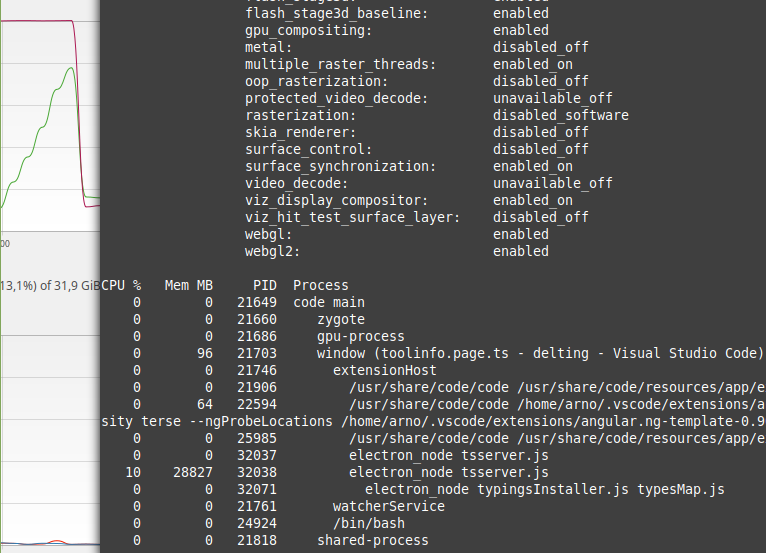
With tslint enabled, all my 64GB RAM+SWAP are eaten and then I see a memory allocation error toast… In my tests, the memory hog seems to not start before I open/save a file in my project.
 arnotixe
on 2 Jan 2020
arnotixe
on 2 Jan 2020
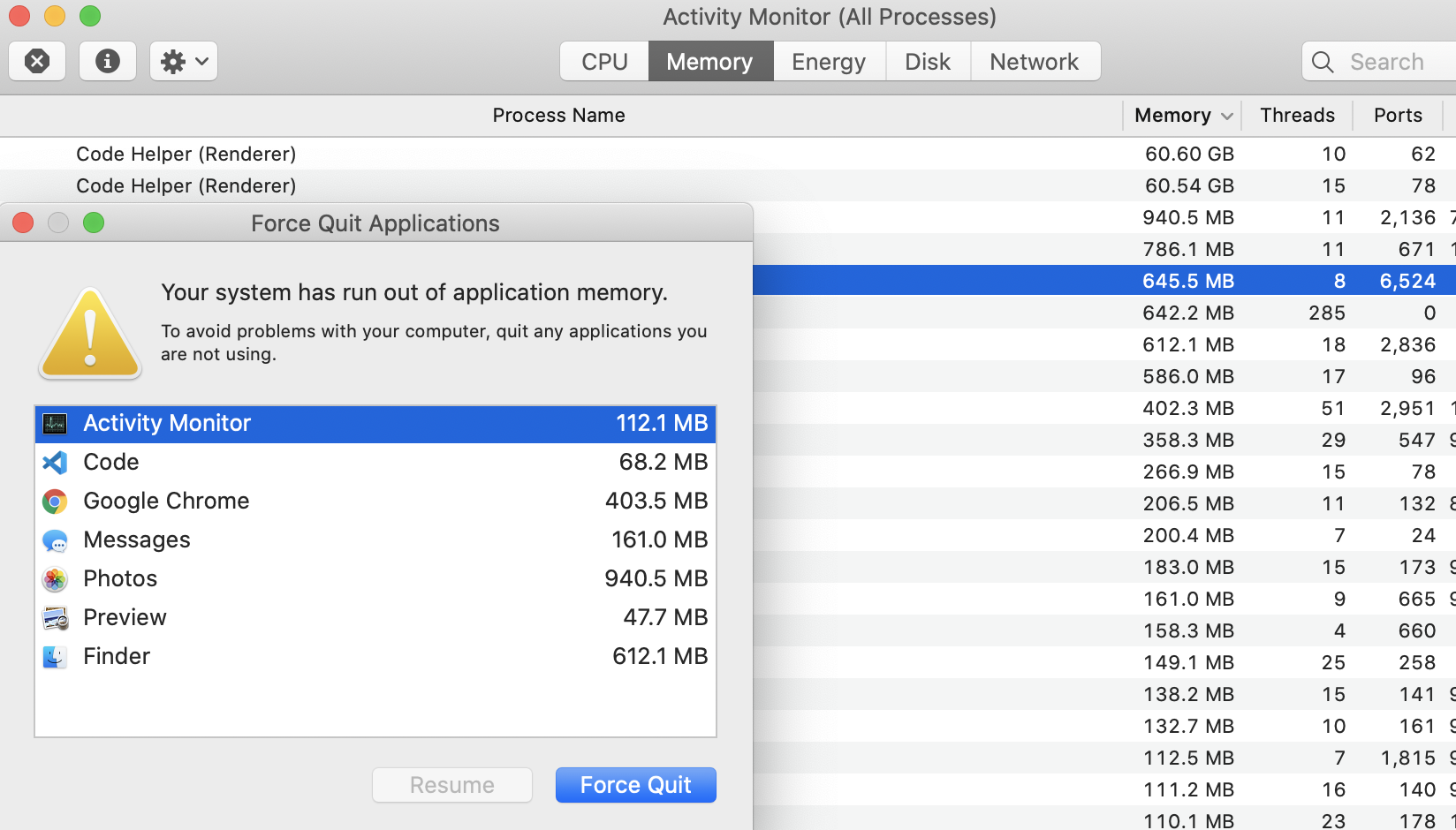
I wasn't aware that I made any updates to VSCode or any extensions but half way through my day today my laptop become unusable with an ionic/angular project.
Disabling all extensions has returned my laptop to normal.

 skotturi
on 11 Jan 2020
skotturi
on 11 Jan 2020
@deepak1556 The electron 7.x build in the current VS Code insiders has the fix, correct?
mjbvz
on 15 Jan 2020
@mjbvz nope, it will available with the next electron version bump, I will update here once the fix is available.
 deepak1556
on 16 Jan 2020
deepak1556
on 16 Jan 2020
Our current VS Code 1.43 insiders build now include Electron 7 which has the fix.
Let me know if you still see this issue using VS Code 1.43+
mjbvz
on 8 Feb 2020
Vscode Insider 1.43 is still using 450MB+ for me.
 meotimdihia
on 19 Feb 2020
meotimdihia
on 19 Feb 2020
@mjbvz I'm still having the issue with VSCode Insiders.

 nebrelbug
on 3 Mar 2020
nebrelbug
on 3 Mar 2020
@nebrelbug The numbers you posted don't show anything unexpected with memory usage (TS Server may use several hundred MB depending on your project). Please open a new issue if you feel otherwise
mjbvz
on 3 Mar 2020
Related issues
 biij5698
·
3Comments
biij5698
·
3Comments
 philipgiuliani
·
3Comments
philipgiuliani
·
3Comments
 sijad
·
3Comments
sijad
·
3Comments
 v-pavanp
·
3Comments
v-pavanp
·
3Comments
 villiv
·
3Comments
villiv
·
3Comments
Most helpful comment
The number of issues related to this is growing. This is definitely a VSCode issue. The tsserver.js process is ignoring the new --max_old_space_size parameter and using up as much RAM as possible.