Issue Type: Bug
Copy Paste doesnt work
VS Code version: Code 1.40.1 (8795a9889db74563ddd43eb0a897a2384129a619, 2019-11-13T16:47:44.719Z)
OS version: Darwin x64 18.7.0
 abhiatg777
All 18 comments
(Experimental duplicate detection)
Thanks for submitting this issue. Please also check if it is already covered by an existing one, like:
![vscodebot[bot] picture](https://avatars2.githubusercontent.com/in/2406?v=4&s=40) vscodebot[bot]
on 23 Nov 2019
vscodebot[bot]
on 23 Nov 2019
/needsMoreInfo
 gjsjohnmurray
on 23 Nov 2019
gjsjohnmurray
on 23 Nov 2019
Thanks for creating this issue! We figured it's missing some basic information or in some other way doesn't follow our issue reporting guidelines. Please take the time to review these and update the issue.
Happy Coding!
vscodebot[bot]
on 23 Nov 2019
This is a valid problem. Happening for multiple people in the office using MacOS Mojave. If you have something in your clipboard, a string of text for example and you double click to highlight another string of text and paste it no longer replaces it just pastes what you were trying to replace in the middle of the highlighted word. I have to manually highlight the word I want to replace, no longer able to double click to highlight.
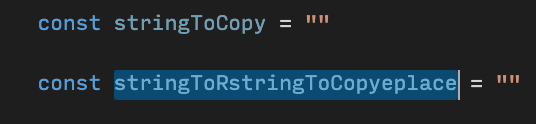
Above image shows it now pastes the new item in the middle of the highlight area after selecting via double click rather than replacing.
Thanks!
 bmtdh
on 25 Nov 2019
bmtdh
on 25 Nov 2019
@bmtdh thanks for adding more details, but please provide individual steps so that we can precisely reproduce the problem. For example,
- this is the contents of the document, this the text in the clipboard
- this is the current selection
- now you paste
- this is what I get
- this is what I expect.
 egamma
on 25 Nov 2019
egamma
on 25 Nov 2019
- Document in my case is any .js or .ts or .tsx file
Current selection can be any string, in my case it is a variable name. I double click a varable name that I want to copy and replace via pasting

Now I press cmd + v
- The location where my mouse was when I double clicked to make my current selection is where the clipboard data gets pasted, rather then replacing the selection

It looks like the entire word is selected.
But in reality when I paste it pastes in the location I performed the double click
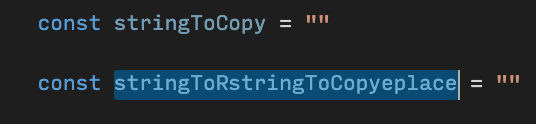
- I expect the paste to replace the selected content.
It seems like the issue is actually the selecting of content not the pasting because if I manually select a word by clicking and dragging it works fine.
Thanks!
bmtdh
on 25 Nov 2019
Same issue for me ✋
Same OS, same behavior.
 glarivie
on 25 Nov 2019
glarivie
on 25 Nov 2019
I'm using 1.40.2 and tried following with content
const stringToCopy = ""
const stringToPaste = ""
- Double click
stringToCopyand pressCmd+C - Double click
stringToPasteand pressCmd+V
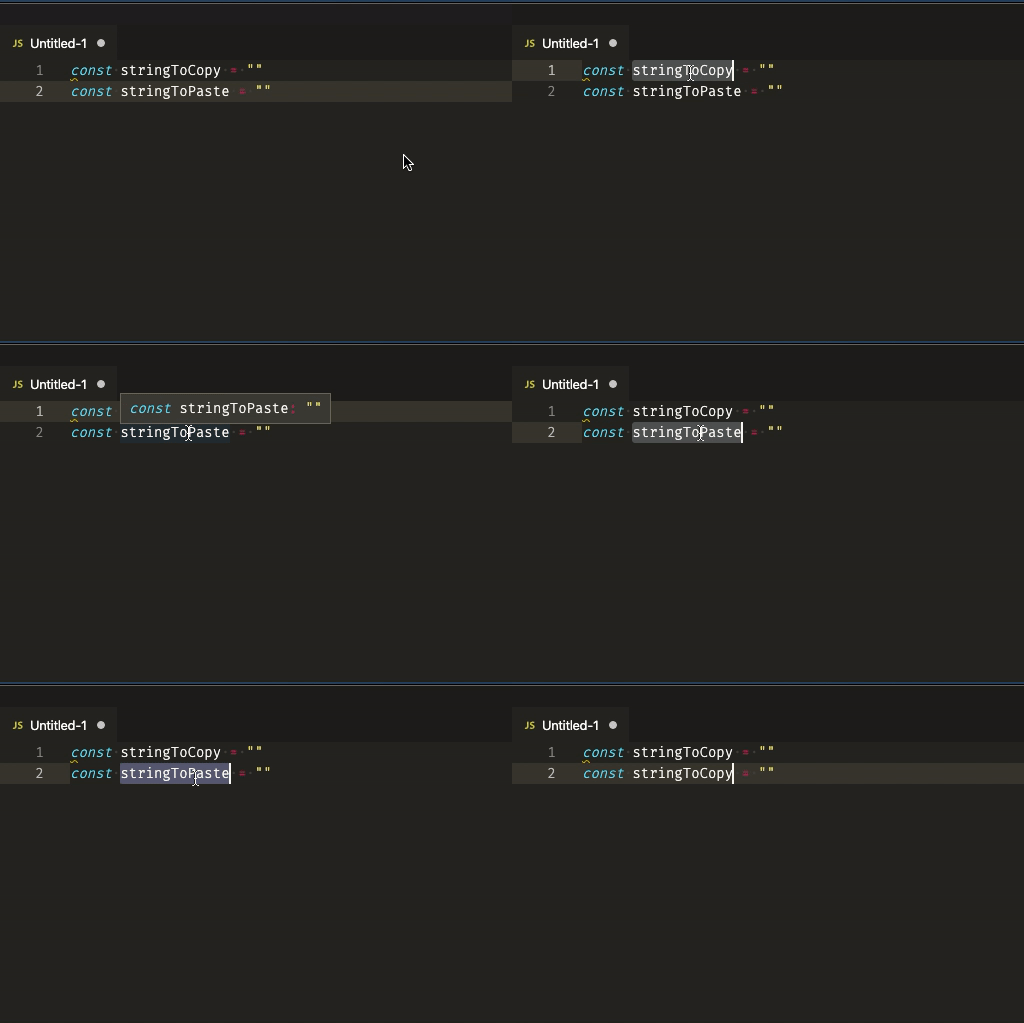
but I didn't reproduce this issue. Did anyone know what I miss here?
It would be great if you can try follow to help narrow down the issue
- Disable all extensions by
code --disable-extensionsand see if you can reproduce - Go to Settings (JSON) and comment out all custom settings and see if you can still reproduce
Thanks!
 rebornix
on 26 Nov 2019
rebornix
on 26 Nov 2019
Using code-insiders I am able to reproduce on macOS Mojave 10.14.6 with --disable-extensions and .vscode/settings.json commented out.
$ code-insiders --disable-extensions .
  [Able to repro]

$ code-insiders --version
1.41.0-insider
a63d88ec550107a66c08d813fb5d3c32c9e131a7
x64
 jwthomp
on 26 Nov 2019
jwthomp
on 26 Nov 2019
It is intermittent for sure, doesn't happen all the time. I am also now noticing then when I do double click to copy, it highlights a single word but actually it is copying the entire line... Intermittent again.
Thanks!
bmtdh
on 26 Nov 2019
Same issue with Catalina...
glarivie
on 27 Nov 2019
@bmtdh @glarivie could you check the status bar and check the selection status to see if it's correct or not?
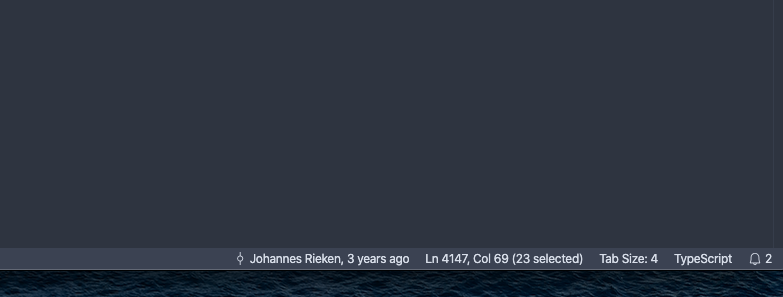
rebornix
on 2 Dec 2019
Always seems to be correct for me.
Thanks,
bmtdh
on 2 Dec 2019
I do not see (# selected) when I've gone to paste and had my selection insert in between where my cursor was rather than replace the selection. My double-clicked selection shows itself as highlighted when this happens.
jwthomp
on 2 Dec 2019
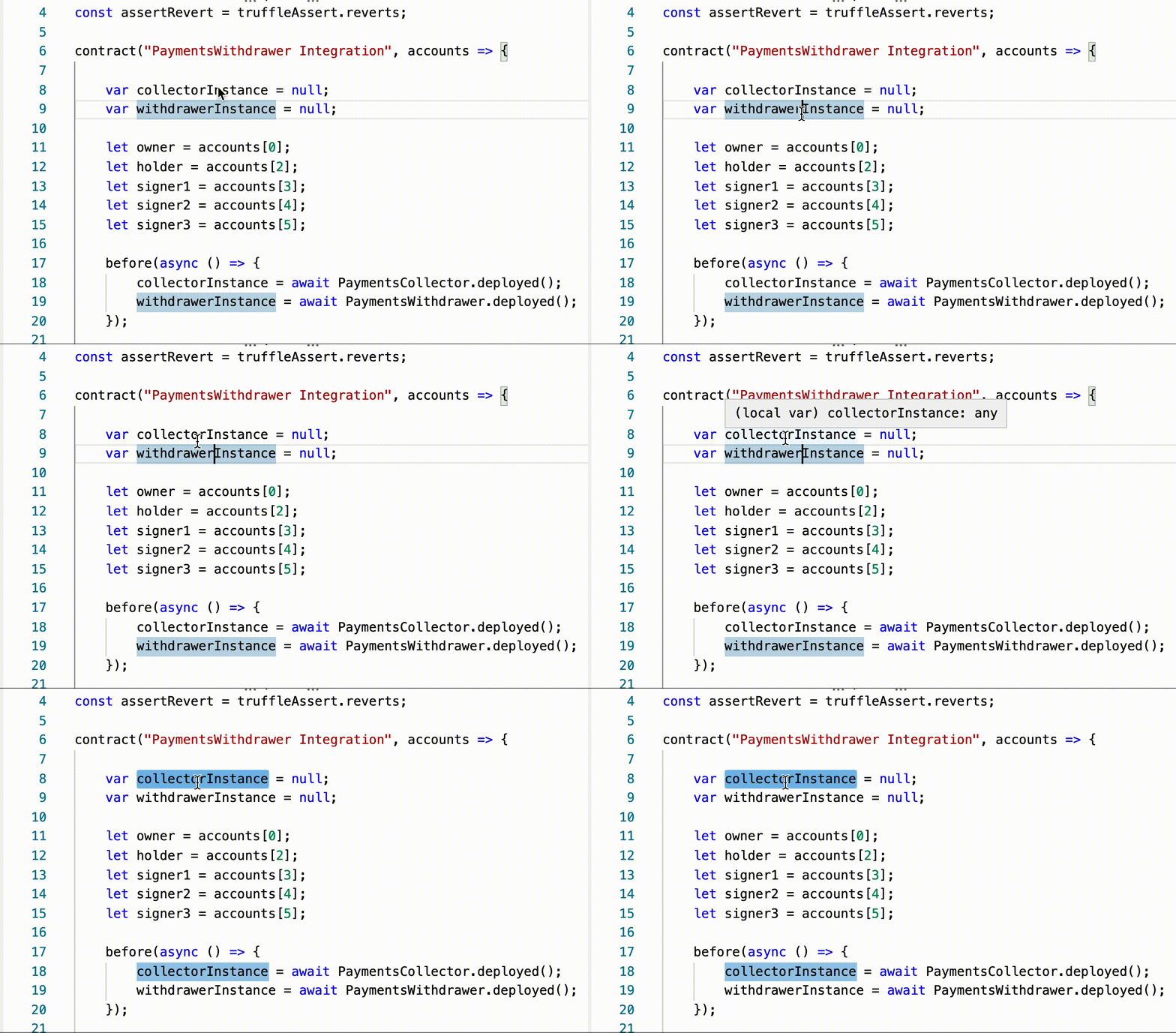
I'm seeing this behavior as well on macOS Mojave. As far as I can tell, here is what is happening: when I double click an identifier, like a variable name in a JS file, there is a slight delay before the text is "actually" selected.
You can tell because once it's "actually" selected the highlight color changes (becomes slightly darker). If I'm fast enough and happen to hit cmd-V before that occurs, it seems to copy the whole line, rather than just the identifier I'm expecting.
You can see the color-change delay here:
 apbendi
on 2 Dec 2019
apbendi
on 2 Dec 2019
@apbendi I've seen that behavior as well. The other one where you highlight the text but insert it inside seems to happen more if you double click between two letters. It's not consistent, but highly reproducible.
jwthomp
on 3 Dec 2019
This looks like caused by https://github.com/microsoft/vscode/issues/83150 and tomorrow's Insiders should have this issue fixed.
rebornix
on 5 Dec 2019
Thanks for creating this issue! We figured it's covering the same as another one we already have. Thus, we closed this one as a duplicate. You can search for existing issues here. See also our issue reporting guidelines.
Happy Coding!
vscodebot[bot]
on 5 Dec 2019
Related issues
 vsccarl
·
3Comments
vsccarl
·
3Comments
 ryan-wong
·
3Comments
ryan-wong
·
3Comments
 chrisdias
·
3Comments
chrisdias
·
3Comments
 curtw
·
3Comments
curtw
·
3Comments
 NikosEfthias
·
3Comments
NikosEfthias
·
3Comments
Most helpful comment
I'm seeing this behavior as well on macOS Mojave. As far as I can tell, here is what is happening: when I double click an identifier, like a variable name in a JS file, there is a slight delay before the text is "actually" selected.
You can tell because once it's "actually" selected the highlight color changes (becomes slightly darker). If I'm fast enough and happen to hit cmd-V before that occurs, it seems to copy the whole line, rather than just the identifier I'm expecting.
You can see the color-change delay here: