Vscode: Display different ICON on taskbar according to different project
Issue Type: Feature Request
Open many vscode instance, with documents and projects in different languages, but taskbar icon is too single to distinguish easily
VS Code version: Code 1.40.0 (86405ea23e3937316009fc27c9361deee66ffbf5, 2019-11-06T17:09:34.601Z)
OS version: Darwin x64 19.0.0
 5dao
5dao
All 12 comments
(Experimental duplicate detection)
Thanks for submitting this issue. Please also check if it is already covered by an existing one, like:
![vscodebot[bot] picture](https://avatars2.githubusercontent.com/in/2406?v=4&s=40) vscodebot[bot]
on 15 Nov 2019
vscodebot[bot]
on 15 Nov 2019
Yes this would be great - it is very hard to switch instances when having many different projects open. Ideally this would be something configurable per Folder/Project allowing to override default VS icon or at least provide an overlay.
 akrymskiy
on 19 Nov 2019
akrymskiy
on 19 Nov 2019
Yes please, i just wanted to open an issue about this. It's the only thing that is missing to really manage multiple projects. Please add this.
A hue slider would do it for me. But if you could change the Icon or even just add a second notification style icon on it, that would be really great.
 edenprojectde
on 27 Nov 2019
edenprojectde
on 27 Nov 2019
This feature request is now a candidate for our backlog. The community has 60 days to upvote the issue. If it receives 20 upvotes we will move it to our backlog. If not, we will close it. To learn more about how we handle feature requests, please see our documentation.
Happy Coding!
vscodebot[bot]
on 16 Jan 2020
Yes this would be great - it is very hard to switch instances when having many different projects open. Ideally this would be something configurable per Folder/Project allowing to override default VS icon or at least provide an overlay.
If it receives 20 upvotes we will move it to our backlog @edenprojectde @akrymskiy
5dao
on 16 Jan 2020
Yes this would be great - it is very hard to switch instances when having many different projects open. Ideally this would be something configurable per Folder/Project allowing to override default VS icon or at least provide an overlay.
I created an feature request asking if we could change the icon colour because I have so many blue icons in my taskbar, but this would also be great!
 mfearby
on 17 Jan 2020
mfearby
on 17 Jan 2020
This feature request has not yet received the 20 community upvotes it takes to make to our backlog. 10 days to go. To learn more about how we handle feature requests, please see our documentation.
Happy Coding
vscodebot[bot]
on 6 Mar 2020
This feature request has not yet received the 20 community upvotes it takes to make to our backlog. 10 days to go. To learn more about how we handle feature requests, please see our documentation.
Happy Coding
vscodebot[bot]
on 6 Mar 2020
This feature request has not yet received the 20 community upvotes it takes to make to our backlog. 10 days to go. To learn more about how we handle feature requests, please see our documentation.
Happy Coding
@akrymskiy @edenprojectde @mfearby @bpasero
how to upvotes?
5dao
on 6 Mar 2020
how to upvotes?
I believe you just have to add a +1 / Thumbs-Up reaction to the first comment of the thread - there are currently 13 as of now
akrymskiy
on 9 Mar 2020
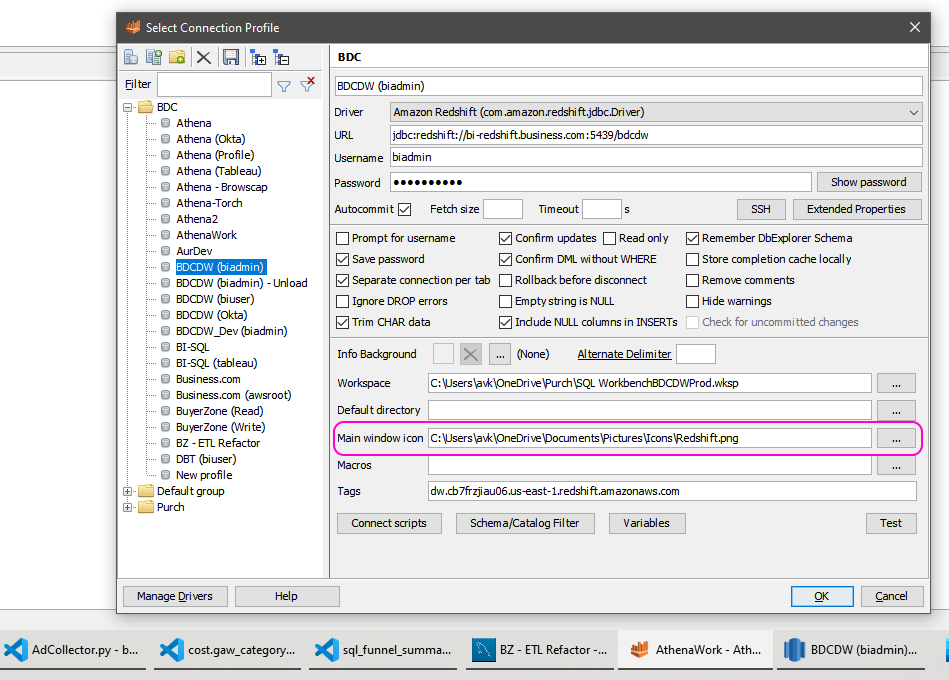
Just to illustrate the feature as implemented in SQL Workbench/J - compared to the current state of VS.Code. Setting different icons per project gives a much better clarity when switching among multiple instances. Would also be okay if we could at least do icon overlay like Windows shortcuts - or anything really to make it easier to get back to the right instance :)
akrymskiy
on 11 Mar 2020
:slightly_frowning_face: In the last 60 days, this feature request has received less than 20 community upvotes and we closed it. Still a big Thank You to you for taking the time to create this issue! To learn more about how we handle feature requests, please see our documentation.
Happy Coding!
vscodebot[bot]
on 16 Mar 2020
Related issues
 shanalikhan
·
3Comments
shanalikhan
·
3Comments
 NikosEfthias
·
3Comments
NikosEfthias
·
3Comments
 trstringer
·
3Comments
trstringer
·
3Comments
 villiv
·
3Comments
villiv
·
3Comments
 lukehoban
·
3Comments
lukehoban
·
3Comments
Most helpful comment
Yes please, i just wanted to open an issue about this. It's the only thing that is missing to really manage multiple projects. Please add this.
A hue slider would do it for me. But if you could change the Icon or even just add a second notification style icon on it, that would be really great.