When I startup my mscode I immediately get the information that my extension host terminated unexpectedly.
I reinstalled mscode via dnf and snap and did not install any extension -> I get the same message always.
My system information
Version: 1.40.1
Commit: 8795a9889db74563ddd43eb0a897a2384129a619
Date: 2019-11-13T16:49:30.162Z
Electron: 6.1.2
Chrome: 76.0.3809.146
Node.js: 12.4.0
V8: 7.6.303.31-electron.0
OS: Linux x64 5.3.8-200.fc30.x86_64
My errormessage
Extension Host
/usr/share/code/resources/app/out/vs/workbench/workbench.desktop.main.js:3695
## Fatal error in , line 0# ignored##
##FailureMessage Object: 0x7fffca114930
/usr/share/code/resources/app/out/bootstrap-window.js:5 [uncaught exception]: Error: read ECONNRESET
onUnexpectedError @ /usr/share/code/resources/app/out/bootstrap-window.js:5
/usr/share/code/resources/app/out/bootstrap-window.js:6 Error: read ECONNRESET
    at Pipe.onStreamRead (/usr/share/code/resources/app/out/vs/code/electron-browser/workbench/internal/stream_base_commons.js:183)
onUnexpectedError @ /usr/share/code/resources/app/out/bootstrap-window.js:6
events.js:177 Uncaught Error: read ECONNRESET
    at Pipe.onStreamRead (/usr/share/code/resources/app/out/vs/code/electron-browser/workbench/internal/stream_base_commons.js:183)
/usr/share/code/resources/app/out/vs/workbench/workbench.desktop.main.js:3458 Extension host terminated unexpectedly. Code:  null  Signal:  SIGILL
_onExtensionHostCrashed @ /usr/share/code/resources/app/out/vs/workbench/workbench.desktop.main.js:3458
/usr/share/code/resources/app/out/vs/workbench/workbench.desktop.main.js:2596 Extension host terminated unexpectedly.
The effect is: I cant use any extension.
 MichaelGruben
All 34 comments
I have almost the same issue, for the same version!
 KajendranPulendran
on 14 Nov 2019
KajendranPulendran
on 14 Nov 2019
The same...
"Extension host terminated unexpectedly" after either mouse hover + Alt or Alt+Click over code hiperlinks
Versión: 1.40.1 (system setup)
Commit: 8795a9889db74563ddd43eb0a897a2384129a619
Fecha: 2019-11-13T16:49:35.976Z
Electron: 6.1.2
Chrome: 76.0.3809.146
Node.js: 12.4.0
V8: 7.6.303.31-electron.0
OS: Windows_NT x64 10.0.18362
 gbesoain
on 14 Nov 2019
gbesoain
on 14 Nov 2019
Do you see this if you run VS Code with all external extensions disabled? To check, start code from the command line using code --disable-extensions
 mjbvz
on 14 Nov 2019
mjbvz
on 14 Nov 2019
I described the same problem in #84842 without any extensions installed, I did narrow it down to the built-in-extension "typescript and javascript language features". If i disabled that built-in-extension vs code did work with other extensions again. But without this built-in-extension VS Code is not usable --> no intellisense
 geniodellavittoria
on 14 Nov 2019
geniodellavittoria
on 14 Nov 2019
Do you see this if you run VS Code with all external extensions disabled? To check, start code from the command line using
code --disable-extensions
I tried that, doesnt affect the already built-in-extensions, therefore still the same problem
geniodellavittoria
on 14 Nov 2019
I successfully could downgrade mscode to 1.39.2. The problem occured with 1.40.0 also. So my extensions work with the following configuration for now:
Version: 1.39.2
Commit: 6ab598523be7a800d7f3eb4d92d7ab9a66069390
Date: 2019-10-15T15:33:40.634Z
Electron: 4.2.10
Chrome: 69.0.3497.128
Node.js: 10.11.0
V8: 6.9.427.31-electron.0
OS: Linux x64 5.3.11-200.fc30.x86_64
MichaelGruben
on 15 Nov 2019
I successfully could downgrade mscode to 1.39.2. The problem occured with 1.40.0 also. So my extensions work with the following configuration for now:
Commit: 6ab598523be7a800d7f3eb4d92d7ab9a66069390
Date: 2019-10-15T15:33:40.634Z
Electron: 4.2.10
Chrome: 69.0.3497.128
Node.js: 10.11.0
V8: 6.9.427.31-electron.0
OS: Linux x64 5.3.11-200.fc30.x86_64```
I did sucessfully downgrade vscode to 1.39.2 as well. My configuration right now:
Version: 1.39.2 (system setup)
Commit: 6ab598523be7a800d7f3eb4d92d7ab9a66069390
Date: 2019-10-15T15:35:18.241Z
Electron: 4.2.10
Chrome: 69.0.3497.128
Node.js: 10.11.0
V8: 6.9.427.31-electron.0
OS: Windows_NT x64 10.0.18362
geniodellavittoria
on 15 Nov 2019
Same problem and same error message as the first post on Manjaro linux after upgrading vscode from 1.39.2 to 1.40
Downgrading to 1.39.2 seems to make it work again. I also tried 1.40 with only one extension and clean settings and the problem persists, so it's not caused by an extension installed by the user.
 fazo96
on 15 Nov 2019
fazo96
on 15 Nov 2019
I have the same problem since 1.40.0 on Windows 10 Pro (not on Ubuntu though). Today I had some additional output next to the Fatal error message (maybe it is relevant).

Downgrading to 1.39.2 works for now.
 MareikeTaeubner
on 18 Nov 2019
MareikeTaeubner
on 18 Nov 2019
This just worked for me... try disabling and then enabling back extension theme "One Dark Pro" (zhuangtongfa.material-theme) then the bug gone!
gbesoain
on 18 Nov 2019
@geniodellavittoria @MichaelGruben @KajendranPulendran @gbesoain @fazo96 @MareikeTaeubner
Can you please attach the extension host logs? F1 > Developer: Open Logs Folder will show the folder where logs are kept.
@MichaelGruben @KajendranPulendran @gbesoain @fazo96 @MareikeTaeubner Can you please try to disable the builtin TS extension and check if the crash occurs for you? You can disable the builtin extension by going to the Extensions Viewlet > ... > Show Built-in Extensions . In the first group (FEATURES) find TypeScript and JavaScript Language Features, click on the gear icon and choose disable:

 alexdima
on 18 Nov 2019
alexdima
on 18 Nov 2019
@geniodellavittoria @MichaelGruben @KajendranPulendran @gbesoain @fazo96 @MareikeTaeubner
Can you please attach the extension host logs?F1 > Developer: Open Logs Folderwill show the folder where logs are kept.
geniodellavittoria
on 18 Nov 2019
@geniodellavittoria I see a lot of extensions being loaded and activated in the extension host from your attached log. I have looked only at the log statements after [2019-11-18 13:13:54.170] (appears to be the last launch):
- built-in
extension-editing - built-in
typescript-language-features - user
angular.ng-template-0.802.3 - user
ms-vscode.vscode-typescript-tslint-plugin-1.2.3 - built-in
configuration-editing - built-in
json-language-features - built-in
npm - built-in
debug-auto-launch - built-in
emmet - built-in
git - built-in
merge-conflict - user
streetsidesoftware.code-spell-checker-1.7.20
This log still contains 3 user installed extensions (not built-in). Does the crash reproduce when disabling these user installed extensions? Could you attach a log from an extension host that crashes with only built-in extensions? I'm sorry for insisting, but I would like to rule out those 3 extensions.
alexdima
on 18 Nov 2019
@geniodellavittoria I see a lot of extensions being loaded and activated in the extension host from your attached log. I have looked only at the log statements after
[2019-11-18 13:13:54.170](appears to be the last launch):* built-in `extension-editing` * built-in `typescript-language-features` * user `angular.ng-template-0.802.3` * user `ms-vscode.vscode-typescript-tslint-plugin-1.2.3` * built-in `configuration-editing` * built-in `json-language-features` * built-in `npm` * built-in `debug-auto-launch` * built-in `emmet` * built-in `git` * built-in `merge-conflict` * user `streetsidesoftware.code-spell-checker-1.7.20`This log still contains 3 user installed extensions (not built-in). Does the crash reproduce when disabling these user installed extensions? Could you attach a log from an extension host that crashes with only built-in extensions? I'm sorry for insisting, but I would like to rule out those 3 extensions.
Ah sorry had to switch back to the updated vs code 1.40 and forgot to uninstall my installed extensions here the log without installed extensions
exthost.log
geniodellavittoria
on 18 Nov 2019
My post from 3 days ago was wrong: I thought I tried with an empty clean configuration but I didn't clean it up properly.
I tried a proper clean setup and then installing all the extensions I had to see which one caused the issue. To my surprise the issue never came back.
Turns out for some unknown reason I had two versions of the GitLens extension in my old ~/.vscode-oss/extensions, but when I reinstalled them in the clean setup I only had one. So I tried restoring the old setup but deleting the older version of GitLens and the issue went away.
For anyone affected, try checking your ~/.vscode-oss/extensions folder and deleting any older versions of the same extension.
fazo96
on 18 Nov 2019
@alexandrudima
After reinstalling 1.40.1 the log looks not suspicious (even though I get again the error on startup.
exthost.log
This one from this morning on the other hand does contain an error (although I don't know if I already switched to the older version at that time - sry :( )
exthost.log
Disabling the specified Typescript/Javascript extension as instructed does indeed remove the error on my side. No error is printed on the developer console and git integration seems to work fine as well again (hinting that the extension host works - I guess).
Re-enabling this extension again directly leads to the error - but still nothing in the log file. Do you perhaps need another log I did not post?
MareikeTaeubner
on 18 Nov 2019
Not sure when but soon after the error came back for me :( so even my post from 30 minutes ago is wrong.
The error still happens after uninstalling all extensions.
The error does not happen anymore if I disable the built in Typescript/Javascript extension
The log is for no user extensions, and Typescript/Javascript built in extension enabled (which caused the crash).
fazo96
on 18 Nov 2019
@geniodellavittoria @MareikeTaeubner @fazo96
Thanks a lot for following through so quickly. All your attempts convince me that the crash is caused by our built-in typescript-language-features.
@mjbvz Here is the only relevant hit I found when searching for FailureMessage Object: https://github.com/nodejs/node/issues/27379 . Perhaps there is something new in the TypeScript extension that uses locale information in dates, regular expressions, or other basic JavaScript concepts?
alexdima
on 18 Nov 2019
@alexandrudima great catch. Actually, I use node.js for my web development and ran into that node.js error already on my system. Turns out that happens in node.js 12 but is fixed in node.js 13
I run Manjaro Linux (distro based on arch linux) and in the repos we have node.js 12. In the testing repo however it's already at 13 so I use the testing package to be able to continue doing node.js development on my machine
Perhaps from 1.40 vscode has switched to node.js 12 internally? That would explain the bug. Using node.js 13 inside vscode would fix it I guess.
fazo96
on 18 Nov 2019
@fazo96 Yes, 1.40 includes an Electron update that brings us to node.js 12.
@deepak1556 It looks like we are hitting a nodejs 12 bug in our extension host - https://github.com/nodejs/node/issues/27379 -, from the TS extension. I don't really know what is special about these machines, do you perhaps have a certain OS locale other than English? (this doesn't reproduce on my machine)
alexdima
on 18 Nov 2019
Great investigation @alexandrudima!
I see two places in our extension code where we use Date.toLocaleTimeString. This code has not changed recently but the electron (node 12) could have caused this. I have pushed a possible fix with 5b428d2
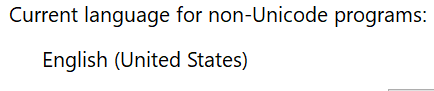
I also have not been able to repo this yet however. For anyone effected: what locale are you using?
mjbvz
on 18 Nov 2019
I think https://github.com/nodejs/node/issues/27379 has been fixed in node.js 12.1 but @deepak1556 can confirm maybe.
 bpasero
on 18 Nov 2019
bpasero
on 18 Nov 2019
Great investigation @alexandrudima!
I see two places in our extension code where we use
Date.toLocaleTimeString. This code has not changed recently but the electron (node 12) could have caused this. I have pushed a possible fix with 5b428d2I also have not been able to repo this yet however. For anyone effected: what locale are you using?
geniodellavittoria
on 18 Nov 2019
Did further investigation on this, @bpasero is right that the fix for this went in node 12.1.0 and our stable is on node 12.4.0.
But after looking at the fix , its a backport of an ICU patch for this corresponding v8 api, in electron v8 and icu come from chromium, which means the ICU patch has to be backported there too. I was able to repro the crash on electron with the following sample.
// icu.js

console.log(new Date().toLocaleString())
> ELECTRON_RUN_AS_NODE=1 LC_ALL=sp ./vscode/.build/electron icu.js
 deepak1556
on 18 Nov 2019
deepak1556
on 18 Nov 2019
I have my language set to american english but being italian. I use the italian locale for formats such as dates, time, etc. I guess the italian locale for dates is what triggers the bug.
fazo96
on 18 Nov 2019
To repro on vscode launch with an invalid/unsupported locale and point to a typescript file so that typescript-language-features extension is loaded
$ LC_ALL=sp code
@mjbvz was able to confirm your fix averts this issue atleast with our builtin extensions 👍
I will backport https://chromium-review.googlesource.com/c/v8/v8/+/1769479 for more broader fix with the next candidate release.
deepak1556
on 18 Nov 2019
Electron PR https://github.com/electron/electron/pull/21188
deepak1556
on 19 Nov 2019
My language was set to English but I had the Swiss-German locale on. I changed the locale to English (UK) and now VS Code works with version 1.40.1. Thanks for your investigations and help !
geniodellavittoria
on 19 Nov 2019
Thanks everyone for investigating and as I see already fixing this so quickly!
As a follow up:
Because of https://github.com/nodejs/node/issues/29338 I had https://www.npmjs.com/package/full-icu globally installed. Thanks to your investigation I removed this package to see whether this fixes the crash. And yes, removing full-icu fixed this issue for 1.40.1 on my side.
MareikeTaeubner
on 19 Nov 2019
Thanks for the good work guys :) If anyone is still affected, like me, I looked deeper into my system's locale settings and found that I did have some weird botched setup. Through my desktop's system settings I managed to properly keep my desired settings (american english language, italian formats for dates etc) while having vscode 1.40 and nodejs 12 working fine and not running into the toLocaleString() issue.
fazo96
on 19 Nov 2019
deepak1556
on 21 Nov 2019
@deepak1556 What are the steps to verify this fix?
 chrmarti
on 22 Nov 2019
chrmarti
on 22 Nov 2019
@chrmarti using any of the following apis should not crash extension host when run under unsupported locale on your system.
new Date().toLocaleString()
new Date().toLocaleTimeString()
new Date().toLocaleDateString()
new Date().toLocaleFormat()
- Verify by starting vscode with
LC_ALL=sp codeand see the extension host runs without any issues. - Verify by using one of the above apis in an extension doesn't cause issues.
deepak1556
on 22 Nov 2019
Sorry I sadly had no time to give you my logfiles but now I can officially verify that this is fixed with 1.40.2
MichaelGruben
on 27 Nov 2019
Related issues
 VitorLuizC
·
3Comments
VitorLuizC
·
3Comments
 trstringer
·
3Comments
trstringer
·
3Comments
 chrisdias
·
3Comments
chrisdias
·
3Comments
 DovydasNavickas
·
3Comments
DovydasNavickas
·
3Comments
 borekb
·
3Comments
borekb
·
3Comments