Vscode: Linux Mint Guest OS crashes while using VSCode
Issue Type: Bug
problem:
VirtualBoxVM crashes with Application Error while running VSCode
- start with Windows 10
- Run Oracle VirtualBox
- create linux mint VM
- run linux mint VM
- install VSCode for Linux from tar.gz
- clone some repo from GitHub
- cd into local repo and start editor (usually
code -a .) - work with VSCode in local clone (unsure exactly what activity triggers this)
After some unpredictable amount of time, clicking on a menu or the settings icon (maybe some other actions also trigger), the expected pop-up menu will be all black instead of filled with content. A short time (usually no more than a minute) later, the guest VM will be unresponsive and an Application Error dialog will appear in the Win10 host. The VM is dead at this point. Here is the content of the dialog just received:
The instruction at 0x00007FF84210F161 referenced memory at
0x00000000000000000000000000000000.  The memory could not be written.

Click on OK to terminate the program
This has been a consistent problem in the VSCode versions since I started. May be tied to git plugin and editing in a directory that is a git repo.
VS Code version: Code 1.40.0 (86405ea23e3937316009fc27c9361deee66ffbf5, 2019-11-06T18:14:08.920Z)
OS version: Linux x64 4.15.0-70-generic
System Info
|Item|Value|
|---|---|
|CPUs|Intel(R) Core(TM) i7-8550U CPU @ 1.80GHz (1 x 1991)|
|GPU Status|2d_canvas: enabled
flash_3d: enabled
flash_stage3d: enabled
flash_stage3d_baseline: enabled
gpu_compositing: enabled
metal: disabled_off
multiple_raster_threads: disabled_off
oop_rasterization: disabled_off
protected_video_decode: unavailable_off
rasterization: disabled_software
skia_renderer: disabled_off
surface_control: disabled_off
surface_synchronization: enabled_on
video_decode: unavailable_off
viz_display_compositor: enabled_on
viz_hit_test_surface_layer: disabled_off
webgl: enabled
webgl2: enabled|
|Load (avg)|1, 1, 0|
|Memory (System)|5.82GB (3.37GB free)|
|Process Argv|-a . --no-sandbox|
|Screen Reader|no|
|VM|100%|
Extensions (6)
Extension|Author (truncated)|Version
---|---|---
gitlens|eam|10.1.2
vscode-docker|ms-|0.8.2
python|ms-|2019.10.44104
cpptools|ms-|0.26.2-insiders
preview-vscode|myh|1.3.0
vscode-print|pdc|0.7.13
Also:
(base) mintadmin@mint-vm:~/.../eclipse/adl2pydm$ more /etc/os-release
NAME="Linux Mint"
VERSION="19.2 (Tina)"
ID=linuxmint
ID_LIKE=ubuntu
PRETTY_NAME="Linux Mint 19.2"
VERSION_ID="19.2"
HOME_URL="https://www.linuxmint.com/"
SUPPORT_URL="https://forums.ubuntu.com/"
BUG_REPORT_URL="http://linuxmint-troubleshooting-guide.readthedocs.io/en/latest/"
PRIVACY_POLICY_URL="https://www.linuxmint.com/"
VERSION_CODENAME=tina
UBUNTU_CODENAME=bionic
Windows 10 host details (running Oracle VirtualBox)
VS Code version: Code 1.40.0 (86405ea23e3937316009fc27c9361deee66ffbf5, 2019-11-06T17:02:13.381Z)
OS version: Windows_NT x64 10.0.17763
System Info
|Item|Value|
|---|---|
|CPUs|Intel(R) Core(TM) i7-8550U CPU @ 1.80GHz (8 x 1992)|
|GPU Status|2d_canvas: enabled
flash_3d: enabled
flash_stage3d: enabled
flash_stage3d_baseline: enabled
gpu_compositing: enabled
metal: disabled_off
multiple_raster_threads: enabled_on
oop_rasterization: disabled_off
protected_video_decode: enabled
rasterization: enabled
skia_renderer: disabled_off
surface_control: disabled_off
surface_synchronization: enabled_on
video_decode: enabled
viz_display_compositor: enabled_on
viz_hit_test_surface_layer: disabled_off
webgl: enabled
webgl2: enabled|
|Load (avg)|undefined|
|Memory (System)|15.85GB (6.32GB free)|
|Process Argv|-a .|
|Screen Reader|no|
|VM|0%|
 prjemian
All 40 comments
screen shot at time of recent crash

Linux Mint Guest VM is in right panel
prjemian
on 13 Nov 2019
Suspecting that git is involved, will try working without plugins next.
prjemian
on 13 Nov 2019
FYI: code -a --disable-extensions .
System still crashed.
prjemian
on 14 Nov 2019
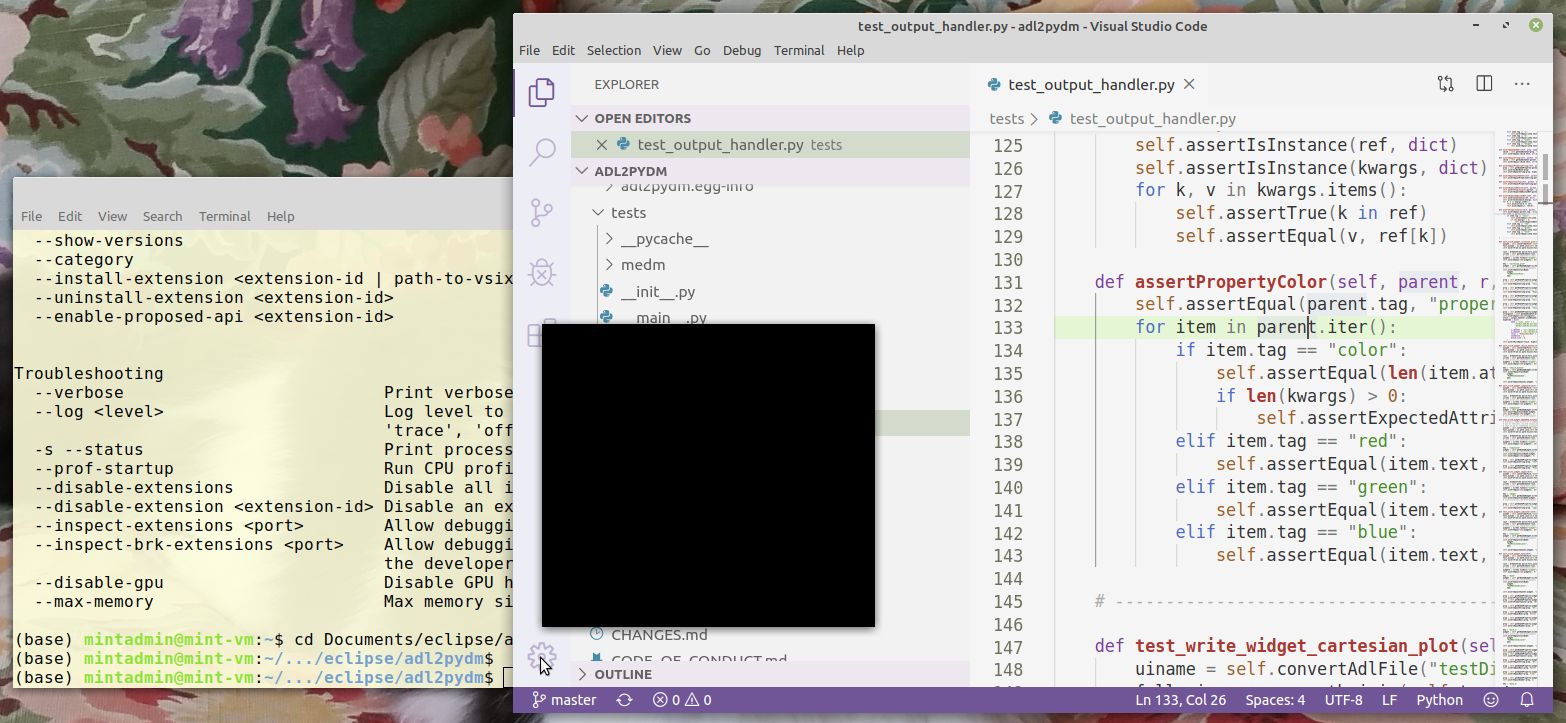
This screen shows one of the symptoms. In this case (just installed VSCode-linux-x64-1573664143 now), starting with: code -a --disable-extensions ., opened one of the python source code files. Then clicked on the settings gear (planning to look for plugin configuration to verify that plugins are still off) and received this black box instead of a pop-up menu:

prjemian
on 14 Nov 2019
And now the VM has crashed with exactly the same VirtualBoxVM.exe - Application Error dialog as originally posted: The instruction at 0x00007FF84210F161 referenced memory ...
Hope this is enough info for y'all to figure this one out.
prjemian
on 14 Nov 2019
Ok, one more variation to try (don't use the -a option), once the VM is restarted. code --disable-extensions
prjemian
on 14 Nov 2019
This is not a good sign (tried clicking the settings gear):
prjemian
on 14 Nov 2019
Any other diagnostics?
prjemian
on 14 Nov 2019
... and system has now crashed again
Was moving mouse between menus, looking if any of them would appear with text content rather than all black. Started with Help (all black), slid left to Terminal (text content), back to Help (all black and VM crashed right away.)
prjemian
on 14 Nov 2019
Can you run with code --disable-gpu and see if it still crashes ?
 deepak1556
on 14 Nov 2019
deepak1556
on 14 Nov 2019
Started with code --disable-gpu and observe no initial problems while clicking the settings gear or moving between the different items in the menu bar. Before, symptoms were displayed during these activities as shown above.
Before we declare this to be a finding, let's work with it a bit, typical activities, and see if problem recurs.
prjemian
on 14 Nov 2019
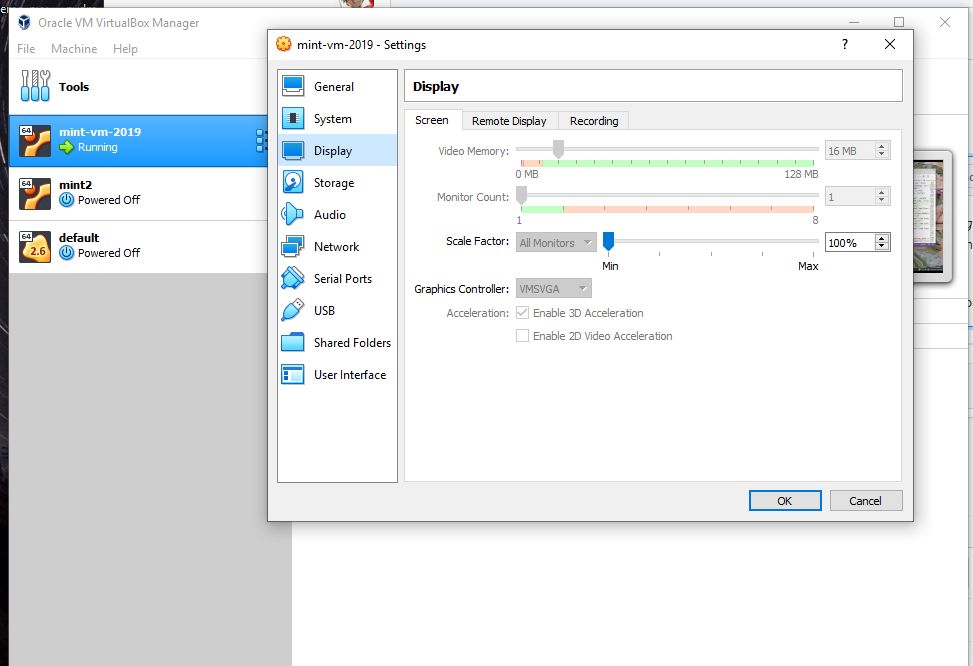
Here's the VirtualBox Display setup for this VM:
prjemian
on 14 Nov 2019
restarted code as code --disable-gpu -a . and still no problems
This "works for me now". However, not closing the issue since it remains a bug. I assume you have all you need to resolve it?
prjemian
on 14 Nov 2019
Oh, two more things that may not have been clear about the system description:
- VSCode is installed by the unprivileged user, not root account, in subdirectory of ~/Apps/, subdir includes the build number so I can easily revert if desired
- linux mint Mate variant is used
prjemian
on 14 Nov 2019
update: worked with that (code --disable-gpu -a .) all day with no problems
Looks like a NULL pointer was not checked, perhaps related to when GPU use is enabled.
Once that line of code is found, will you follow up with Oracle VirtualBox? There is no way that a user program on linux (even in a VM) should crash the entire machine.
prjemian
on 15 Nov 2019
It just crashed out. Same error message. Crashes only happen when interacting with VSCode editor.
prjemian
on 16 Nov 2019
Thanks for testing this, the fix for it has to come from chromium. I am leaving the issue open until the fix is landed in future versions, can you test our exploration build from https://github.com/microsoft/vscode/issues/84574#issuecomment-553260601 that has newer chromium runtime to see if its fixed.
deepak1556
on 18 Nov 2019
On it now (this version, obviously, VSCode-linux-x64-exploration-1573181432). And, thanks for being responsive!
prjemian
on 19 Nov 2019
Youch! Crashed right out in this many minutes! (started with code -a .)
prjemian
on 19 Nov 2019
Specifically, had been editing python code. Needed to configure the new app with theme and extensions (GitLens, Python). Ran debugger once. No problems yet. Edited a .coveragerc file and git commit. When trying to do the git push, got the black pop-up menu. Tried using the menubar. Help menu OK, Debug menu all black and then VM crashed.
prjemian
on 19 Nov 2019
Thanks for the repro steps, I will see if I can narrow down the issue from upstream. Will ping back if needed addional info.
deepak1556
on 19 Nov 2019
AND, my local .git directory is now corrupt. Restarted with code --disable-gpu -a . and will report if anything adverse happens.
prjemian
on 19 Nov 2019
FYI, this installation detail:
(base) mintadmin@mint-vm:~/.../eclipse/adl2pydm$ ll ~/Apps/VSCode-linux-x64/bin/
total 4.0K
lrwxrwxrwx 1 mintadmin mintadmin   18 Nov 18 17:10 code -> ./code-exploration*
-rwxr-xr-x 1 mintadmin mintadmin 1.7K Nov  7 20:47 code-exploration*
This is a known issue when running Chrome (and Electron, and anything built on Electron) under VirtualBox. See https://www.virtualbox.org/ticket/15417 and https://www.virtualbox.org/ticket/12738
The issue has been known for many years. Apparently there aren't enough resources at VirtualBox to work on a fix, so don't expect one soon. For now your best bet is either using the --disable-gpu flag, or moving to a different virtualization software, e.g. VMWare Workstation, if you don't mind going proprietary. I can confirm these issues went away when I migrated my VM from VirtualBox to VMWare Workstation.
 jrial
on 4 Dec 2019
jrial
on 4 Dec 2019
Additionally, if memory serves well, I believe my workaround back in the day was to quit the application with ctrl-q as soon as the graphical glitches started to appear. If you catch it in time, you can simply quit and relaunch the application and your VM will keep on truckin'.
jrial
on 4 Dec 2019
Aha! Well, thanks for getting to the root cause of this issue. I confirm your empirical approach to quit as soon as glitches start to appear. That has worked for me as well. For now, this conversation has helped me remember to use --disable-gpu when in the VM.
Let's leave this issue open until the upstream (VirtualBox) issues are resolved, if ever. That would be helpful to others who encounter this problem, seeing it as yet unresolved.
prjemian
on 4 Dec 2019
@deepak1556 & @jrial: I applaud you both on your responsiveness and diligence on this issue.
prjemian
on 4 Dec 2019
Understood this issue is closed, but as a note for future visitors, this issue affects VMWare Fusion as well.
 jmaha
on 10 Jan 2020
jmaha
on 10 Jan 2020
jmaha: no, this issue is still open. It was mentioned in another issue, which has been closed.
Quoting @prjemian:
Let's leave this issue open until the upstream (VirtualBox) issues are resolved, if ever. That would be helpful to others who encounter this problem, seeing it as yet unresolved.
jrial
on 10 Jan 2020
@jrial Aha, thanks for the clarification. Well I can confirm the same issue with VMWare Fusion, and also can confirm that setting the --disable-gpu flag in all VSCode processes (and disabling hardware acceleration in my Chromium-based Electron app in development) eliminates the graphical corruption -> OS crash issue described here.
jmaha
on 11 Jan 2020
I just tried this with the latest version of VSCode on a ubuntu VM. After opening VSCode and pressing right click on a file in the side panel shows an empty context menu. Second right click crashes the VM.
 tahaimt
on 7 Feb 2020
tahaimt
on 7 Feb 2020
Same symptoms here with Centos7.
Followed these instructions insode VSCode to fix - no performance changes other than it doesn't crash!
Open the Command Palette (Ctrl+Shift+P).
Run the Preferences: Configure Runtime Arguments command. This command will open a argv.json file to configure runtime arguments.
You might see some default arguments there already.
Add
"disable-hardware-acceleration": true
Restart VS Code.
 dandymon
on 5 Mar 2020
dandymon
on 5 Mar 2020
On my linux mint, that file is ${HOME}/.vscode/argv.json
prjemian
on 5 Mar 2020
Also happens on Ubuntu 19.10, fully updated, latest vs code
 AndyXan
on 1 Apr 2020
AndyXan
on 1 Apr 2020
I have the very same issue using Virtual Box and Red Hat 7.8 as the guest OS. Using VS Code version 1.44.2. The only way to make it stable is to open it with code --disable-gpu -a
 d-daniel
on 23 Apr 2020
d-daniel
on 23 Apr 2020
I'm having this same issue with a centos 7 vm in a virtual box. Opening right-click context menus will eventually crash the whole VM.

 danogburn
on 7 May 2020
danogburn
on 7 May 2020
Same issue...With Linux Mint. Black popup and VM Crash.
 flavio20002
on 10 Jun 2020
flavio20002
on 10 Jun 2020
Related? #98924 I found an other temporary solution (with the help of a dev) switching the titleBar to Custom.
 mathisgag
on 6 Jul 2020
mathisgag
on 6 Jul 2020
Yes.
prjemian
on 6 Jul 2020
Still experiencing the same crash when clicking VSCode menu on LinuxMint VM. VSCode menus turns black and the whole VM is crashed. Experienced each time tried to use the VSCode menu.
 HasneinTareque
on 16 Sep 2020
HasneinTareque
on 16 Sep 2020
Related issues
 Tyriar
·
187Comments
Tyriar
·
187Comments
 stoffeastrom
·
380Comments
stoffeastrom
·
380Comments
 ozsay
·
247Comments
ozsay
·
247Comments
 lw-schick
·
229Comments
Tyriar
·
204Comments
lw-schick
·
229Comments
Tyriar
·
204Comments
Most helpful comment
Same symptoms here with Centos7.
Followed these instructions insode VSCode to fix - no performance changes other than it doesn't crash!
Open the Command Palette (Ctrl+Shift+P).
Run the Preferences: Configure Runtime Arguments command. This command will open a argv.json file to configure runtime arguments.
You might see some default arguments there already.
Add
"disable-hardware-acceleration": true
Restart VS Code.