Vscode: Make "always-on" bracket highlighting optional
The release notes for v1.40 say "Improvements to bracket matching"
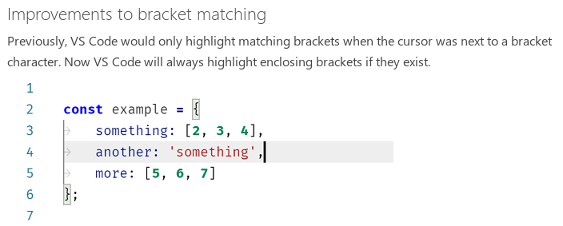
This is not an improvement but a regression (because the highlight is unnecessarily applied 99+ % of the time). Most of the time (99+ %) you're not interested in where the braces are (because of autocomplete you already know that they are in pairs).
So highlighting braces all the time has no benefits and it's extremely distracting in the case of dark themes that use high-contrast highlighting for braces. Here is a (perl) example to demonstrate

Conceptually the original proximity-based bracket highlighting behavior was the correct behavior. Hence this new highlighting feature is a regression.
This new highlighting feature should have been introduced as an optional feature that is turned off by default.
The Settings panel should have an extra checkbox "Always show matching brackets" under the "Highlight matching brackets when one of them is selected" checkbox as shown by the red place-holder below

And by default "Always show matching brackets" should be unchecked.
Please make this new highlighting method optional. And go back to the original correct highlighting method as the default.
 gk-devhub
All 12 comments
(Experimental duplicate detection)
Thanks for submitting this issue. Please also check if it is already covered by an existing one, like:
![vscodebot[bot] picture](https://avatars2.githubusercontent.com/in/2406?v=4&s=40) vscodebot[bot]
on 12 Nov 2019
vscodebot[bot]
on 12 Nov 2019
I checked the issue (#84537) flagged by vscodebot. It's a different issue.
gk-devhub
on 12 Nov 2019
Change was in response to #45920
 gjsjohnmurray
on 13 Nov 2019
gjsjohnmurray
on 13 Nov 2019
@gjsjohnmurray: the sublime version of this feature is unobtrusive, with just a line below the brackets. Here, it bordering on highly-distracting.
Would love to be able to disable this.
 cbsiddharth
on 13 Nov 2019
cbsiddharth
on 13 Nov 2019
@cbsiddharth I agree it'd be a good thing for this new behaviour to be optional.
As for how distracting (or not), that's the responsibility of the theme.
gjsjohnmurray
on 13 Nov 2019
I agree that there should be a setting for this behavior. It's extremely annoying.
 carlsvensson
on 14 Nov 2019
carlsvensson
on 14 Nov 2019
@alexandrudima, thanks for the fix. I checked your fix using the latest insiders build. Here are the results.
My above issue report had 2 components:
- the always-on highlighting feature should be optional
- the default highlighting should be the original one based on proximity
You implemented the first feature as a selection between the options 'never', 'near' and 'always' and I tested them and they work fine.
However the default is set to the wrong value of 'always'. The default value should be set to 'near'. (As per my explanation above in my original report.)
So please set the default value to the correct 'near' value. Thanks.
gk-devhub
on 6 Dec 2019
@gk-devhub there's a saying "Two wrongs don't make a right". The new 'always' behaviour landed in 1.40, bringing an unexpected change. Some users of earlier versions will have welcomed the change. Others didn't like it. A third category of users are the new ones, who never used VS Code before 1.40. If the new setting defaults to 'near', everyone will see 1.41 behaving differently from 1.40. I think that would be the wrong thing to do (again).
gjsjohnmurray
on 6 Dec 2019
@gjsjohnmurray
"Two wrongs don't make a right".
I agree. But this saying doesn't apply in our particular case. Because in our case we have 1 wrong + 1 right thing. So the choice is not that difficult, really. We're not talking about 2 wrong things here.
The new 'always' behaviour landed in 1.40, bringing an unexpected change.
Yes. And this was a mistake. That's why it was a regression. As I clearly explained. Which is what we are trying to fix.
Some users of earlier versions will have welcomed the change. Others didn't like it.
Although this is obviously true, but this fact is also irrelevant. Because here we were talking about an objective UX design flaw (the regression) and not about whether some humans like/prefer or don't like design flaws.
A third category of users are the new ones, who never used VS Code before 1.40.
Yes, and you could use the exact same argument for the 1.39 release so that you can argue against the change (this regression) that was introduced in 1.40 the same way that you're now trying to arguing for it:) (In other words, this argument is unsound.)
If the new setting defaults to 'near', everyone will see 1.41 behaving differently from 1.40.
Yeah, just like everybody saw 1.40 behave differently than 1.39, when this issue was introduced with 1.40. So it wouldn't be like that it never happened before.
You have to look at it from the right perspective. Look at it this way: it's better to fix a temporary glitch (this issue introduced in 1.40) now and then everything goes back to how it should be than having to carry the burden of this design flaw to eternity with you.
There is no shame in accepting that there was a(n honest) mistake (in 1.40) (as there are others. There are 4,000 other issues in the issue tracker) and then it was fixed in the next release (1.41). But from 1.41 onwards it's gonna be as it always should have been in the first place (as if the mistake had never been made). So new people joining after 1.41 will not know about this issue in the first place. They will just see perfection as it was intended;)
I think that would be the wrong thing to do (again).
No, it wouldn't be. As I explained above: it's better to fix it now and cause a one-off minor disturbance than carry the consequences of the bad decision forever. (And those few people how like the always-on setting could easily change the value based on the 1.41 release logs).
But let me just give you an everyday analogy to drive the point home.
Imagine that you wanna watch a movie. But somebody had the "bright" idea to run an AI algorithm over each frame to detect the faces of the actors (just like cameras tend to do) and highlight the faces of actors using the usual white rectangle overlays. Now obviously having always-on white face-detector rectangles all over the faces of actors completely ruins the movie experience. And you would be just asking yourself: why are they highlighting the faces constantly? I already know where the faces of the actors are. So it just makes no sense. And if at this point you would ask the movie goers which default option is better: 1. always-on highlighting of faces, or 2. always-on face detection turned off, they can easily identify the correct option that "always-on highlighting should be turned off by default". QED.
gk-devhub
on 6 Dec 2019
@gk-devhub You can get the old behavior of 1.39.x using "editor.matchBrackets": "near".
I have carefully considered the arguments brought forward in this thread, and I believe the default "editor.matchBrackets": "always" is a good default. This aligns with user expectations coming in from other editors.
I am sorry that this feature has disrupted your usage of VS Code, and I am sorry for making you feel that this feature was forced upon you and I am sorry for not having an option to get back the old behaviour until now.
Thank you!
 alexdima
on 6 Dec 2019
alexdima
on 6 Dec 2019
@alexandrudima
You can get the old behavior of 1.39.x using "editor.matchBrackets": "near".
I know. I said in one of my previous comments that I tested all 3 options ('never','near' and 'always') to verify that they work as expected. And they worked fine.
I have carefully considered the arguments brought forward in this thread, and I believe the default "editor.matchBrackets": "always" is a good default.
Oh, wow. Okay. I guess that's the kind of conclusion that we robots tend to respond to as "Does not compute":) But I guess it must be true for some definition of "careful". So I'm just gonna put this down as a "business decision".
And I guess half a solution is better than no solution, so let's just move on. At least it's optional now.
This aligns with user expectations coming in from other editors.
Yeah, except when it doesn't. Because it obviously does NOT align with the expectations of vim and gvim users (so a typically Linux user) because gvim uses the highlighting method that corresponds to the "near" method of VS Code. (And I know this for a fact because I work in such a Linux environment.)
So your statement is obviously false and hence it doesn't support your conclusion. And even if it was just intended to be a weaker statistical statement, you still didn't provide the necessary stats to actually support it. (You should really verify these kinds of assumptions with actual stats.) But anyway my point was that this issue has nothing to do with expectations but it has to do with how the human visual system works, but never mind. (I guess we just have to keep watching movies with face-detector white overlays on top. Because we wouldn't wanna defy the expectations of people, right?)
I am sorry that this feature has disrupted your usage of VS Code
Don't worry about it. Obviously it wasn't a critical issue (provided that there was a fix coming). And since we now have a fix, hence it's not an issue anymore.
and I am sorry for making you feel that this feature was forced upon you
It was not a feeling. It was a fact. It was forced on us.
and I am sorry for not having an option to get back the old behaviour until now.
You shouldn't be. You have a monthly release cycle. And you did the right thing. You took my report on board, created a fix and you're gonna release the fix with the next release. That's exactly how this release cadence is supposed to work. So no problems there.
The only thing that you should really be sorry about is choosing the wrong default value for matchBrackets. (The correct one is 'near'.)
But, hey, maybe in a parallel universe:)
Thanks for the fix again. [EOT]
gk-devhub
on 6 Dec 2019
Setting "near" works great, thanks for fixing this!
carlsvensson
on 18 Dec 2019
Related issues
 sijad
·
3Comments
sijad
·
3Comments
 trstringer
·
3Comments
trstringer
·
3Comments
 sirius1024
·
3Comments
sirius1024
·
3Comments
 DovydasNavickas
·
3Comments
DovydasNavickas
·
3Comments
 mrkiley
·
3Comments
mrkiley
·
3Comments
Most helpful comment
I agree that there should be a setting for this behavior. It's extremely annoying.