Vscode: Switch Chinese and English input mode inflict IDE can't work correctly
- VSCode Version: 1.40.0
- OS Version: win10
Steps to Reproduce:
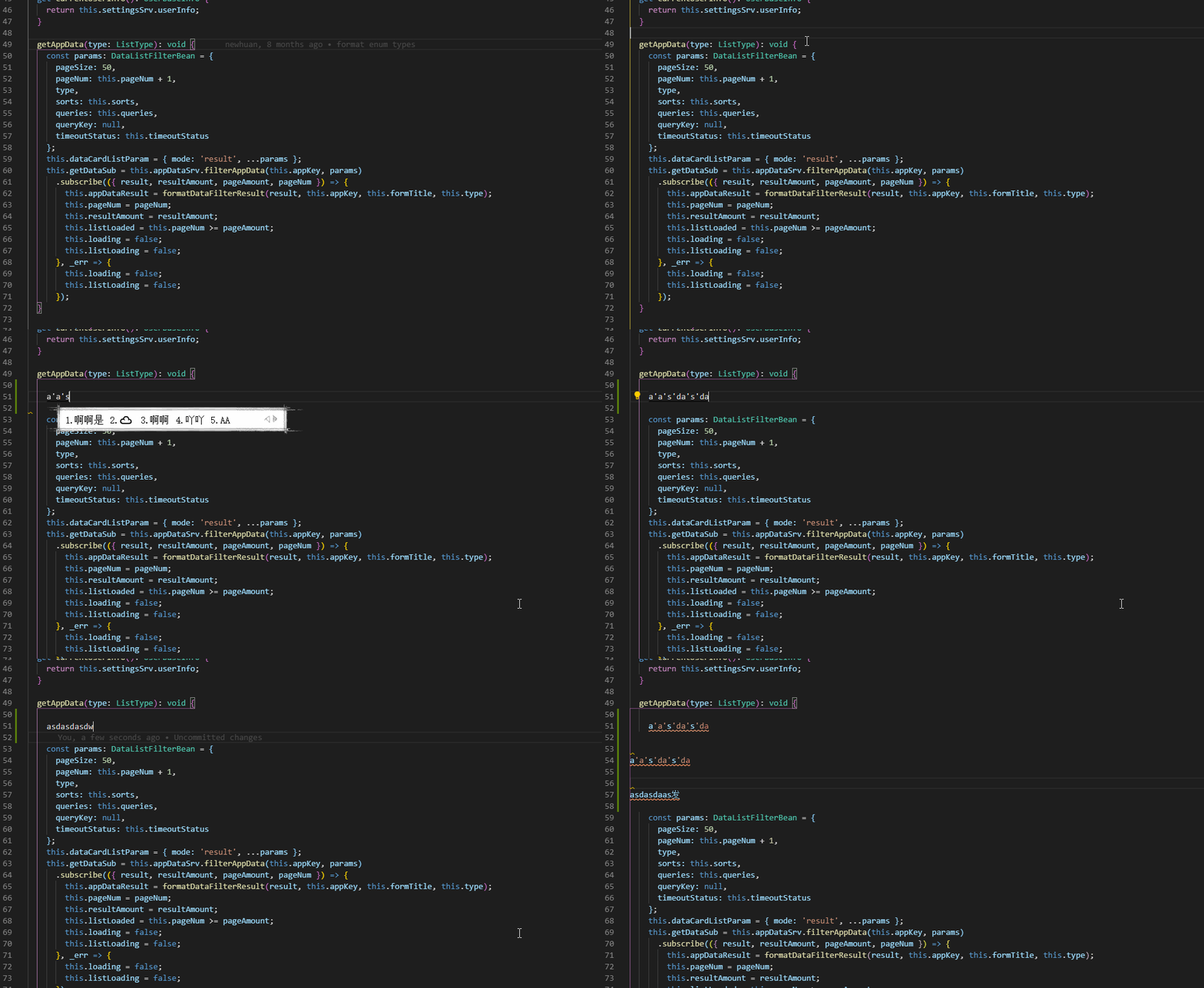
- Under Chinese mode, try to input something without enter.
- Switch to English mode, can't delete this line, and many operations are odd.
 Eve-Sama
All 36 comments
(Experimental duplicate detection)
Thanks for submitting this issue. Please also check if it is already covered by an existing one, like:
![vscodebot[bot] picture](https://avatars2.githubusercontent.com/in/2406?v=4&s=40) vscodebot[bot]
on 11 Nov 2019
vscodebot[bot]
on 11 Nov 2019
I have used VSC for 2 years, and never meet this problem before. (I'm not sure if it is related to the version).
And this troubled me a lot, because I need to communicate with workmates in Chinese and write code comment in Chinese. I have to switch language frequently. My solution is reopen the file, in a conclude, this bother me a lot.
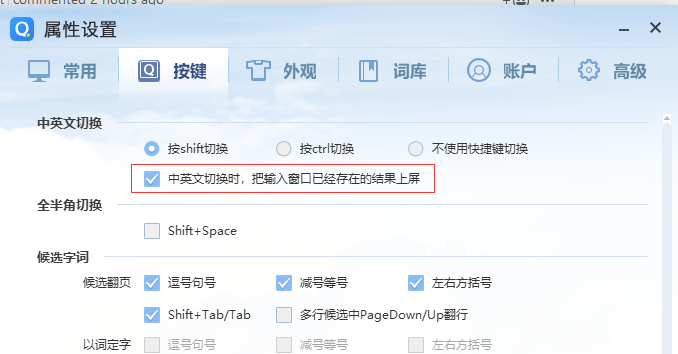
But now I find a perfect solution. Thanks @byyxx128 , your comment inspired me. I find in QQ IME setting as below. The red block means 'Input the holder text when switch language'. And everything's fine when I checked this radio.
However, not all IME support this function, so I'm sure there is a few people are suffering.
Eve-Sama
on 11 Nov 2019
I just know QQ IME has own group. I will submit a application for joining and feedback this issue. And my QQ IME can't update automatically, and this issue happens rencently. Therefore I still keep a doubt for VSC.
Eve-Sama
on 11 Nov 2019
It sounds like an issue with QQ IME as mentioned above it happened in other applications too. Is there any link to the issue report to QQ IME?
 rebornix
on 11 Nov 2019
rebornix
on 11 Nov 2019
@rebornix Thanks a lot to check this issue.
This problem should appear in the past time if the reason is related to QQ IME. Because I have never update the version of QQ IME. And I have reported this issue to the official group of QQ IME.
Eve-Sama
on 12 Nov 2019
Have the some problem with microsoft IME. It happen to keystrokes that doesn't trigger compositionupdate event during composition.
It seem like it's because compositionend doesn't fired when switching input mode. Maybe it's a chrome issue?
 jasonlyu123
on 14 Nov 2019
jasonlyu123
on 14 Nov 2019
It make sense! Should I close this issue?
Eve-Sama
on 14 Nov 2019
I'm using Windows 10 built-in 微軟新注音輸入法(Microsoft New Phonetic IME). I'm suffering from this issue as well. I just record a short clip to demonstrate this issue on my PC.
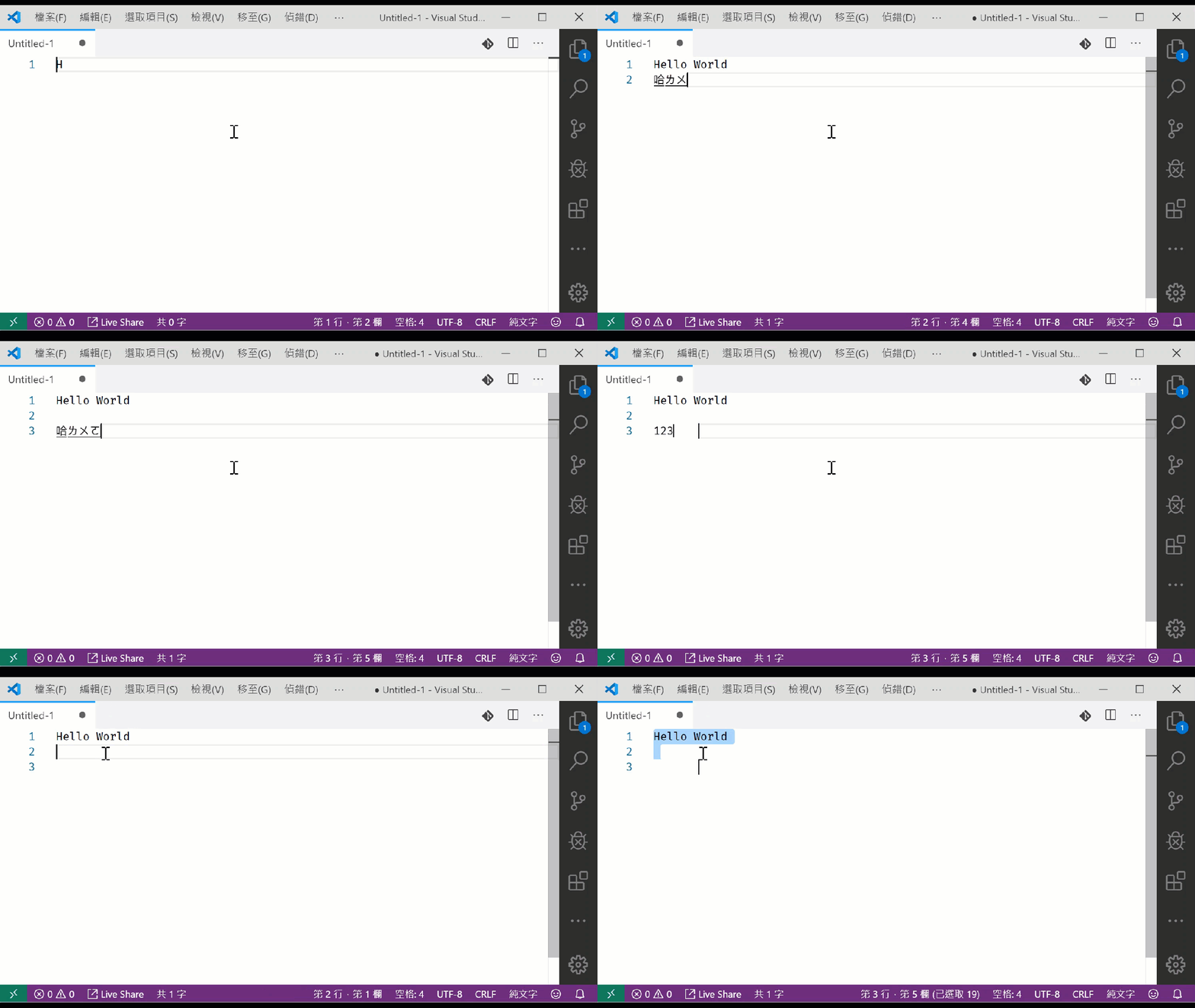
- type in English is no problem
- type in Chinese without modification is fine as well
- type in Chinese but fixing typo during input, then switch IME back to US Keyboard. The editor will become strange.
I just confirmed this doesn't happening in VSCode 1.39.2. It's happening after VSCode 1.40.0.
 doggy8088
on 18 Nov 2019
doggy8088
on 18 Nov 2019
You can try to find some input settings via IME to solve this problem. @doggy8088
BTW, The world is very small... I will see u in ngChina2019 : )
Eve-Sama
on 18 Nov 2019
@Mr-Eve I can't find any settings related to this problem. This is definitely a bug. Any suggestion?
See you soon! 😄
doggy8088
on 18 Nov 2019
@doggy8088 This problem really effect the state of work. I guess u wanna solve it as soon as possible.
Temparerily, u can switch another IME as a solution, u can find some settings based on the words of @byyxx128 .
Eve-Sama
on 18 Nov 2019
@Mr-Eve No no, I already solved this issue by downgrade my VSCode to 1.39! 😄
doggy8088
on 18 Nov 2019
Could be. @rebornix
doggy8088
on 18 Nov 2019
@rebornix I found this problem also appear in the embed chrome dev tool. Maybe we'll just wait for next electron version bump and see if the problem persist.
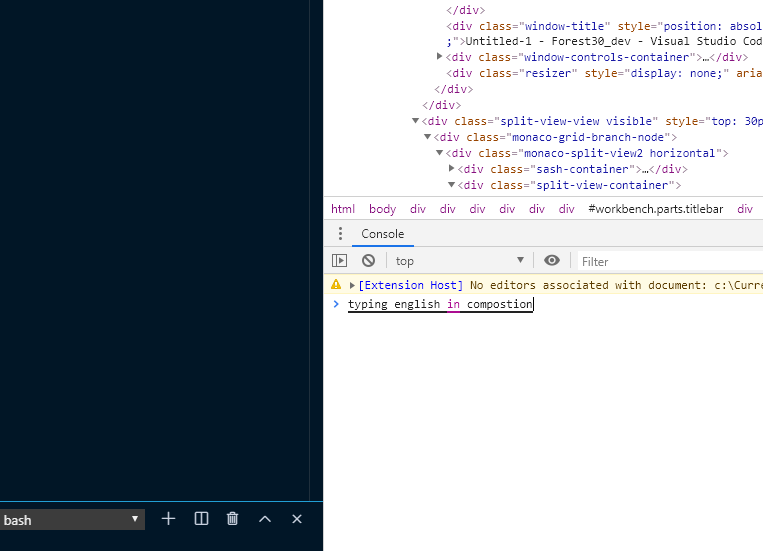
(just ignore the typo in the screenshot lol)
jasonlyu123
on 20 Nov 2019
@jasonlyu123 I can confirm that in my Chrome version 78.0.3904.97 and 78.0.3904.108. Did you see any upstream issue been opened?
doggy8088
on 20 Nov 2019
I have this issue too.
VS Code version: 1.40.2
 ck97756
on 4 Dec 2019
ck97756
on 4 Dec 2019
After I upgrade to 1.41.0, this issue still exists. 😒
doggy8088
on 19 Dec 2019
@rebornix Do you have any upstream issues information?
doggy8088
on 13 Jan 2020
@Mr-Eve 你的標題有個錯字,是否可以請你修正? Swich -> Switch
doggy8088
on 19 Jan 2020
@Mr-Eve 你的標題有個錯字,是否可以請你修正?
Swich->Switch
OK, thanks for reminding
Eve-Sama
on 19 Jan 2020
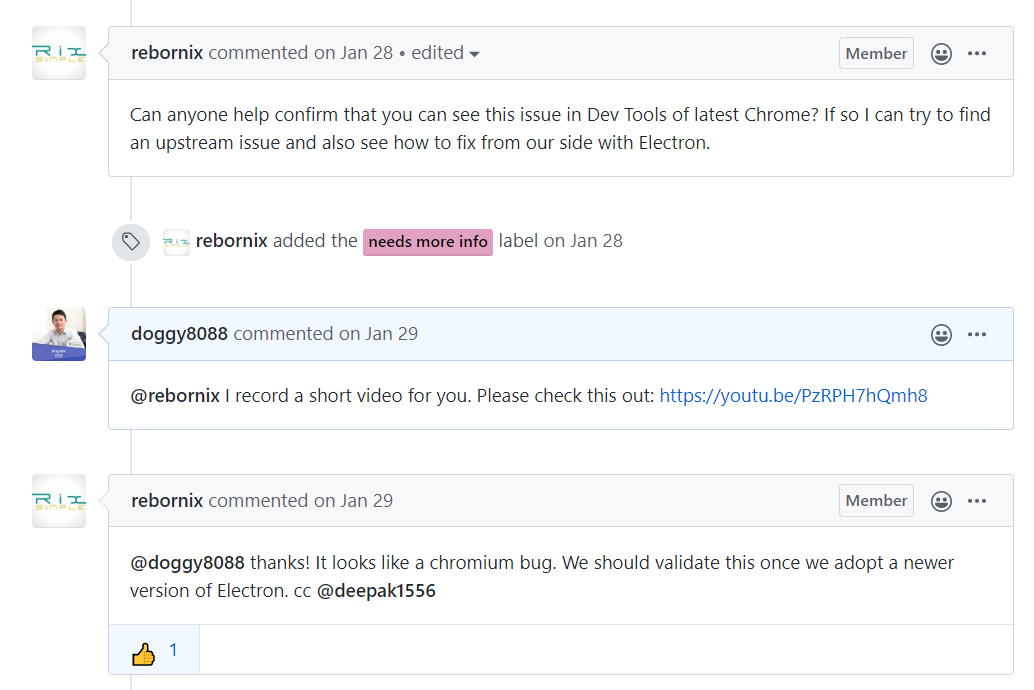
Can anyone help confirm that you can see this issue in Dev Tools of latest Chrome? If so I can try to find an upstream issue and also see how to fix from our side with Electron.
rebornix
on 27 Jan 2020
@rebornix I record a short video for you. Please check this out: https://youtu.be/PzRPH7hQmh8
doggy8088
on 28 Jan 2020
@doggy8088 thanks! It looks like a chromium bug. We should validate this once we adopt a newer version of Electron. cc @deepak1556
rebornix
on 29 Jan 2020
In vscode 1.43.2:
when windows 10 version 18363.720, no issue
when windows 10 version 19041.172 (insider), issue still exist
using Taiwan's Microsoft Bopomofo IME
 abc1236762
on 29 Mar 2020
abc1236762
on 29 Mar 2020
@abc1236762 I'm using windows 10 version 18363.720 and vscode 1.43.2. There are still does have issue. I'm using Taiwan's Microsoft Bopomofo IME.
doggy8088
on 29 Mar 2020
in vscode 1.43.2 and windows 10 version 18363.720, the issue exist again to me, and when I reopen vscode, no issue.
seems sometimes happened to me, sometimes not, I cannot find out the conditions.
abc1236762
on 29 Mar 2020
when I upgraded to vscode 1.45.0 the issue is gone
switching between Chinese and English works perfect
 peienxie
on 14 May 2020
peienxie
on 14 May 2020
@peidaqi I don't think so. I still have this problem in my VSCode 1.45.0.
doggy8088
on 14 May 2020
As @abc1236762 said. we don't know how to reproduce the issue. It just sometimes happened and resolved after restarting vs code.
We could either
- find a way to reproduce it and found a workaround or report to the chrome team.
- Just wait for a long enough period of time after each release and see if it resolved.
if most people on this thread agreed on it resolved, just close this.
jasonlyu123
on 14 May 2020
@jasonlyu123 I can reproduce the problem anytime. If I know how to report to upstream, I can do the work, but I don't know where I can report to.
doggy8088
on 14 May 2020
how do you reproduce it? maybe we could at least try to found a workaround.
jasonlyu123
on 14 May 2020
@jasonlyu123 Check this out: https://youtu.be/PzRPH7hQmh8
doggy8088
on 14 May 2020
I think @rebornix already know this. https://github.com/microsoft/vscode/issues/84449#issuecomment-578907589
doggy8088
on 14 May 2020
I didn't notice that was the way to reproduce it. Sorry
jasonlyu123
on 14 May 2020
@doggy8088 保哥:
我試了一段時間終於發現要怎麼重現你的問題了,沒有發現你是切換輸入法,切換輸入法或是用游標切換中英模式幾乎百分之百可以重現問題,我在 chromium 的 edge 中也可重現一樣的問題,但可能是因為我大多是用 shift 鍵切換中英模式所以問題很少出現。
jasonlyu123
on 19 May 2020
@Mr-Eve I think this issue has been solved by recent versions.
doggy8088
on 24 Aug 2020
Related issues
 NikosEfthias
·
3Comments
NikosEfthias
·
3Comments
 borekb
·
3Comments
borekb
·
3Comments
 biij5698
·
3Comments
biij5698
·
3Comments
 ryan-wong
·
3Comments
ryan-wong
·
3Comments
 chrisdias
·
3Comments
chrisdias
·
3Comments