Vscode: Extremely Slow Typescript VSCode Intellisense
- VSCode Version: 1.39.2
- OS Version: Windows 10 - 1903
Steps to Reproduce:
- When will I implement Javascript / Typescript code
- Typescript service keeps loading for a long time
Does this issue occur when all extensions are disabled?: Yes
Extremely Slow Typescript VSCode Intellisense

As per the image above, I have a serious problem with my VSCode intellisense. When I go to inspect a code, it keeps charging for 13 minutes. When the process is over, and I will inspect the implementation of another Javascript code, it goes back to the same process.
The annoying thing is that this has only happened with the Javascript language. I do this in Java or Dart, for example ... and it doesn't happen. It only happens with the Typescript / Javascript language.
I have an amazing workstation and the operating system is up to date and working perfectly.
Windows 10 Operating System - 64bits
Core i7 - 87xxk
16GB Ram Memory - 3200Hz
480GB SSD (OS runs on it and VSCode runs on it) + 10TB Storage (Barracuda)
4GB NVidea Video - 1050TI
My VSCode version always stays up to date.
Note: I've already researched similar issues, which helped to solve is to restart the Typescript Service. But within 2-5 minutes, the problem returns.
 thiagosantoscunha
All 24 comments
Does this reproduce in the latest VS Code insiders build with all extensions disabled?
Are you using a network drive?
Does this happen in all projects you open? What about a new folder that just has a single js file in it?
 mjbvz
on 18 Oct 2019
mjbvz
on 18 Oct 2019
@mjbvz
[_1Does this reproduce in the latest VS Code insiders build with all extensions disabled?_]
Yes! :)
[_Are you using a network drive?_]
I did not quite understand this question. But I am not doing any kind of remote access, or using network resources to code.
[_Does this happen in all projects you open? What about a new folder that just has a single js file in it?_]
This happens with all projects in TS / JS. I haven't opened any simple projects just with JS file yet. But I'll try as soon as I get home!
[Edit]
I got home and create a new workspace, and inside it a 'test.js' project. I ran 5 lines of code for this scenario. But the problem still persists.
thiagosantoscunha
on 18 Oct 2019
It happened to me too
 insinfo
on 18 Oct 2019
insinfo
on 18 Oct 2019
Having the same experience
 francismarcus
on 19 Oct 2019
francismarcus
on 19 Oct 2019
Also having high CPU (+120%) and also have JS/TS language features sometimes showing for extended time. Disabling the built-in extension and restarting makes CPU normal.
Tested both in VS Code Stable and in Insiders latest.
 houmark
on 19 Oct 2019
houmark
on 19 Oct 2019
@thiagosantoscunha Can you please follow these instructions to collect performance information. Using the insiders build, reproduce the issue and then share the output of code-insiders --status
mjbvz
on 22 Oct 2019
@mjbvz
Ok ... grateful for the help!
I will be relocating this weekend, but I will take time for such a procedure.
thiagosantoscunha
on 25 Oct 2019
@mjbvz I'm having similar issues with following VS Code versions:
OS: macOS Mojave 10.14.6 (18G95)
Version: 1.39.2
Commit: 6ab598523be7a800d7f3eb4d92d7ab9a66069390
Date: 2019-10-15T15:33:00.827Z
Electron: 4.2.10
Chrome: 69.0.3497.128
Node.js: 10.11.0
V8: 6.9.427.31-electron.0
OS: Darwin x64 18.7.0
Version: 1.40.0-insider
Commit: 33cc09da7a314ea0ee5677d1927739af60d16734
Date: 2019-10-28T11:46:25.634Z
Electron: 6.1.2
Chrome: 76.0.3809.146
Node.js: 12.4.0
V8: 7.6.303.31-electron.0
OS: Darwin x64 18.7.0
Needless to say, my VS Code status bar looks same as @thiagosantoscunha
Process explorer looks like this:


 panchalkalpesh
on 28 Oct 2019
panchalkalpesh
on 28 Oct 2019
@panchalkalpesh Can you please open a new issue
mjbvz
on 28 Oct 2019
@mjbvz Issue #83474 submitted
panchalkalpesh
on 28 Oct 2019
@thiagosantoscunha Did you get chance to collect the additional information?
mjbvz
on 4 Nov 2019
In our case we have rewritten a project from JS to TS. It is an opensource project which you can get from https://github.com/FreemapSlovakia/freemap-v3-react. Since it is in TS the development is much slower as waiting for intellisense takes often tens of seconds.
 zdila
on 10 Nov 2019
zdila
on 10 Nov 2019
This is happening to me too. Is very frustrating :/
 cecodor
on 15 Nov 2019
cecodor
on 15 Nov 2019
~~ Performance test ~~
Project https://github.com/SupinePandora43/electron-app
Note: PC#1 and PC#2 uses 1 project harddrive
~ ~ ~ ~
PC#1:
RAM: 2 gb
CPU: 2.2 Ghz 2 Cores
OS: Windows 7 x32 Professional
System HardDrive: HDD, veeery slow
Project HardDrive: HDD, not slow, but not so fast
~ ~ ~ ~
PC#2:
RAM: 4 gb
CPU: 2.8 Ghz 2 Cores
OS: Windows 7 x64 Professional License
System HardDrive: SSD, fast!
Project HardDrive: HDD, not slow, but not so fast
~ ~ ~ ~ ~ ~ ~ ~
file https://github.com/SupinePandora43/electron-app/blob/master/src/App.tsx#L203
results
PC#1: nothing can be displayed loooooooong time, if something displayed - OMG i waited it more 1 min
PC#2: delay between Ctrl+Space and Autocompletions showed up: ~0.3 sec
 SupinePandora43
on 15 Nov 2019
SupinePandora43
on 15 Nov 2019
I am having the same issue.
It looks like that disabling eslint and tslint-plugin kind of helps.
 misantronic
on 15 Nov 2019
misantronic
on 15 Nov 2019
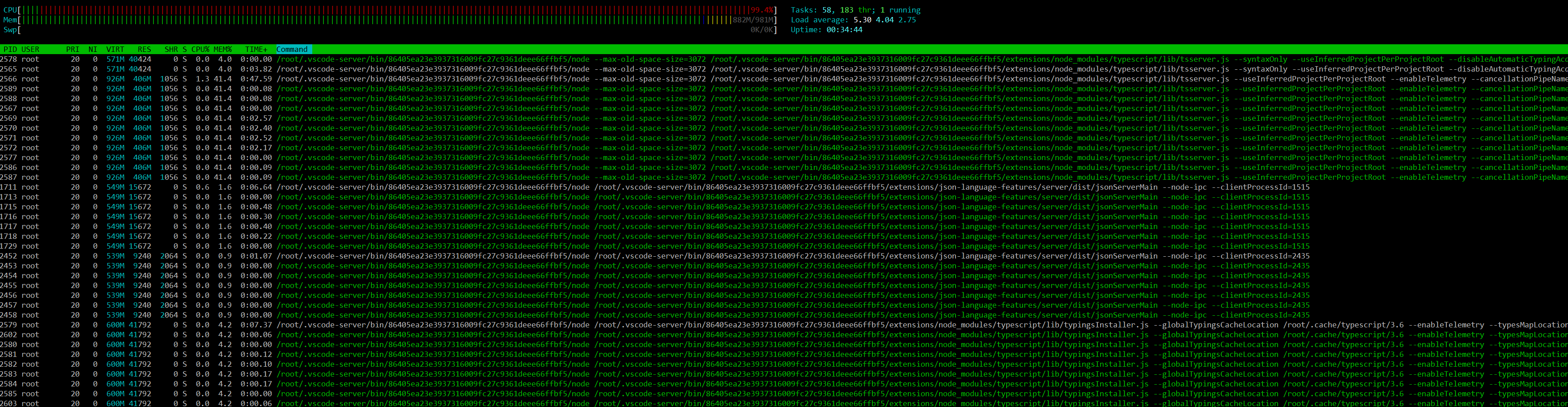
Same as @misantronic - disabling eslint plugin resolved massive CPU usage when working in remote workspace. Which is a shame as I kind of like eslint but I like outline view, too.
Looks like the problem lies in using eslint and the builtin intellisense plugin together, but one OR the other is OK.
Edit: I spoke to soon - looks like the built in intellisense is still hammering the server when I save the document, and, oddly, when I run a simple node command in the directory from the terminal.
But I also now see that Intellisense doesn't handle ES7 and above - but I would like to know if it's possible to get document outline without the builtin js plugin, or whether eslint plugin can do this?
https://code.visualstudio.com/docs/languages/javascript
 lardconcepts
on 15 Nov 2019
lardconcepts
on 15 Nov 2019
Looks like 1GB of memory on the server is not enough - I chucked another 1GB of swap on it, and now it builds up to about 600MB of swap, but once it's done that, everything works perfectly!
lardconcepts
on 16 Nov 2019
@lardconcepts how do you do that?
misantronic
on 16 Nov 2019
@misantronic - well, on Ubuntu it looks like this. This assumes you have no swap in the first place. Give it a try and let me know if it helps, but don't blame me if you screw your system up! Be careful :)
sudo fallocate -l 1024M /swapfile
ls -lh /swapfile
sudo chmod 600 /swapfile
sudo mkswap /swapfile
sudo swapon /swapfile
sudo swapon -s
sudo nano /etc/fstab
add the following line at the end
/swapfile none swap defaults 0 0
Then save. Might need to reboot. Good luck!
lardconcepts
on 16 Nov 2019
Have not heard back from @thiagosantoscunha so closing this issue
Please open separate issues if you are still running into problems
mjbvz
on 20 Nov 2019
I recently updated to the latest version after using 1.32.3 for a long time exactly because of this issue. It was ok for a while but in the past few days intellisense has been really slow, so I downgraded back to 1.32.3. Any later version seems to slow down intellisense for me. I am not sure why, but for now I'll stick to 1.32.3.
 RobertB4
on 26 Nov 2019
RobertB4
on 26 Nov 2019
1.32.3 does seem way faster.
Unfortunately for me a bunch of extensions rely on newer versions of VS Code.
This is the top result on Google so not sure why this issue is closed. VS Code is so slow it's almost unusable for me right now.
Just tried 1.4.2 and it's faster than 1.37.1 which I was on.
 cdeutsch
on 2 Dec 2019
cdeutsch
on 2 Dec 2019
takes 5 seconds for me to load typescript intellisense everytime I ctrl+space
 arnotes
on 16 Dec 2019
arnotes
on 16 Dec 2019
Going through the same on Linux Mint. Intellisense is so slow it's affecting my productivity.
 fullofcaffeine
on 4 Jan 2020
fullofcaffeine
on 4 Jan 2020
Related issues
 shanalikhan
·
3Comments
shanalikhan
·
3Comments
 mrkiley
·
3Comments
mrkiley
·
3Comments
 ryan-wong
·
3Comments
ryan-wong
·
3Comments
 sirius1024
·
3Comments
sirius1024
·
3Comments
 NikosEfthias
·
3Comments
NikosEfthias
·
3Comments
Most helpful comment
takes 5 seconds for me to load typescript intellisense everytime I ctrl+space