Vscode: Maximize button not working properly with auto-hide taskbar enabled
Version: 1.39.0-insider (user setup)
Commit: cc481ab31b5827add5f99a770f2c860d0575df69
Date: 2019-09-18T07:02:14.165Z
Electron: 6.0.9
Chrome: 76.0.3809.146
Node.js: 12.4.0
V8: 7.6.303.31-electron.0
OS: Windows_NT x64 10.0.18362
Steps to Reproduce:
- Start VS code in normal window state
- Maximize it through the maximize button
Expected result - VS Code maximizes and the button changes to it's maximized glyph, user is able to restore to normal window through the same button
Actual result - VS Code maximizes visually, BUT the window actually just takes the screen size while remains draggable and the glyph remains the one for the normal state. The user is unable to restore normal state by clicking ti again.
Note : the maximize/restore by double clicking the title bar works normally.
Does this issue occur when all extensions are disabled?: Yes
 lllopo
All 41 comments
(Experimental duplicate detection)
Thanks for submitting this issue. Please also check if it is already covered by an existing one, like:
![vscodebot[bot] picture](https://avatars2.githubusercontent.com/in/2406?v=4&s=40) vscodebot[bot]
on 18 Sep 2019
vscodebot[bot]
on 18 Sep 2019
No, it is not #79902 :-)
lllopo
on 18 Sep 2019
I see the expected behavior on Windows 10 ver. 18362. VS Code maximizes, the glyph changes, and when dragged the window properly restores down before moving.
I'm on VS Code 1.38.1, Electron 4.2.10
Chrome 69
Node 10.11.0
V8: 6.9.427.31
 ABeeinSpace
on 18 Sep 2019
ABeeinSpace
on 18 Sep 2019
In addition - I said maximize/restore works properly through double-clicking the title bar, but this is not entirely true. When maximized, VS Code prevents the windows taskbar from showing up (it is set to autohide on my system).
lllopo
on 18 Sep 2019
I was using the maximize button but didn't specify in my reply. My apologies. However, I'm still unable to reproduce the issue. I'm not at the PC I was using, and won't be for another 24 hrs. I can try to reproduce on another system but again that will take a few hours for me to be able to access it.
ABeeinSpace
on 18 Sep 2019
I was using the maximize button but didn't specify in my reply. My apologies. However, I'm still unable to reproduce the issue. I'm not at the PC I was using, and won't be for another 24 hrs. I can try to reproduce on another system but again that will take a few hours for me to be able to access it.
It is on insiders builds, appeared a few builds ago, so you can't reproduce it on stable branch anyway.
lllopo
on 18 Sep 2019
if this is only reproducing in insiders, this is likely electron @deepak1556 @bpasero
 sbatten
on 23 Sep 2019
sbatten
on 23 Sep 2019
@sbatten can you try to reproduce too please? I cannot.
@lllopo did you configure the window.titleBarStyle setting?
 bpasero
on 24 Sep 2019
bpasero
on 24 Sep 2019
@sbatten can you try to reproduce too please? I cannot.
@lllopo did you configure the
window.titleBarStylesetting?
No, I don't have it (and it defaults to custom, I guess). When set to 'native', it works as intended, but that can be expected.
lllopo
on 24 Sep 2019
@lllopo ok so to confirm, this only happens when window.titleBarStyle: custom is configured. What is your exact windows version (winver in cmd prompt)?
bpasero
on 24 Sep 2019
@lllopo ok so to confirm, this only happens when
window.titleBarStyle: customis configured. What is your exact windows version (winver in cmd prompt)?
Yes - insiders with custom title bar and Win version is the very latest : Win 10 1903 Build 18362.356
lllopo
on 24 Sep 2019
I could not reproduce either
sbatten
on 24 Sep 2019
I tried to record a video of how my VS code behaves. Unfortunately it doesn't visualize the moments when I click with the mouse, but still I hope it would be helpful. Please, just assume when I go over the maximize button without shaking the cursor, I click it.
At the end I also recorded the misbehavior regarding the taskbar, but I guess it is related to the minimize/maximize problem overall. Anyway what it does is - start maximized and the windows taskbar is blocked from showing. After the sequance : doubleclick titlebar to restore, doubleclick the titlebar to maximize again, click once the maximize button ... and the win taskbar gets unblocked and shows normally when I move the cursor to the bottom of the screen.
lllopo
on 25 Sep 2019
I can reproduce this as well. Same issues, very frustrating to work with.
Win10, latest updates.
 Paril
on 26 Sep 2019
Paril
on 26 Sep 2019
I can reproduce this as well. Same issues, very frustrating to work with.
Win10, latest updates.
Yup - that's it.
lllopo
on 26 Sep 2019
I do confirm however it only happens with custom bar. Native one works great.
Paril
on 26 Sep 2019
@Paril @lllopo please test with today's insiders build. If you can still reproduce, please copy the text from Help > About here.
sbatten
on 30 Sep 2019
Seems to work now. The only issue I've ran into is that, rarely, when un-maximizing, all three of my monitors flicker on and off (sort of like when the GPU crashes, except there is no crash; like when desktop resolution changes kinda). It's random and not really reproducable though.
Paril
on 1 Oct 2019
Thanks for testing @Paril, sounds to me like another issue with electron 6, @bpasero
sbatten
on 1 Oct 2019
@sbatten I also confirm - it is back to working as intended. Thanks for fixing it.
lllopo
on 1 Oct 2019
Ooookay, the issue returned as of :
Version: 1.40.0-insider (user setup)
Commit: 72bc289d32ec4f867e73b7f1f2a22f7d614ae2bb
Date: 2019-10-11T05:44:05.506Z
Electron: 6.0.12
Chrome: 76.0.3809.146
Node.js: 12.4.0
V8: 7.6.303.31-electron.0
OS: Windows_NT x64 10.0.18362
lllopo
on 11 Oct 2019
@lllopo makes sense as we've returned to electron 6 but are tracking this issue as part of that process
sbatten
on 11 Oct 2019
Here is the related electron issue: https://github.com/electron/electron/issues/19934
 eamodio
on 14 Oct 2019
eamodio
on 14 Oct 2019
Same problem here since I think the first 1.41 Insiders on latest Win 10 Pro: the window maximize button doesn't maximize the window, it just makes it as large as the screen (the window state and button appearance don't change) and the window doesn't restore when clicking again. To restore to smaller size, I have to resize by dragging a border, which shouldn't be possible in maximized state. Maximize/restore does work when doubleclicking the title bar but then the (auto-hide) Windows taskbar remains hidden unless I type the Win key. Window: Title Bar Style setting is "custom" but I don't remember setting that. Perhaps an extension did that? Didn't get notified of that. If any, I suspect PlatformIO. Version info:
Version: 1.41.0-insider (user setup)
Commit: 0d728c31ebdf03869d2687d9be0b017667c9ff37
Date: 2019-11-12T05:39:58.193Z
Electron: 6.1.4
Chrome: 76.0.3809.146
Node.js: 12.4.0
V8: 7.6.303.31-electron.0
OS: Windows_NT x64 10.0.18362
Edit: problem can be solved by setting Title Bar Style to "native". However, I do like the old Windows way of double-clicking the title bar icon to close the app and apparently that's only possible with style=custom.
Edit edit: aha, custom title bar comes with themes. Yeah, the native titlebar looks awful in VS Code dark theme with Windows in standard colors. And I imagine the same goes for the reverse.
 ednl
on 12 Nov 2019
ednl
on 12 Nov 2019
Just to confirm , does everyone seeing this issue have auto-hide taskbar enabled ? I am only able to repro under that condition. The videos from @Paril and @lllopo seems to suggest that.
 deepak1556
on 13 Nov 2019
deepak1556
on 13 Nov 2019
No. I don't have auto-hide taskbar.
 fireattack
on 13 Nov 2019
fireattack
on 13 Nov 2019
Just to confirm , does everyone seeing this issue have auto-hide taskbar enabled ? I am only able to repro under that condition. The videos from @Paril and @lllopo seems to suggest that.
Yes, I get it only with the "autohide taskbar" enabled. When I disable it - it works fine.
lllopo
on 13 Nov 2019
@fireattack can you provide some exact repro steps and also if possible attach a video demonstrating it , so that I can repro it on my end.
Thanks for confirming @lllopo
deepak1556
on 13 Nov 2019
https://github.com/electron/electron/pull/18321 possible cause of regression, looking into it,
deepak1556
on 13 Nov 2019
@deepak1556
I investigated it further.
In my case, it was related to an instant messenger program, QQ, the most popular IM in China.
The way it works is that you can have it sticked to the top or side of the screen (and always display on top). So you can reveal the main GUI by simply move the cursor to that part.
How it looks like when it hides:
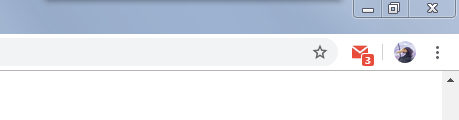
(notice the shadow)
How it looks when it reveals:
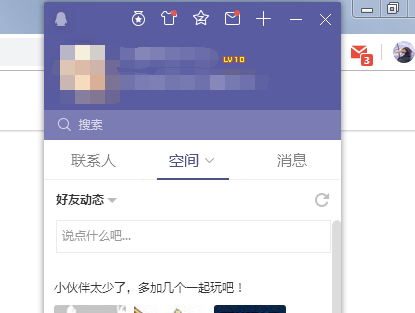
But this causes problem on VS Code's maximizing function, like what the other has said:
the window maximize button doesn't maximize the window, it just makes it as large as the screen (the window state and button appearance don't change) and the window doesn't restore when clicking again.
This actually reminds me of another program, Steam, which has a similar problem. In that case, you literally can't maximize at all (not even with double-click on title bar), it will always just make the window as big as the screen, sans 1px on top due to QQ.
I should stress, this is a regression. I've been using both VS Code and QQ together for a very long time and there was no problem.
fireattack
on 13 Nov 2019
Thanks for the details @fireattack , yeah the root cause is same for this case.
deepak1556
on 13 Nov 2019
Just had this issue after updating recently, glad it's already being investigated (I'm also auto hiding my task bar (on Windows 10) and it happens only with the title bar setting of VSCode set to "custom". Reverting to the native title bar fixes everything)
But I'd like to mention another problem that seems related : when vscode is maximized (either by double clicking the custom title bar or using the upper right corner icon) then my task bar will not show. I have to manually minimize my vscode to be able to show the task bar. e.g.:
- set your system's task bar in auto-hide and vscode in custom title bar
- launch vscode and maximize its window
- try to move the mouse cursor to where the task bar usually pops... nothing happens
If you use the native title bar, everything works, the task bar correctly pops when the mouse move over it.
 dcourtois
on 17 Nov 2019
dcourtois
on 17 Nov 2019
Also mentioned already. My temporary workaround for now is to click once one the maximize button. Although it’s still not working, it makes the taskbar appear agin for some unknown reason.
lllopo
on 17 Nov 2019
If I am reading this correctly, this entry is actually 2 different issues:
- The maximize button on the upper right corner does not do anything
- VSCode in maximized state does not allow autohide taskbar to trigger
 tonygiang
on 18 Nov 2019
tonygiang
on 18 Nov 2019
That's correct, but it was mentioned in #84342 that they're two manifestations of the same root issue.
 supposedly
on 18 Nov 2019
supposedly
on 18 Nov 2019
I am able to reproduce the error mentioned by dcourtois.
It doesn't matter what other applications are running, when the focus is on vscode, the windows taskbar does not auto-pop-up. When I focus on another application in a different screen or a different application in the same screen (doesn't really matter), I can unhide/auto-hide the task bar.
For reference, this issue started for me after the latest update.
vscode: 1.40.1
os: windows 7
 eeasoftware
on 18 Nov 2019
eeasoftware
on 18 Nov 2019
Thanks for the reports, the issue is being actively worked on , fix is already up on electron end https://github.com/electron/electron/pull/21164 and will soon be available in the next vscode stable recovery release later this week.
deepak1556
on 18 Nov 2019
It's over, latest insiders works fine again for me ! Hallelujah !
lllopo
on 21 Nov 2019
deepak1556
on 21 Nov 2019
This is crazy. Electron had a bug (hey, what is testing?) that is already fixed by now. About 4 programs I use and depends on Electron released their program with the Electorn's bug (VS Code was updated today...), so now I can be pretty happy. This is amazing how many programs depend on other programs, so users will get these trivial bugs, one program brokes 5 other, and fixes for these 5 will come some months later. That's why we replaced stable GUI technologies like WPF?
 klenium
on 24 Nov 2019
klenium
on 24 Nov 2019
Issue is still present on 1.41.1
Edit: Used the "Copy" button
Version: 1.41.1 (system setup)
Commit: 26076a4de974ead31f97692a0d32f90d735645c0
Date: 2019-12-18T14:58:56.166Z
Electron: 6.1.5
Chrome: 76.0.3809.146
Node.js: 12.4.0
V8: 7.6.303.31-electron.0
OS: Windows_NT x64 10.0.17763
Edit 2: found #86260
 0x5c
on 31 Dec 2019
0x5c
on 31 Dec 2019
Related issues
 trstringer
·
3Comments
trstringer
·
3Comments
 curtw
·
3Comments
curtw
·
3Comments
 lukehoban
·
3Comments
lukehoban
·
3Comments
 philipgiuliani
·
3Comments
philipgiuliani
·
3Comments
 villiv
·
3Comments
villiv
·
3Comments
Most helpful comment
Thanks for the reports, the issue is being actively worked on , fix is already up on electron end https://github.com/electron/electron/pull/21164 and will soon be available in the next vscode stable recovery release later this week.