Vscode: Unable to connect to remote server getting error "server_name".y.onDidWriteData is not a function
Issue Type: Bug
Unable to connect to remote server getting error "server_name".y.onDidWriteData is not a function
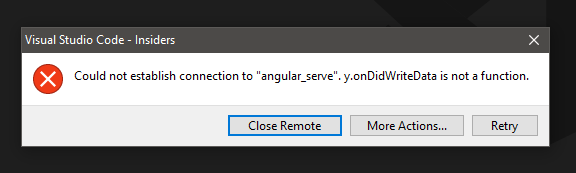
VS Code version: Code - Insiders 1.39.0-insider (d157c2e941cae17acb79bf26a70bbfad732bdc83, 2019-09-16T06:06:10.647Z)
OS version: Windows_NT x64 10.0.17134
Fetching remote diagnostics for 'SSH' failed: y.onDidWriteData is not a function
System Info
|Item|Value|
|---|---|
|CPUs|Intel(R) Core(TM) i5-4590 CPU @ 3.30GHz (4 x 3292)|
|GPU Status|2d_canvas: enabled
flash_3d: enabled
flash_stage3d: enabled
flash_stage3d_baseline: enabled
gpu_compositing: enabled
metal: disabled_off
multiple_raster_threads: enabled_on
oop_rasterization: disabled_off
protected_video_decode: unavailable_off
rasterization: enabled
skia_renderer: disabled_off
surface_control: disabled_off
surface_synchronization: enabled_on
video_decode: enabled
viz_display_compositor: enabled_on
viz_hit_test_surface_layer: disabled_off
webgl: enabled
webgl2: enabled|
|Load (avg)|undefined|
|Memory (System)|7.96GB (2.72GB free)|
|Process Argv||
|Screen Reader|no|
|VM|0%|
Fetching remote diagnostics for 'SSH' failed: y.onDidWriteData is not a function
Extensions: none
 sanket-bhalerao
All 30 comments
(Experimental duplicate detection)
Thanks for submitting this issue. Please also check if it is already covered by an existing one, like:
![vscodebot[bot] picture](https://avatars2.githubusercontent.com/in/2406?v=4&s=40) vscodebot[bot]
on 16 Sep 2019
vscodebot[bot]
on 16 Sep 2019
same problem
 nxyd
on 16 Sep 2019
nxyd
on 16 Sep 2019
same problem
 prooyf
on 16 Sep 2019
prooyf
on 16 Sep 2019
same problem
 riba2534
on 16 Sep 2019
riba2534
on 16 Sep 2019
this issue is present in the stable build now as well.
unable to work as my workspace is set up on a remote server.
sanket-bhalerao
on 16 Sep 2019
same problem
 iFanze
on 16 Sep 2019
iFanze
on 16 Sep 2019
Error from the output console:
[07:47:58.602] [email protected]
[07:47:58.602] win32 x64
[07:47:58.603] SSH Resolver called for "ssh-remote+angular_serve", attempt 1
[07:47:58.603] SSH Resolver called for host: angular_serve
[07:47:58.603] Setting up SSH remote "angular_serve"
[07:47:58.659] Using commit id "d157c2e941cae17acb79bf26a70bbfad732bdc83" and quality "insider" for server
[07:47:58.668] Testing ssh with ssh -V
[07:47:59.098] ssh exited with code: 0
[07:47:59.098] Got stderr from ssh: OpenSSH_for_Windows_7.6p1, LibreSSL 2.6.4
[07:47:59.099] Running script with connection command: ssh -D 65534 angular_serve bash
[07:47:59.108] Install and start server if needed
[07:47:59.110] "install" process failed: TypeError: y.onDidWriteData is not a function
[07:47:59.110] y.onDidWriteData is not a function
[07:47:59.110] ------
sanket-bhalerao
on 16 Sep 2019
same problem
 lxy598951
on 16 Sep 2019
lxy598951
on 16 Sep 2019
same problem in VSCode insider recently update.
Version: 1.39.0-insider (user setup)
Commit: d157c2e941cae17acb79bf26a70bbfad732bdc83
Date: 2019-09-16T06:06:10.647Z
Electron: 6.0.9
Chrome: 76.0.3809.146
Node.js: 12.4.0
V8: 7.6.303.31-electron.0
OS: Windows_NT x64 10.0.18362
 azenapow
on 16 Sep 2019
azenapow
on 16 Sep 2019
Issue also turned in at the remote extension: https://github.com/microsoft/vscode-remote-release/issues/1417
 lustremedia
on 16 Sep 2019
lustremedia
on 16 Sep 2019
Apparently this is the issue: https://github.com/microsoft/vscode-remote-release/issues/1112
lustremedia
on 16 Sep 2019
same issue here
 jfpaccini
on 16 Sep 2019
jfpaccini
on 16 Sep 2019
same issue here!!! i get Unable to open 'user': Unable to read file (TypeError: y.onDidWriteData is not a function).
[10:57:39.525] [email protected]
[10:57:39.525] win32 x64
[10:57:39.526] SSH Resolver called for "ssh-remote+ddserver", attempt 1
[10:57:39.527] SSH Resolver called for host: ddserver
[10:57:39.527] Setting up SSH remote "ddserver"
[10:57:39.618] Using commit id "d157c2e941cae17acb79bf26a70bbfad732bdc83" and quality "insider" for server
[10:57:39.622] Testing ssh with ssh -V
[10:57:39.777] ssh exited with code: 0
[10:57:39.778] Got stderr from ssh: OpenSSH_for_Windows_7.7p1, LibreSSL 2.6.5
[10:57:39.778] Using SSH config file "C:UsersEvaremoteconfig.config"
[10:57:39.778] Running script with connection command: ssh -D 50411 -F C:UsersEvaremoteconfig.config ddserver bash
[10:57:39.782] Install and start server if needed
[10:57:39.785] "install" process failed: TypeError: y.onDidWriteData is not a function
[10:57:39.786] y.onDidWriteData is not a function
[10:57:39.786] ------
Please Help!
 evalufran
on 16 Sep 2019
evalufran
on 16 Sep 2019
same issue :
[11:50:23.999] Testing ssh with ssh -V
[11:50:24.265] ssh exited with code: 0
[11:50:24.265] Got stderr from ssh: OpenSSH_for_Windows_7.6p1, LibreSSL 2.6.4
[11:50:24.265] Running script with connection command: ssh -D 54350 xenlogin-eqx-02 bash
[11:50:24.300] Install and start server if needed
[11:50:24.303] "install" process failed: TypeError: y.onDidWriteData is not a function
[11:50:24.303] y.onDidWriteData is not a function
[11:50:24.304] ------
 shivakv9
on 16 Sep 2019
shivakv9
on 16 Sep 2019
Same problem here, with 1.39.0-insider.
 tttonyyy
on 16 Sep 2019
tttonyyy
on 16 Sep 2019
Same issue just started arising today for me, Mac OS X. Insider 1.39.0
 Dayjo
on 16 Sep 2019
Dayjo
on 16 Sep 2019
Same problem, 1.39.0-insider.
 art049
on 16 Sep 2019
art049
on 16 Sep 2019
Downgrade to 1.38 and it should work fine
I won't upgrade until the fix the only feature in insiders that matters, remote-ssh
 techshot25
on 16 Sep 2019
techshot25
on 16 Sep 2019
Downgrade link for the lazy.
https://vscode-update.azurewebsites.net/1.38.0-insider/win32-x64/insider
Be sure to turn off auto updates. The ssh session will drop connection even before you restart VS Code.
 dryansweet
on 16 Sep 2019
dryansweet
on 16 Sep 2019
I hit this issue as well.
 fueler
on 16 Sep 2019
fueler
on 16 Sep 2019
I have this issue - Hopefully it can be resolved. I depend on remote SSH.
Thanks!
 daniel347x
on 16 Sep 2019
daniel347x
on 16 Sep 2019
I have the same issue with insider version which i noticed this morning. It was fine last I checked on Friday.
 hsg777
on 16 Sep 2019
hsg777
on 16 Sep 2019
Linux downgrade link for the lazy:
https://vscode-update.azurewebsites.net/1.38.0-insider/linux-deb-x64/insider
 calebrob6
on 16 Sep 2019
calebrob6
on 16 Sep 2019
 Tyriar
on 16 Sep 2019
Tyriar
on 16 Sep 2019
Fixed now, sorry everyone
 roblourens
on 17 Sep 2019
roblourens
on 17 Sep 2019
Thanks @roblourens, am back to work today :D
Dayjo
on 17 Sep 2019
I have the same error on 1.39.0 (not insiders) but it says v.onDidWriteData instead of y.onDidWriteData. It's apparently not fixed?
 Zezombye
on 10 Oct 2019
Zezombye
on 10 Oct 2019
@Zezombye you probably have an out of date extension
Tyriar
on 10 Oct 2019
I have the same error with g.onDidWriteData
"uname" process failed: TypeError: g.onDidWriteData is not a function
while connecting to a remote server
 aimzer
on 16 Oct 2019
aimzer
on 16 Oct 2019
@aimzer update vscode and the extension, you might be on an old version of vscode and that's the reason you're not getting the latest extension.
Tyriar
on 16 Oct 2019
Related issues
 vsccarl
·
3Comments
vsccarl
·
3Comments
 sirius1024
·
3Comments
sirius1024
·
3Comments
 NikosEfthias
·
3Comments
NikosEfthias
·
3Comments
 shanalikhan
·
3Comments
shanalikhan
·
3Comments
 v-pavanp
·
3Comments
v-pavanp
·
3Comments
Most helpful comment
Fixed now, sorry everyone