Vscode: cmd flashing when editing code
Issue Type: Bug
Whenever I type something into an active file, the cmd prompt flashes on my screen. I don't know how this can be reproduced, but the steps for me to create the error:
- Open any file
- Type anything, even one character
- Watch the files in the explorer that I'm editing change color briefly, then a cmd prompt appear and disappear on screen twice.
Title of the command window is C:\Users\Owners\Anaconda3\Scripts\conda.exe. Not sure if this is related.
Setup: Coding primarily python, installed via Anaconda
Latest version of VScode (August update). This did not happen before I updated.
VS Code version: Code 1.38.0 (3db7e09f3b61f915d03bbfa58e258d6eee843f35, 2019-09-03T21:49:13.459Z)
OS version: Windows_NT x64 10.0.18362
System Info
|Item|Value|
|---|---|
|CPUs|Intel(R) Core(TM) i5-6300U CPU @ 2.40GHz (4 x 2496)|
|GPU Status|2d_canvas: enabled
flash_3d: enabled
flash_stage3d: enabled
flash_stage3d_baseline: enabled
gpu_compositing: enabled
multiple_raster_threads: enabled_on
native_gpu_memory_buffers: disabled_software
oop_rasterization: disabled_off
protected_video_decode: unavailable_off
rasterization: enabled
skia_deferred_display_list: disabled_off
skia_renderer: disabled_off
surface_synchronization: enabled_on
video_decode: enabled
viz_display_compositor: disabled_off
webgl: enabled
webgl2: enabled|
|Load (avg)|undefined|
|Memory (System)|7.93GB (1.13GB free)|
|Process Argv||
|Screen Reader|no|
|VM|0%|
Extensions (17)
Extension|Author (truncated)|Version
---|---|---
project-manager|ale|10.7.0
path-intellisense|chr|1.4.2
bracket-pair-colorizer-2|Coe|0.0.28
gitlens|eam|9.9.3
file-icons|fil|1.0.19
kite|kit|0.96.0
MagicPython|mag|1.1.0
anaconda-extension-pack|ms-|1.0.1
python|ms-|2019.9.34474
atom-keybindings|ms-|3.0.6
csharp|ms-|1.21.1
team|ms-|1.149.2
material-icon-theme|PKi|3.9.0
vscode-yaml|red|0.5.2
code-settings-sync|Sha|3.4.2
vscode-spotify|shy|3.1.0
vscode-icons|vsc|9.3.0
(2 theme extensions excluded)
 Markpajr
All 20 comments
First try disabling extensions that look like they might be related to the rogue window. Can you still repro the problem? If not, report it as an issue with the offending extension.
 gjsjohnmurray
on 6 Sep 2019
gjsjohnmurray
on 6 Sep 2019
agree with @gjsjohnmurray
/needsMoreInfo
 sbatten
on 6 Sep 2019
sbatten
on 6 Sep 2019
Thanks for creating this issue! We figured it's missing some basic information or in some other way doesn't follow our issue reporting guidelines. Please take the time to review these and update the issue.
Happy Coding!
![vscodebot[bot] picture](https://avatars2.githubusercontent.com/in/2406?v=4&s=40) vscodebot[bot]
on 6 Sep 2019
vscodebot[bot]
on 6 Sep 2019
Alright, I've proceeded to disable every extension and reload VScode. The problem continues, when I type anything at all into a file the command terminal flashes on the screen twice roughly 2 seconds after I stop typing. Doesn't seem to be an extension issue.
Markpajr
on 6 Sep 2019
if you open an untitled file (Ctrl+N) and modify its contents without saving the file, does the issue reproduce?
sbatten
on 6 Sep 2019
Yes, I tried with both new files and current files. Weirdly enough though, I've been away for the weekend and came back today and it seems to be fixed, though I haven't changed a single thing or restarted. I'd say this can be closed because without knowing exactly what was causing it or being able to continue reproducing it, I don't know where else this could go unless the problem returns.
Markpajr
on 9 Sep 2019
Me too, can't find a solution...
 BingSlient
on 9 Sep 2019
BingSlient
on 9 Sep 2019
In my case, only when I edit python file and save it, the cmd window flashes. I did try to disable every extensions but didn't work.
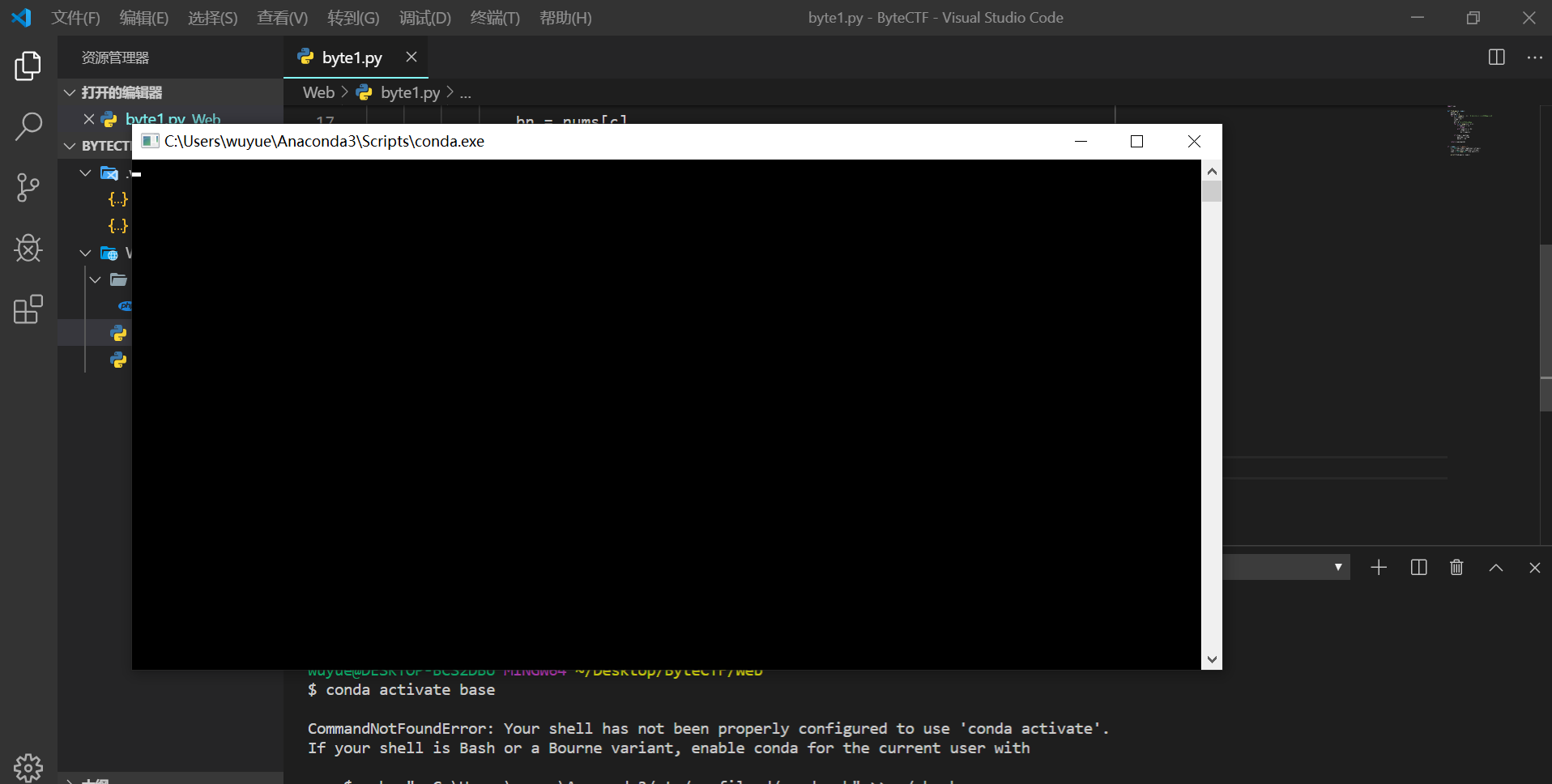
BingSlient
on 9 Sep 2019
@BingSlient That was the exact window I was getting. And it could be happening on save, I have autosave enabled and do the majority of my work in python files. But, it just stopped happening to me, I don't have a solution because I didn't change anything I was doing.
Markpajr
on 9 Sep 2019
@Markpajr I even reinstalled VS code, still didn't work. Now I have to disable autosave to avoid the annoying windows, seems that's the only workaround for me, or I have to stop using Anaconda with vscode.
BingSlient
on 9 Sep 2019
I'm having the same problem. A cmd window flashes twice when I press CTRLS in a python file (but not in any other type of file as far as I have seen).
It appears also in VS Code Insider (commit 0f1bd7721b793ed8b7805ba621061ce5a1f5c263).
 md2perpe
on 9 Sep 2019
md2perpe
on 9 Sep 2019
Can everyone try editing the files in the files in an external application when this reproduces? E.g. open the same file you are editing in Code in Notepad instead and make changes and save. My suspicion is some kind of file watcher installed by Anaconda.
sbatten
on 9 Sep 2019
Issue is back for me, and I can confirm on my end editing the file in notepad then saving causes the same window to appear. It appears twice in vscode, just once when I save the notepad file. Assuming this is an anaconda specific issue then if it's the same case for others.
Markpajr
on 10 Sep 2019
@sbatten. You're right. I closed VS Code and opened a python file in Notepad. When saving the file the cmd windows still flash. So I assume that this issue can be closed.
md2perpe
on 10 Sep 2019
It seems to be an issue with Kite. When I quit Kite, the issue stops. When I start Kite, the issue starts again.
md2perpe
on 10 Sep 2019
@md2perpe Interesting, I didn't think of kite, exiting the kite copilot program causes the issue to stop for me as well. It just started recently though, I don't believe Kite recently updated? Either way, seems the issue isn't directly VSCode related, so we can close this.
Markpajr
on 10 Sep 2019
It might be that the last update of VSCode affected something that Kite calls. I've sent a message to the Kite developers and referred them to this issue.
md2perpe
on 10 Sep 2019
Thanks for bringing this to our attention. We have a fix for this that should get released soon.
 its-dhung
on 10 Sep 2019
its-dhung
on 10 Sep 2019
This has been fixed in the 20190910 release. Thanks again for helping us fix this!
its-dhung
on 11 Sep 2019
No flashing cmd windows today, after an automatic update (I suppose). Thanks, @its-dhung!
md2perpe
on 12 Sep 2019
Related issues
 ryan-wong
·
3Comments
ryan-wong
·
3Comments
 borekb
·
3Comments
borekb
·
3Comments
 sirius1024
·
3Comments
sirius1024
·
3Comments
 philipgiuliani
·
3Comments
philipgiuliani
·
3Comments
 sijad
·
3Comments
sijad
·
3Comments
Most helpful comment
This has been fixed in the 20190910 release. Thanks again for helping us fix this!