Vscode: Integration tests should use the produced build to run with
As seen in https://monacotools.visualstudio.com/DefaultCollection/Monaco/_build/results?buildId=54770
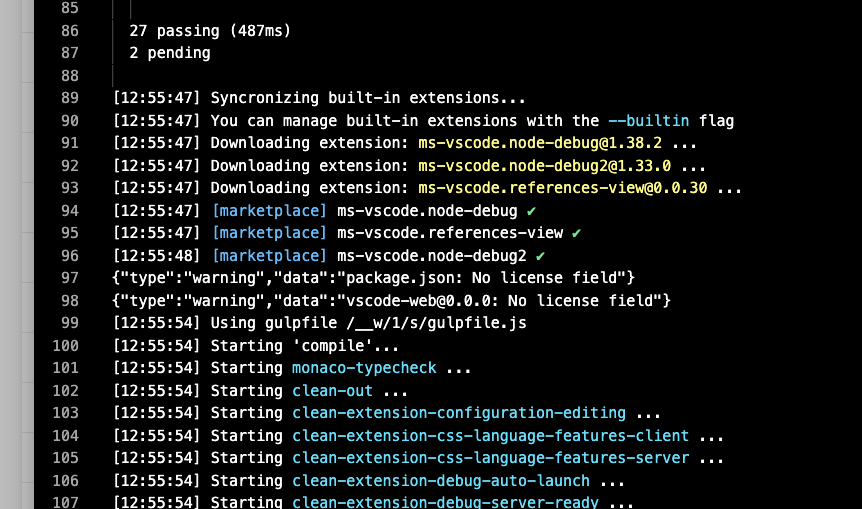
My understanding is that compilation is done shared and then reused.
 bpasero
All 8 comments
@joaomoreno as @jrieken was suggesting, could this be the --build option that checks for compilation artifacts under out-build and not out?
bpasero
on 20 Aug 2019
To be clear. Running with --build is IMO to be expected but maybe the out-build does exists or maybe the path cannot be resolved?
 jrieken
on 20 Aug 2019
jrieken
on 20 Aug 2019
This has been there since the day the integration tests were introduced. The integration tests need to use out-build. So code.sh needs to understand --build which would make the loader use out-build instead of out.
 joaomoreno
on 30 Aug 2019
joaomoreno
on 30 Aug 2019
It would also be very cool if the integration build is run off the product (not the sources) so that we have a partial, automated sanity check
jrieken
on 30 Aug 2019
Integration tests on Windows, macOS and Linux now use the built version of the product for running. A new environment variable INTEGRATION_TEST_ELECTRON_PATH drives this. Will also try to adopt this for our remote integration tests.
bpasero
on 2 Sep 2019
@aeschli I might need your help. Looks like running the remote tests in a real build starts some download action which fails on the build machine, is there any way to avoid that?
+ EXTRA_INTEGRATION_TEST_ARGUMENTS='--extensions-dir=/__w/1/s/extensions --enable-proposed-api=vscode.vscode-test-resolver'
+ /__w/1/VSCode-linux-x64/code-insiders --no-sandbox --folder-uri=vscode-remote://test+test/__w/1/s/extensions/vscode-api-tests/testWorkspace --extensionDevelopmentPath=vscode-remote://test+test/__w/1/s/extensions/vscode-api-tests --extensionTestsPath=vscode-remote://test+test/__w/1/s/extensions/vscode-api-tests/out/singlefolder-tests --disable-telemetry --disable-crash-reporter --disable-updates --skip-getting-started --disable-inspect --user-data-dir=/tmp/tmp.CjLGG2Ut8v --extensions-dir=/__w/1/s/extensions --enable-proposed-api=vscode.vscode-test-resolver
/__w/1/VSCode-linux-x64/code-insiders: /lib/x86_64-linux-gnu/libdbus-1.so.3: no version information available (required by /__w/1/VSCode-linux-x64/code-insiders)
/__w/1/VSCode-linux-x64/code-insiders: /lib/x86_64-linux-gnu/libdbus-1.so.3: no version information available (required by /__w/1/VSCode-linux-x64/code-insiders)
Fontconfig warning: "/etc/fonts/fonts.conf", line 86: unknown element "blank"
Xlib:  extension "RANDR" missing on display ":10".
/proc/self/exe: /lib/x86_64-linux-gnu/libdbus-1.so.3: no version information available (required by /proc/self/exe)
/proc/self/exe: /lib/x86_64-linux-gnu/libdbus-1.so.3: no version information available (required by /proc/self/exe)
[main 2019-09-02T16:23:49.926Z] update#ctor - updates are disabled by the environment
Downloading VS Code Server insider - ea4bd25cc503dade65f339c025c7a0eab9fd41cf into /home/vsts_azpcontainer/.vscode-server-insiders/bin/ea4bd25cc503dade65f339c025c7a0eab9fd41cf.
Downloading VS Code Server from: https://update.code.visualstudio.com/commit:ea4bd25cc503dade65f339c025c7a0eab9fd41cf/server-linux-x64/insider
rejected promise not handled within 1 second: Error: Failed to download and unzip VS Code insider - ea4bd25cc503dade65f339c025c7a0eab9fd41cf
stack trace: Error: Failed to download and unzip VS Code insider - ea4bd25cc503dade65f339c025c7a0eab9fd41cf
    at Object.downloadAndUnzipVSCodeServer (/__w/1/s/extensions/vscode-test-resolver/out/download.js:109:19)
@joaomoreno ever seen this issue that a download would fail from within docker image on build machine?
Refs: https://monacotools.visualstudio.com/DefaultCollection/Monaco/_build/results?buildId=56490&view=logs&j=a5e52b91-c83f-5429-4a68-c246fc63a4f7 (scroll to the end of "Run Integration Tests")
bpasero
on 2 Sep 2019
Oh I see the issue, we are trying to download a server as part of the build that has not yet been build...
bpasero
on 3 Sep 2019
Thanks for all this @bpasero 👏
joaomoreno
on 3 Sep 2019
Related issues
 villiv
·
3Comments
villiv
·
3Comments
 DovydasNavickas
·
3Comments
DovydasNavickas
·
3Comments
 curtw
·
3Comments
curtw
·
3Comments
 vsccarl
·
3Comments
vsccarl
·
3Comments
 biij5698
·
3Comments
biij5698
·
3Comments
Most helpful comment
Integration tests on Windows, macOS and Linux now use the built version of the product for running. A new environment variable
INTEGRATION_TEST_ELECTRON_PATHdrives this. Will also try to adopt this for our remote integration tests.