Vscode: New icons make it very difficult to distinguish intellisense from autocomplete suggestions
Issue Type: Bug
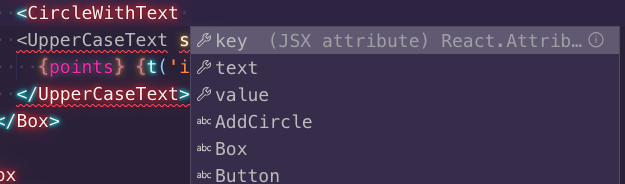
With the new icons, it's pretty hard to distinguish between actual intellisense items and autocomplete suggestions :( They used to have different colors, now it's all the same color, same font etc.
VS Code version: Code 1.37.0 (036a6b1d3ac84e5ca96a17a44e63a87971f8fcc8, 2019-08-08T01:22:37.660Z)
OS version: Darwin x64 18.6.0
System Info
|Item|Value|
|---|---|
|CPUs|Intel(R) Core(TM) i7-6820HQ CPU @ 2.70GHz (8 x 2700)|
|GPU Status|2d_canvas: enabled
flash_3d: enabled
flash_stage3d: enabled
flash_stage3d_baseline: enabled
gpu_compositing: enabled
multiple_raster_threads: enabled_on
native_gpu_memory_buffers: enabled
oop_rasterization: disabled_off
protected_video_decode: unavailable_off
rasterization: enabled
skia_deferred_display_list: disabled_off
skia_renderer: disabled_off
surface_synchronization: enabled_on
video_decode: enabled
viz_display_compositor: disabled_off
webgl: enabled
webgl2: enabled|
|Load (avg)|2, 2, 2|
|Memory (System)|16.00GB (0.74GB free)|
|Process Argv||
|Screen Reader|no|
|VM|0%|
Extensions (24)
Extension|Author (truncated)|Version
---|---|---
ActiveFileInStatusBar|Ros|1.0.3
cypress-snippets|and|1.2.0
vscode-custom-css|be5|3.0.4
vscode-styled-jsx|bla|1.5.0
vscode-tailwindcss|bra|0.2.0
vscode-exports-autocomplete|cap|0.5.4
bracket-pair-colorizer|Coe|1.0.61
vscode-eslint|dba|1.9.0
tslint|eg2|1.0.44
prettier-vscode|esb|1.9.0
vscode-pull-request-github|Git|0.9.2
vscode-styled-components|jpo|0.0.26
terraform|mau|1.3.12
vscode-docker|ms-|0.7.0
csharp|ms-|1.21.0
node-debug2|ms-|1.33.0
code-settings-sync|Sha|3.4.1
language-stylus|sys|1.11.0
html-preview-vscode|tht|0.2.5
vscode-icons|vsc|9.2.0
vscode-import-cost|wix|2.12.0
JasmineSnippets|xab|1.0.1
JavaScriptSnippets|xab|1.7.2
ReactSnippets|xab|2.3.0
(1 theme extensions excluded)
 luisrudge
All 9 comments
The new icon is ugly.
 jiankafei
on 9 Aug 2019
jiankafei
on 9 Aug 2019
How to get back to the old icon set?
 tranvannhat
on 9 Aug 2019
tranvannhat
on 9 Aug 2019
The new icon is ugly.
I agree
 WebGhan
on 9 Aug 2019
WebGhan
on 9 Aug 2019
@tranvannhat install the previous release...
 dhonx
on 9 Aug 2019
dhonx
on 9 Aug 2019
@luisrudge I think that's not a bug..
dhonx
on 9 Aug 2019
It would be very nice to have an option to switch old icons back.
 alexamy
on 9 Aug 2019
alexamy
on 9 Aug 2019
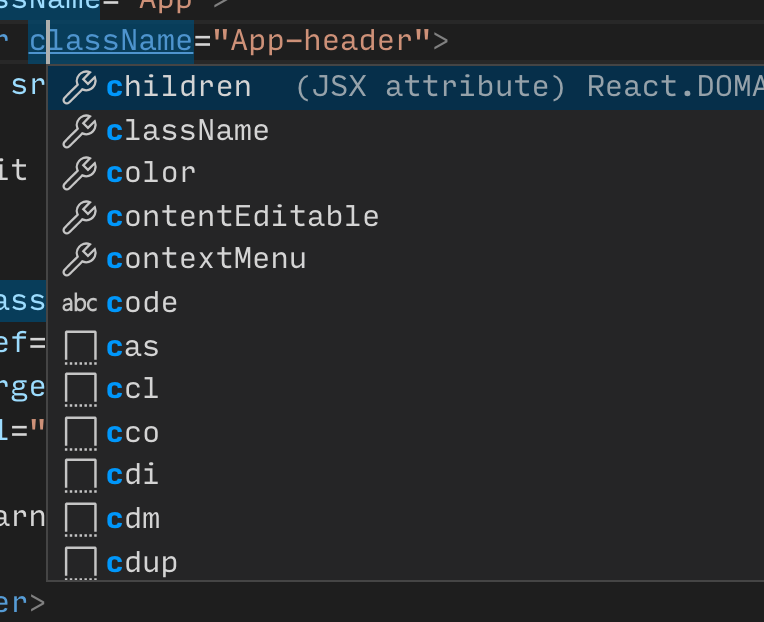
@LuisBosquez as I mentioned on Twitter, property and text icons in intellisense have always been the same color so that has not changed.
Using your React example, here's a comparison of the two:
|Before|After|
|---|---|
| |
| |
|
And the rest of the IntelliSense icons still use color:
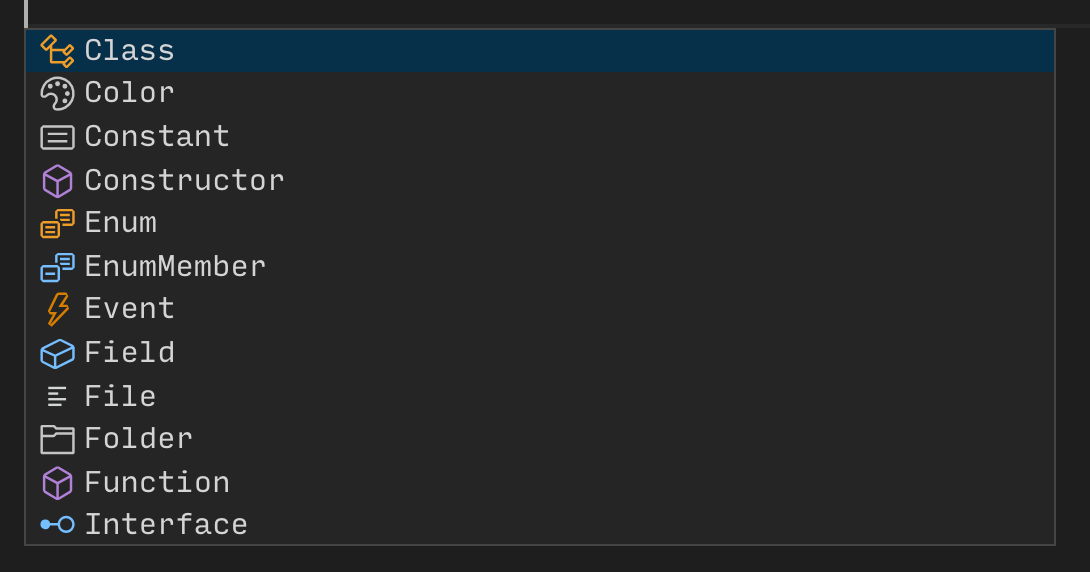
If you do encounter any other specific issue please create a new one and I'll take a look.
 misolori
on 9 Aug 2019
misolori
on 9 Aug 2019
@misolori sorry, missed your tweet. The colors haven't changed, but now the distinction between a component pro and a regular autocomplete suggestion is not that great. Although the color wasn't different (my bad), they did have a clear difference: one is 'filled and the other is outlined. You can barely tell the difference between a react component pro and a suggestion
luisrudge
on 9 Aug 2019
If only icon themes would allow for intellisense icons too..
 DeltaRazero
on 19 Aug 2019
DeltaRazero
on 19 Aug 2019
Related issues
 philipgiuliani
·
3Comments
philipgiuliani
·
3Comments
 NikosEfthias
·
3Comments
NikosEfthias
·
3Comments
 vsccarl
·
3Comments
vsccarl
·
3Comments
 mrkiley
·
3Comments
mrkiley
·
3Comments
 v-pavanp
·
3Comments
v-pavanp
·
3Comments
Most helpful comment
The new icon is ugly.