Vscode: Debug console stops autoscrolling when a line wraps around
Issue Type: Bug
- Make sure the debug console is narrow enough that at least one line will wrap around
- Scroll all the way to the bottom of the debug console so it will autoscroll as more output is generated
- Run any task that produces output with long lines
Notice that when a line that wraps around is printed, autoscrolling stops working and you have to manually scroll to the end to resume it.
VS Code version: Code 1.36.1 (2213894ea0415ee8c85c5eea0d0ff81ecc191529, 2019-07-08T22:56:38.504Z)
OS version: Darwin x64 18.6.0
System Info
|Item|Value|
|---|---|
|CPUs|Intel(R) Core(TM) i7-6920HQ CPU @ 2.90GHz (8 x 2900)|
|GPU Status|2d_canvas: enabled
flash_3d: enabled
flash_stage3d: enabled
flash_stage3d_baseline: enabled
gpu_compositing: enabled
multiple_raster_threads: enabled_on
native_gpu_memory_buffers: enabled
oop_rasterization: disabled_off
protected_video_decode: unavailable_off
rasterization: enabled
skia_deferred_display_list: disabled_off
skia_renderer: disabled_off
surface_synchronization: enabled_on
video_decode: enabled
viz_display_compositor: disabled_off
webgl: enabled
webgl2: enabled|
|Load (avg)|6, 5, 5|
|Memory (System)|16.00GB (0.12GB free)|
|Process Argv||
|Screen Reader|no|
|VM|0%|
 banga
banga
All 19 comments
I can reproduce this, but only if the debug console panel is moved right, not bottom.
 sguillia
on 16 Aug 2019
sguillia
on 16 Aug 2019
I am also running into this.
Possibly related: https://github.com/Microsoft/vscode/issues/70331
- VSCode Version: 1.37.1
- OS Version: Ubuntu 18.04.3 LTS
Steps to Reproduce:
- Create a new Python project (requires
numpy) - Add the code:
import numpy as np
x = 5
- Place a breakpoint on
x=5 - Run the code, allow the breakpoint to be hit.
- In the debug console type:
np.ones((720,1)) - In the debug console type:
4+4 - Observe that the scroll returns to the top of the debug console
Does this issue occur when all extensions are disabled?: Yes

 JoshVarty
on 30 Aug 2019
JoshVarty
on 30 Aug 2019
@JoshVarty nice steps. Thanks. I plan to look next week into this.
 isidorn
on 30 Aug 2019
isidorn
on 30 Aug 2019
I can not reproduce this with node, even though I have multiple lines that wrap.
Unfortunetly I do not have pyhton setup on my machine to follow the exact python steps (after doing pip install numpy I get an exception when debugging the program No module named 'numpy')
I believe the issue is here
I am open for a PR which fixes this.
The solution would be to better aproximate the height based on the value length.
Due to this bad approximation the autoscrolling breaks.
isidorn
on 10 Sep 2019
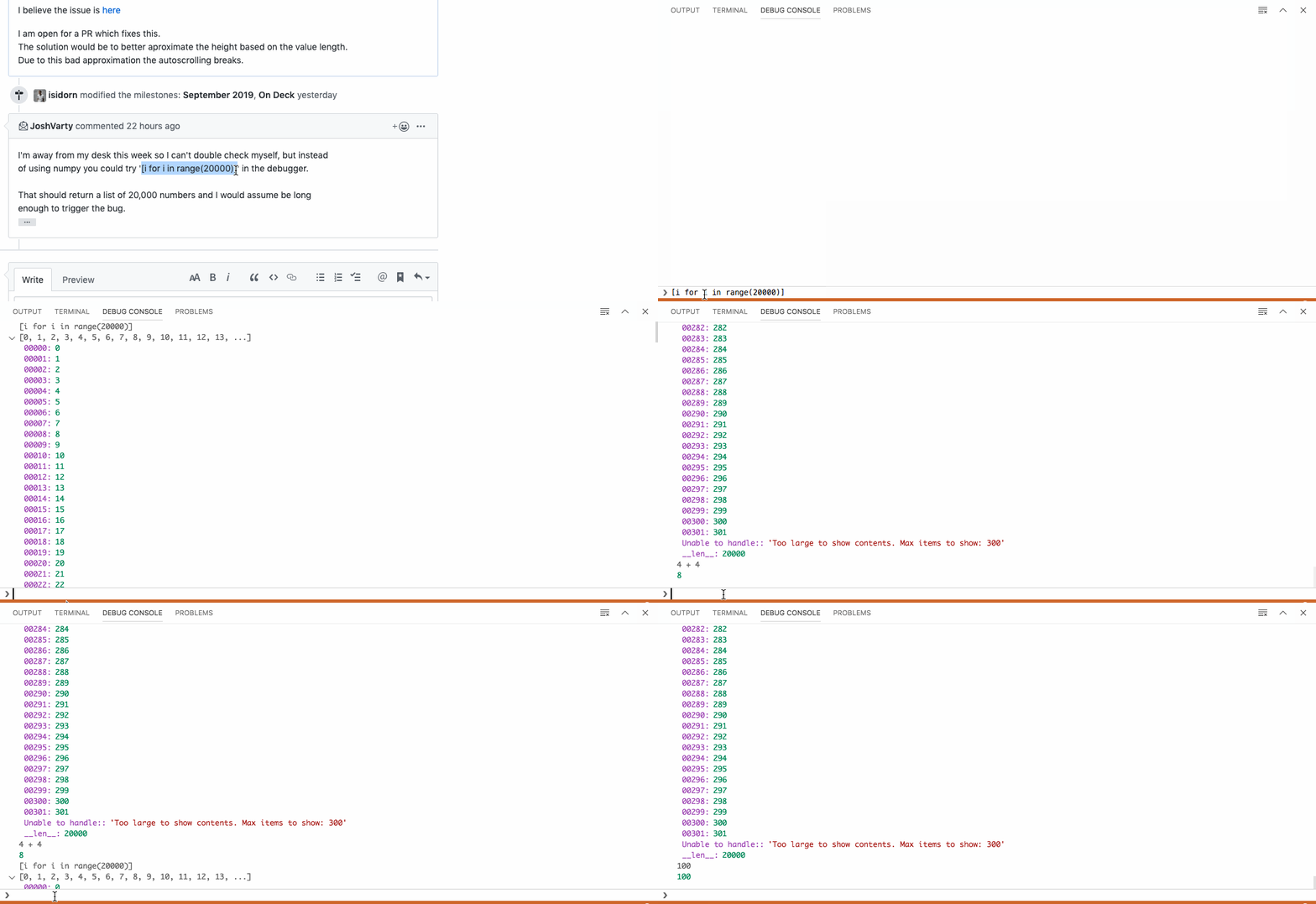
I'm away from my desk this week so I can't double check myself, but instead
of using numpy you could try '[i for i in range(20000)]' in the debugger.
That should return a list of 20,000 numbers and I would assume be long
enough to trigger the bug.
Sent from my iPhone
On Sep 10, 2019, at 9:01 AM, Isidor Nikolic notifications@github.com
wrote:
I can not reproduce this with node, even though I have multiple lines that
wrap.
Unfortunetly I do not have pyhton setup on my machine to follow the exact
python steps (after doing pip install numpy I get an exception when
debugging the program No module named 'numpy')
I believe the issue is here
https://github.com/Microsoft/vscode/blob/5a9913099c077fe0c93abcdb88d0cb67169fefcf/src/vs/workbench/contrib/debug/browser/repl.ts#L794
I am open for a PR which fixes this.
The solution would be to better aproximate the height based on the value
length.
Due to this bad approximation the autoscrolling breaks.
—
You are receiving this because you were mentioned.
Reply to this email directly, view it on GitHub
https://github.com/microsoft/vscode/issues/77837?email_source=notifications&email_token=AAJQ6P4DGKOFKAREKZDDHX3QI6SCBA5CNFSM4IGKQBP2YY3PNVWWK3TUL52HS4DFVREXG43VMVBW63LNMVXHJKTDN5WW2ZLOORPWSZGOD6LF4AQ#issuecomment-529948162,
or mute the thread
https://github.com/notifications/unsubscribe-auth/AAJQ6P3UJNFZZKXXZZXQ6LDQI6SCBANCNFSM4IGKQBPQ
.
JoshVarty
on 10 Sep 2019
Nope, this works for me
isidorn
on 11 Sep 2019
@isidorn
The line doesn't wrap around because the output is trimmed. You might want to try this instead:
'-'.join([str(i) for i in range(2000)])
Also I can only reproduce with the debug panel on the right (Right click > Move panel right).
I can't reproduce the problem with that python line above though. It do with the steps here #79213 (install Python extension, start debug session, move panel to right)
sguillia
on 11 Sep 2019
In trying to come up with a numpy-free set of repro steps (I failed), I noticed something unexpected. In the Python stand-alone console, numpy.ones((5,1)) outputs
array([[1.],
       [1.],
       [1.],
       [1.],
       [1.]])
while in the Debug Console, it outputs
array([[1.],\n [1.],\n [1.],\n [1.],\n [1.]])
The same is not true for some other non-numpy multiline-output, such as the one from print("a\nb"), which is shown in two lines in both cases. Also, commands such as print(str(numpy.ones((720,1)))) (note the extra str) do not cause this issue.
Based on this, consider the following hypotheses (speculative, but nevertheless):
- This is a
numpy-specific problem, so @isidorn might have a hard time reproducing it without setting upnumpyin his Python environment. - VS Code uses a correct internal rendering of the output to estimate its height, but the actual output has a lower height due to
\nbeing printed instead of converted into line breaks. This causes a height mismatch somewhere, leading to incorrect vertical scroll positions. This is somewhat supported by the "Copy All" command in the Debug Console copying line breaks, not\ncharacters.
 bersbersbers
on 12 Sep 2019
bersbersbers
on 12 Sep 2019
Point 2. makes sense. However this is not only specific to numpy, but to a particular type of output.
isidorn
on 12 Sep 2019
I think it has something to do with Python's __repr__ (which might mean this isn't a VSCode bug, but a Python tools bug?)
I believe __repr__ creates a representation of a Python object for use in things like debuggers.
Anyways, I've got a numpy-free repro for you:
- Create a new Python project
- Add the code:
class Test:
    def __repr__(self):
        return "\n\t" * 10000
x = Test()

y = "this line is for your breakpoint"
- Place a breakpoint on
y = "this line is for your breakpoint" - Run the code, allow the breakpoint to be hit.
- In the debug console type:
x - In the debug console type:
4+4 - Observe that the scroll returns to the top of the debug console
What's interesting is that if you create x="\n\t" * 10000 and then observe x in the debug console, you'll notice that it prints the value of x properly and has no problems with any subsequent commands in the debug console.
This only seems to reproduce for me within the context of __repr__.
JoshVarty
on 25 Sep 2019
Can you all reproduce this with the debug console panel to the bottom? I can only when it's to the right.
Here are my steps to reproduce:
- Run command
ext install ms-python.python - Open this extension sample folder in vscode
- Start debugging session (F5)
- Open debug console on host
- Move it to the right
- Open a python file in the guest
And observe the scrolling problem.
This forces me to have the debug console at the bottom while developing an extension.
sguillia
on 25 Sep 2019
@JoshVarty thanks for awesome repro steps. I can repro now, investigating...
isidorn
on 26 Sep 2019
Thanks! :tada:
sguillia
on 2 Oct 2019
I verified using the nice steps here: https://github.com/microsoft/vscode/issues/77837#issuecomment-534796235
I'm still seeing scroll return to the top of the console.
 alexr00
on 4 Oct 2019
alexr00
on 4 Oct 2019
Let's keep this closed since there is already a duplicate which I will look into next milestone.
Though it should behave a bit better now
Duplicate https://github.com/microsoft/vscode/issues/81951#event-2687450865
isidorn
on 4 Oct 2019
Actually my fix just made it worse. Sorry about that. Reverting my fix and reopening this issue.
This milestone I will fix this proper, promise 🙏
isidorn
on 8 Oct 2019
@jeanp413 contributed a cool fix for this, thanks a lot!
Can people please try this out in vscode insiders from Tuesday and let us know if it is better for you. Thanks a lot!
isidorn
on 21 Oct 2019
@jeanp413 The fix is working. I now have the desired scroll behaviour back! @jeanp413 and @isidorn Thanks a lot!
 rickstaa
on 23 Oct 2019
rickstaa
on 23 Oct 2019
Thanks, adding verified label.
isidorn
on 23 Oct 2019
Related issues
 chrisdias
·
3Comments
chrisdias
·
3Comments
 borekb
·
3Comments
borekb
·
3Comments
 vsccarl
·
3Comments
vsccarl
·
3Comments
 biij5698
·
3Comments
biij5698
·
3Comments
 shanalikhan
·
3Comments
shanalikhan
·
3Comments
Most helpful comment
@JoshVarty nice steps. Thanks. I plan to look next week into this.