Vscode: WebViewPanel created with preserveFocus: true suffers from a focus problem.
- VSCode Version: Version: 1.37.0-insider
Commit: d50852db1af10ec100a71ad57cc3a04c8aead117
Date: 2019-07-08T05:33:31.335Z
Electron: 4.2.5
Chrome: 69.0.3497.128
Node.js: 10.11.0
V8: 6.9.427.31-electron.0
OS: Darwin x64 17.7.0 - OS Version: macOS High Sierra 10.13.6 (17G7024)
Steps to Reproduce:
- Execute the following sample code of extension.
- Execute the
Hello Worldcommand. - Click the tab of WebView and press the
fkey of the keyboard. - In the conlose, only the
window focused!message shown. - Click the tab of WebView, again. Then, press
f. - The message
keyboard F typed!shown.

import * as vscode from 'vscode';

export function activate(context: vscode.ExtensionContext) {
  const rootUrl = vscode.Uri.file(context.extensionPath)
  const disposable = vscode.commands.registerCommand('extension.helloWorld', async (args, brgs, crgs) => {
    if (!vscode.window.activeTextEditor) {
      return;
    }

    const panel = vscode.window.createWebviewPanel(
      'catCoding',
      'Cat Coding',
      { preserveFocus: true, viewColumn: vscode.ViewColumn.Beside },
      { enableScripts: true }
    );
    panel.webview.html = getHtml();
  });
  context.subscriptions.push(disposable);
}

function getHtml() {
    return `
<!DOCTYPE html><html><head></head>
<body>
<script>
window.onfocus = function() {
    console.log('window focused!');
}
window.addEventListener('keydown', function(evt) {
    if(evt.keyCode == 70 && evt.target.nodeName != 'INPUT') {
      console.log('keyboard F typed!')
    }
  })
</script>
`
}


// this method is called when your extension is deactivated
export function deactivate() {}
Does this issue occur when all extensions are disabled?: Yes
 tamuratak
All 37 comments
I am having the same issue with the Ungit extension.

 Hirse
on 10 Jul 2019
Hirse
on 10 Jul 2019
Any updates on this? If it's any help, I don't experience this bug on my Ubuntu machine, but it does occur on my Mac, so could be something specific to that build.
 justinarose
on 13 Aug 2019
justinarose
on 13 Aug 2019
That makes it an even more interesting bug/gremlin, as I can reproduce it on Manjaro Linux, KUbuntu 18.04, Ubuntu 18.04 and Windows 10. If you running a Ubuntu build and it's not affecting you, that may make it even harder to track down.
Just to be clear, if you open whatever WebViewPanel based extension you're using (you don't say which), click on some onscreen element of VSCode - editor window, menubar, activity sidebar, etc, and then click back on the WebViewPanel and try to enter text, it does get captured in the WebViewPanel for you? The key aspect here is input focus - if you click on some element of VSCode, and back on the WebViewPanel, it doesn't regain input focus - it stays with whatever you clicked on previously.
 pfeerick
on 13 Aug 2019
pfeerick
on 13 Aug 2019
So I'm getting this bug with LaTeX-Workshop: James-Yu/LaTeX-Workshop#1481. When switching to view the pdf on a Mac via command+2, all shortcuts within VSCode seem to no longer work. What makes this even nastier is that it sometimes only happens after switching TWICE (i.e. I can go from pdf to tex to pdf via command+1 and command+2 but it eventually gets stuck focused on the pdf). I believe this focus issue is the underlying problem with the bug, as referenced earlier. Strangely, I don't experience this on Ubuntu at all.
justinarose
on 14 Aug 2019
@mjbvz do you have any updates here? We over million installs of our PlatformIO IDE extension and this issue blocks https://github.com/platformio/platformio-vscode-ide/issues/892
 ivankravets
on 15 Aug 2019
ivankravets
on 15 Aug 2019
PRs welcome. The webview code lives here: https://github.com/microsoft/vscode/blob/02702327c1fea8b6c6425b84adb004c41cb84769/src/vs/workbench/contrib/webview/electron-browser/webviewElement.ts#L266
 mjbvz
on 15 Aug 2019
mjbvz
on 15 Aug 2019
I've narrowed it down to changes introduced between the June 2nd and June 5th VS Code Insiders builds. A couple unfortunate details have made this hard to track down further:
- I can't reproduce when I build the OSS version from github
- Nightly builds failed between those two dates, so I can't bisect further
It's likely the root cause is either in the proprietary additions or in some build process or environment change between those two dates, but I can't access either to try to fix the issue
6/2 Insiders build (good) commit: a848f18df4efa9eb947bd01cbebcede418e66148
6/5 Insiders build (bad) commit: fc294b683d88fe607d9456bc1bf774ad1d4a7ce6
 txase
on 27 Aug 2019
txase
on 27 Aug 2019
@txase Thanks for the investigation.
We upgraded from electron 3 to electron 4 between those two commits which seems suspect. When building from master, did you do a full build (including yarn install) at those checkpoints?
Also, if this is electron related, can you try our our electron 6 exploration builds to see if that fixes the problem.
mjbvz
on 28 Aug 2019
@mjbvz Here's the steps I took:
$ git clone [email protected]:microsoft/vscode.git
$ yarn
$ scripts/code.sh
I also tried running yarn run gulp vscode-darwin and yarn run gulp vscode-darwin-min to see if the app packages they produced exhibit the bug. Unfortunately, they don't.
I also tried the electron 6 exploration build you linked. It also has the bug.
One thing that would be interesting to try: Are you able to re-build the 6/2 commit of the insiders edition? If it had the bug after being rebuilt, then it would point to a change in the build pipeline having caused the issue. If it doesn't have the bug, then it is a problem in the source code somewhere (OSS or proprietary).
txase
on 28 Aug 2019
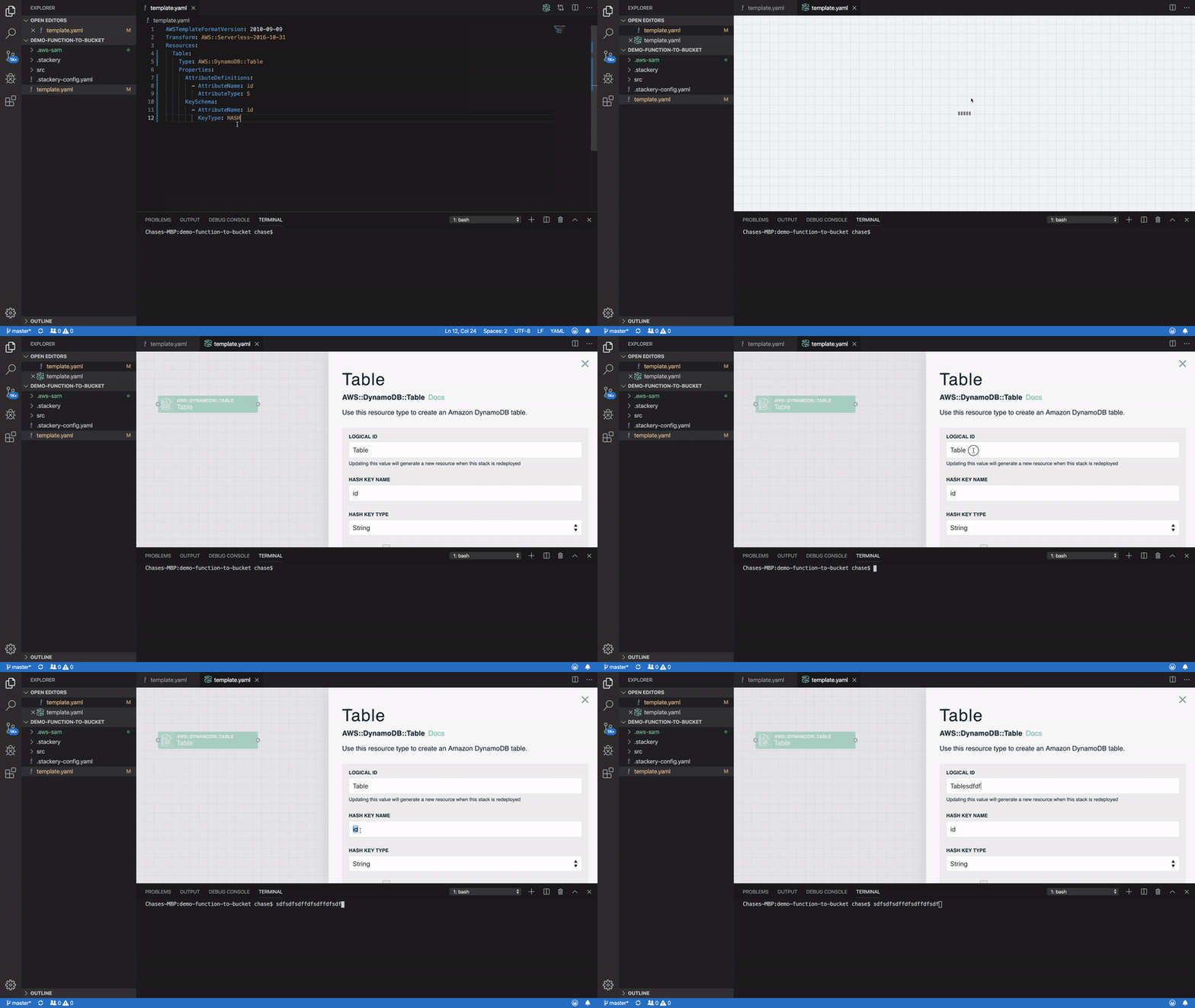
@mjbvz If it helps, here's a reproducible set of steps to see the issue using our extension:
- Install the "stackery" extension
- Open a folder (opening a file alone doesn't work through our extension)
- Create a file called
template.yamlwith the following inside:
yaml AWSTemplateFormatVersion: 2010-09-09 Transform: AWS::Serverless-2016-10-31 Resources: Table: Type: AWS::DynamoDB::Table Properties: AttributeDefinitions: - AttributeName: id AttributeType: S KeySchema: - AttributeName: id KeyType: HASH - Click the Stackery "S" icon at the top right of the file context menu, or otherwise execute the "Edit with Stackery" command while the template.yaml file is the active editor.
- Double click on the "Table" resource on the canvas to open a settings form
- Open the built-in terminal
- Click back into the form editor and notice that while you can interact with a webview element (e.g. highlighting text in a form input field) you can't type. If you focus the terminal, then try to focus the webview form, you'll find keyboard input still goes to the terminal.
It's possible to fix the focus state by double clicking on the canvas editor tab.
Here's a video showing the above:
txase
on 29 Aug 2019
We include a few extra files before shipping but it's not really that much code. I just tested a oss-style build that includes this proprietary code and it works fine, so I don't believe that is the problem.
However we do also use a custom electron build for security and maintainability reasons. @deepak1556 Are you aware of anything in our electron build related to webviews? Do we enable or disable enable features vs a normal electron build? Is it possible to swap in our custom electron build to check this?
The other possibility is that code optimization for production builds is somehow changing the code, which has been known to happen before (https://github.com/microsoft/vscode/issues/79433). @bpasero I know you faced this issue, how did you track it down? Can @txase easily create a minimized oss build to test this? Is it just:
    yarn gulp compile-build
    yarn gulp compile-extensions-build
    yarn gulp minify-vscode
@mjbvz there are no feature differences wrt webview between the custom build and official build. They can swapped to test.
 deepak1556
on 30 Aug 2019
deepak1556
on 30 Aug 2019
@mjbvz in my case it was a pretty obvious exception that happened because our minifier was not supporting a statement in a finally block, not sure you have that here.
But yeah, you can easily build from the command line by running the same gulp task our build machine runs, e.g. yarn gulp vscode-darwin-min for macOS or yarn gulp vscode-linux-x64 for linux.
You can easily swap out the Electron version, by doing this:
- download the same version of Electron
- run
./Electron ./out/main
This will start Electron with our main entry point.
 bpasero
on 30 Aug 2019
bpasero
on 30 Aug 2019
@mjbvz @bpasero I've tried yarn gulp vscode-darwin-min, but that didn't reproduce the issue.
Where would I download the version of Electron that you use in the VS Code builds so I can test it out?
txase
on 30 Aug 2019
@txase you can literally do the same by downloading VSCode and cd into it to find our executable and start the main entry point with it.
bpasero
on 30 Aug 2019
@bpasero When I do that, running Electron out/main simply opens up the file out/main in the VS Code editor as though it is an argument (i.e. it's equivalent to running code out/main from the command line). It doesn't execute the code of out/main.js.
txase
on 30 Aug 2019
@txase ok then try with this download
bpasero
on 30 Aug 2019
@bpasero Thanks. I can repo this bug using our electron build. Here's what I ran:
$/Users/matb/Downloads/electron-v4/Electron.app/Contents/MacOS/Electron out/main.js
I can't repo when I run:
./.build/electron/Code\ -\ OSS.app/Contents/MacOS/Electron out/main.js
@mjbvz are you using 4.2.10 running from master? asking because we just merged the update and my link was with that version.
bpasero
on 30 Aug 2019
I confirmed I was using electron v4.2.10 in both cases. Using the electron download you linked to, I see the bug. Using the electron version we download for the OSS build, I do not
mjbvz
on 30 Aug 2019
@bpasero Can you describe how the official electron build differs? Is there any way to view any patches or build flag differences? We're happy to help investigate the root cause if we know how the electron executable is built :).
txase
on 31 Aug 2019
@deepak1556 can answer that
bpasero
on 31 Aug 2019
@deepak1556 @bpasero @mjbvz Any updates? Or any way to provide info on how the electron build is produced so we can help resolve this issue for our users?
Thanks!
txase
on 10 Sep 2019
@txase the only difference in the officially build is that it has v8_untrusted_code_mitigations=false https://cs.chromium.org/chromium/src/v8/BUILD.gn?l=176, not sure if this will cause the difference in behavior thats being observed here. I am creating a build which enables this back, will have further updates tomorrow. Thanks!
deepak1556
on 10 Sep 2019
@deepak1556 I wouldn't think that switch would be likely to cause issues, but who knows. What did you find in your testing?
txase
on 11 Sep 2019
Hi @deepak1556, any way I can help debug this issue? :pray:
txase
on 1 Oct 2019
Sorry for the delayed response, I tried with https://github.com/microsoft/vscode/pull/81644 that has the v8 flags aligned with OSS version, but the problem was visible in OSS version as well with repro steps https://github.com/microsoft/vscode/issues/76863#issuecomment-525947246, @txase can you confirm this ? Thanks!
The corresponding insider build for this version will be available tomorrow, we can test that as well. But now I highly doubt its due to build difference because the issue is visible in OSS version.
deepak1556
on 10 Oct 2019
I can confirm the issue does not happen in current master but does happen with that branch. That gives us something to work with. 🙏
It was still strange to see that the private build of electron 4 was showing the same behavior. Is it possible that the current electron 4 private build process for vscode is using an updated build mechanism from later releases of electron?
txase
on 10 Oct 2019
Is there any update on this issue? It's currently affecting any extension that uses a webview.
 joseleonserna
on 7 Nov 2019
joseleonserna
on 7 Nov 2019
This issue is super-annoying in PlatformIO (VScode extension). And it has been there waaaay too long ;-)
Any updates on this?
 VanKurt
on 13 Nov 2019
VanKurt
on 13 Nov 2019
I've made some progress on this issue, though it's unclear still exactly why this is occurring only in VSCode vs in Chrome. I sent an email to two Chromium maintainers who work on the relevant bits hoping to get their take. For those curious, here's what I sent them:
This summer, VSCode upgraded from Electron 4 to Electron 6, which enabled OOPIFs. This change has broken focus-on-mouse-click for all VSCode WebView extensions (https://github.com/microsoft/vscode/issues/76863).
I built debug versions of Electron 4 and 6 to figure out why focusing isn't working. I found that in Electron 6, when a mouse clicks in the iframe we hit test and end up calling WebContentsImpl::FocusOwningWebContents on the OOPIF's render widget host. The problem is when that method calls WebContentsImpl::GetFocusedRenderWidgetHost the first check performed is to determine if the render widget host matches the main frame's render widget host. Because this is an OOPIF, it has a different render widget host, and the default return value ends up causing WebContentsImpl::FocusOwningWebContents to skip focusing the page.
I don't understand why this isn't an issue in Chrome (I tested it at http://csreis.github.io/tests/cross-site-iframe-simple.html). That said, I have a hunch that with OOPIFs this main frame check is incorrect. Based on the comment above the check, I wonder if instead of checking whether the receiving widget is the main frame it should check whether the receiving widget is a frame type (vs a select pop-up menu). I can confirm that commenting out this check makes VSCode extensions work.
Am I on the right track here? Any thoughts on why this is only broken in VSCode/Electron and not Chrome?
txase
on 16 Nov 2019
Chromium issue filed here: https://bugs.chromium.org/p/chromium/issues/detail?id=1026056
txase
on 19 Nov 2019
The fix for Chromium has been merged to master: https://github.com/chromium/chromium/commit/c4f0a725ff5bc078ccdf43e60b2b455ce4efafa8 🎉. It will be released in Chromium M80.
@deepak1556 @mjbvz @bpasero Is it possible for you to apply this patch to the Electron sources when you build for the next release? 🙏
txase
on 20 Nov 2019
@txase https://github.com/electron/electron/pull/21219 , thanks for following up on this on chromium end.
deepak1556
on 20 Nov 2019
deepak1556
on 21 Nov 2019
@txase the fix is now available in latest insiders
deepak1556
on 21 Nov 2019
I already checked earlier today. Works beautifully! 🙏
txase
on 21 Nov 2019
Related issues
 Perkovec
·
191Comments
Perkovec
·
191Comments
 Brakkar
·
364Comments
Brakkar
·
364Comments
 niagr
·
246Comments
niagr
·
246Comments
 misolori
·
282Comments
misolori
·
282Comments
 ghost
·
234Comments
ghost
·
234Comments
Most helpful comment
The fix for Chromium has been merged to master: https://github.com/chromium/chromium/commit/c4f0a725ff5bc078ccdf43e60b2b455ce4efafa8 🎉. It will be released in Chromium M80.
@deepak1556 @mjbvz @bpasero Is it possible for you to apply this patch to the Electron sources when you build for the next release? 🙏