Vscode: Embedding C++ code in latex is broken but C code works fine
I am a maintainer of LaTeX-Workshop and embedding C++ code stopped working with vscode 1.36.
The following piece of code embeds C++ inside LaTeX, but we never step out from cpp scope
\begin{listing}[htbp]
    \begin{minted}{cpp}
    int f() {
        return 0
    }
    \end{minted}
\end{listing}

If instead of including source.cpp, we include source.c everything works fine

This is related to James-Yu/LaTeX-Workshop/issues/1476. Let me know if we can help investigating the issue.
 jlelong
All 9 comments
@alexr00 this probably follows under your domain.
Hey @jlelong, nice to meet you. @matter123 and I maintain the C++/C syntax. This is a somewhat complicated issue that isn't quite limited to C++. I'll work to get some sort of solution in the next few days though and I could use your help. The same issue should also show up for shell, perl, and dockerfile syntaxes if using any of the "Better __ Syntax" extensions.
Why did this occur in the first place?
There was a previous issue embedding languages inside markdown here:
https://github.com/atom/language-c/issues/146
As part of that fix for that, all of the languages I'm generating are wrapped inside a duplicate source wrapper e.g. source.cpp. This was done so that highlighting rules like source.cpp keyword would be applied to all C++ keywords even when they're embedded.
EDIT: @jlelong I see that you're already adding the source.cpp scope yourself, thats great. If everyone else was doing that the wrapper wouldn't be needed at all. This implies the C++ grammar and other grammars should remove the source wrapper (fixing this issue) and new issues around "source.cpp" should be opened on the other embeddings like markdown. (See solution #2 below)
What exactly is happening?
In order to wrap the whole language, the pattern is designed to start with the beginning of the file and end with the end of the file (which means it doesn't match anything).
This isn't an issue for markdown because markdown uses a while pattern. (Note the while pattern in VS Code has it's own issues). The while pattern force-closes the "find-the-end-of-the-file" scope which is ideal for any language embedding. However, LaTeX and other languages probably can't use the while pattern simply because thats not how their syntax works. This is a general limitation issue with TextMate.
So here are the solution options, all of which have significant downsides.
0. LaTeX fix for multi-line C++ embeddings.
__Downsides__
- Does not work for
\begin{minted}{cpp} void f() { }; \end{minted}but does work for
 \begin{minted}{cpp}
    int f() {
        return 0
    }
    \end{minted}
__Changes:__
- In then LaTeX tmLanguage replace the current C++ embedding pattern with one that uses a
while, here's an example that should work:
{
    "while": "(^|\\G)(?!\\s*(\\\\end\\{minted\\}))",
    "begin": "(\\\\begin\\{minted\\}(?:\\[.*\\])?\\{(?:cpp|c)\\})",
    "contentName": "source.cpp",
    "patterns": [
        {
            "patterns" :[
                {
                    "match": "(^|\\G)(\\\\end\\{minted\\})",
                    "patterns" : [
                        {
                            "include": "#minted-env"
                        }
                    ]
                }
            ]
        },
        {
            "include": "source.cpp"
        }
    ],
    "captures": {
        "1": {
            "patterns": [
                {
                    "include": "#minted-env"
                }
            ]
        }
    }
}
1. LaTeX reacting to the source wrapper (not recommended)
Inside LaTeX and any other languages that cannot use the while pattern
- change
{ "include" : "source.cpp" }to{ "include" : "source.cpp#intital_context" } manually add thesource.cppscope inside of LaTeX
(UPDATE: I see you're already adding thesource.cpp)
__Downsides__
- If the older atom-language-c syntax is what gets embedded (rather than the C++ that I maintain) then the C++ highlighting will not exist
- If there is a C++ fragment like
class {( where the pattern is looking for the}) the pattern will overflow and still screw up the LaTeX
2. Coordinated change the other language embeddings
- Inside Markdown, ruby, perl, and any other language embedding; add the
"contentName": "source.cpp"scope for the{ "include": "source.cpp" }pattern. (LaTeX is already doing this.) - In all my syntaxes I'll remove the
source_wrappersince everyone else is doing the wrapping
__Downsides__
- If there is a C++ fragment like
class {( where the pattern is looking for the}) the pattern will overflow and still screw up the LaTeX - Might take time to coordinate the other syntaxes.
3. Upgrade VS Code Textmate (ideal)
- Create an end pattern that force-closes internal scopes the same way the
whilepattern does - This fixes the problems that would still be present in #2 and #1
- I've been looking into implementing this myself, as there are many other nearly-unsolvable issues like C++ macros that this could be used for
__Downsides__
- will take time
- will require changes to the LaTeX grammar and any other grammar that doesn't use the
whilepattern
Notes
Right now the best solution is probably #2, in the next few days I'll try to reach out to other syntax maintainers and see if they can add the source.cpp scope. If the syntax repo is inactive, (some of them don't update for years) I have a framework setup to pull in new syntaxes, and I can add the scope and re-release the syntax with the source.cpp.
 jeff-hykin
on 4 Jul 2019
jeff-hykin
on 4 Jul 2019
@jlelong thank you for finding this issue and @jeff-hykin thank you for the detailed options.
For an immediate fix in 1.36.1 I can roll back to the version of the grammar we had in 1.35.
For insiders and for the next release, option 2 does sound the best. For the grammars that VS Code pulls in from unmaintained repos, I can make the changes in the grammar local to VS Code. The only one that I actually see that will need the update is markdown. We can track down grammars that exist in other extensions and recommend the change to add the contentName.
 alexr00
on 5 Jul 2019
alexr00
on 5 Jul 2019
Okay the source wrapper has been removed 👍
jeff-hykin
on 6 Jul 2019
@jeff-hykin thank you! When I pull in the update I'll make the change to the built in markdown grammar.
alexr00
on 8 Jul 2019
To verify:
Install https://marketplace.visualstudio.com/items?itemName=James-Yu.latex-workshop
Open an editor and set the language mode to LaTeX. Use the example in the original post and verify that it looks like the second picture, not the first.
alexr00
on 9 Jul 2019
Everything is not completely fixed in 1.36.1
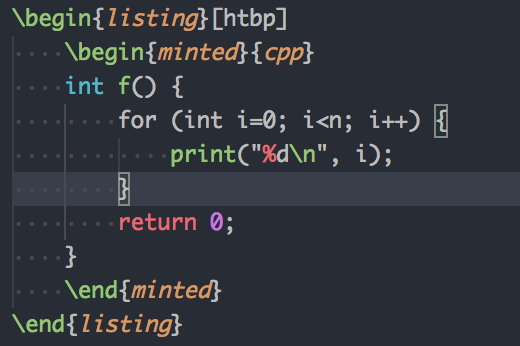
The for line does not seem to be highlighted. This is confirmed by the following screenshot.


jlelong
on 10 Jul 2019
@jlelong This is an issue with the grammar that was in use for 1.35.
Objective-C and Objective-C++ used to inherit from the C and C++ grammar. As a result many patterns such as #block_context have an `{"includes": "$base"} at the end. See line 3366 of the grammar.
This causes issues when a non C-like language embeds C++, however, as $base now refers to the outer grammar, in this case latex.
What you are seeing should be identical to how vscode 1.35 looked.
 matter123
on 10 Jul 2019
matter123
on 10 Jul 2019
In insiders we are using a newer version of the grammar which solves both this issue that was present in 1.35 and the other embedding issue. Based on that, we're getting closer to everything being completely fixed.
I also went back to 1.35.1 and confirmed that the highlighting looks the same as in 1.36.1.
alexr00
on 10 Jul 2019
@alexr00 thanks for the clarification. I thought the new grammar would appear in 1.36.1 but I am not well aware of vscode's releasing process.
jlelong
on 10 Jul 2019
Related issues
 biij5698
·
3Comments
biij5698
·
3Comments
 trstringer
·
3Comments
trstringer
·
3Comments
 lukehoban
·
3Comments
lukehoban
·
3Comments
 shanalikhan
·
3Comments
shanalikhan
·
3Comments
 VitorLuizC
·
3Comments
VitorLuizC
·
3Comments
Most helpful comment
@jlelong thank you for finding this issue and @jeff-hykin thank you for the detailed options.
For an immediate fix in 1.36.1 I can roll back to the version of the grammar we had in 1.35.
For insiders and for the next release, option 2 does sound the best. For the grammars that VS Code pulls in from unmaintained repos, I can make the changes in the grammar local to VS Code. The only one that I actually see that will need the update is markdown. We can track down grammars that exist in other extensions and recommend the change to add the
contentName.