Vscode: terminal.integrated.inheritEnv breaks integrated terminal
Issue Type: Bug
- Add
"terminal.integrated.inheritEnv": falseto settings.json - Try to open terminal
- Terminal blinks and can't do anything
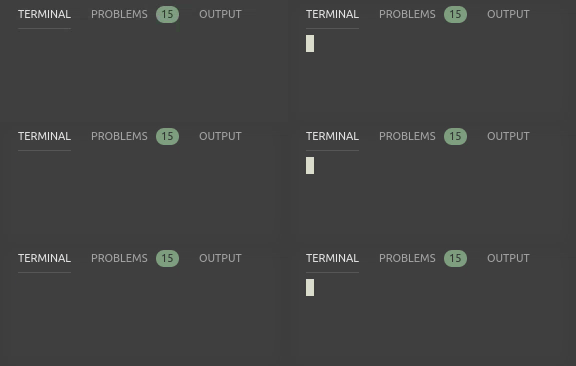
VS Code version: Code 1.36.0 (0f3794b38477eea13fb47fbe15a42798e6129338, 2019-07-03T13:20:56.241Z)
OS version: elementary OS 5.0 Juno (Ubuntu 18.04.2 LTS), Linux x64 4.15.0-54-generic
System Info
|Item|Value|
|---|---|
|CPUs|Intel(R) Core(TM) i7-7560U CPU @ 2.40GHz (4 x 3454)|
|GPU Status|2d_canvas: enabled
flash_3d: enabled
flash_stage3d: enabled
flash_stage3d_baseline: enabled
gpu_compositing: enabled
multiple_raster_threads: enabled_on
native_gpu_memory_buffers: disabled_software
oop_rasterization: disabled_off
protected_video_decode: unavailable_off
rasterization: disabled_software
skia_deferred_display_list: disabled_off
skia_renderer: disabled_off
surface_synchronization: enabled_on
video_decode: unavailable_off
viz_display_compositor: disabled_off
webgl: enabled
webgl2: enabled|
|Load (avg)|2, 2, 2|
|Memory (System)|15.28GB (4.55GB free)|
|Process Argv|--unity-launch|
|Screen Reader|no|
|VM|0%|
 GammaGames
All 19 comments
Same problem. I see this in output of Log (Window):
[2019-07-04 18:06:11.943] [renderer1] [error] A system error occurred (EACCES: permission denied, open '/proc/2194/environ'): Error: EACCES: permission denied, open '/proc/2194/environ'
$ ls -la /proc/2194/environ
-r-------- 1 root root 0 Jul  4 17:44 /proc/2194/environ
$ ps -p 2194 -o comm=
gnome-shell
VS Code version: Code 1.36.0 (0f3794b38477eea13fb47fbe15a42798e6129338, 2019-07-03T13:20:56.241Z)
OS version: Linux x64 5.1.8-1-MANJARO
System Info
|Item|Value|
|---|---|
|CPUs|Intel(R) Core(TM) i7-8550U CPU @ 1.80GHz (8 x 2992)|
|GPU Status|2d_canvas: enabled
flash_3d: enabled
flash_stage3d: enabled
flash_stage3d_baseline: enabled
gpu_compositing: enabled
multiple_raster_threads: enabled_on
native_gpu_memory_buffers: disabled_software
oop_rasterization: disabled_off
protected_video_decode: unavailable_off
rasterization: disabled_software
skia_deferred_display_list: disabled_off
skia_renderer: disabled_off
surface_synchronization: enabled_on
video_decode: unavailable_off
viz_display_compositor: disabled_off
webgl: enabled
webgl2: enabled|
|Load (avg)|1, 1, 1|
|Memory (System)|15.45GB (0.97GB free)|
|Process Argv||
|Screen Reader|no|
|VM|0%|
Extensions (24)
Extension|Author (truncated)|Version
---|---|---
latte|Kas|0.1.1
vscode-paste-and-indent|Rub|0.0.8
cucumberautocomplete|ale|2.14.0
xml|Dot|2.5.0
EditorConfig|Edi|0.13.0
vsc-material-theme|Equ|29.2.0
vsc-material-theme-icons|equ|1.0.6
varnish-vcl|flo|0.1.3
vscode-pull-request-github|Git|0.8.0
vscode-peacock|joh|2.4.0
chat|kar|0.15.5
restructuredtext|lex|110.0.0
dotenv|mik|1.0.1
vscode-docker|ms-|0.6.4
python|ms-|2019.6.22090
cpptools|ms-|0.24.0
vsliveshare|ms-|1.0.488
vsliveshare-audio|ms-|0.1.56
vsliveshare-pack|ms-|0.3.2
vscode-yaml|red|0.4.1
vscode-qt-for-python|sea|0.3.0
gitconfig|sid|2.0.0
shellcheck|tim|0.6.0
twig|wha|1.0.2
 teohhanhui
on 4 Jul 2019
teohhanhui
on 4 Jul 2019
Investigating further, could it be related to this? https://superuser.com/questions/842155/what-is-the-policy-for-permissions-on-proc-pid-environ
$ cat /proc/sys/fs/suid_dumpable
0
On Ubuntu 18.04, I installed VSCode with snap. When I launch VSC inside a terminal with
> /snap/bin/code
I am able to work in the VSC terminal whatever the terminal.integrated.inheritEnv settings, but when I launch it with the .desktop link, if the settings is at false I got the issue of a blank terminal.
 gandroz
on 10 Oct 2019
gandroz
on 10 Oct 2019
For whatever reason, I'm no longer able to reproduce this bug.
"terminal.integrated.inheritEnv": false seems to work perfectly for me now.
EDIT: Probably related to https://gitlab.gnome.org/World/ShellExtensions/desktop-icons/issues/155
teohhanhui
on 11 Oct 2019
For whatever reason, I'm no longer able to reproduce this bug.
"terminal.integrated.inheritEnv": falseseems to work perfectly for me now.
not for me (even with the 1.39.1 version)
gandroz
on 11 Oct 2019
I also still get the issue, though I'm using the deb
GammaGames
on 11 Oct 2019
"terminal.integrated.inheritEnv": false
produced the blank terminal window that the above mention for me on RHEL, VS Code 1.39.1. Log Window shows the same error as mentioned earlier:
A system error occurred (EACCES: permission denied, open '/proc/1/environ'): Error: EACCES: permission denied, open '/proc/1/environ'
 astrowonk
on 11 Oct 2019
astrowonk
on 11 Oct 2019
I got this problem after once running sudo code --user-data-dir
and after that I always get this bug when I launch vscode in without sudo
 creeper121386
on 6 Nov 2019
creeper121386
on 6 Nov 2019
Same here with the latest 1.40.1 on amd64 Ubuntu 16.04.
I used '--user-data-dir'. Only adding '--verbose' make the integrated terminal work.
"terminal.integrated.inheritEnv": false
 tufei
on 14 Nov 2019
tufei
on 14 Nov 2019
Several issues have been marked as duplicates of this, so I'm adding a comment here rather than opening a new issue. I am using vscode 1.41.1 on Ubuntu 18.4 (gnome).
I had the same symptoms and log error message as described here and elsewhere (although in my case and other linked issues, the cursor was not blinking in my terminal). Specifically: non-working integrated terminal despite attempting to set the default shell or open additional terminals.
In addition, attempting to run the debugger on a python file resulted in a popup window saying simply "timeout".
However, since I wasn't using "inheritEnv" in my settings.json, the recommended workarounds didn't apply. (and so maybe I should have opened a separate issue)
In attempting to check the log messages, I ran code from a bash terminal "code --log trace", but no longer had the bad symptoms. I discovered the bad symptoms for me only happen when I run code using a custom keyboard shortcut I made for gnome (I was able to log the error messages, by changing the command associated with the shortcut).
So, for me, the failed debugging and failed integrated terminal were fixed by opening vscode from the command-line rather than via a gnome keyboard shortcut.
 teichert
on 1 Jan 2020
teichert
on 1 Jan 2020
Reproduced in Ubuntu 18.04, .deb Version: 1.9.1-1486597190
Workaround: remove "terminal.integrated.inheritEnv": false from options (but my use case does not require it)
A system error occurred (EACCES: permission denied, open '/proc/1/environ'): Error: EACCES: permission denied, open '/proc/1/environ'
Just a note: I think /proc/1/environ points to the environment of systemd or any init process, which is unlikely to be accessible by any user process without root privs.
 norru
on 22 Jan 2020
norru
on 22 Jan 2020
As others have mentioned, this issue doesn't seem to happen if you run code from the terminal. Therefore I found a simple workaround in modifying my menu entry (via menulibre) to enable the "run in terminal" option.
(Also FWIW #83100 seems like another duplicate of this - just mentioning it here so that this issue gets linked there). (Edit: apparently that doesn't work for locked issues, never mind...)
 martinlbrook
on 23 Jan 2020
martinlbrook
on 23 Jan 2020
@martinlbrook I am running from the terminal and the problem occurs anyway.
norru
on 23 Jan 2020
Version: 1.41.1
Commit: 26076a4de974ead31f97692a0d32f90d735645c0
Date: 2019-12-18T15:04:31.999Z
Electron: 6.1.5
Chrome: 76.0.3809.146
Node.js: 12.4.0
V8: 7.6.303.31-electron.0
OS: Linux x64 4.15.0-76-generic
I also run it from the terminal, usually doing a code . in a project directory.
It started happening to me today, I ticked this option and it started working

 dre2004
on 2 Feb 2020
dre2004
on 2 Feb 2020
A system error occurred (EACCES: permission denied, open '/proc/1598/environ'): Error: EACCES: permission denied, open '/proc/1598/environ'
In fedora:
- Just go to settings > user
- Search terminal.integrated.inheritEnv
- Check it to enable it.
For some reason it is not enabled by default and that is preventing the Terminal from running.
 cyogian
on 21 Feb 2020
cyogian
on 21 Feb 2020
The reason Inherit Env isn't enable by default is probably this:
https://github.com/microsoft/vscode-python/issues/7607
(ie: to make it more compatible with conda)
I can confirm it happens for version 1.44.2, with both gnome-shortcut and terminal. Temporary fix for me is enable it, since my particular project does not care about it. But that is just a workaround.
 vhquang
on 27 Apr 2020
vhquang
on 27 Apr 2020
I also experience this issue when my settings.json contains the terminal.integrated.inheritEnv: False flag. Like @martinlbrook mentioned this only happens if you use the desktop shortcut or as others mentioned you set it to "terminal.integrated.inheritEnv": true.
 rickstaa
on 29 Sep 2020
rickstaa
on 29 Sep 2020
For Windows, I tried to use this answer, as I had environment variables not being included, and that question was closed as a dup to this one. So I went to the setting in vscode, and it says "Terminal>Integrated:Inherit Env" is checked, but it says "This is not supported on Windows".
So which is it? I know the variable list looks completely different than if I just launched CMD and typed "set".
My use case is: "set NODE_OPTIONS=--max_old_space_size=8192" because in Angular I get an out-of-memory error when trying to build prod, and setting an environment variable tells Node to use a larger VM. This is supposed to be better in my situation than other proposed solutions, but I think I've fallen down a rabbit hole!
For reference the fix I needed best fits on https://github.com/microsoft/vscode/issues/94697 but it sent me here - any help would be appreciated.
Edit: I fixed my issue using a different method:
"terminal.integrated.env.windows": {
"NODE_OPTIONS": "--max_old_space_size=8192"
}
However I do wish I could have just had the variables in the terminal from the system.
Edit: Interesting, when I went into the settings.json file, even though the settings shows inherit to be true (and says not supported in Windows), I see the line: "terminal.integrated.inheritEnv": false... Curious
 danchaseCTS
on 23 Oct 2020
danchaseCTS
on 23 Oct 2020
@danchaseCTS the setting is not supported on Windows, the environment will be different though because it's essentially set to true always there since that's the default. Some extensions like Python may set inheritEnv to false which could explain why it was there.
 Tyriar
on 30 Oct 2020
Tyriar
on 30 Oct 2020
Related issues
 mrkiley
·
3Comments
mrkiley
·
3Comments
 biij5698
·
3Comments
biij5698
·
3Comments
 borekb
·
3Comments
borekb
·
3Comments
 sijad
·
3Comments
sijad
·
3Comments
 philipgiuliani
·
3Comments
philipgiuliani
·
3Comments
Most helpful comment
A system error occurred (EACCES: permission denied, open '/proc/1598/environ'): Error: EACCES: permission denied, open '/proc/1598/environ'
In fedora:
For some reason it is not enabled by default and that is preventing the Terminal from running.