Vscode: Unable to open '%A0.txt': URI malformed
- VSCode Version: Version 1.36.0-insider (1.36.0-insider) 2019-07-02T12:01:08.179Z
- OS Version: macOS Mojave 10.14.5
Steps to Reproduce:
- Create a new file started with % and any hex from A0 to FF in any case, with or without any extension. E.g.
%A0.txt - Attempt to open this file. Get error in Output Log (window)
[2019-07-03 11:23:50.478] [renderer5] [error] URI malformed: URIError: URI malformed
    at decodeURIComponent (<anonymous>)
    at o (file:///Applications/Visual Studio Code - Insiders.app/Contents/Resources/app/out/vs/workbench/workbench.main.js:234:714)
    at Function.parse (file:///Applications/Visual Studio Code - Insiders.app/Contents/Resources/app/out/vs/workbench/workbench.main.js:239:188)
    at b.<anonymous> (file:///Applications/Visual Studio Code - Insiders.app/Contents/Resources/app/out/vs/workbench/workbench.main.js:4587:367)
    at Generator.next (<anonymous>)
    at file:///Applications/Visual Studio Code - Insiders.app/Contents/Resources/app/out/vs/workbench/workbench.main.js:35:460
    at new Promise (<anonymous>)
    at n (file:///Applications/Visual Studio Code - Insiders.app/Contents/Resources/app/out/vs/workbench/workbench.main.js:35:237)
    at b.createReferencedObject (file:///Applications/Visual Studio Code - Insiders.app/Contents/Resources/app/out/vs/workbench/workbench.main.js:4587:289)
    at b.acquire (file:///Applications/Visual Studio Code - Insiders.app/Contents/Resources/app/out/vs/workbench/workbench.main.js:73:201)
    at Proxy.<anonymous> (file:///Applications/Visual Studio Code - Insiders.app/Contents/Resources/app/out/vs/workbench/workbench.main.js:4589:220)
    at Generator.next (<anonymous>)
    at file:///Applications/Visual Studio Code - Insiders.app/Contents/Resources/app/out/vs/workbench/workbench.main.js:35:460
    at new Promise (<anonymous>)
    at n (file:///Applications/Visual Studio Code - Insiders.app/Contents/Resources/app/out/vs/workbench/workbench.main.js:35:237)
    at Proxy.doCreateModelReference (file:///Applications/Visual Studio Code - Insiders.app/Contents/Resources/app/out/vs/workbench/workbench.main.js:4588:814)
    at Proxy.createModelReference (file:///Applications/Visual Studio Code - Insiders.app/Contents/Resources/app/out/vs/workbench/workbench.main.js:4588:755)
    at e.<anonymous> (file:///Applications/Visual Studio Code - Insiders.app/Contents/Resources/app/out/vs/workbench/workbench.main.js:4090:81)
    at Generator.next (<anonymous>)
    at r (file:///Applications/Visual Studio Code - Insiders.app/Contents/Resources/app/out/vs/workbench/workbench.main.js:35:293)
    at process._tickCallback (internal/process/next_tick.js:68:7)
Does this issue occur when all extensions are disabled?: Yes
 daimor
All 10 comments
(Experimental duplicate detection)
Thanks for submitting this issue. Please also check if it is already covered by an existing one, like:
![vscodebot[bot] picture](https://avatars2.githubusercontent.com/in/2406?v=4&s=40) vscodebot[bot]
on 3 Jul 2019
vscodebot[bot]
on 3 Jul 2019
Looks like the URI doesn't get the proper encoding...
 jrieken
on 3 Jul 2019
jrieken
on 3 Jul 2019
similar problem
If this file is in the recently opened files, even vscode can't be opened.
 Xmader
on 4 Jul 2019
Xmader
on 4 Jul 2019
Changes we make for 1.36 leading to too relaxed encoding, e.g now we skip over %<hex><hex> which isn't correct...
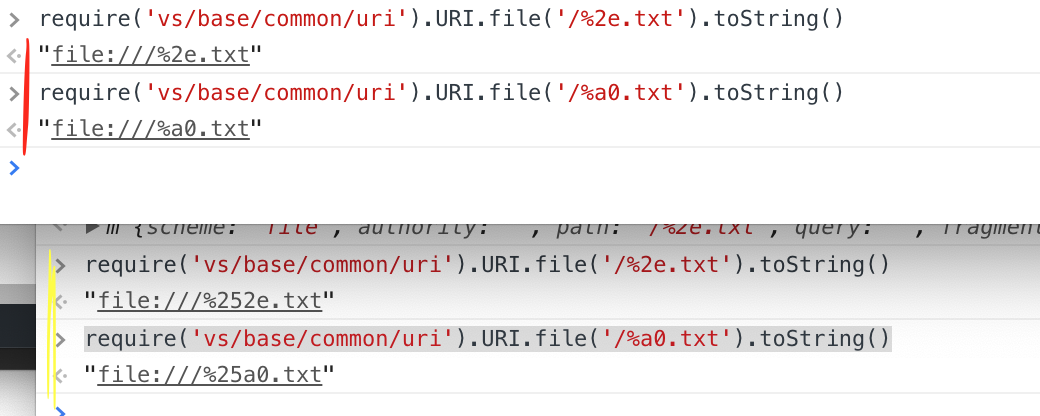
jrieken
on 4 Jul 2019
I just encountered this on mac and was completely unable to open vscode.
Deleting the following folder (which I believe contains the state of recently opened files for each project) made it possible to use vscode again:
~/Library/Application Support/Code
This folder includes global settings and keybindings keybindings.json and settings.json so remember to back these up!
Doing this also deletes the workspace states, including but not limited to: recently open projects, recently opened files, unsaved files, open tabs, tab configurations etc.
Here is the stack trace:
[main 2019-07-05T07:46:44.134Z] URIError: URI malformed
    at decodeURIComponent (<anonymous>)
    at s (/Applications/Visual Studio Code.app/Contents/Resources/app/out/vs/code/electron-main/main.js:106:693)
    at Function.parse (/Applications/Visual Studio Code.app/Contents/Resources/app/out/vs/code/electron-main/main.js:111:310)
    at Object.t.restoreRecentlyOpened (/Applications/Visual Studio Code.app/Contents/Resources/app/out/vs/code/electron-main/main.js:226:857)
    at e.getRecentlyOpenedFromStorage (/Applications/Visual Studio Code.app/Contents/Resources/app/out/vs/code/electron-main/main.js:385:457)
    at e.addEntriesFromStorage (/Applications/Visual Studio Code.app/Contents/Resources/app/out/vs/code/electron-main/main.js:385:101)
    at e.addRecentlyOpened (/Applications/Visual Studio Code.app/Contents/Resources/app/out/vs/code/electron-main/main.js:383:115)
    at t.open (/Applications/Visual Studio Code.app/Contents/Resources/app/out/vs/code/electron-main/main.js:448:116)
    at t.openFirstWindow (/Applications/Visual Studio Code.app/Contents/Resources/app/out/vs/code/electron-main/main.js:490:304)
    at a.invokeFunction.t (/Applications/Visual Studio Code.app/Contents/Resources/app/out/vs/code/electron-main/main.js:484:931)
    at l.invokeFunction (/Applications/Visual Studio Code.app/Contents/Resources/app/out/vs/code/electron-main/main.js:228:522)
    at t.<anonymous> (/Applications/Visual Studio Code.app/Contents/Resources/app/out/vs/code/electron-main/main.js:484:908)
    at Generator.next (<anonymous>)
    at o (/Applications/Visual Studio Code.app/Contents/Resources/app/out/vs/code/electron-main/main.js:13:454)
 mathiastj
on 5 Jul 2019
mathiastj
on 5 Jul 2019
This prevent code on Ubuntu to start if a faulty uri is detected
 ColdEvul
on 5 Jul 2019
ColdEvul
on 5 Jul 2019
I have verified that I can create, open and edit a file %a0.txt. Thus adding verified label.
 isidorn
on 9 Jul 2019
isidorn
on 9 Jul 2019
Had to delete "/Users/{USERNAME}/Library/Application Support/Code/storage.json". Now it starts again and is working fine.
Thanks for the thread.
 hinzhelg
on 9 Jul 2019
hinzhelg
on 9 Jul 2019
On mac's remove this file: ~/Library/Application\ Support/Code/storage.json
 dzikiqba
on 9 Jul 2019
dzikiqba
on 9 Jul 2019
Less intrusive workaround (will preserve your file history):
- rename
storage.jsontostorage.json.old - restart
- wait till we release 1.36.1 later today
- rename
storage.json.oldbad tostorage.json
Generally, the issue is that we 1.36 struggles to parse file paths that have %<hex><hex> in it, e.g. %a0.txt or fome%ef.foo and despite starting with a fresh storage.json this will come back as soon as such a file is being opened. Recovery release is almost done: https://github.com/microsoft/vscode/issues/76882
jrieken
on 9 Jul 2019
Related issues
 NikosEfthias
·
3Comments
NikosEfthias
·
3Comments
 mrkiley
·
3Comments
mrkiley
·
3Comments
 lukehoban
·
3Comments
lukehoban
·
3Comments
 sijad
·
3Comments
sijad
·
3Comments
 VitorLuizC
·
3Comments
VitorLuizC
·
3Comments
Most helpful comment
Had to delete "/Users/{USERNAME}/Library/Application Support/Code/storage.json". Now it starts again and is working fine.
Thanks for the thread.