Vscode: Keyboard shortcut for command palette stops working
Issue Type: Bug
Keyboard shortcut for the command palette often fails on Mac. Have to restart Mac to bring it back. Issue is only in VSCode.
When I try to re-assign keybaord shortcut to "show all commands" as shift+cmd+p (because it has stopped working), the P will not register, just "shift+cmd+". P key works fine on Mac in all other apps.
Keyboard shortcut fails after some time -- a few hours. Not sure how to reproduce exactly. Just leave VSCode open for a day and you should notice it. Only started doing this in last 2 or 3 versions of VSCode.
VS Code version: Code 1.35.1 (c7d83e57cd18f18026a8162d042843bda1bcf21f, 2019-06-12T14:29:22.216Z)
OS version: Darwin x64 18.6.0
System Info
|Item|Value|
|---|---|
|CPUs|Intel(R) Core(TM) i7-4850HQ CPU @ 2.30GHz (8 x 2300)|
|GPU Status|2d_canvas: enabled
checker_imaging: disabled_off
flash_3d: enabled
flash_stage3d: enabled
flash_stage3d_baseline: enabled
gpu_compositing: enabled
multiple_raster_threads: enabled_on
native_gpu_memory_buffers: enabled
rasterization: enabled
surface_synchronization: enabled_on
video_decode: enabled
webgl: enabled
webgl2: enabled|
|Load (avg)|2, 2, 2|
|Memory (System)|16.00GB (0.36GB free)|
|Process Argv|-psn_0_393312|
|Screen Reader|no|
|VM|0%|
Extensions (41)
Extension|Author (truncated)|Version
---|---|---
Bookmarks|ale|10.4.4
snapshot-tools|asv|0.3.0
vscode-multi-line-tricks|big|0.0.3
htmltagwrap|bra|0.0.7
vscode-eslint|dba|1.9.0
binary-plist|dni|0.1.0
xml|Dot|2.5.0
gitlens|eam|9.8.2
EditorConfig|Edi|0.13.0
prettier-vscode|esb|1.9.0
vscode-install-vsix|fab|1.4.0
gc-excelviewer|Gra|2.1.32
beautify|Hoo|1.5.0
jbockle-format-files|jbo|3.0.0
sublime-babel-vscode|jos|0.2.10
dotenv|mik|1.0.1
vscode-json5|mrm|1.0.0
mssql|ms-|1.6.0
python|ms-|2019.5.18875
cpptools|ms-|0.23.1
sublime-keybindings|ms-|4.0.0
debugger-for-chrome|msj|4.11.3
vscode-open-iterm2|mus|0.0.4
vscode-jest|Ort|2.9.2
vscode-docker|Pet|0.6.2
vscode-spring-boot|Piv|1.7.0
vscode-xml|red|0.7.0
vscode-yaml|red|0.4.1
elastic|ria|0.13.3
LiveServer|rit|5.6.1
vscode-workspace-switcher|sad|1.13.1
vscode-fileutils|sle|2.14.5
open-in-browser|tec|2.0.0
selectline-statusbar|tom|0.0.2
sort-lines|Tyr|1.8.0
vscode-terminal-here|Tyr|0.1.1
vscode-spring-initializr|vsc|0.4.5
vscode-icons|vsc|8.7.0
change-case|wma|1.0.0
vscode-terminal-launcher|yah|1.0.2
markdown-all-in-one|yzh|2.3.1
(3 theme extensions excluded)
 peterneely
All 22 comments
@peterneely did you happen to switch IME before the keybindings stop working?
 rebornix
on 14 Jun 2019
rebornix
on 14 Jun 2019
@rebornix, no I didn't.
Just tried the default keyboard shortcut for showing the command palette (cmd+shift+p) in VSCode on my home Mac (I was using my work Mac when I reported this), and it also fails. My workaround is to use another shortcut, but hopefully this bug will get fixed instead. Again, my "P" key works fine in general and in all other apps.
peterneely
on 15 Jun 2019
Having issues with shortcuts and command pallete here too.
Current version (no updates available). Mac OS.
Given this js:
function getDataForYear(year){
    const sheetUrl = sheets[`${year}`];  try {
        const sheetData = await fetch(sheetUrl)
        const jsonArray=await csv().fromString(sheetData)
    } catch (error) {
           console.log(error)
        console.log(`Failed to fetch sheet data for ${year}`)
    }
    return jsonArray;     }
This is the only code in the file. The file extension is js, file name is scratch.js.
After setting keyboard shortcut for format document to Sh+Cm+L (no conflicts) and then pressing the combination, nothing happens. Then I press Sh+Cm+P and select Format Document and nothing happens.
Restarted computer, keyboard shortcut is still not working.
 jcollum
on 16 Jun 2019
jcollum
on 16 Jun 2019
@jcollum @peterneely sorry for reaching out late. Could you please help follow the wiki https://github.com/microsoft/vscode/wiki/Keybinding-Issues to help provide more information to help troubleshoot?
rebornix
on 26 Jun 2019
@rebornix I'm watching this issue because I have the exact same problem; macOS 10.14 on a MacBook Pro, with external Apple keyboard. I just ran through the "Troubleshoot Mac Keybindings" points with the following results. Nothing too helpful I'm afraid, but I am more than happy to run any other kind of test.
Are you using a custom installed keyboard layout with its own sub-layouts?
No
Are you using an external ISO keyboard attached to a laptop with an ANSI keyboard?
Yes, I guess? (Apple bluetooth keyboard). I tried my MacBook Pro's built-in keyboard and the same issue exists
Are you using some keyboard layout that remaps more than the printable characters?
No
An important action is not mapped to a good keybinding by default.
I suppose that's a way of describing the issue? (command-shift-p should open the Command Palette but doesn't.)
try: use "keyboard.dispatch": "keyCode" in your settings and restart VS Code
I made this change and restarted VS Code, without improvement.
 jeff-h
on 26 Jun 2019
jeff-h
on 26 Jun 2019
I've also tested a second MacBook Pro and it's fine on that one. Cmd-shift-P works without issue. I also disabled bluetooth on my mac (and hence disabled the external keyboard), restarted VS Code and still the problem exists with the built-in keyboard.
jeff-h
on 26 Jun 2019
@rebornix, here are my replies to those questions.
Troubleshoot Mac Keybindings
Are you using a custom installed keyboard layout with its own sub-layouts?
No
Are you using an external ISO keyboard attached to a laptop with an ANSI keyboard?
I'm using the Apple wireless keyboard (with and without number pad, both US models).
Are you using some keyboard layout that remaps more than the printable characters?
No
An important action is not mapped to a good keybinding by default.
Not applicable since I'm using a US QWERTY keyboard.
Experiencing any other issue?
I tried using "keyboard.dispatch": "keyCode" in settings and restarted VS Code. No joy.
peterneely
on 28 Jun 2019
@rebornix, here is a gif showing the problem.
When I go to Preferences > Keyboard Shortcuts > edit the shortcut for "Show All Commands" > press Shift Cmd P, VSCode won't capture the P key when it follows Shift Cmd. All other keys, and the P key, work in all other cases. This is the one case where the P key simply won't register that it was pressed.
In the gif, I'm pressing P several times after Shift Cmd, but ... nothing.

peterneely
on 28 Jun 2019
@rebornix, also, this behavior is the same on the built-in MacBook Pro keyboard; it's not just a wireless keyboard problem.
peterneely
on 28 Jun 2019
@rebornix, here is a gif showing the problem.
When I go to Preferences > Keyboard Shortcuts > edit the shortcut for "Show All Commands" > press Shift Cmd P, VSCode won't capture the P key when it follows Shift Cmd. All other keys, and the P key, work in all other cases. This is the one case where the P key simply won't register that it was pressed.
In the gif, I'm pressing P several times after Shift Cmd, but ... nothing.
The same thing happened here.
Troubleshoot Mac Keybindings
Are you using a custom installed keyboard layout with its own sub-layouts?
No
Are you using an external ISO keyboard attached to a laptop with an ANSI keyboard?
I'm using a Mac Mini, so I do have a wired keyboard (with number pad).
Are you using some keyboard layout that remaps more than the printable characters?
No
VSCode Info
1.36.0 (1.36.0)

2019-07-03T12:59:35.697Z
 rosuH
on 11 Jul 2019
rosuH
on 11 Jul 2019
@rebornix, does this issue still need the label needs more info?
peterneely
on 18 Jul 2019
same issue.
 viix
on 6 Aug 2019
viix
on 6 Aug 2019
I've noticed something else about this: sometimes when the format doesn't happen it's because there is a syntax error in the code.
It's very easy to miss it when this happens, the UX could be improved.
jcollum
on 6 Aug 2019
@jcollum Please open a separate issue. It appears you have trouble with formatting JS files, which is unrelated to the cmd+shift+p issue the OP has.
@peterneely @jeff-h @rosuH
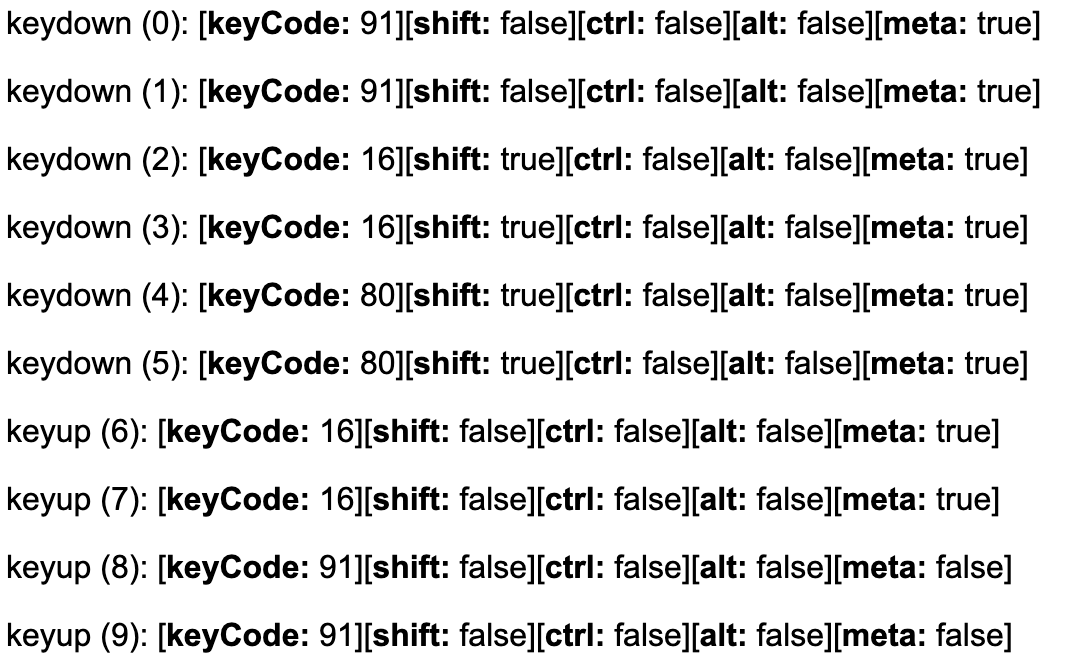
The fact that the keybinding is not registered in the input box means that we are not receiving the keybinding in VS Code. From my dealing with such things in the past, I think it means that the OS or some 3rd party software is eating it up. When cmd+shift+p is not working in VS Code, does it work in other software on your machine? What is the log when pressing cmd+shift+p at https://www.w3.org/2002/09/tests/keys.html in Chrome on the same machine?
Here is what I get on my machine, where cmd+shift+p always works fine:
 alexdima
on 7 Aug 2019
alexdima
on 7 Aug 2019
I would share more.
in my case, it looks like (not sure) it disfunction, after I open a large file(which will not tokenize by default).
my extensions includes vim and Prettify JSON.
viix
on 7 Aug 2019
@viix Does VSCode receive cmd+shift+p for you?

alexdima
on 7 Aug 2019
@alexandrudima no.
viix
on 7 Aug 2019
@alexandrudima Wow, https://www.w3.org/2002/09/tests/keys.html is illuminating. You're right, cmd+shift+p does NOT register there. I feel bad blaming VS Code! :)
Despite cmd+shift+p having no apparent effect on my Mac, the above link prompted me to go digging. First I checked System Preferences > Keyboard > Shortcuts but the combination wasn't defined there. Next I started checking all the other apps I run which have global keyboard shortcuts. And what do you know, I use an app called TickTick which has registered this combination.
Their release of 3.0.10 on Jun 12, 2019 includes the note "Added several new shortcut keys " and correlates suspiciously with the creation date of this issue :)
So I removed the shortcut in Ticktick and of course, it now works in VS Code again! 👍
jeff-h
on 8 Aug 2019
@jeff-h You are right! The TickTick has registered this combination. And I launch it when the OS login... Thank you~
rosuH
on 8 Aug 2019
Thanks for following through. I will close this issue since a 3rd party is eating up the keybinding, as I suspected :)
alexdima
on 8 Aug 2019
@jeff-h, you're the bomb! That was my problem -- and fix -- too.
I wish Mac had a centralized directory of all registered keyboard shortcuts so that these issues are easier to track down. Not the first time this has happened.
peterneely
on 8 Aug 2019
Does any OS have that? It would be nice...
jcollum
on 9 Aug 2019
Related issues
 biij5698
·
3Comments
biij5698
·
3Comments
 VitorLuizC
·
3Comments
VitorLuizC
·
3Comments
 borekb
·
3Comments
borekb
·
3Comments
 ryan-wong
·
3Comments
ryan-wong
·
3Comments
 villiv
·
3Comments
villiv
·
3Comments
Most helpful comment
@alexandrudima Wow, https://www.w3.org/2002/09/tests/keys.html is illuminating. You're right,
cmd+shift+pdoes NOT register there. I feel bad blaming VS Code! :)Despite
cmd+shift+phaving no apparent effect on my Mac, the above link prompted me to go digging. First I checked System Preferences > Keyboard > Shortcuts but the combination wasn't defined there. Next I started checking all the other apps I run which have global keyboard shortcuts. And what do you know, I use an app called TickTick which has registered this combination.Their release of 3.0.10 on Jun 12, 2019 includes the note "Added several new shortcut keys " and correlates suspiciously with the creation date of this issue :)
So I removed the shortcut in Ticktick and of course, it now works in VS Code again! 👍