Vscode: "Terminal: Clear" not working as desired
Steps to Reproduce:
- Run a python file using command palette >Python: Run file in terminal window
- Terminal shows the output. Now, clear the terminal using command palette >Terminal: Clear
- Terminal gets clear now. Run the file again in the terminal >Python: Run file in terminal window
- Here is where issue shows up - the terminal still shows all the previous outputs from before the last clear command. IMO, desired should be that terminal should not show any previously cleared outputs.
- Attached below is a gif of the screen reproducing & visualizing this issue

Does this issue occur when all extensions are disabled?:
Yes, the issue reoccurs. (Note: All except the "Python" extension were disabled. Python extension is needed to run the python file in terminal.
I had also posted in Super User forum thinking this was some issue with my system. And then I tried it on a clean build of VS code and it got repeated. Hence, I decided to post it as a bug.
Link to Super User forum question
VS Code version: Code - Insiders 1.36.0-insider (c089daa858f34631f5f827ff8a0313bf1e2ded6d, 2019-06-07T05:19:15.188Z)
OS version: Windows_NT x64 10.0.18362
System Info
|Item|Value|
|---|---|
|CPUs|Intel(R) Core(TM) i7-8700K CPU @ 3.70GHz (12 x 3696)|
|GPU Status|2d_canvas: enabled
flash_3d: enabled
flash_stage3d: enabled
flash_stage3d_baseline: enabled
gpu_compositing: enabled
multiple_raster_threads: enabled_on
native_gpu_memory_buffers: disabled_software
oop_rasterization: disabled_off
protected_video_decode: enabled
rasterization: enabled
skia_deferred_display_list: disabled_off
skia_renderer: disabled_off
surface_synchronization: enabled_on
video_decode: enabled
viz_display_compositor: disabled_off
webgl: enabled
webgl2: enabled|
|Load (avg)|undefined|
|Memory (System)|15.68GB (7.71GB free)|
|Process Argv||
|Screen Reader|no|
|VM|0%|
Extensions (1)
Extension|Author (truncated)|Version
---|---|---
python|ms-|2019.5.18875
 vivekmalhotra
All 33 comments
(Experimental duplicate detection)
Thanks for submitting this issue. Please also check if it is already covered by an existing one, like:
![vscodebot[bot] picture](https://avatars2.githubusercontent.com/in/2406?v=4&s=40) vscodebot[bot]
on 8 Jun 2019
vscodebot[bot]
on 8 Jun 2019
@vivekmalhotra this is happening because Terminal: Clear tells the frontend (the thing rendering everything) to clear, but the way that the conpty backend works is it will sometimes reprint what it thinks should be visible. Since it doesn't know about our clear it reprints the unwanted output, this doesn't happen on a regular linux/mac backend that conpty is trying to emulate.
@zadjii-msft is there anything that can be done here to tell conpty to not reprint the screen? I suspect python.exe does not enter alt mode so I'm not sure why a reprint is necessary.
 Tyriar
on 8 Jun 2019
Tyriar
on 8 Jun 2019
Hmm. That might not be a scenario that works for us right now. We might need to add an extra input sequence/signal to tell conpty to clear the buffer.
I am a little curious why the whole buffer got repainted, that does seem like a bug. However, since conpty does think that all that text is still there (because its buffer wasn't cleared, only the frontend buffer was), it might get more confused by not repainting the entire thing.
 zadjii-msft
on 10 Jun 2019
zadjii-msft
on 10 Jun 2019
@zadjii-msft might be better to fix the bug if there is one, rather than add an explicit manually clear the buffer sequence that only works on conpty.
Tyriar
on 10 Jun 2019
This issue has been closed automatically because it needs more information and has not had recent activity. See also our issue reporting guidelines.
Happy Coding!
vscodebot[bot]
on 17 Jun 2019
@zadjii-msft @Tyriar
I can confirm that the issue is still prevalent in the latest insiders build.
Unsure on how to re-open this issue?
vivekmalhotra
on 19 Jun 2019
This is a bug that's external to VsCode. It'll be fixed by work on the ConPTY API that'll be tracked by microsoft/terminal#1193.
zadjii-msft
on 19 Jun 2019
This is a bug that's external to VsCode. It'll be fixed by work on the ConPTY API that'll be tracked by microsoft/terminal#1193.
Thanks for the reply, Mike
vivekmalhotra
on 19 Jun 2019
@vivekmalhotra the bot closed it because of the needs more info label, reopened.
Tyriar
on 19 Jun 2019
Terminal clear
I run npm in terminal,then end it with "Ctrl + C" , useing code clear and get result as left(I have click enter several times),useing "ctrl + shift + p" and "terminal clear" get result as right,it clear all and terminal crashed.
terminal will back to line 1 and enterable but not clear character。
用了clear命令后,terminal返回第一行并且可编辑,但是并没有清理界面字符,使用 控制中心的Terminal clear 指令后可以清理,但是terminal崩溃了

 ghost
on 26 Jun 2019
ghost
on 26 Jun 2019
So who should be fixing the issue now? VS Code here or Windows Terminal? 😢
Any workaround at the moment? This issue is quite annoying.
 solacens
on 3 Jul 2019
solacens
on 3 Jul 2019
No debounce,Push 1s Enter,it still effective,more than 1s
ghost
on 3 Jul 2019
@solacens
It'll be fixed by work on the ConPTY API that'll be tracked by microsoft/terminal#1193.
zadjii-msft
on 3 Jul 2019
@zadjii-msft Thanks for the information. I will keep track on the related issue.
solacens
on 8 Jul 2019
I've got to exact same problem with my projects after windows update 1803 ->1903 (clean install). No idea what changed, but I've never seen this before.
 inliquid
on 13 Oct 2019
inliquid
on 13 Oct 2019
Hello @Tyriar,
I have assigned the keyboard shortcut 'ALT+M' for clearing the Terminal.
{
    "key": "alt+m",
    "command": "workbench.action.terminal.clear",
    "when": "terminalFocus"
  }
Clear the Terminal with the keyboard shortcut.
Type "node index", the cursor jumps in the Terminal.
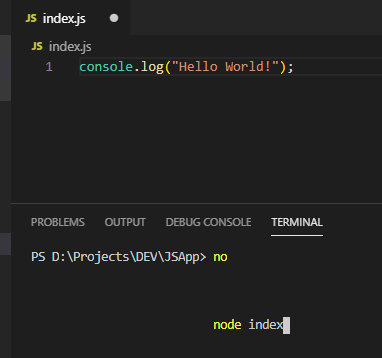
Press Enter.
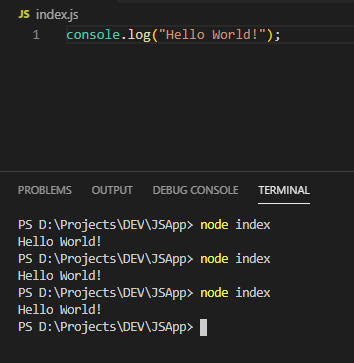
Terminal is not cleared.
Please check and let me know your comments.
Best Regards,
Karthi M R.
 mrkarthi
on 15 Nov 2019
mrkarthi
on 15 Nov 2019
I have discovered a workaround. It's a little annoying, but it is definitely better than nothing.
You need to clear the terminal with two commands:
- Command Palette
Terminal: Clear(or your chosen keyboard shortcut) - Type
clsat the terminal
Interestingly, sometimes just the cls is enough without the Terminal:Clear, and sometimes it isn't. I have not figured out why that would be.
(Note: it used to be that the cls command did not work in the integrated terminal. I guess that there was a fix for that at some point as well.)
 kohenkatz
on 15 Nov 2019
kohenkatz
on 15 Nov 2019
@kohenkatz, Thanks for your suggestions.
Command Palette Terminal: Clear (or your chosen keyboard shortcut)
This is not working anyways. I have to manually clear the Terminal by typing cls or clear.
Will this issue be fixed sooner as this is quite troublesome every time?
Best Regards,
Karthi M R.
mrkarthi
on 16 Nov 2019
It'll be fixed by work on the ConPTY API that'll be tracked by microsoft/terminal#1193.
@mrkarthi I suggest we don't bump this issue anymore, because it's already marked as an upstream problem.
But anyway, feel free to add your thumbs up to this and the upstream issue to add priority to them.
 escape0707
on 16 Nov 2019
escape0707
on 16 Nov 2019
@solacens
So who should be fixing the issue now? VS Code here or Windows Terminal? 😢
Any workaround at the moment? This issue is quite annoying.
As previously suggested, you can try entering the builtin command cls (if using cmd-shell) or clear (if using bash or similar). While less quick and annoying, it works reliably for me.
 mhaaz
on 12 Mar 2020
mhaaz
on 12 Mar 2020
cls command doesn't fix this issue at all for me!
 Yegorich555
on 12 Mar 2020
Yegorich555
on 12 Mar 2020
@Yegorich555 As I noted above, you need to use both cls and Terminal: Clear together at the moment. Either one without the other isn't enough.
kohenkatz
on 12 Mar 2020
While this issue persists, I want to share what I have been using as a temporary workaround:
- As of VS-Code v 1.44.0, executing either "cls" or "clear terminal" command in the integrated terminal seems to clear the terminal output properly
- Although, "Terminal: Clear" still does NOT work properly
- I have created a keybinding (in my case CTRL+k) to accomplish this.
Add the following code in your "keybindings.json" file (refer to the attached GIF for details)
{
        "key": "ctrl+k",
        "command": "workbench.action.terminal.sendSequence",
        "args": { "text": "cls \u000D" },
        "when": "terminalFocus"
    }
- The attached GIF shows, in order, the following:
- "Terminal: Clear" command NOT working properly
- "cls" and "clear terminal" commands working in integrated terminal
- How to modify the keybindings.json file to make a keyboard shortcut
- Verifying that keyboard shortcut works
Hope that this helps!
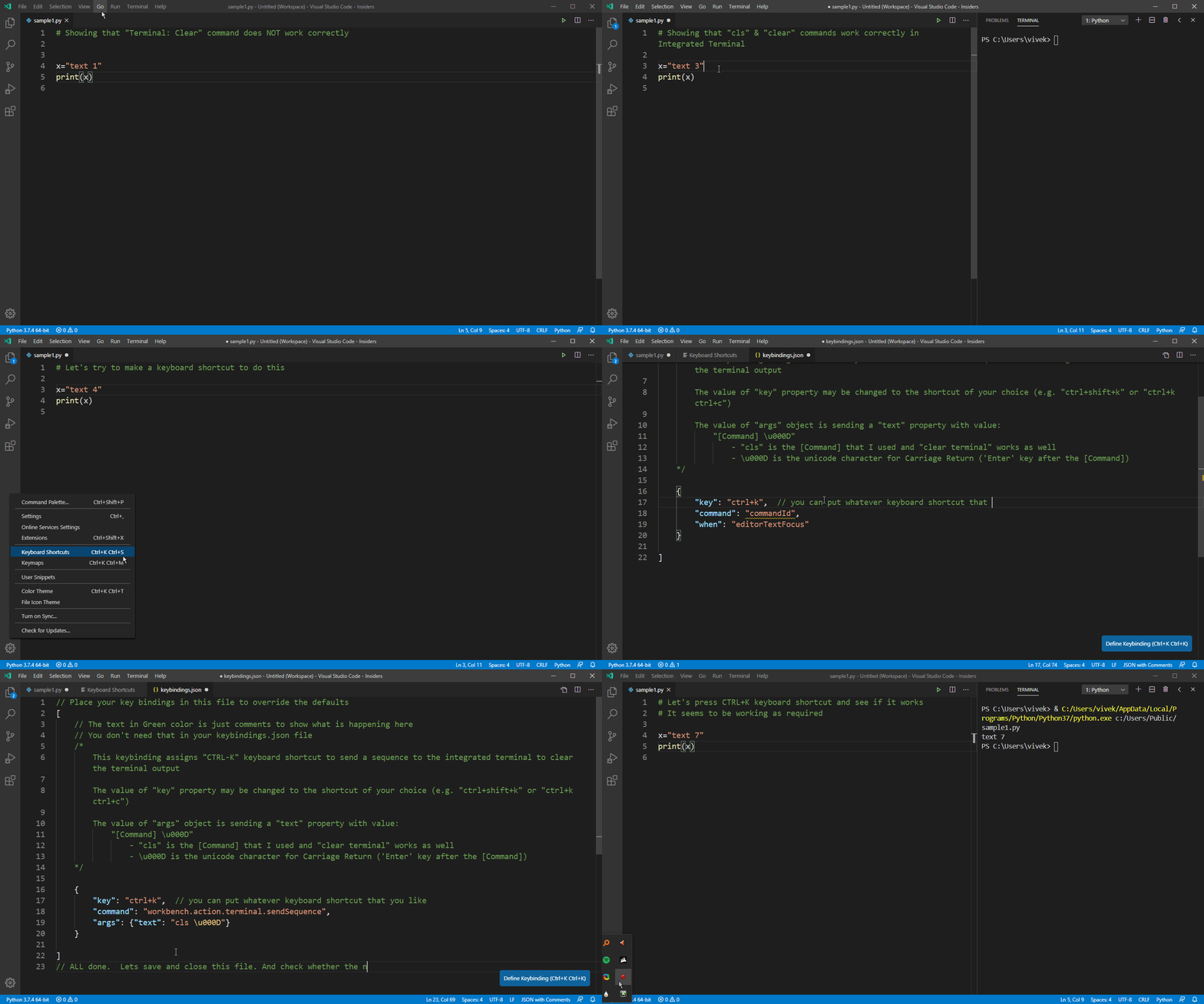
EDIT - Changed the code snippet
Using "CTRL+k" as shortcut key and not adding a "when": "terminalFocus" value in keybindings.json property somehow stops all other shortcuts that start with "CTRL+K" from running properly e.g. the default theme selection shortcut key (CTRL+K, CTRL+T)
So, either use a different shortcut key e.g. (CTRL+K, CTRL+K) for clearing the terminal - you can exclude "when": "terminalFocus" from the code snippet above and this shortcut will work even when you are not directly focused in the Terminal
Or else, include the "when": "terminalFocus" in the keybindings.json file (as is in the code snippet above) and the "CTRL+K" shortcut will run only when Terminal is in focus
vivekmalhotra
on 15 Mar 2020
On Windows 10.0.18363.778 running cls in the terminal in VS Code 1.44 does not do as described in the above comment. Instead, it does the same thing as originally reported: it seemingly clears the terminal, then running _any command_ will show (part of) the previous console output.
 Pomax
on 17 Apr 2020
Pomax
on 17 Apr 2020
I confirm. I noticed the same problem working with R and the extension vscode-R.
Initially, I reported the problem to the extension developers.
Here you can find the details with screenshots https://github.com/Ikuyadeu/vscode-R/issues/307#issuecomment-623534315
Once I verified the same problems with Python and the extension developed by Microsoft I can confirm it is a vscode issue.
I used a workaround too (a shortcut that runs an R command) but I prefer if the problem is solved.
 albertoarcagni
on 4 May 2020
albertoarcagni
on 4 May 2020
At-least clear command is working for me. Command+K stopped from long time but I see something being expected post pressing Command + K. Please check the screenshot.

 manwithsteelnerves
on 14 May 2020
manwithsteelnerves
on 14 May 2020
@manwithsteelnerves https://code.visualstudio.com/docs/editor/integrated-terminal#_why-is-cmdkctrlk-not-clearing-the-terminal
Tyriar
on 14 May 2020
@Tyriar Thanks a lot it worked! Any reason it suddenly stopped? Can it be due to external extensions?
manwithsteelnerves
on 14 May 2020
@manwithsteelnerves that happened when any extension adds a cmd+k chord keybinding. Actually that might have been fixed after the terminal.integrated.allowChords setting was added (true by default) 🤔, anyway that's not related to this particular issue.
Tyriar
on 14 May 2020
I would like to join this conversation by saying that the use of '\033c' is also buggy. This is similar to issue #94231, which was deemed a duplicate of this one. When printing '\033c' to clear the terminal 3 (non blank) lines will correctly print in the terminal before it skips enough lines so that any new content can't be seen when scrolled to the top of the terminal. if the 3rd line is the end of input() the cursor will skip the same number of lines but be offset to match the end of the correct line. In addition, if you go back 2 entries the line you should be on is reprinted in the displaced area. The program ending will fix the spacing unless a path prompt is printed as/before the 4th line, where the next thing printed (or the 4th line if you were already on it) will skip lines. if you just click enter the path will back-fill the skipped lines, else it prints after your current line. If you cycle to your previous 2 entries before entering anything into the path prompt is will also duplicate at the bottom despite your cursor not being there, leaving your 1st previous entry on the line you were just on.
 CullenW99
on 23 Aug 2020
CullenW99
on 23 Aug 2020
If you are on linux then in .bashrc at last add a line 'alias clear='/bin/clear/' and save and at last you can retry
 Pratik-Hub
on 23 Sep 2020
Pratik-Hub
on 23 Sep 2020
I'm sorry to bump the issue again, but I couldn't find the bit that I wanted to add to the conversation. After clearing the terminal, when you switch to another terminal and back, the contents are there again. Running cls isn't an option for me because I'm looking at the output of several running processes.
My guess is that the cause is the same and that fixing the upstream bug will fix this too (or allowing this to be fixed). Could be useful as a test scenario though.
 mrwensveen
on 30 Sep 2020
mrwensveen
on 30 Sep 2020
My workaround for this. The history is still available when scrolled above.
{ "key": "alt+n", "command": "workbench.action.terminal.sendSequence", "args": { "text": "clear\u000D" } }
mrkarthi
on 4 Oct 2020
Related issues
 philipgiuliani
·
3Comments
philipgiuliani
·
3Comments
 trstringer
·
3Comments
trstringer
·
3Comments
 vsccarl
·
3Comments
vsccarl
·
3Comments
 sirius1024
·
3Comments
sirius1024
·
3Comments
 VitorLuizC
·
3Comments
VitorLuizC
·
3Comments
Most helpful comment
@mrkarthi I suggest we don't bump this issue anymore, because it's already marked as an upstream problem.
But anyway, feel free to add your thumbs up to this and the upstream issue to add priority to them.