Vscode: Sluggish User Interface on High-Resolution Screens
Issue Type: Performance Issue
Hey there, I often experience sluggish and laggy UI when working with VS Code, e.g. clicking on tabs, activity bar icons, menus, etc.
Is this related to certain machines or is it a global problem? And are there currently any workarounds? Isn't VS Code supposed to be smooth and fast by nature?
Thanks in advance.
VS Code version: Code 1.35.0 (553cfb2c2205db5f15f3ee8395bbd5cf066d357d, 2019-06-04T01:17:12.481Z)
OS version: Windows_NT x64 10.0.18362
System Info
|Item|Value|
|---|---|
|CPUs|Intel(R) Core(TM) i7-7500U CPU @ 2.70GHz (4 x 2904)|
|GPU Status|2d_canvas: enabled
checker_imaging: disabled_off
flash_3d: enabled
flash_stage3d: enabled
flash_stage3d_baseline: enabled
gpu_compositing: enabled
multiple_raster_threads: enabled_on
native_gpu_memory_buffers: disabled_software
rasterization: enabled
surface_synchronization: enabled_on
video_decode: enabled
webgl: enabled
webgl2: enabled|
|Load (avg)|undefined|
|Memory (System)|7.89GB (0.79GB free)|
|Process Argv||
|Screen Reader|no|
|VM|0%|
Process Info
CPU %   Mem MB     PID  Process
    1       78    2888  code main
    2       67    1976     window (Issue Reporter)
    0      220    9180     gpu-process
    0       58   21624     shared-process
    0      190   24260     window (index.html - MyPortfoiloWebsite - Visual Studio Code)
    0       16    5028       searchService
    0       12    9496       watcherService
    0        5    1712         console-window-host (Windows internal process)
    0      102   21196       extensionHost
    0       22    3588         electron_node server.js
    0       17    8212         electron_node sass-lint-server.js
    0        3   14940         cmd /s /c "C:\Users\AmirHossein\.vscode\extensions\ms-vscode.csharp-1.19.1\.omnisharp\1.32.19\OmniSharp.exe -s "d:\My Development\Projects\MyPortfoiloWebsite" --hostPID 21196 DotNet:enablePackageRestore=false --encoding utf-8 --loglevel information --plugin C:\Users\AmirHossein\.vscode\extensions\ms-vscode.csharp-1.19.1\.razor\OmniSharpPlugin\Microsoft.AspNetCore.Razor.OmniSharpPlugin.dll formattingOptions:useTabs=false formattingOptions:tabSize=4 formattingOptions:indentationSize=4"
    0        5     944           console-window-host (Windows internal process)
    0       46   21472           C:\Users\AmirHossein\.vscode\extensions\ms-vscode.csharp-1.19.1\.omnisharp\1.32.19\OmniSharp.exe  -s "d:\My Development\Projects\MyPortfoiloWebsite" --hostPID 21196 DotNet:enablePackageRestore=false --encoding utf-8 --loglevel information --plugin C:\Users\AmirHossein\.vscode\extensions\ms-vscode.csharp-1.19.1\.razor\OmniSharpPlugin\Microsoft.AspNetCore.Razor.OmniSharpPlugin.dll formattingOptions:useTabs=false formattingOptions:tabSize=4 formattingOptions:indentationSize=4
    0       21   15308         electron_node server.js
    0       75   16032         electron_node server.js
    0       28   19600         "C:\Users\AmirHossein\AppData\Local\Programs\Microsoft VS Code\Code.exe" "c:\Users\AmirHossein\AppData\Local\Programs\Microsoft VS Code\resources\app\extensions\html-language-features\server\dist\htmlServerMain" --node-ipc --clientProcessId=21196
    0       30   20120         C:\Users\AmirHossein\.vscode\extensions\ms-vscode.csharp-1.19.1\.razor\rzls.exe -lsp --logLevel None
    0        4   18644           console-window-host (Windows internal process)
    0       21   21284         "C:\Users\AmirHossein\AppData\Local\Programs\Microsoft VS Code\Code.exe" "c:\Users\AmirHossein\AppData\Local\Programs\Microsoft VS Code\resources\app\extensions\css-language-features\server\dist\cssServerMain" --node-ipc --clientProcessId=21196
    0       16   23128         "C:\Users\AmirHossein\AppData\Local\Programs\Microsoft VS Code\Code.exe" "c:\Users\AmirHossein\AppData\Local\Programs\Microsoft VS Code\resources\app\extensions\json-language-features\server\dist\jsonServerMain" --node-ipc --clientProcessId=21196
    0       28   23136         electron_node server.js
    0        9   23456       electron-crash-reporter
Workspace Info
|  Window (index.html - MyPortfoiloWebsite - Visual Studio Code)
|    Folder (MyPortfoiloWebsite): 7 files
|      File types: scss(2) png(1) cs(1) html(1) razor(1) MD(1)
|      Conf files:;
Extensions (35)
Extension|Author (truncated)|Version
---|---|---
better-comments|aar|2.0.5
Bookmarks|ale|10.4.4
path-intellisense|chr|1.4.2
vscode-faker|dee|1.3.0
vscode-html-css|ecm|0.2.0
vsc-material-theme|Equ|2.9.0
prettier-vscode|esb|1.9.0
auto-rename-tag|for|0.1.0
code-runner|for|0.9.10
sass-lint|gle|1.0.5
todo-tree|Gru|0.0.134
beautify|Hoo|1.5.0
rest-client|hum|0.21.3
csharpextensions|jch|1.3.0
vscode-csharp-snippets|jor|0.3.1
docomment|k--|0.1.7
vscode-gutter-preview|kis|0.19.0
vscode-filesize|mkx|2.1.3
vscode-scss|mrm|0.6.2
python|ms-|2019.5.18875
csharp|ms-|1.19.1
color-highlight|nau|2.3.0
material-icon-theme|PKi|3.8.0
polacode|pnp|0.3.2
vscode-css-navigation|puc|1.6.2
Csharp-ASPNETCore|rah|1.11.0
live-sass|rit|3.0.0
LiveServer|rit|5.6.1
sass-indented|rob|1.5.1
code-settings-sync|Sha|3.2.9
swdc-vscode|sof|0.16.13
code-spell-checker|str|1.7.16
ayu|tea|0.18.0
vscode-wakatime|Wak|2.1.2
markdown-all-in-one|yzh|2.3.1
(1 theme extensions excluded)
 AradAral
All 37 comments
Please follow this guide for how to help us track down performance issues https://github.com/microsoft/vscode/wiki/Performance-Issues
 egamma
on 8 Jun 2019
egamma
on 8 Jun 2019
Please follow this guide for how to help us track down performance issues https://github.com/microsoft/vscode/wiki/Performance-Issues
Visual Studio Code is consuming a lot of CPU:
Probably not.
Windows Task Manager:
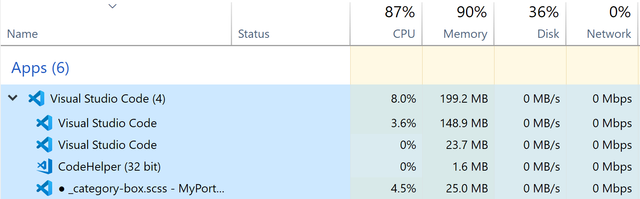
VS Code Internal Process Explorer:
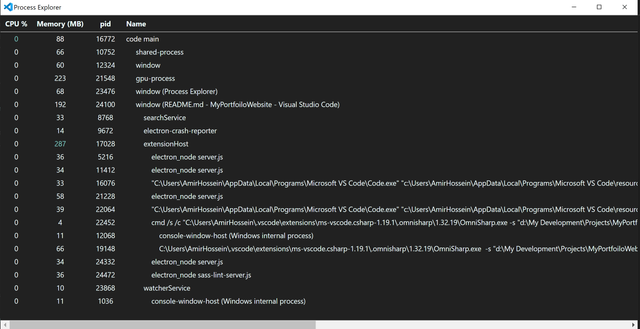
CMD: code --status:
Run with Extensions Disabled
I disabled all extensions (including color themes and icon themes) but the problem still exists.
JavaScript Profiler:
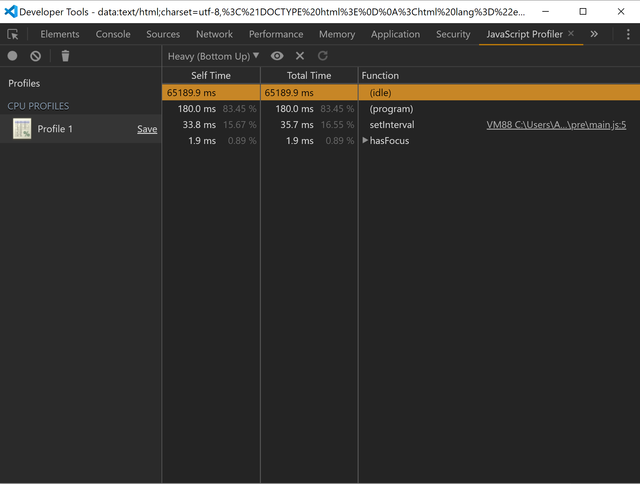
Note:
I'm not sure if I followed the steps correctly. If I didn't, please tell me.
Description:
The problem is about the GUI. For example, when I want to open the sidebar (using Ctrl + B or clicking on one of the buttons on the activity bar), it often takes around 1s or 1.5s for it to open, the same thing happens when I want to open the panel (terminal output, etc.). Another example would be when I want to switch tabs or editor groups, again, every time I click on another tab, it takes about 1s for it to open. This problem doesn't exist in Visual Studio 2019 or almost any other application (except for those that have been made by using Electron.js - See the "What I think" section).
Anyways, I'd like to experience a smooth and fast user interface, but I'm currently not, with VS Code.
What I think:
I think that the problem comes down to the fact that the VS Code is not a native desktop application, and it's been made with Electron.js (which I think is cancer!). e.g. I've got the same problem with the WhatsApp desktop app, it's extremely laggy and unsmooth, and surprisingly, it's also been made with Electron.js. I know that it's not possible for you to rewrite the entire application...!!! But it'd be highly appreciated if you help me experience a better UI.
Thanks in advance.
AradAral
on 9 Jun 2019
I think that the problem comes down to the fact that the VS Code is not a native desktop application, and it's been made with Electron.js (which I think is cancer!)
Prove it - it OK to believe something but if you cannot show numbers or point to something concrete then this discussion should be held over lunch/campfire/beer but not in an issue
 jrieken
on 12 Jun 2019
jrieken
on 12 Jun 2019
I think that the problem comes down to the fact that the VS Code is not a native desktop application, and it's been made with Electron.js (which I think is cancer!)
Prove it - it OK to believe something but if you cannot show numbers or point to something concrete then this discussion should be held over lunch/campfire/beer but not in an issue
I didn't say I'm sure sir. I said based on my experience with Electron.js apps (WhatsApp, etc.) I "THINK" that this could be one of the reasons. However, if you know the actual reasons behind this problem, please tell me, I'm still waiting for a helpful response.
Thanks in Advance.
AradAral
on 12 Jun 2019
Well, this is guide we have pointed you to: https://github.com/microsoft/vscode/issues/75111#issuecomment-500158655. There is a section about the renderer/UX process and how to get numbers: https://github.com/microsoft/vscode/wiki/Performance-Issues#profiling-the-renderer-process
jrieken
on 12 Jun 2019
Well, this is guide we have pointed you to: #75111 (comment). There is a section about the renderer/UX process and how to get numbers: https://github.com/microsoft/vscode/wiki/Performance-Issues#profiling-the-renderer-process
Well, I followed all the steps and it didn't help me.
What now?
AradAral
on 12 Jun 2019
By the way, it'd be better if you treat your users a bit nicer than this.
AradAral
on 12 Jun 2019
steps and it didn't help me.
How about this: (1) start UX profiling, (2) hide/show side bar, (3) stop UX profiling and share the profile. In addition to the CPU profiler, also use the Performance tab tools. Also, repeat step (2) with some other UX interaction you believe is slow
jrieken
on 12 Jun 2019
Opening/closing the sidebar:
CPU-20190612T150154.zip
Switching tabs and editor groups:
CPU-20190612T150414.zip
Tell me if it's not what you wanted.
AradAral
on 12 Jun 2019
That's what I need. Hide closing the side bar seems to be in range of 200ms for you. That's a lot slower than for me (60ms, 2015 MBP). How many editors groups do you have open when hiding/showing the side bar?
jrieken
on 12 Jun 2019
That's what I need. Hide closing the side bar seems to be in range of 200ms for you. That's a lot slower than for me (60ms, 2015 MBP). How many editors _groups_ do you have open when hiding/showing the side bar?
I usually have 1 to 2 editor groups, not more. (I had 2 editor groups when I recorded)
I also think it's worth noting a few things:
- Opening/closing the sidebar is so much faster when I have no editor opened.
- The more editor groups I have, the slower things become (including opening and closing the sidebar).
- This time it was even faster than usual, it's usually about 500ms. At least I feel so.
AradAral
on 12 Jun 2019
I'm sorry @rebornix, would you please pay attention to this issue?
AradAral
on 15 Jun 2019
Well, I just found out that it has something to do with my screen resolution.
When I change my resolution from 4K (3840 x 2160) to Full HD (1920 x 1080), VS Code becomes super fast, surprisingly.
However, it'll be highly appreciated if you give me some solution to this problem.
AradAral
on 16 Jun 2019
@rebornix Pay attention to this issue, please.
AradAral
on 23 Jun 2019
@AmirHosseinHmd didn't realize this issue was assigned to me. Do you think we can call it a duplicate of https://github.com/microsoft/vscode/issues/9432 ?
 rebornix
on 24 Jun 2019
rebornix
on 24 Jun 2019
@AmirHosseinHmd didn't realize this issue was assigned to me. Do you think we can call it a duplicate of #9432 ?
Oh, thank god you responded.
Well, I think the #9432 is basically reporting the same problem, yes. But no one really seems to care about this issue. What do you suggest to do?
AradAral
on 28 Jun 2019
We are building exploration builds that use a much newer version of our UI framework (Electron version 6.0.x). I wonder if this issue reproduces with one of these builds, could you try? Download:
 bpasero
on 5 Aug 2019
bpasero
on 5 Aug 2019
I have the same problem 3 screens and poor intel gfx, it is almost impossible to use the built in terminal with electron.js v4.2.10. It is better if I only use the laptop screen.
At home I have 3 screens but a decent nvidia gfx card, I do not see this issue at all.
I can confirm the exploration build for windows above fixes my problem, Finally I can use the built in terminal. I've not seen any problems with plugins yet (I use python, gitlens, docker mainly).
The release version:
Version: 1.38.0 (user setup)
Commit: 3db7e09f3b61f915d03bbfa58e258d6eee843f35
Date: 2019-09-03T21:49:13.459Z
Electron: 4.2.10
Chrome: 69.0.3497.128
Node.js: 10.11.0
V8: 6.9.427.31-electron.0
OS: Windows_NT x64 10.0.18362
The exploration version:
Version: 1.37.0-exploration (system setup)
Commit: 54c6f2047b7e26f9dd6f991d9831ead1f06964b2
Date: 2019-07-09T10:09:10.044Z
Electron: 6.0.0-beta.12
Chrome: 76.0.3809.54
Node.js: 12.0.0
V8: 7.6.303.18-electron.0
OS: Windows_NT x64 10.0.18362
 fenchu
on 10 Sep 2019
fenchu
on 10 Sep 2019
Given https://github.com/microsoft/vscode/issues/15211 we think about allowing to configure Chrome command line flags to be used on each startup. Is there a particular command line flag that makes the situation better for this issue? Then we can add it to the list of supported flags.
bpasero
on 9 Oct 2019
@AmirHosseinHmd
I wonder if this issue is reproducible when running VSCode in a browser or bare Electron. For that purpose, can you please:
git clone https://github.com/bpasero/vscode-runner.gityarn- Web (Chrome only):
yarn web - Electron:
yarn electron
And report back if you still reproduce the issue in either or both web and Electron?
bpasero
on 15 Oct 2019
Absolutely the same (sluggish) for:
- Installed VSCode
- yarn web
- yarn electron
* Ubuntu 19.10 (kernel 5.3), Nvidia 435.21 , gtx 1660 ti
* The most interesting part of an issue is that with AMD gpu (rx 550, which is x3 slower than 1660 ti) it is much smoother, however not perfect so.
* Also, i noticed, that cursor shifting is much much better with any gpu unlike with --disable-gpu flag, BUT windows / tiles resizing in split mode is much slower and unsmooth with gpu rather than on cpu (--disable-gpu).
 up-to-you
on 20 Oct 2019
up-to-you
on 20 Oct 2019
@up-to-you would you be willing to transform this issue into a bug against Chrome (crbug.com) then? I think it would be great if you could file it as there are possibly some questions being asked by the Chrome team about your setup.
bpasero
on 21 Oct 2019
FYI: i just filed the issue https://bugs.chromium.org/p/chromium/issues/detail?id=1016329
@bpasero it will be a good idea to verify it for some inaccuracy and respectively to comment there.
up-to-you
on 21 Oct 2019
Thanks a ton!
bpasero
on 21 Oct 2019
@bpasero it got fixed for me in 1.40 version!!!
up-to-you
on 8 Nov 2019
Anyone else sees an improvement?
bpasero
on 8 Nov 2019
I'm still having this problem with 1.43.2 (Windows 10). Is there any active work on this currently?
 muodov
on 8 Apr 2020
muodov
on 8 Apr 2020
Still seeing this issue with 4K displays. My PC specs should be more than enough for this. RTX 2070 Super, Intel i9. Scrolling a large C# file on my 4K primary display runs at barely 10 FPS.
 Zee2
on 16 Jun 2020
Zee2
on 16 Jun 2020
I'm seeing this issue on my 2015 MBP when VS Code is on my 4k secondary monitor. There is no UI latency on my built-in monitor.
Version: 1.46.1
Commit: cd9ea6488829f560dc949a8b2fb789f3cdc05f5d
Date: 2020-06-17T21:17:14.222Z
Electron: 7.3.1
Chrome: 78.0.3904.130
Node.js: 12.8.1
V8: 7.8.279.23-electron.0
OS: Darwin x64 18.7.0
 davenovelli
on 29 Jun 2020
davenovelli
on 29 Jun 2020
I've got the same performance issue:
computer: iMac 5k 2020, core i5-9600k, 32G RAM, Radeon Pro 580X
os: bootcamp windows 10 professional, version 2004 1904.508
vscode:
Version: 1.49.0 (user setup)
Commit: e790b931385d72cf5669fcefc51cdf65990efa5d
Date: 2020-09-10T13:22:08.892Z
Electron: 9.2.1
Chrome: 83.0.4103.122
Node.js: 12.14.1
V8: 8.3.110.13-electron.0
OS: Windows_NT x64 10.0.19041
I just opened 5 very small file (40 or 50 lines of json), and move cursor up and down, the UI is extremely sluggish. However, I tried some WYSIWYG editor in chromium edge browser, there was no performance issue.
Here is my performance profile,
Profile-20200916T135512.zip
 OYangXiao
on 16 Sep 2020
OYangXiao
on 16 Sep 2020
@OYangXiao or anyone else in this thread facing the slowdown with 4k monitors on windows, can you provide chrometrace.log following the steps below,
- Create trace.json somewhere on your disk with the following content:
{
 "result_file": "<some-absolute-writable-path>\chrometrace.log",
 "trace_config": {
 "record_mode": "record-until-full",
 "included_categories": [
     "blink",
     "browser",
     "io",
     "ipc",
     "content",
     "renderer",
     "renderer_host",
     "latency",
     "benchmark",
     "gpu",
     "cc",
     "toplevel",
     "viz",
     "v8",
     "input",
     "disabled-by-default-renderer.scheduler"
 ],
 "excluded_categories": ["*"]
 }
}
- Start code --trace-config-file="
\trace.json" - Perform the steps that indicate slowdown
- Quit the editor
 deepak1556
on 13 Oct 2020
deepak1556
on 13 Oct 2020
Also please check if the latest insiders fixes the issue https://code.visualstudio.com/insiders/. Thanks!
deepak1556
on 16 Oct 2020
This issue has been closed automatically because it needs more information and has not had recent activity. See also our issue reporting guidelines.
Happy Coding!
 vscode-triage-bot
on 24 Oct 2020
vscode-triage-bot
on 24 Oct 2020
Please don't close this!!!! This is still a huge issue for high resolution displays!
Zee2
on 25 Oct 2020
@Zee2 can you check if this is still an issue with latest insiders https://code.visualstudio.com/insiders/, and if so, please provide the trace generated following https://github.com/microsoft/vscode/issues/75111#issuecomment-707500834
deepak1556
on 25 Oct 2020
@deepak1556 Yes, will do.
Zee2
on 25 Oct 2020
@deepak1556 I've tested with a fresh Insiders install, no plugins, etc. System specs are Windows 10, GTX 1080ti, i7 7700k, 32 GB RAM.
I repro'd it successfully; when scrolling a sizeable C file, the viewport performance drops to < 1 FPS.
The chrometrace.log is here on Onedrive: https://1drv.ms/u/s!Arc6MwgsCiwij58m5tfpUXRTq9yPKg
P.S. Also, hello from a fellow MSFT-er :)
Zee2
on 25 Oct 2020
Related issues
 villiv
·
3Comments
villiv
·
3Comments
 borekb
·
3Comments
borekb
·
3Comments
 shanalikhan
·
3Comments
shanalikhan
·
3Comments
 lukehoban
·
3Comments
lukehoban
·
3Comments
 sijad
·
3Comments
sijad
·
3Comments
Most helpful comment
I'm still having this problem with 1.43.2 (Windows 10). Is there any active work on this currently?