Vscode: Screen Flickering with macOS 10.14.5 & VSCode 1.34.0
Issue Type: Bug
I have my MBP (docked, laptop lid closed) connected to an external 4K display, and the screen flickering is getting pretty obnoxious. Happens routinely when switching tabs. I tried disabling all extensions and running with code --disable-gpu and --ignore-gpu-blacklist which didn't solve it in my testing. Any ideas on other workarounds?
Ideally I'd want this fixed, and not need to open it from the command line every time.
VS Code version: Code 1.34.0 (a622c65b2c713c890fcf4fbf07cf34049d5fe758, 2019-05-15T21:59:22.738Z)
OS version: Darwin x64 18.6.0
System Info
|Item|Value|
|---|---|
|CPUs|Intel(R) Core(TM) i7-7700HQ CPU @ 2.80GHz (8 x 2800)|
|GPU Status|2d_canvas: enabled
checker_imaging: disabled_off
flash_3d: enabled
flash_stage3d: enabled
flash_stage3d_baseline: enabled
gpu_compositing: enabled
multiple_raster_threads: enabled_on
native_gpu_memory_buffers: enabled
rasterization: enabled
surface_synchronization: enabled_on
video_decode: enabled
webgl: enabled
webgl2: enabled|
|Load (avg)|3, 2, 2|
|Memory (System)|16.00GB (0.25GB free)|
|Process Argv||
|Screen Reader|no|
|VM|0%|
Extensions (105)
Extension|Author (truncated)|Version
---|---|---
better-comments|aar|2.0.5
html-snippets|abu|0.2.1
scss-lint|ada|0.1.8
vscode-caniuse|aga|0.5.0
vscode-javascript-snippet-pack|aka|0.1.5
project-manager|ale|10.5.1
spellright|ban|3.0.38
color-info|bie|0.5.1
markdown-checkbox|bie|0.1.3
markdown-emoji|bie|0.0.9
markdown-preview-github-styles|bie|0.1.6
markdown-yaml-preamble|bie|0.0.4
htmltagwrap|bra|0.0.7
better-toml|bun|0.3.2
markdown-jira|chi|1.1.0
npm-intellisense|chr|1.3.0
path-intellisense|chr|1.4.2
regex|chr|0.2.0
open-html-in-browser|cod|0.1.21
gitignore|cod|0.6.0
bracket-pair-colorizer-2|Coe|0.0.28
compulim-vscode-closetag|Com|1.2.0
vscode-svgviewer|css|2.0.0
scala|dal|0.0.5
vue-peek|dar|1.0.2
vscode-markdownlint|Dav|0.26.0
vscode-eslint|dba|1.9.0
vscode-dash|dee|2.1.0
xml|Dot|2.4.0
gitlens|eam|9.7.4
vscode-html-css|ecm|0.2.0
EditorConfig|Edi|0.13.0
vscode-npm-script|eg2|0.3.7
LogFileHighlighter|emi|2.5.0
vscode-great-icons|emm|2.1.47
json-tools|eri|1.0.2
prettier-vscode|esb|1.9.0
vscode-todo-plus|fab|4.13.0
vimL|fal|0.0.3
markdown-table-formatter|fcr|1.4.3
git-project-manager|fel|1.7.1
file-icons|fil|1.0.17
auto-close-tag|for|0.5.6
auto-rename-tag|for|0.0.15
code-runner|for|0.9.9
shell-format|fox|4.0.11
vscode-javac|geo|0.2.19
nightswitch|gha|1.1.0
beautify|Hoo|1.5.0
output-colorizer|IBM|0.1.2
applescript|idl|0.14.2
golang-tdd|joa|0.0.9
intellij-idea-keybindings|k--|0.2.32
swift|Kas|0.0.3
vscode-gutter-preview|kis|0.19.0
vscode-fix-checksums|leh|1.1.0
expand-region|let|0.1.2
scratchpad|mac|0.0.3
MagicPython|mag|1.1.0
terraform|mau|1.3.11
rainbow-csv|mec|1.0.0
HTMLHint|mka|0.6.0
python|ms-|2019.4.12954
cpptools|ms-|0.23.1
csharp|ms-|1.19.1
Go|ms-|0.10.2
debugger-for-chrome|msj|4.11.3
vuejs-extension-pack|mub|1.1.3
vetur|oct|0.21.0
advanced-new-file|pat|1.2.0
vscode-css-peek|pra|2.2.0
itunes-vscode|Psy|0.9.1
seti-icons|qin|0.1.3
java|red|0.45.0
vscode-yaml|red|0.4.0
vscode-sort-json|ric|1.13.0
bash-debug|rog|0.3.5
rust|rus|0.6.1
partial-diff|ryu|1.4.0
crates|ser|0.4.3
code-settings-sync|Sha|3.2.9
markdown-preview-enhanced|shd|0.3.13
vscode-fileutils|sle|2.13.7
guides|spy|0.9.3
autoimport|ste|1.5.3
rewrap|stk|1.9.1
ayu|tea|0.18.0
vscode-status-bar-format-toggle|tom|1.5.0
terminal-tabs|Tyr|0.2.0
vscode-lldb|vad|1.2.3
vscodeintellicode|Vis|1.1.6
vscode-swift-development-environment|vkn|2.7.1
vscode-java-debug|vsc|0.18.0
vscode-java-dependency|vsc|0.4.0
vscode-java-pack|vsc|0.7.1
vscode-java-test|vsc|0.16.0
vscode-maven|vsc|0.17.0
vscode-icons|vsc|8.6.0
vscode-todo-highlight|way|1.0.4
vscode-import-cost|wix|2.12.0
change-case|wma|1.0.0
vscode-jumpy|wma|0.3.1
JavaScriptSnippets|xab|1.7.2
markdown-all-in-one|yzh|2.3.1
propertylist|zho|0.0.2
(7 theme extensions excluded)
 macintacos
All 74 comments
We are building exploration builds that use a much newer version of our UI framework (Electron version 4.0.x). I wonder if this issue reproduces with one of these builds, could you try? Download:
 bpasero
on 23 May 2019
bpasero
on 23 May 2019
Hi, having exactly the same problem as macintacos describes above. Tried the exploration build that bpasero linked, but the flickering still remains. I'm not 100% sure, but I think the problem escaleted on the latest 1.34.0 build.
 iamanders
on 24 May 2019
iamanders
on 24 May 2019
@macintacos please see https://github.com/microsoft/vscode/issues/74098#issuecomment-495271855
bpasero
on 24 May 2019
@bpasero apologies, wasn't in my normal setup yesterday when you sent the initial comment.
The exploration build appears to have worked for me! Any ideas when it will be available in the stable build? Or do I have to continue using the Exploration build for a long while? (I'd prefer not to actually use it for _too_ long; not a fan of running beta builds on my production applications 😄)
macintacos
on 24 May 2019
We aim for June/July.
bpasero
on 24 May 2019
@bpasero When I run that Exploration build I see the following (see below). It indicates that the Exploration build is basically running the equivalent flags of code-exploration --disable-gpu except for a few items. Without the GPU fully enabled I'm not sure this tests anything. Is that due to some blacklisting done on the Electron 4.0+ side that you have no control over?
$ code-exploration --status
Version:          Code - Exploration 1.32.0-exploration (14236f9f44cc7c94055bb8e65ebda29a4a91ddc7, 2019-02-18T11:51:08.890Z)
OS Version:       Darwin x64 18.6.0
CPUs:             Intel(R) Core(TM) i7-8750H CPU @ 2.20GHz (12 x 2200)
Memory (System):  16.00GB (0.43GB free)
Load (avg):       2, 2, 2
VM:               0%
Screen Reader:    no
Process Argv:     -psn_0_340051
GPU Status:       2d_canvas:                     disabled_software
                  flash_3d:                      disabled_software
                  flash_stage3d:                 disabled_software
                  flash_stage3d_baseline:        disabled_software
                  gpu_compositing:               disabled_software
                  multiple_raster_threads:       enabled_on
                  native_gpu_memory_buffers:     enabled
                  oop_rasterization:             disabled_off
                  protected_video_decode:        disabled_off
                  rasterization:                 disabled_software
                  skia_deferred_display_list:    disabled_off
                  skia_renderer:                 disabled_off
                  surface_synchronization:       enabled_on
                  video_decode:                  disabled_software
                  viz_display_compositor:        disabled_off
                  webgl:                         disabled_off
                  webgl2:                        disabled_off

CPU %   Mem MB     PID  Process
   20      164    5757  code-exploration main
    0       49    5762     gpu-process
    0      197    5766     window (Welcome)
    0      131    5796       extensionHost
    0       82    5800     shared-process

$ code-exploration --version
1.32.0-exploration
14236f9f44cc7c94055bb8e65ebda29a4a91ddc7
x64
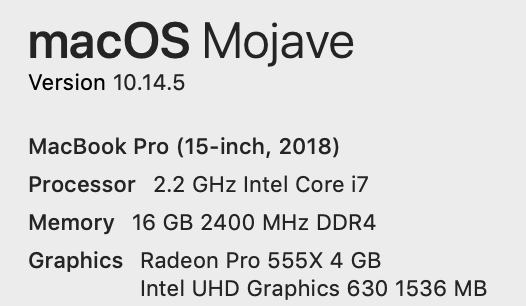
For MacOS and MacBook:
 alxgrtnstrngl
on 24 May 2019
alxgrtnstrngl
on 24 May 2019
@bpasero Wanted to confirm that the Exploration build does not work, I still see flickering when I close and open the terminal pane. I don't think Electron 4.0+ fixes this problem.
alxgrtnstrngl
on 24 May 2019
Using with an external Thunderbolt Display is fine with me.
 andremacola
on 27 May 2019
andremacola
on 27 May 2019
Are there any updates on this issue? I started seeing heavy flickering after upgrade to Mojave. Using 1.37.0-insider, and an external 4K Dell monitor over USB-C -> DisplayPort connector.
It goes away if I set --disable-gpu however.
 dinvlad
on 11 Jul 2019
dinvlad
on 11 Jul 2019
@dinvlad
We are building exploration builds that use a much newer version of our UI framework (Electron version 6.0.x). I wonder if this issue reproduces with one of these builds, could you try? Download:
bpasero
on 11 Jul 2019
Unfortunately, I still see the same flickering using the exploration build.
dinvlad
on 12 Jul 2019
System: 15" MBP 2017, macOS 10.14.5, Radeon Pro 560 (4GB), Eizo EV2785 4K (USB-C/USB-C), vscode 1.36.1
Observations:
- flickering only happens on external display
- (fullscreen) flickering got worse after macOS update 10.14.3 -> 10.14.5: flickering starts, gets worse over a period of 2 or 3 seconds, display completely blacks out for less than a second, then comes back normal until the next time
- (mild case of) flickering was happening for older vscode versions with Electron 3.x
- flickering does not happen when A) laptop lid is open and/or B) external display resolution is not scaled (
Default for displayin Displays preferences) - mild flickering can be triggered by visual zoom in/out (COMMAND - +/-/0)
- exploration build (1.32.0-exploration) mentioned above shows same behavior
 dehmer
on 14 Jul 2019
dehmer
on 14 Jul 2019
VS Code Version 1.36.1 (1.36.1)
System Version: macOS Mojave 10.14.6
GPU: Radeon Pro 555X (4GB) / IntelUHD Graphics 630 (1536MB)
I can reproduce some observations of my previous post.
Observations:
- (fullscreen) (rare) flickering got worse after macOS update 10.14.5 -> 10.14.6: flickering starts, gets worse over a period of 2 or 3 seconds, display completely blacks out for less than a second, then comes back normal until the next time. sometimes it also happens that the screen flickers yellow (wtf?)
- when triggering a lot (really try for 30s or a minute) tab switches with Ctrl+[1-9] i can reproduce it everytime
- (fullscreen) sometimes vscode also flickers when the actual editor gains focus after another fullscreen application (e.g. browser) had the focus before; it flickers on the click event
- happens on 4K external LG monitor (connected via USB-C) and also on the integrated display
After trying a minute or so --disable-gpu helps.
Side question: Is there actually now a setting that I can set inside vscode's JSON to avoid command line arguments?
 lukasbash
on 25 Jul 2019
lukasbash
on 25 Jul 2019
@bpasero Does using the flag --disable-gpu-compositing have the same effect as --disable-gpu? I tried a bunch of different flags and that seemed to calmed things down. When I check --status I still see below and vscode still launches a gpu process.
@lukasbash @dehmer @dinvlad can you test with that flag --disable-gpu-compositing and see if it has any positive effect?
GPU Status:
                  2d_canvas:                     enabled
                  flash_3d:                      enabled
                  flash_stage3d:                 enabled
                  flash_stage3d_baseline:        enabled
                  gpu_compositing:               disabled_software
                  multiple_raster_threads:       enabled_on
                  native_gpu_memory_buffers:     enabled
                  oop_rasterization:             disabled_off
                  protected_video_decode:        unavailable_off
                  rasterization:                 enabled
                  skia_deferred_display_list:    disabled_off
                  skia_renderer:                 disabled_off
                  surface_synchronization:       enabled_on
                  video_decode:                  enabled
                  viz_display_compositor:        disabled_off
                  webgl:                         enabled_readback
                  webgl2:                        enabled_readback
This seems to help! Not sure yet if it degrades performance in any way though.
dinvlad
on 2 Aug 2019
can you test with that flag
--disable-gpu-compositingand see if it has any positive effect? ```
@alxgrtnstrngl It "seems" to work as well (same positive effect as --disable-gpu). The thing is, I cannot really convince myself just by trying like 2 hours. Sometimes the flickering comes back after a day or so.
I know that maybe nobody wants to hear this right now in this thread but, did you consider it to not be a vscode bug, but rather a macOS issue? I had a pretty long chat with a support agent today and we tried several things and nailed down a specific portion of steps:
- It only happens when I have an external monitor (LG 32UD99-W; not sure if the scaled 4K resolution makes a difference, but seems like it does not happen with lower res than 4K)
- It only happens when I am connected through USB-C
- It only happens when the Macbook's lid is closed
- It only happens when using vscode in fullscreen mode
- (It only happens when I do a file tab switch very very fast and sometimes very long)
The last thing I will now try, is to update the monitor's firmware (I am 99% sure that this is not the issue) and then I get back to apple's support. The case also went up to senior support in the meantime.
lukasbash
on 5 Aug 2019
While I’m definitely not at liberty to say you’re 100% wrong (because the bug could very well be a macOS issue), that fact that I’ve never in my life seen this flickering issue on any application other than VSCode is probably an indication that VSCode is doing something wrong, rather than the OS.
macintacos
on 5 Aug 2019
Just another data point: --disable-gpu-compositing prevents the issue completely for me, just like --disable-gpu, BUT the performance suffers a lot. All terminal operations feel sluggish with it.
dinvlad
on 5 Aug 2019
In addition, without any flags, for me the issue appears in most if the circumstances listed above, however it _also_ appears when the VS Code window is just maximized, not necessarily in full-screen.
dinvlad
on 5 Aug 2019
Is there any way we could see the “debug log” for VS Code UI itself, to try finding relevant errors? We can also check Console log on Mac OS, of course.
dinvlad
on 5 Aug 2019
@deepak1556 could maybe comment how to debug GPU performance issues.
bpasero
on 5 Aug 2019
I know that maybe nobody wants to hear this right now in this thread but, did you consider it to not be a vscode bug, but rather a macOS issue?
@lukasbash I don't think this is a MacOS issue for the following reasons:
- Other Electron apps like Slack and Atom and current Chrome versions don't show this issue at all and I've never experienced flickering with them.
- Apparently there are reports of this happening in Linux and Windows with certain GPU combinations.
- It seems restricted to VSCode alone and no other apps do this on MacOS.
I'm sure this is a VSCode issue where it's doing some non-standard graphics operations that Electron doesn't like and that the other Electron based apps aren't using. Changing Electron versions isn't fixing this either. It has to be something within VSCode and something that's very custom and not standard Electron.
alxgrtnstrngl
on 5 Aug 2019
@deepak1556 could maybe comment how to debug GPU performance issues.
@bpasero @deepak1556 Not only about performance issues please. You could also point us to the general UI logs. Especially what we should look for with regard to the electron interfaces. Maybe we can confirm the flickering this way ... it is just so annoying ... :-(
lukasbash
on 5 Aug 2019
@lukasbash VSCode is providing a few logs, though I doubt you would find anything related to flickering in there. I think what you are asking for is access to relevant logs from Chrome itself when talking to the GPU. I am sorry but do not know if such log actually exists.
bpasero
on 5 Aug 2019
@bpasero Do you have an Explorer build with Electron 6+ I can try? Thanks!
alxgrtnstrngl
on 5 Aug 2019
bpasero
on 6 Aug 2019
@bpasero Unfortunately the Electron 6+ Exploration build makes it worse. Flickering now makes the entire desktop unusable even when VSCode isn't fullscreen. There's an initial flicker when the window starts up. No other Electron apps do this, this is unique to VSCode.
alxgrtnstrngl
on 6 Aug 2019
@alxgrtnstrngl thanks for testing. Can you distill the reproducible steps you take to get to flicker from a fresh start?
bpasero
on 6 Aug 2019
Can you distill the reproducible steps you take to get to flicker from a fresh start?
@bpasero see the steps below, basically any operation that causes a paint results in flicker but see below, this is when MacBook is in clamshell mode (output to monitor). The monitor I'm using is a Dell 4K monitor (27.5-inch (3840 x 2160), scaled to 2560x1440) connecting over DisplayPort via USB-C. This monitor combination is probably very common.
- Open VSCode un-maximized, on startup see a flicker.
- Switch open tabs un-maximized, see a flicker.
- Open and close the terminal un-maximized, massive flickers if you do this enough the entire screen blacks out temporarily.
- Running various combinations of these switches
--disable-accelerated-2d-canvasand--disable-gpu-compositingmitigates the impact a bit but still the ocassional flicker.
What is VSCode doing differently than other Electron apps? Are there patches, workarounds or optimizations so that text rendering is faster when using the GPU? Is the use of canvas to render text in the terminal typical or a special feature of VSCode?
alxgrtnstrngl
on 6 Aug 2019
@alxgrtnstrngl
on startup see a flicker
Can we get a bit more detail here? I guess every startup is different for every user, so I would assume that it maybe only flickers in certain cases depending on what you have opened in the UI. Can you play around and see if this always flickers on startup, e.g. even when no editor is open and no folder in the explorer?
bpasero
on 6 Aug 2019
Can you play around and see if this always flickers on startup, e.g. even when no editor is open and no folder in the explorer?
@bpasero Very interesting I tried a variation of the steps above and got no flickering when there's no content in the editor window, this is with the canvas renderer enabled for the integrated terminal.
Tests were done with both Exploration and Insiders, results are identical in both channels.
Testing the terminal
- Close out all open files so that the editor window is blank.
- Relaunch and toggle the terminal very fast even with complex terminal applications like
top, no flicker when on the desktop or when fullscreen in a separate space. - Open any code file in the editor window in any arrangement, immediate flicker in either desktop or fullscreen mode and only stops when the editor windows are closed completely.
Testing editor tabs/windows
- Close out all open files so that the editor window is blank.
- Open a single file and edit some text, rare flicker in desktop and fullscreen mode.
- Open two files side by side in split arrangement, rare flicker in desktop and fullscreen mode.
- Open same files as tab arrangement and switch tabs, intense spasm of flickering in desktop (Exploration only) and fullscreen mode.
- Open terminal with two tabs open, intense spasm of flickering in desktop (Exploration only) and fullscreen mode.
- When editor tabs are closed and blank background, flickering goes away completely in both desktop and fullscreen mode.
This leads me to believe that the workbench is not triggering the flickering, it's isolated to the editor pane when files are open. Flicker is most intense when there's significant repainting like when switching tabs. Flickering is more minimal if only a small part of the screen is changing like editing text.
@lukasbash can you confirm?
alxgrtnstrngl
on 6 Aug 2019
@alxgrtnstrngl I assume the minimap is enabled in this case in the editor? Can you turn it off? Can you also enable the non-canvas terminal renderer to check the diff.
bpasero
on 6 Aug 2019
I assume the minimap is enabled in this case in the editor? Can you turn it off? Can you also enable the non-canvas terminal renderer to check the diff.
@bpasero I have the minimap disabled by default so that wasn't displayed. Tried the dom renderer and had the same results as above, no change.
alxgrtnstrngl
on 6 Aug 2019
@bpasero I also don't use minimap either and have no tabs ("workbench.editor.showTabs": false). And I usually don't use the built-in terminal, so it's not the sole source for flickering.
dehmer
on 6 Aug 2019
@lukasbash can you confirm?
@alxgrtnstrngl Unfortunately not. None of your cases was reproducible on my instance. This issue gets more and more weird guys.
More than this I cannot really provide. It is just always the same. Check this out: https://streamable.com/8n3n5
lukasbash
on 6 Aug 2019
Having same flickering issue here only for VScode.
Vscode: Version 1.36.1 (1.36.1)
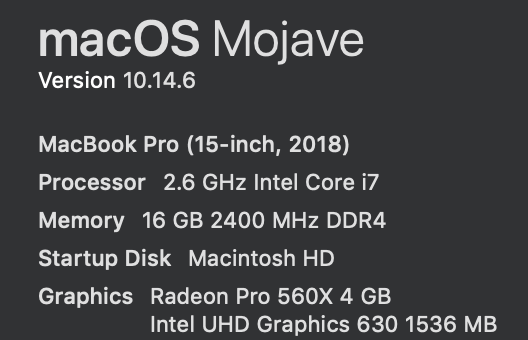
I'm using LG Ultrafine 4k 21.5, connected with lid closed.
Everytime I switch file, screen flickers and sometime screen just turns off.
So, work around for me is by opening from terminal code --disable-gpu, but is there a flag I can set this from json config?
 rkdmen
on 7 Aug 2019
rkdmen
on 7 Aug 2019
Would people say that this issue is the same as our old one: https://github.com/microsoft/vscode/issues/25934
There are some gifs showing the behaviour. From my memories at that time it was related to a change Chrome had to do to increase memory limits of the GPU, see https://github.com/electron/electron/issues/9413 for the related discussion and https://chromium.googlesource.com/chromium/src.git/+/0375ae80fe1d94e9d0fc175ce4312d1b3a6bc168 for the change in Chrome. I wonder if this issue is back because we are hitting the GPU memory limit again.
Basically the more pixels Chrome has to render on the screen (related to the size of the window + the screen resolution + the number of elements), the more GPU memory is needed to render.
There is a way to track GPU memory if you open developer tools and then enable this option:
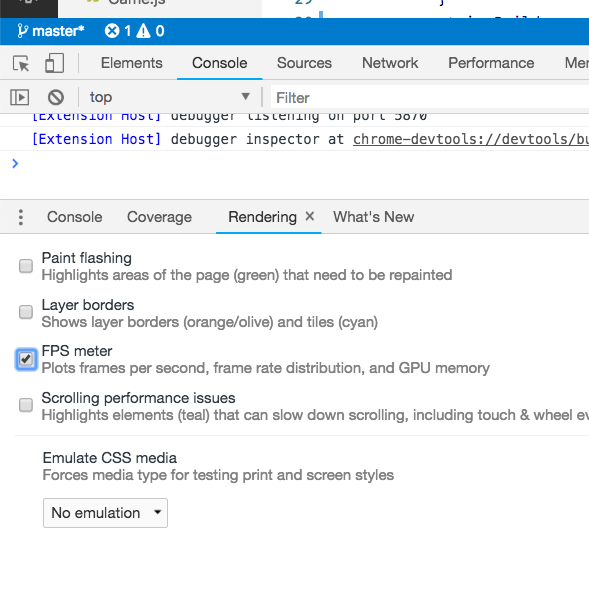
You will get this control:
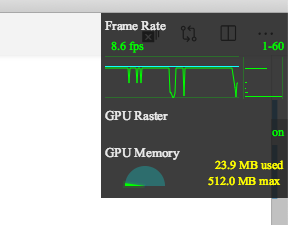
Are people seeing the GPU memory going up to a 100% when it starts to flicker?
bpasero
on 7 Aug 2019
@bpasero Tested and for me it never goes over 250MB (max. is displayed as 1024MB).
Also - even if it does not make sense - while having the devtools open and performing your test, it never flickered (tested 2 min as I also showed in my video above).
Totally crazy.
lukasbash
on 7 Aug 2019
Did you notice that all GPUs reported here where AMD Radeon Pro 560 or similar?
Also, flickering got worse with recent macOS update. So it's probably save to assume, that GPU driver is involved somehow.
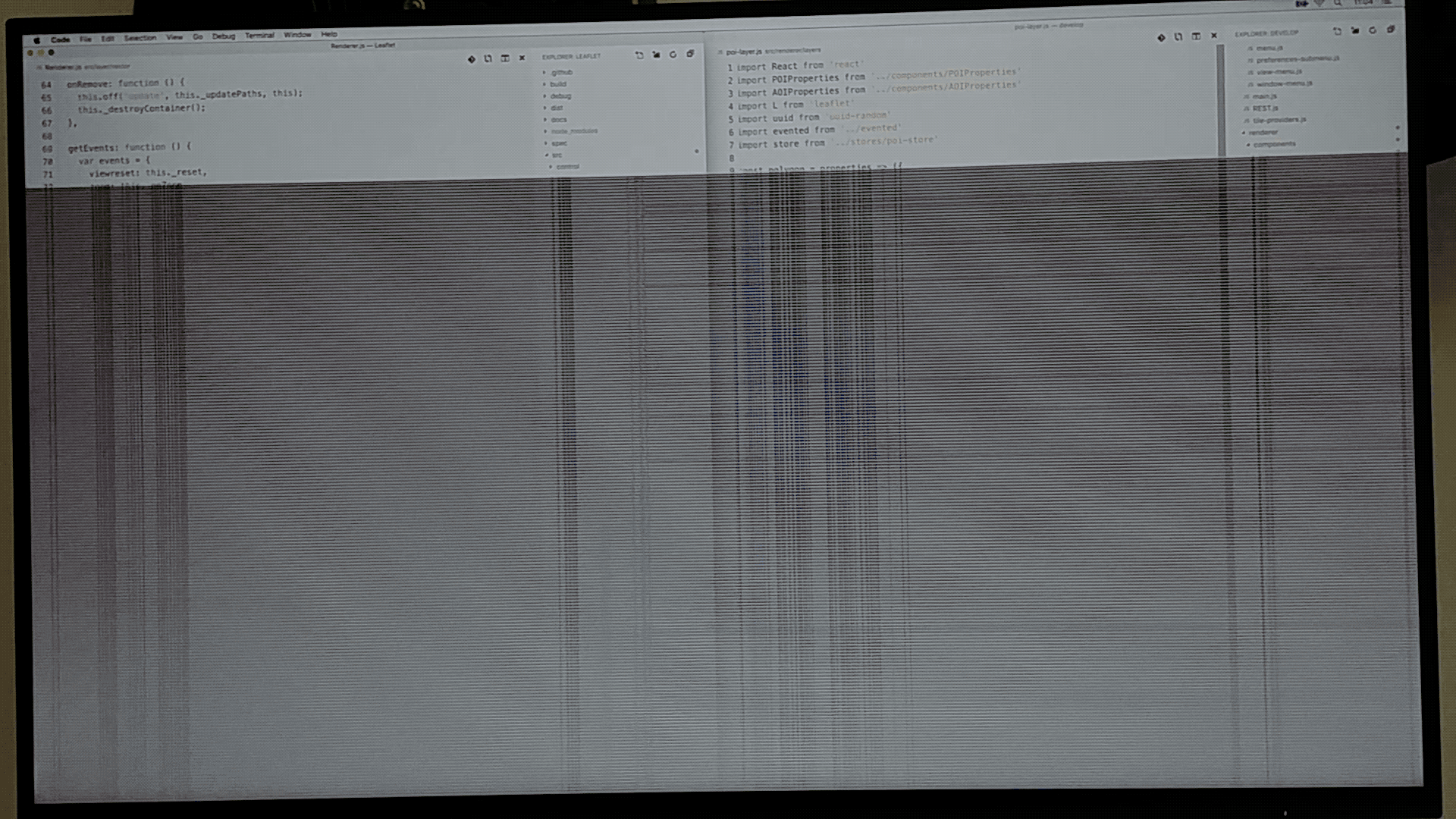
For me, flickering distorts/corrupts a large portion of the entire screen until display completely blacks out for a short while. Doesn't look like #25934 at all.
Here is a single frame of a video I made: Two vscode instances, side by side.
dehmer
on 7 Aug 2019
@dehmer Can you tell us if you are also using the external display in combination with the Macbook's lid closed?
What resolution is it?
And most important: How did you reproduce it? Also with switching files and playing with the focus of the editor?
I also think that it is not completely unrelated to the GPU or its drivers. Also the status of the apple support ticket I raised changed. Apple handed it over to the next technical level. So after a lot of chats, calls and reproduction videos, they also take this very serious. Maybe this indicates that they are possibly aware of such things!
lukasbash
on 7 Aug 2019
@lukasbash Yes, clamshell mode (lid closed), single Eizo EV2785 (native 3840x2160), scaled to 150% (2560x1440).
Fun fact: I can only reproduce flickering for 150% scaling!
Neither for 100%, 114%, 127% or 200% flickering can be provoked.
To reproduce:
- Fire up a fresh vscode instance (not fullscreen), no other apps/windows open.
- Flip through 2 open buffers (control/tab)
- For the first few flips (< 5), the screen just flickers briefly once
- Then, flickering is permanent but irregular (2 - 3 times / second)
- Move mouse cursor over vscode file explorer and
- Flicker, flicker, bang: black screen, two, three, four... screen is back on, rinse and repeat.
Additional observations:
- Moving the mouse cursor over editor does not make flickering worse. Only when moved over explorer, the screen goes dark after a few seconds. But moving the mouse seems optional, it just accelerates the inevitable.
- Flickering can be provoked even when explorer is not visible.
- Size matters (after all): The problem can only be reproduced when vscode takes up a certain screen space. For the steps above, vscode takes up left or right half of the screen. Up to a certain size, flickering cannot be triggered. Flickering starts again, when window size is increased gradually. (So much for video buffer/memory theory)
That's all I have for now.
dehmer
on 7 Aug 2019
Are people seeing the GPU memory going up to a 100% when it starts to flicker?
@bpasero When I monitor that in Exploration and Insiders I see the memory limit is 1024 MB max, but it never goes anywhere near that, seems limited to less than 256 MB. Also the frame rate is never steady and during flickers frame rate drops to near zero. I profiled it and saw some major GC events around when the flickers happen.
Could it be dropping frames and whole paint regions because it's hitting an internal application memory limit?
alxgrtnstrngl
on 7 Aug 2019
@bpasero Adding to my previous comment is there a flag that can increase the memory limit?
alxgrtnstrngl
on 7 Aug 2019
Not to my knowledge. But the full list of supported Chrome flags is available here: https://peter.sh/experiments/chromium-command-line-switches/
bpasero
on 7 Aug 2019
@bpasero This is definitely a GPU memory issue and I just used this flag in both Insiders and Exploration and found it made the flicker go away completely --disable-gpu-memory-buffer-compositor-resources. It also seems like the memory meter in the render monitor is able to move a bit more fluidly.
https://peter.sh/experiments/chromium-command-line-switches/#enable-gpu-memory-buffer-compositor-resources
@lukasbash @dehmer Can you confirm the flag works for you?
edit: I'll monitor this to see if I see additional flickers or glitches.
$ code-insiders --status
Process Argv:     --verbose --disable-gpu-memory-buffer-compositor-resources
GPU Status:       2d_canvas:                     enabled
                  flash_3d:                      enabled
                  flash_stage3d:                 enabled
                  flash_stage3d_baseline:        enabled
                  gpu_compositing:               enabled
                  multiple_raster_threads:       enabled_on
                  native_gpu_memory_buffers:     enabled
                  oop_rasterization:             disabled_off
                  protected_video_decode:        unavailable_off
                  rasterization:                 enabled
                  skia_deferred_display_list:    disabled_off
                  skia_renderer:                 disabled_off
                  surface_synchronization:       enabled_on
                  video_decode:                  enabled
                  viz_display_compositor:        disabled_off
                  webgl:                         enabled
                  webgl2:                        enabled
$ code-exploration --status
Process Argv:     --verbose --disable-gpu-memory-buffer-compositor-resources
GPU Status:       2d_canvas:                     enabled
                  flash_3d:                      enabled
                  flash_stage3d:                 enabled
                  flash_stage3d_baseline:        enabled
                  gpu_compositing:               enabled
                  metal:                         disabled_off
                  multiple_raster_threads:       enabled_on
                  oop_rasterization:             disabled_off
                  protected_video_decode:        unavailable_off
                  rasterization:                 enabled
                  skia_renderer:                 disabled_off
                  surface_control:               disabled_off
                  surface_synchronization:       enabled_on
                  video_decode:                  enabled
                  viz_display_compositor:        enabled_on
                  viz_hit_test_surface_layer:    disabled_off
                  webgl:                         enabled
                  webgl2:                        enabled
That is some good news, thanks for testing it!
bpasero
on 8 Aug 2019
Affirmative. No flicker with --disable-gpu-memory-buffer-compositor-resources (vscode 1.36.1).
I will use this flag in the next days for more testing.
$ code --status
Version:          Code 1.36.1 (2213894ea0415ee8c85c5eea0d0ff81ecc191529, 2019-07-08T22:56:38.504Z)
OS Version:       Darwin x64 18.7.0
CPUs:             Intel(R) Core(TM) i7-7820HQ CPU @ 2.90GHz (8 x 2900)
Memory (System):  16.00GB (8.00GB free)
Load (avg):       1, 1, 1
VM:               0%
Screen Reader:    no
Process Argv:     --disable-gpu-memory-buffer-compositor-resources
GPU Status:       2d_canvas:                     enabled
                  flash_3d:                      enabled
                  flash_stage3d:                 enabled
                  flash_stage3d_baseline:        enabled
                  gpu_compositing:               enabled
                  multiple_raster_threads:       enabled_on
                  native_gpu_memory_buffers:     enabled
                  oop_rasterization:             disabled_off
                  protected_video_decode:        unavailable_off
                  rasterization:                 enabled
                  skia_deferred_display_list:    disabled_off
                  skia_renderer:                 disabled_off
                  surface_synchronization:       enabled_on
                  video_decode:                  enabled
                  viz_display_compositor:        disabled_off
                  webgl:                         enabled
                  webgl2:                        enabled
Well, I tried the flag you suggested and I think it did not happen. Again, I have to admit that I am not sure if it just works or randomly did not happen in the time I've used vscode with the flag set.
However I am now using vscode (without any flags now) with these version details:
Version: 1.37.1
Commit: f06011ac164ae4dc8e753a3fe7f9549844d15e35
Date: 2019-08-15T16:16:34.800Z
Electron: 4.2.7
Chrome: 69.0.3497.128
Node.js: 10.11.0
V8: 6.9.427.31-electron.0
OS: Darwin x64 18.7.0
And it did not happen for one day now. Did you guys change/fix something in there?
Can anybody confirm this?
lukasbash
on 19 Aug 2019
I used --disable-gpu-memory-buffer-compositor-resources for almost three weeks now.
- Result A: No more flicker; really, none at all
- Result B: No noticeable negative side effects
dehmer
on 27 Aug 2019
I’ve been using it as well, but did notice a substantial performance degradation (maybe not as bad as with —disable-gpu, but typing in the terminal is really sluggish still).
dinvlad
on 27 Aug 2019
@dinvlad I don't use the terminal, so I have no info on that.
dehmer
on 27 Aug 2019
When I use this or any Chromium flag now I get the following message Option 'disable-gpu-memory-buffer-compositor-resources' is unknown. Ignoring on the latest Insiders but it still seems to work. I tried other GPU oriented flags and code-insiders --status shows those flags working. Still not seeing flicker though when I use that flag.
Version: 1.39.0-insider
Commit: b7a5b7cf39f569a570599530ffc855b454e37b06
Date: 2019-09-12T08:43:00.105Z
Electron: 4.2.10
Chrome: 69.0.3497.128
Node.js: 10.11.0
V8: 6.9.427.31-electron.0
OS: Darwin x64 18.7.0
@bpasero Any updates on root cause and potential fixes?
alxgrtnstrngl
on 12 Sep 2019
Hi I just came across by googling macos flickering issue, I'm not using VSCode but I think the root cause is mojave itself. I only had screen flickering randomly since 10.14.5 and the problem continues in 10.14.6. The most annoying one is watching youtube fullscreen in safari, sometimes flashing non-stop, not sure if chrome has this issue tho.
If you google up, there are many others experiencing flickering on mojave outside VSCode.
 smileycat
on 17 Sep 2019
smileycat
on 17 Sep 2019
Hi all! sorry for chiming in late on this issue, I would like to collect some basic info with the following chromium flags to eliminate some gpu code paths. On latest insiders whats the behavior with
1) code --disable-gpu-rasterization --disable-features=UiGpuRasterization
2) code --disable-features=UiGpuRasterization
3) code --disable-features=VizDisplayCompositor
 deepak1556
on 7 Oct 2019
deepak1556
on 7 Oct 2019
@deepak1556 I'm in the process or merging Github accounts and posted my response with the wrong one, here's what I wrote:
I tried all three and still got flickering when I had two tabs open and switched between them on the latest Insiders which for some reason has reverted back to Electron 4x and behavior is identical to Stable.
Version: 1.39.0-insider
Commit: c8252b63f547674d2faf361d4181bb76b0b5f81a
Date: 2019-10-04T09:23:20.797Z
Electron: 4.2.10
Chrome: 69.0.3497.128
Node.js: 10.11.0
V8: 6.9.427.31-electron.0
OS: Darwin x64 18.7.0
alxgrtnstrngl
on 8 Oct 2019
@alxgrtnstrngl thanks for testing it, yeah we reverted insiders to 4.x due to other blockers which got fixed recently, we will roll the insiders to electron 6 soon. Can you also give the above flags a try with latest exploration builds. Thanks!
deepak1556
on 11 Oct 2019
--disable-gpu-memory-buffer-compositor-resources seems to not be working for me anymore either (using the latest Insiders build)
dinvlad
on 17 Oct 2019
Additionally, I tested the exploration version you posted right above, and --disable-gpu-memory-buffer-compositor-resources seems to be the only option that works (none of the other ones --disable-gpu-rasterization --disable-features=UiGpuRasterization, --disable-features=UiGpuRasterization, --disable-features=VizDisplayCompositor seem to work). Thanks.
dinvlad
on 17 Oct 2019
Same as @dinvlad using the latest Insiders build
Version: 1.40.0-insider
Commit: 5aec74ad3b55bb9463e717ec950e665288accd0f
Date: 2019-10-18T05:32:01.162Z
Electron: 6.0.12
Chrome: 76.0.3809.146
Node.js: 12.4.0
V8: 7.6.303.31-electron.0
OS: Darwin x64 18.7.0
Looking at the comments above I think this is a problem the native gpu memory buffer implementation with Electron and MacOS. I'm also curios why the Skia renderer is disabled now. Perhaps the two are related?
alxgrtnstrngl
on 18 Oct 2019
Mine is
Version: 1.39.2
Commit: 6ab598523be7a800d7f3eb4d92d7ab9a66069390
Date: 2019-10-15T15:33:00.827Z
Electron: 4.2.10
Chrome: 69.0.3497.128
Node.js: 10.11.0
V8: 6.9.427.31-electron.0
OS: Darwin x64 18.7.0
facing the same issue. It's getting too bad. disable gpu also didn't help.
 sakina1403
on 18 Nov 2019
sakina1403
on 18 Nov 2019
I am one of the unlucky, the issue is present in latest VS Code
Version: 1.40.1
Commit: 8795a9889db74563ddd43eb0a897a2384129a619
Date: 2019-11-13T16:47:44.719Z
Electron: 6.1.2
Chrome: 76.0.3809.146
Node.js: 12.4.0
V8: 7.6.303.31-electron.0
OS: Darwin x64 18.7.0
and even trying Exploration release with --disable-gpu-memory-buffer-compositor-resources
Version: 1.39.0-exploration
Commit: a715df3459718a501686bd03414f69929bf6e9a2
Date: 2019-09-13T06:37:35.080Z
Electron: 6.0.9
Chrome: 76.0.3809.146
Node.js: 12.4.0
V8: 7.6.303.31-electron.0
OS: Darwin x64 18.7.0
 genuinefafa
on 19 Nov 2019
genuinefafa
on 19 Nov 2019
I even have a new behavior that feels right to share here;
1.40.1 VS Code, don't allow me any of this
# code --disable-gpu-memory-buffer-compositor-resources --disable-gpu-rasterization --disable-features=UiGpuRasterization --disable-features=UiGpuRasterization --disable-features=VizDisplayCompositor
Option 'disable-gpu-memory-buffer-compositor-resources' is unknown. Ignoring.
Option 'disable-gpu-rasterization' is unknown. Ignoring.
Option 'disable-features' is unknown. Ignoring.
somehow flickering stopped, so I have to check, and restart via command line without any arguments - _since any of the ones were apparently accepted_; then, flickering started once again... my brain start melting on each tab switching;
try to close and restart once again... flickering stopped; now i'm not sure if the melting of the brain was only an irony...
Resume somehow depending on the start of the window flickering might appear, sometimes might not, not sure how to reach a more verbose report.
genuinefafa
on 19 Nov 2019
This is a problem for me as well. Each tab that I switch causes flickering, if I switch tabs frequently it will get so bad as to cause the monitor to go back, before resetting after a moment. Then the problem will continue.
 crazyrabbitLTC
on 30 Nov 2019
crazyrabbitLTC
on 30 Nov 2019
Having this problem a lot of my external display DELL U2718Q, on my 2018 MBP with Radeon Pro 555X 4 GB.
Have tried the latest stable release, and insiders release. Have tried disabling the feature flags listed above. Nothing as worked. Flashing persists nearly every time I switch tabs.
 thomas-lowry
on 20 Dec 2019
thomas-lowry
on 20 Dec 2019
I've been using Exploration build using this shortcut:
open -a "Visual Studio Code - Exploration.app" --args --disable-gpu-memory-buffer-compositor-resources
for over a month now, and haven't seen this issue pop up again yet. I'm not sure if this flag is available only in Exploration still, or maybe others work too.
dinvlad
on 21 Dec 2019
@deepak1556 @bpasero What's the status of this bug right now? Is this something that's been identified upstream? Is there a timeline to fix?
alxgrtnstrngl
on 22 Jan 2020
I have the same issue with Parallels running Mojave. The insiders build has the same problem.
 mykz-cy
on 24 Jan 2020
mykz-cy
on 24 Jan 2020
Seeing the same issue on Version: 1.42.1 macOS Catalina 10.15.3 and 15" Macbook Pro
 eknkc
on 16 Feb 2020
eknkc
on 16 Feb 2020
Any news when --disable-gpu-memory-buffer-compositor-resources makes it into the release? I tried regular channel again yesterday, and it still suffers from this issue.
dinvlad
on 18 Mar 2020
Still badly flickering on 2013 Mac Pro running macOS 10.15.4 and VSCode 1.43.2. Exploration version 1.44.0-exploration does not suffer from the flicker.
 bateau
on 6 Apr 2020
bateau
on 6 Apr 2020
I am having the same issue of screen flickering on vscode.
causes
- VScode running in window mode
Video: https://jmp.sh/jZ7K5dn
What fixes it
- When any window other than vscode is selected
- another monitor is connected
- fullscreen mode
- Quicktime screen recorder - whenever i try to screen record with Quicktime the flickering goes away
What I have tried already
--disable-gpudoesn't fix it--disable-gpu-compositingdoesn't fix it- code insiders version also doesn't fix it
System Specs
mac pro
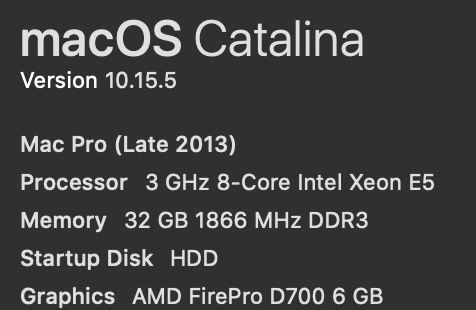
Radeon GPUs

VScode version

Screen: LG 32UD59-B
 farhansalam
on 7 Jul 2020
farhansalam
on 7 Jul 2020
Subtle flickering of individual components. Reliably occurs when the mouse hovers over file name and path at the top of the screen. Switching tabs triggers it as well. Erratically occurs in other components.
Don't know if it's related but wanted to add my fairly unique setup to the list:
- MPB Mid 2015 w/ Intel Corporation Crystal Well Integrated Graphics Controller and i915 driver
- Kernel: Linux 5.4.50-1-lts
- XFCE 4
- Acer G276HL monitor
It only occurs for me when GPU rendering is enabled and the window is located on an external screen (HDMI or thunderbolt to HDMI).
 alex-griffes
on 10 Jul 2020
alex-griffes
on 10 Jul 2020
Does anyone have that flickering issue when scrolling? That's the issue I'm facing on my mac (macOS Catalina 10.15.6, Graphics: Intel HD Graphics 6000 1236 MB), but I've just figured out that it's not confined to vscode only. It also happens with WebStorm but it's much less pronounced on Atom, I'd say on Atom it's virtually invisible. And one more important note, I've googled through a ton of different sources and it seems to me that different people mean different things when talking about screen flickering. To me it looks like stroboscopic effect of some sort that only occurs when I scroll up or down. It does not happen in Google Chrome, it does not happen in Safari.
Maybe someone had the same or similar issue?
vscode info:
Version: 1.47.3
Date: 2020-07-23T13:08:29.692Z (2 wks ago)
Electron: 7.3.2
Chrome: 78.0.3904.130
Node.js: 12.8.1
V8: 7.8.279.23-electron.0
OS: Darwin x64 19.6.0
 ShanIgor
on 10 Aug 2020
ShanIgor
on 10 Aug 2020
I have the same issue when I try to toggle the terminal view.
Connected to an external display with the lid closed.
MacBook Pro (15-inch, 2019)
Version: 1.48.2
Commit: a0479759d6e9ea56afa657e454193f72aef85bd0
Date: 2020-08-25T10:09:08.021Z (2 wks ago)
Electron: 7.3.2
Chrome: 78.0.3904.130
Node.js: 12.8.1
V8: 7.8.279.23-electron.0
OS: Darwin x64 19.5.0
 predam
on 10 Sep 2020
predam
on 10 Sep 2020
Related issues
 villiv
·
3Comments
villiv
·
3Comments
 DovydasNavickas
·
3Comments
DovydasNavickas
·
3Comments
 lukehoban
·
3Comments
lukehoban
·
3Comments
 borekb
·
3Comments
borekb
·
3Comments
 philipgiuliani
·
3Comments
philipgiuliani
·
3Comments
Most helpful comment
This is a problem for me as well. Each tab that I switch causes flickering, if I switch tabs frequently it will get so bad as to cause the monitor to go back, before resetting after a moment. Then the problem will continue.