Vscode: Better outline tree settings/functionality for tree depth and expand/collapse functionality
It would be amazing if double-clicking an item in the Outline ListTree functioned the same as clicking on its corresponding twistie!
Use Case:
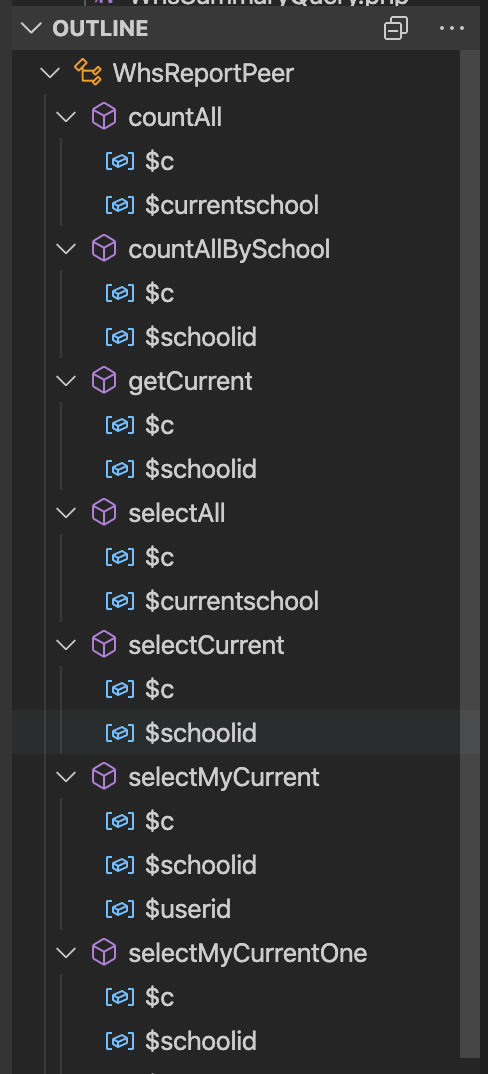
The reason I would prefer this is that by default I personally find that expanding the entire tree out to display down to the function variables to be excessive and hard to find what I'm looking for.
Due to this I almost always do a collapse all and then expand down to showing all functions in a class.
Alternate (and preferred) Possible "Fix":
Provide a setting to determine how deep a user wants the tree to expand. Providing something like this would nearly eliminate the need for me to modify the depth of the tree almost entirely!
 Jared-Dev
All 23 comments
On trees such as the Outline one, clicking the twistie while holding the Alt key down (I'm on Windows) makes an expand act on multiple levels, and ditto a collapse.
 gjsjohnmurray
on 16 May 2019
gjsjohnmurray
on 16 May 2019
That is handy, however, that ends up getting me back to the view which triggered the feature request. The "ideal" solution for me is still that a setting gets added to allow me to specify the depth that the Outline panel is expanded by default.
I'd be happy with the option to double click an item in the tree to trigger an expand or collapse.
Jared-Dev
on 16 May 2019
@Jared-Dev Is this an Outline specific feature request, or any trees?
 joaomoreno
on 23 May 2019
joaomoreno
on 23 May 2019
The Outline tree is where I have the issue personally so, at the moment, I don't see a need to expand the functionality outside of this.
Jared-Dev
on 23 May 2019
Let me try to summarize:
- If the user clicks the twistie, the node expands/collapses
- If the user clicks the row, the editor line is selected and revealed
- If the user double clicks the row, the node expands/collapses
Did I get this right?
joaomoreno
on 23 May 2019
That is an option. A setting that lets me determine how many levels deep I want expanded by default would be SOOO much better since it would eliminate the need for double clicking!
Jared-Dev
on 23 May 2019
A setting that lets me determine how many levels deep I want expanded by default would be SOOO much better since it would eliminate the need for double clicking!
While that might make sense in your use case I doubt it actually makes sense as a product setting. What value would you set it to? 2? 3? What if we decide to add/remove a level in that tree? It just doesn't make sense to me.
Unsure of whether we should do anything here.
joaomoreno
on 24 May 2019
A user-defined setting means it is always the depth I want. I have two PHP parsers (since I have to develop with the horrid Code Igniter framework) so I have an additional depth that I assume a chunk of users wouldn't. If a numeric value doesn't make sense... What about an enum (I.e. namespace, class, function, variable/constant/enum/etc)?
The point of a setting is that the editor has what it thinks is the sensible default, but the user gets to choose what they want when the default setting isn't "right" (as far as they are concerned).
Jared-Dev
on 24 May 2019
What I mean is that the correct value will always change, even for you. One day it will be X, the other day it will be Y. For the same workspace/folder/file/outline. It just doesn't sound feasible.
joaomoreno
on 27 May 2019
That is the nice part. Its a setting and could be changed. If structured properly I'm guessing this could be something that is language based.
If this is an enum value it would rarely (most likely never) change for me. If there is an internal discussion on this and it still doesn't seem feasible than the summary you provided previously would much better than the current implementation.
For some reason, it has been deleted, but there was a previous comment that seemed to echo the desire for more settings surrounding the code outline pane. It is an amazing tool, but at the moment the defaults cause some annoyance around it!
The recent changes in the default outline display has degraded it's usability.
Originally when opening a file the Outline would by default display the functions which was perfect, or the classes and functions. I'm always looking for a particular function in a file, and having them listed alphabetical is perfect. (I normally have only a single class per file so in general I only have a single list of functions for each file).
The current version however lists all functions constants and variables, this is really long as my files can be quite large (lots of functions). So I use the "collapse" button - this works in a file that only contains functions - the functions are all listed alphabetically. But in a class file the collapse function then shows all of the classes, and generally I only have one class per file, so it lists one class name. I then have to expand the class to see the functions. This is 2 clicks more than I want.
Can we please have the outline default to listing functions only? Or as Jared suggests, an option we can set indicating a default depth.
I'll leave his name out in case he has removed this for some specific reason but wanted the sentiment included in the issue.
Jared-Dev
on 28 May 2019
Hi Jared
Having a configurable number of levels will not work. We need more
intelligence than this. For example:
A library of functions might contain just functions, so we only want this
expanded to 1 level:
function abc() {
}
function def() {
}
A class file might contain a class and functions, so we want this expanded
to 2 levels:
class xyz {
function x1() {
}
}
So, either the outline tool needs to be intelligent enough to determine the
difference between class names and function names, or, a level is used but
then remembered for each file name opened.
Cheers
Murray
 murraycollingwood
on 29 May 2019
murraycollingwood
on 29 May 2019
@murraycollingwood I think you are placing too much on the outline piece itself. Just like with #region this could be up to the plugins for a language to implement. If an enum is used I'm having trouble seeing makes that problem something that couldn't be overcome?!
EDIT: Sorry, I think I'm misremembering functionality. I think to add #region support users were sending PRs. Regardless, I think defining the "how" support could be added to a language would allow for a user enable it if they found value in it.
Jared-Dev
on 29 May 2019
Hey @joaomoreno, this issue might need further attention.
@Jared-Dev, you can help us out by closing this issue if the problem no longer exists, or adding more information.
![github-actions[bot] picture](https://avatars2.githubusercontent.com/in/15368?v=4&s=40) github-actions[bot]
on 9 Apr 2020
github-actions[bot]
on 9 Apr 2020
Closing this as idle. It's not very clear how well this could work and whether it would really improve usability. Sorry.
joaomoreno
on 9 Apr 2020
Closing this as idle. It's not very clear how well this could work and whether it would really improve usability. Sorry.
@joaomoreno You have us 2 minutes to close and then closed it yourself.
This problem still exists, and I think I have a better solution suggestion.
Instead of specify the number of levels to expand, perhaps we can specify the number of levels not to expand. That is, in a tree analogy a value of -1 does not expand to the leaves, it only expands to the twigs.
Here is an image of what I currently get when opening a file:
Here is an image of what I want when opening a file:
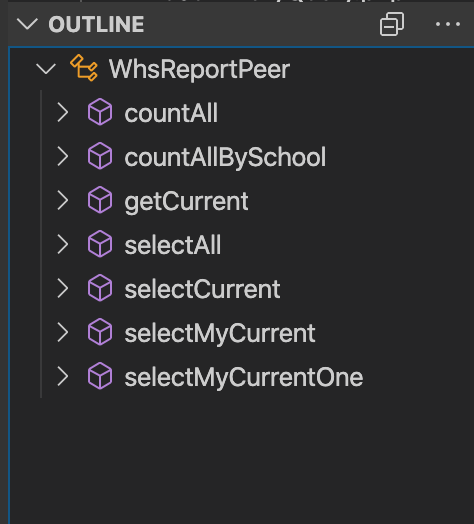
Does that help explain?
murraycollingwood
on 9 Apr 2020
Yes it definitely does. But it seems overly specific to the Outline view. Again, this is hard to generalize over other trees. Let's narrow on this specific tree usage.
@jrieken I wonder if you already have such a feature request?
joaomoreno
on 9 Apr 2020
This feature request is now a candidate for our backlog. The community has 60 days to upvote the issue. If it receives 20 upvotes we will move it to our backlog. If not, we will close it. To learn more about how we handle feature requests, please see our documentation.
Happy Coding!
 vscode-triage-bot
on 9 Apr 2020
vscode-triage-bot
on 9 Apr 2020
This feature request is now a candidate for our backlog. The community has 60 days to upvote the issue. If it receives 20 upvotes we will move it to our backlog. If not, we will close it. To learn more about how we handle feature requests, please see our documentation.
Happy Coding!
vscode-triage-bot
on 9 Apr 2020
I'd agree with @murraycollingwood that initial state of the outline should be collapsed. While full expansion may be useful for very small classes, something bigger will be only usable through search/filter.
I also think that a click on the row should expand the outline too, if it's not yet expanded.
 AnrDaemon
on 16 Apr 2020
AnrDaemon
on 16 Apr 2020
As I see it, the problem is that expand-all makes too many rows visible. Maybe a good heuristic could be based on not just the depth level, but also the number of visible rows.
A simple example would be to expand depth levels until no more than N rows are visible.
A more complicated example would be to expand to at least depth D, and then keep expanding until no more than N rows are visible.
I don't know whether this would actually feel good in practice, but using the number of visible rows in the heuristic might be worth a try.
 stacktracer
on 16 Apr 2020
stacktracer
on 16 Apr 2020
:slightly_smiling_face: This feature request received a sufficient number of community upvotes and we moved it to our backlog. To learn more about how we handle feature requests, please see our documentation.
Happy Coding!
vscode-triage-bot
on 17 Apr 2020
/duplicate of https://github.com/microsoft/vscode/issues/53262
 jrieken
on 6 Oct 2020
jrieken
on 6 Oct 2020
Thanks for creating this issue! We figured it's covering the same as another one we already have. Thus, we closed this one as a duplicate. You can search for existing issues here. See also our issue reporting guidelines.
Happy Coding!
vscode-triage-bot
on 6 Oct 2020
Related issues
 shanalikhan
·
3Comments
shanalikhan
·
3Comments
 trstringer
·
3Comments
trstringer
·
3Comments
 v-pavanp
·
3Comments
v-pavanp
·
3Comments
 ryan-wong
·
3Comments
ryan-wong
·
3Comments
 curtw
·
3Comments
curtw
·
3Comments
Most helpful comment
@joaomoreno You have us 2 minutes to close and then closed it yourself.
This problem still exists, and I think I have a better solution suggestion.
Instead of specify the number of levels to expand, perhaps we can specify the number of levels not to expand. That is, in a tree analogy a value of -1 does not expand to the leaves, it only expands to the twigs.
Here is an image of what I currently get when opening a file:

Here is an image of what I want when opening a file:

Does that help explain?