Vscode: Quickfix closes right after opening
Issue Type: Bug
When I open a quickfix suggestion either by hotkey or clicking the lightbulb, the quickfix suggestion appears and immediately dissapears again. It happens so quickly that if I try to press enter to apply the fix, it is send to the editor window instead as a newline.
Unfortunately this is hard to reproduce and usually happens after VS Code has been running for a while. If I close VS Code and reopen it the issue dissappears, but comes back later.
In any case, this is extremely annoying.
The quickfix in question comes from TSLint.
VS Code version: Code 1.33.1 (51b0b28134d51361cf996d2f0a1c698247aeabd8, 2019-04-11T08:20:22.771Z)
OS version: Linux x64 4.15.0-47-generic
System Info
|Item|Value|
|---|---|
|CPUs|Intel(R) Core(TM) i5-6300U CPU @ 2.40GHz (4 x 2367)|
|GPU Status|2d_canvas: enabled
checker_imaging: disabled_off
flash_3d: enabled
flash_stage3d: enabled
flash_stage3d_baseline: enabled
gpu_compositing: enabled
multiple_raster_threads: enabled_on
native_gpu_memory_buffers: disabled_software
rasterization: disabled_software
surface_synchronization: enabled_on
video_decode: unavailable_off
webgl: enabled
webgl2: enabled|
|Load (avg)|3, 2, 2|
|Memory (System)|15.56GB (2.18GB free)|
|Process Argv|--unity-launch|
|Screen Reader|no|
|VM|0%|
Extensions (27)
Extension|Author (truncated)|Version
---|---|---
ng-template|Ang|0.1.11
path-intellisense|chr|1.4.2
bracket-pair-colorizer|Coe|1.0.61
gitlens|eam|9.6.3
EditorConfig|Edi|0.13.0
prettier-vscode|esb|1.8.1
vscode-nginx-conf-hint|han|0.1.0
terraform|mau|1.3.9
Angular-BeastCode|Mik|8.0.3
vscode-scss|mrm|0.6.2
python|ms-|2019.4.11987
vscode-typescript-tslint-plugin|ms-|1.0.0
vsliveshare|ms-|1.0.91
debugger-for-chrome|msj|4.11.3
angular-console|nrw|7.4.16
vscode-docker|Pet|0.6.1
vscode-versionlens|pfl|0.23.0
java|red|0.43.0
stylelint|shi|0.49.0
sort-lines|Tyr|1.8.0
vscodeintellicode|Vis|1.1.5
vscode-java-debug|vsc|0.18.0
vscode-java-dependency|vsc|0.4.0
vscode-java-pack|vsc|0.6.0
vscode-java-test|vsc|0.16.0
vscode-maven|vsc|0.16.2
vscode-icons|vsc|8.6.0
 magnattic
All 21 comments
 sbatten
on 25 Apr 2019
sbatten
on 25 Apr 2019
@magnattic can you verify what your auto save setting is? I want to eliminate a hunch that this has to do with auto save and focus lost.
sbatten
on 25 Apr 2019
@sbatten autosave is off
magnattic
on 25 Apr 2019
Thanks, and when the quick fix menu disappears, it does not apply, correct?
sbatten
on 25 Apr 2019
Correct. It dissappears after less than a second, before I can click it. No quickfix is applied after it dissappears.
magnattic
on 25 Apr 2019
@magnattic I fixed an issue earlier this milestone around native context menus dismissing due to GC. This could be happening more frequently after extended usage if it thinks you machine is running low on memory or just unlucky. Would you be able to test to see if you can reproduce this with the latest insiders?
sbatten
on 25 Apr 2019
Thank you, I'll test the insiders version.
Due to the nature of the bug it might take some time to determine if it is really gone, though (or just hasn't happened yet).
magnattic
on 25 Apr 2019
@magnattic understood, thanks for trying it out
sbatten
on 25 Apr 2019
I'm also experiencing this issue. It's quite annoying as the menu disappears from underneath my cursor. It happens all the time, including right after vscode first boots.
I've installed insiders and haven't experienced any issues so far. I'll update if that changes.
 mgummelt
on 27 Apr 2019
mgummelt
on 27 Apr 2019
It happens in insiders as well
mgummelt
on 28 Apr 2019
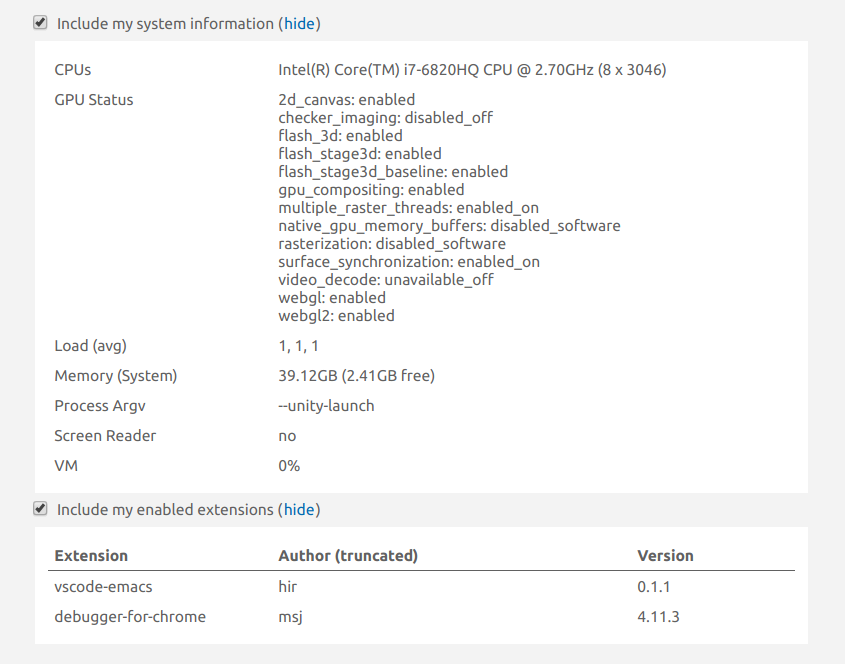
@mgummelt Maybe you could add your system info and extensions as well? If you can reproduce it consistently that would probably be a big help for them to fix it?
Maybe it's an extension we both share.
magnattic
on 29 Apr 2019
OS: Linux 4.15.0-47-generic #50-Ubuntu SMP Wed Mar 13 10:44:52 UTC 2019 x86_64 x86_64 x86_64 GNU/Linux
VS Code:
Version: 1.34.0-insider
Commit: c1abf7978d59415dcfcf8cfcb15e0ee30c5e45a5
Date: 2019-04-26T13:32:23.319Z
Electron: 3.1.8
Chrome: 66.0.3359.181
Node.js: 10.2.0
V8: 6.6.346.32
OS: Linux x64 4.15.0-47-generic
mgummelt
on 29 Apr 2019
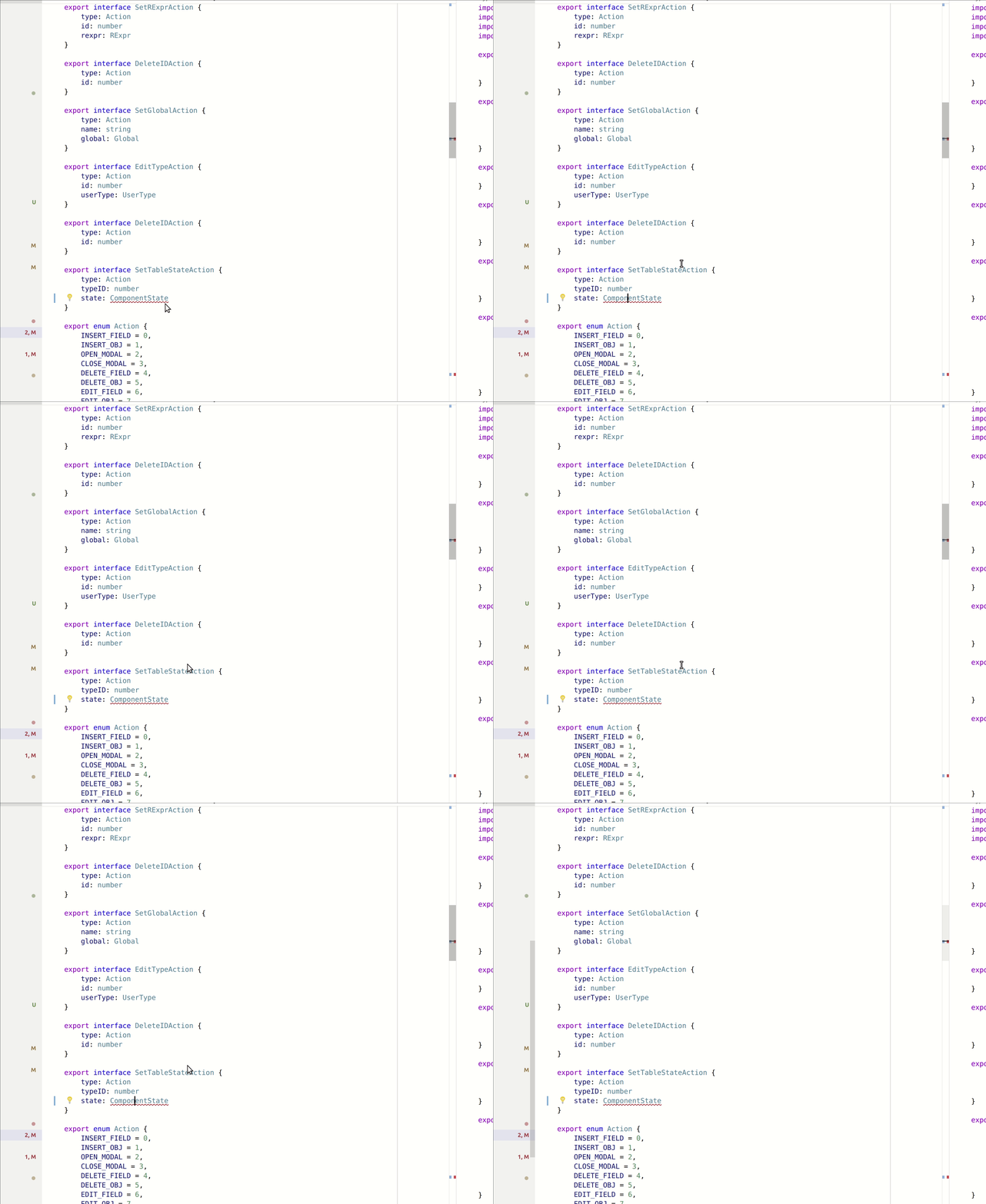
Here's a demo:
mgummelt
on 1 May 2019
I'm glad I'm not the only one experiencing this annoying glitch all the time. For me it happens in C# code.
Version: 1.33.1
Commit: 51b0b28134d51361cf996d2f0a1c698247aeabd8
Date: 2019-04-11T08:20:22.771Z
Electron: 3.1.6
Chrome: 66.0.3359.181
Node.js: 10.2.0
V8: 6.6.346.32
OS: Linux x64 4.19.0-0.bpo.4-amd64
CPUs | Intel(R) Core(TM) i7-6700HQ CPU @ 2.60GHz (8 x 1534)
--|--
GPU Status | 2d_canvas: enabledchecker_imaging: disabled_offflash_3d: enabledflash_stage3d: enabledflash_stage3d_baseline: enabledgpu_compositing: enabledmultiple_raster_threads: enabled_onnative_gpu_memory_buffers: disabled_softwarerasterization: disabled_softwaresurface_synchronization: enabled_onvideo_decode: unavailable_offwebgl: enabledwebgl2: enabled
Load (avg) | 0, 0, 0
Memory (System) | 7.71GB (0.25GB free)
Process Argv | --unity-launch
Screen Reader | no
VM | 0%
Extension | Author (truncated) | Version
-- | -- | --
ng-template | Ang | 0.1.11
npm-intellisense | chr | 1.3.0
xml | Dot | 2.4.0
gitlens | eam | 9.6.3
EditorConfig | Edi | 0.13.0
vscode-npm-script | eg2 | 0.3.5
file-icons | fil | 1.0.17
auto-using | Fud | 0.7.8
csharpextensions | jch | 1.3.0
docomment | k-- | 0.1.6
Angular-BeastCode | Mik | 8.0.6
csharp | ms- | 1.19.0
vscode-typescript-tslint-plugin | ms- | 1.0.0
vsliveshare | ms- | 1.0.125
angular2-inline | nat | 0.0.17
msbuild-project-tools | tin | 0.2.54
vscodeintellicode | Vis | 1.1.5
markdown-all-in-one | yzh | 2.3.1
 mario-d-s
on 3 May 2019
mario-d-s
on 3 May 2019
I have the same Issue. For me it happens only once per problemFocus. After the second try it stays open.
Also I can reproduce it after using Alt+Tab to switch between windows or switching between vscode tabs.
It also happens when fixing a problem and changing the focus to another problem.
I can also confirm that it seems not to be an autosave issue since my autosave is off.
Version: 1.34.0
Commit: a622c65b2c713c890fcf4fbf07cf34049d5fe758
Date: 2019-05-15T21:55:35.507Z
Electron: 3.1.8
Chrome: 66.0.3359.181
Node.js: 10.2.0
V8: 6.6.346.32
OS: Linux x64 4.15.0-50-generic
 schuleke
on 21 May 2019
schuleke
on 21 May 2019
I can confirm that the issue is absent when VSCode first starts, but, at least for me, it arises quite quickly thereafter.
mgummelt
on 2 Jun 2019
I'm disappointed that this issue has received so little attention, and remains unfixed after two minor releases. It absolutely kills development experience as Intellisense drives productivity for me - and I assume for many others too. I just can't grasp how this fundamental feature remains broken for so long!
What can we - as users - do to help move this forward?
(I've noticed everyone reporting it so far is on Linux).
mario-d-s
on 10 Jul 2019
I still cannot reproduce this and given that this is with native menus and we have upgraded our electron version since, I will ask if everyone could try with the latest insiders builds. https://code.visualstudio.com/insiders/
sbatten
on 9 Oct 2019
@sbatten Since reporting on this issue, I've moved on to another Linux distribution (Manjaro), formerly being on Debian 9 Stretch. Since doing so, I have not run into this anymore.
FWIW I'm now on the i3 window manager with the Compton compositor. My knowledge of the Linux graphics stack and how Electron ties into it is far too limited to know if this is useful information but I figured I'd just throw it in anyway.
mario-d-s
on 9 Oct 2019
I can confirm that this is not an Issue anymore when running with the following specs:
Version: 1.38.1
Commit: b37e54c98e1a74ba89e03073e5a3761284e3ffb0
Date: 2019-09-11T13:30:08.229Z
Electron: 4.2.10
Chrome: 69.0.3497.128
Node.js: 10.11.0
V8: 6.9.427.31-electron.0
OS: Linux x64 4.15.0-65-generic
To be honest I didn't realize with which update it got fixed :)
schuleke
on 9 Oct 2019
This also has disappeared for me, but I can't say when it happened. I'm closing as resolved. Thanks for the hard work!
magnattic
on 9 Oct 2019
Related issues
 borekb
·
3Comments
borekb
·
3Comments
 sijad
·
3Comments
sijad
·
3Comments
 vsccarl
·
3Comments
vsccarl
·
3Comments
 omidgolparvar
·
3Comments
omidgolparvar
·
3Comments
 trstringer
·
3Comments
trstringer
·
3Comments
Most helpful comment
I'm disappointed that this issue has received so little attention, and remains unfixed after two minor releases. It absolutely kills development experience as Intellisense drives productivity for me - and I assume for many others too. I just can't grasp how this fundamental feature remains broken for so long!
What can we - as users - do to help move this forward?
(I've noticed everyone reporting it so far is on Linux).