Vscode: Support pwsh (PS Core) in Select Default Shell on Windows

All 13 comments
FYI @TylerLeonhardt
 Tyriar
on 16 Apr 2019
Tyriar
on 16 Apr 2019
Hi @Tyriar, Thank you for reviewing my PR. Can I try this issue again?
And can you check my recognition?
My recognition of this issue
I add the below between PowerShell and WSL Bash in expectedLocations.
'PowerShell Core' : [
        `${process.env['ProgramW6432']}\\PowerShell\\6\\pwsh.exe`,
        `${process.env['ProgramFiles']}\\PowerShell\\6\\pwsh.exe`,
    ],
Currently, the version of PowerShell Core is 6.2.
But I am worried that 6 in file path is changed by upgrading to 7.0.
 roottool
on 17 Apr 2019
roottool
on 17 Apr 2019
I think this issue is more complex than it looks like:
- What if the user hasn't got PowerShell Core installed? Should Code detect that and only show the option if possible or just handle it gracefully?
- PowerShell Core is an MSI installer on Windows where the user can specify a non-default installation location. It is also cross-platform so paths on Linux will be different. We need to either get the installation location from the registry or just call
pwshas it is expected to be on the PATH variable. I assume this approach should then work for Linux as well.
 bergmeister
on 17 Apr 2019
bergmeister
on 17 Apr 2019
@roottool that's the basics of it and I'd merge something like that.
@bergmeister anything on top of basic path detection would be great, if the path doesn't exist that's already handled, but pulling from the environment/registry are options to make this much more user friendly. FYI this command is only available on Windows as on Linux/Mac you normally configure your default shell via chsh and $SHELL.
Tyriar
on 17 Apr 2019
Traditionally, on Windows you used %COMSPEC% for the command processor. That works in Windows, DOS, and OS/2.
For PowerShell and pwsh paths, I'd probably suggest looking at HKLM:\SOFTWARE\Microsoft\Windows\CurrentVersion\App PathsPowerShell.exe and HKLM:\SOFTWARE\Microsoft\Windows\CurrentVersion\App Pathspwsh.exe respectively. This would deal with the 6 vs. 7 issue that @roottool brought up.
I don't have WSL installed to see if WSL respects those also, but I'd guess it does. GIT does not.
I don't do enough js/ts to add these suggestions, but thought I'd add my 2 cents none-the-less.
Thanks.
 essentialexch
on 17 Apr 2019
essentialexch
on 17 Apr 2019
The terminal used to default to COMSPEC, but ended up moving off it I think because everything assumes that's cmd.exe anyway so people don't change unlike $SHELL.
Tyriar
on 17 Apr 2019
The PowerShell Core MSI adds itself to the PATH environment variable, could we just simply call pwsh?
bergmeister
on 17 Apr 2019
We can do that for all of those, except git bash (and I am aware that some people choose the option to have it added to their path - I for one, did not). I had presumed from @Tyriar 's earlier comment that he didn't want to do that.
essentialexch
on 17 Apr 2019
I tried while referring to @swngdnz's suggestion.
I confirmed that I succeeded in getting the file path from the registry.

I used alwaysUnderlineAccessKeys function in src\vs\workbench\services\accessibility\node\accessibilityService.ts for reference.
I added _getAppPathFromRegistry function in src\vs\workbench\contrib\terminal\electron-browser\terminalService.ts due to get the file path from the registry.
I will create PR, but I have an one question.
@swngdnz suggested looking at HKLM:\SOFTWARE\Microsoft\Windows\CurrentVersion\App Paths\PowerShell.exe for PowerShell's path.
Is the change included in PR?
Thanks.
roottool
on 18 Apr 2019
@roottool yeah that would be great! We'll also need verify it works on a custom pwsh path.
Tyriar
on 18 Apr 2019
I installed PowerShell Core to C:\.
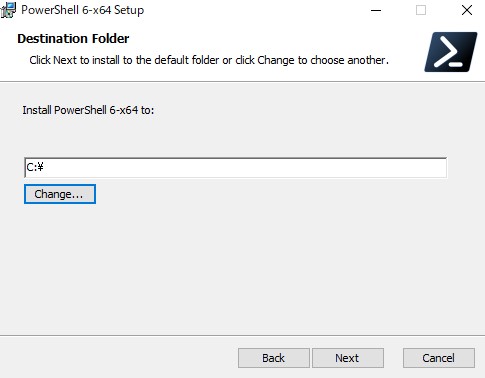
I confirmed that the custom pwsh path was registered to HKLM:\SOFTWARE\Microsoft\Windows\CurrentVersion\App Paths\pwsh.exe.

※(既定) means Japanese (Default).
I verified that _getAppPathFromRegistry function works on the custom pwsh path.
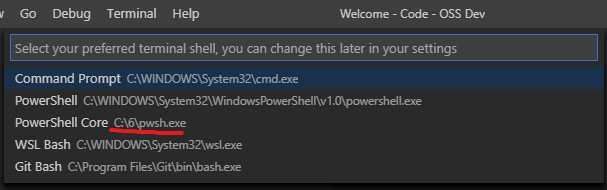
And I checked that pwsh of the custom pwsh path was executed on VSCode.

roottool
on 19 Apr 2019
@swngdnz I verified that we can use PowerShell's path which is got from registry.
In conclusion, we can't use it now.
First, PowerShell's path is registered in HKLM:\SOFTWARE\Microsoft\Windows\CurrentVersion\App Paths\PowerShell.exe as %SystemRoot%\system32\WindowsPowerShell\v1.0\PowerShell.exe.

But VSCode can't recognize %SystemRoot%\system32\WindowsPowerShell\v1.0\PowerShell.exe as PowerShell's path.

Because VSCode can't exchange from %SystemRoot% to a path of system root.
We have to implement a logic to convert from %SystemRoot% to a path of system root using process.env['SystemRoot'].
At the end, I installed WSL.
But WSL's path(%SystemRoot%\system32\bash.exe or %SystemRoot%\system32\wsl.exe) is not registered in registry.
Therefore, there is able for only pwsh within the Default Shell group to acquire a file path from registry.
However only while pwsh's path in registry does not use %SystemRoot%.
roottool
on 20 Apr 2019
sorry for the trouble!
but I think pwsh was the important one anyway.
essentialexch
on 22 Apr 2019
Related issues
 ryan-wong
·
3Comments
ryan-wong
·
3Comments
 sijad
·
3Comments
sijad
·
3Comments
 chrisdias
·
3Comments
chrisdias
·
3Comments
 vsccarl
·
3Comments
vsccarl
·
3Comments
 omidgolparvar
·
3Comments
omidgolparvar
·
3Comments
Most helpful comment
I installed PowerShell Core to

C:\.I confirmed that the custom pwsh path was registered to

HKLM:\SOFTWARE\Microsoft\Windows\CurrentVersion\App Paths\pwsh.exe.※
(既定)means Japanese(Default).I verified that

_getAppPathFromRegistryfunction works on the custom pwsh path.And I checked that pwsh of the custom pwsh path was executed on VSCode.
