Vscode: VSCode main icon not showing (Linux/deb)
Issue Type: Bug
Try to open from the start menu or from anywhere else for that matter. The main visual studio icon isn't present. Problem started with the latest March update.
VS Code version: Code 1.33.0 (0dd516dd412d42323fc3464531b1c715d51c4c1a, 2019-04-04T15:08:57.775Z)
OS version: Linux x64 4.15.0-46-generic
System Info
|Item|Value|
|---|---|
|CPUs|Intel(R) Core(TM) i5-7200U CPU @ 2.50GHz (4 x 2327)|
|GPU Status|2d_canvas: enabled
checker_imaging: disabled_off
flash_3d: enabled
flash_stage3d: enabled
flash_stage3d_baseline: enabled
gpu_compositing: enabled
multiple_raster_threads: enabled_on
native_gpu_memory_buffers: disabled_software
rasterization: disabled_software
surface_synchronization: enabled_on
video_decode: unavailable_off
webgl: enabled
webgl2: enabled|
|Load (avg)|5, 3, 1|
|Memory (System)|15.44GB (12.56GB free)|
|Process Argv|--unity-launch|
|Screen Reader|no|
|VM|0%|
Extensions (14)
Extension|Author (truncated)|Version
---|---|---
vscode-django|bat|0.19.0
vsc-material-theme|Equ|2.8.2
prettier-vscode|esb|1.8.1
python|ms-|2019.3.6352
cpptools|ms-|0.22.1
csharp|ms-|1.18.0
material-icon-theme|PKi|3.7.0
java|red|0.42.1
vscodeintellicode|Vis|1.1.5
vscode-java-debug|vsc|0.17.0
vscode-java-dependency|vsc|0.4.0
vscode-java-pack|vsc|0.6.0
vscode-java-test|vsc|0.15.1
vscode-maven|vsc|0.16.0
 zaid-khan
All 16 comments
Have a look at the start menu and the bottom taskbar: 
zaid-khan
on 8 Apr 2019
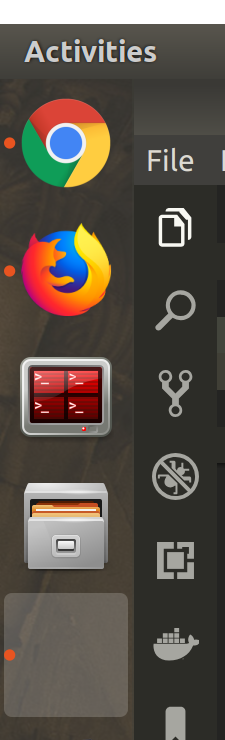
Seeing the same issue on Ubuntu 18.04.2 LTS:
Screen Shot
 epsniff
on 8 Apr 2019
epsniff
on 8 Apr 2019
Can someone seeing this issue post the output of this?
cat /usr/share/applications/code.desktop
/usr/share/pixmaps | grep visualstudio
 Tyriar
on 12 Apr 2019
Tyriar
on 12 Apr 2019
[Desktop Entry]
Name=Visual Studio Code
Comment=Code Editing. Redefined.
GenericName=Text Editor
Exec=/usr/share/code/code --unity-launch %F
Icon=com.visualstudio.code
Type=Application
StartupNotify=false
StartupWMClass=Code
Categories=Utility;TextEditor;Development;IDE;
MimeType=text/plain;inode/directory;
Actions=new-empty-window;
Keywords=vscode;

X-Desktop-File-Install-Version=0.23

[Desktop Action new-empty-window]
Name=New Empty Window
Exec=/usr/share/code/code --new-window %F
Icon=com.visualstudio.code
The second command gives an error:
bash: /usr/share/pixmaps: Is a directory
zaid-khan
on 13 Apr 2019
@zaid-khan doh, I meant ls /usr/share/pixmaps | grep visualstudio for the second command
Tyriar
on 13 Apr 2019
com.visualstudio.code.png
Also, I updated to 1.33.1 and the issue still persists.
zaid-khan
on 13 Apr 2019
Can someone seeing this issue post the output of this?
cat /usr/share/applications/code.desktop
/usr/share/pixmaps | grep visualstudio
$ ls /usr/share/pixmaps | grep visualstudio
com.visualstudio.code.png
 machinebiologist
on 14 Apr 2019
machinebiologist
on 14 Apr 2019
The following workaround fixed the issue for me on several machines:
Modify /usr/share/applications/code.desktop
change:
Icon=com.visualstudio.code
to
Icon=/usr/share/pixmaps/com.visualstudio.code.png
machinebiologist
on 14 Apr 2019
@machinebiologist it's strange that it works on some machines but not others though, it was reported above that it happens on Ubuntu 18.04 but it definitely doesn't for me 🤔
Tyriar
on 14 Apr 2019
@machinebiologist it's strange that it works on some machines but not others though, it was reported above that it happens on Ubuntu 18.04 but it definitely doesn't for me thinking
@Tyriar: indeed! I have had it occur on two machines running Ubuntu MATE 18.04. Perhaps it's related to the distribution or the desktop environment?
machinebiologist
on 14 Apr 2019
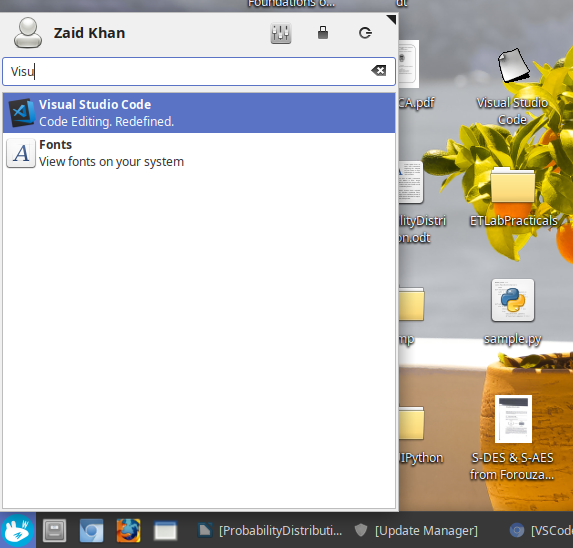
Strangely, on my other machine running Linux Mint 19.1 xfce, the desktop icon has changed into some generic one but the menu and taskbar (thankfully) retains the correct old one.
zaid-khan
on 15 Apr 2019
@zaid-khan Related behaviour on MATE: the "start menu" showed the proper icon, while the taskbar did not.
machinebiologist
on 15 Apr 2019
The following workaround fixed the issue for me on several machines:
Modify /usr/share/applications/code.desktop
change:
Icon=com.visualstudio.code
to
Icon=/usr/share/pixmaps/com.visualstudio.code.png
Work on Ubuntu 18.04
 efremropelato
on 7 Jun 2019
efremropelato
on 7 Jun 2019
The work around worked for me as well, but I also got it working without using the work around.
I removing and installing vscode many times with the no luck. But finally instead of using the dep package from the website, I switched to installing it using the Ubuntu Software's market place. The icon has now reappeared.
This means the desktop file moves from /usr/share/applications/code.desktop to /var/lib/snapd/desktop/applications/code_code.desktop.
epsniff
on 9 Jun 2019
I've made a change to use the exact directory for the deb package, please try the insiders build tomorrow and let me know if you experience any issues https://code.visualstudio.com/insiders/
Tyriar
on 10 Oct 2019
FYI the plan is to revert this change and make the .desktop executable, see https://github.com/microsoft/vscode/issues/95459
Tyriar
on 25 Apr 2020
Related issues
 curtw
·
3Comments
curtw
·
3Comments
 chrisdias
·
3Comments
chrisdias
·
3Comments
 sijad
·
3Comments
sijad
·
3Comments
 vsccarl
·
3Comments
vsccarl
·
3Comments
 shanalikhan
·
3Comments
shanalikhan
·
3Comments
Most helpful comment
The following workaround fixed the issue for me on several machines:
Modify /usr/share/applications/code.desktop
change:
Icon=com.visualstudio.codeto
Icon=/usr/share/pixmaps/com.visualstudio.code.png