Version: 1.34.0-insider
Commit: efa47d77cfd55cbad68bef54a2d765b73d7beb13
Date: 2019-04-03T20:23:50.493Z
Electron: 3.1.8
Chrome: 66.0.3359.181
Node.js: 10.2.0
V8: 6.6.346.32
OS: Darwin x64 18.2.0
Has been happening for quite some time:
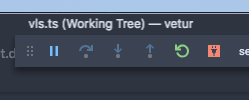
The good ones, by comparison:
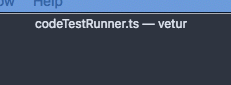
I'm not sure what's the exact repro though.
 octref
All 33 comments
@octref please check zoom in dev tools and also compare with text in explorer/panel/statusbar
 sbatten
on 5 Apr 2019
sbatten
on 5 Apr 2019
No zoom, text in explorer/panel/statusbar all look normal in the blurry window.
octref
on 5 Apr 2019
I am seeing this issue as well. For some more clues to the issue I have included screenshots of the titlebar with the dev tools open.
Unmodified:

Removed the
zoomproperty:

Remove the
positionproperty:

I hope this is helpful to anyone viewing this issue.
EDIT: If anyone has trouble telling the difference the removal of the position property (screenshot #3) seems to resolve the blurriness issue.
 jrwiegand
on 17 Apr 2019
jrwiegand
on 17 Apr 2019
Mine is blurry as well. Toggling a property like flex brings to into focus but it should be like that by default
 eddiemonge
on 3 May 2019
eddiemonge
on 3 May 2019
I have the same problem on my Ubuntu 18.04 installation. When the file is saved, the title bar text is blurred, but not when I am editing...
Configuration :
Version : 1.33.1
Validation : 51b0b28134d51361cf996d2f0a1c698247aeabd8
Date : 2019-04-11T08:20:22.771Z
Électron : 3.1.6
Chrome : 66.0.3359.181
Node.js : 10.2.0
V8 : 6.6.346.32
OS : Linux x64 4.15.0-48-generic
Screenshots :
- Blurred :

- Not blurred :

 Torvaldi
on 14 May 2019
Torvaldi
on 14 May 2019
I use vscode on both windows and linux. The problem is not found on the window. When switching the application out and switching back on LINUX (deepin), I find that the file title will appear fuzzy, and the width corresponding to the file title is non-integer. Happening. Has been solved by the following css:
.monaco-workbench .part.titlebar>.window-title {
width: 800px;
display: flex;
align-items: center;
justify-content: center;
}
 whitetrident
on 23 May 2019
whitetrident
on 23 May 2019
Confirm on OSX Mojave and High Sierra.
Sometimes is fine.

 andremacola
on 2 Jun 2019
andremacola
on 2 Jun 2019
@octref and others, does it reproduce in Exploration builds?
We are building exploration builds that use a much newer version of our UI framework (Electron version 4.0.x). I wonder if this issue reproduces with one of these builds, could you try? Download:
 bpasero
on 4 Jun 2019
bpasero
on 4 Jun 2019
@octref and others, does it reproduce in Exploration builds?
We are building exploration builds that use a much newer version of our UI framework (Electron version 4.0.x). I wonder if this issue reproduces with one of these builds, could you try? Download:
Hi @bpasero apparently in Exploration the problem is fixed. OSX Mojave 10.14.5 (18F203)
andremacola
on 5 Jun 2019
I am still experiencing this.
Version: 1.36.0-insider
Commit: c089daa858f34631f5f827ff8a0313bf1e2ded6d
Date: 2019-06-07T05:15:26.964Z
Electron: 4.2.3
Chrome: 69.0.3497.128
Node.js: 10.11.0
V8: 6.9.427.31-electron.0
OS: Linux x64 5.1.7-arch1-1-ARCH

 cynecx
on 9 Jun 2019
cynecx
on 9 Jun 2019
The insider version does not correct the problem but the bug appears only when using custom title bar style.
{
    "window.titleBarStyle": "custom",
}
Version : 1.36.0-insider
Validation : 15b7c86d86319b187a5ef255c170184a8519c5af
Date : 2019-06-14T10:33:50.651Z
Électron : 4.2.4
Chrome : 69.0.3497.128
Node.js : 10.11.0
V8 : 6.9.427.31-electron.0
OS : Linux x64 4.15.0-51-generic
Please verify if this fix: https://github.com/microsoft/vscode/issues/75615 addresses the issue in tomorrows insiders version.
sbatten
on 17 Jun 2019
Nothing changed... Sorry
Torvaldi
on 18 Jun 2019
I'm also getting this, only with some files.
VSCode 1.35.1
macOS 10.14.5
 adriang133
on 24 Jun 2019
adriang133
on 24 Jun 2019
Still getting this on Linux Manjaro-Deepin.
VSCode 1.34.0
Central part of title bar is blurry depending of displayed content and window width. I can easily reproduce this by resizing window issue happens. Menubar is not affected.
I cannot reproduce this issue when I have developers tool open regardless of its position, which is weird.
 l0ud
on 27 Jun 2019
l0ud
on 27 Jun 2019
I also got this problem when using the NVIDIA GPU, but when I changed the settings to use the Intel GPU, the problem was gone.
 MrChenWithCapsule
on 28 Jun 2019
MrChenWithCapsule
on 28 Jun 2019
VSCode 1.35.1
macOS 10.14.5
External monitor, macOS font smoothing is off.
Slightly resizing the window blurs the title. Resizing a little more sharpens it again.


Yet, for some titles it resizing the window doesn't work at all.
 krmbzds
on 1 Jul 2019
krmbzds
on 1 Jul 2019
It is happening here on the latest 1.36 with the new electron 4. Some files names seem to mysteriously not be affected.


Version: 1.36.0
Commit: 0f3794b38477eea13fb47fbe15a42798e6129338
Date: 2019-07-03T13:20:56.241Z
Electron: 4.2.5
Chrome: 69.0.3497.128
Node.js: 10.11.0
V8: 6.9.427.31-electron.0
OS: Linux x64 5.0.9-200.fc29.x86_64
 David-Else
on 3 Jul 2019
David-Else
on 3 Jul 2019
It is happening in insider version. Exploration for me is fine
andremacola
on 3 Jul 2019
Same problem with 1.38.0-insider (x64).
Some characters appear corrupted:
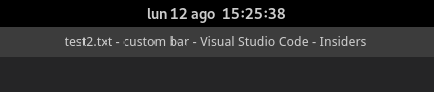
Running on Fedora 30 with Gnome Shell (Wayland).
 zapateo
on 12 Aug 2019
zapateo
on 12 Aug 2019
Hi all, could you try the new explorations builds based on electron 6 and chromium 76 to see if there is progress on this issue ? Thanks!
 deepak1556
on 12 Aug 2019
deepak1556
on 12 Aug 2019
I can give this a go, thanks, ping me if you don't hear from me
 jasonwilliams
on 12 Aug 2019
jasonwilliams
on 12 Aug 2019
@deepak1556 thanks :)
I tried the build and I cannot reproduce the issue, the title bar looks fine, it's neither blurred nor corrupted.
Running on Fedora 30 with Gnome Shell (Wayland), VSCode version 1.37.0-exploration (960208fdf9aa06e6892aa14c9c84ddd607fbeb2f).
zapateo
on 13 Aug 2019
@deepak1556
Testing this on:
MacOS Mojave Version 10.14.5
On VSCode (1.37 stable) the blurring is intermittent, I think its to do with when i open it on my external monitor or on my Macbook. On the exploration build I can't reproduce the blur so that's good.
Video
The first editor is my VSCode Stable: Version: 1.37.0
You can see that Cargo.toml does not blur, but the other files do, i'm not sure why this is the case.
The second editor in the foreground is : Version: 1.37.0-exploration
None of the files blur.

Hopefully this is useful.
jasonwilliams
on 13 Aug 2019
With the latest 1.38.0 release, this issue seems to be fixed already. Title bar text looks good no matter how I switch the tabs around. Thanks! :+1: :smile:

Version: 1.38.0
Commit: 3db7e09f3b61f915d03bbfa58e258d6eee843f35
Date: 2019-09-03T21:51:09.716Z
Electron: 4.2.10
Chrome: 69.0.3497.128
Node.js: 10.11.0
V8: 6.9.427.31-electron.0
OS: Linux x64 4.15.0-60-generic
 ecgan
on 6 Sep 2019
ecgan
on 6 Sep 2019
The problem seems resolved with 1.38.0. Thanks!
zapateo
on 6 Sep 2019
Does anyone know what fixed it? Looks like the difference between 1.37.0 and 1.380 was this in electron https://github.com/electron/electron/compare/v4.2.7...v4.2.10
jasonwilliams
on 6 Sep 2019
The problem looks fixed to me as well. I am not sure what fixed it.
jrwiegand
on 9 Sep 2019
@deepak1556 should we expect this fixed?
sbatten
on 9 Sep 2019
Looks like it's corrected for me too, I'm pretty sure that the commit 13cf7b0 of Electron solved the problem
Torvaldi
on 10 Sep 2019
@Torvaldi How would that change, which is macOS related, correct the title blurring on linux?
cynecx
on 10 Sep 2019
Is it still good for people with our latest insider builds that use Electron 6?
bpasero
on 23 Oct 2019
This bug seems to be fixed for me.
 NullEnt1ty
on 24 Oct 2019
NullEnt1ty
on 24 Oct 2019
Related issues
 lukehoban
·
3Comments
lukehoban
·
3Comments
 chrisdias
·
3Comments
chrisdias
·
3Comments
 v-pavanp
·
3Comments
v-pavanp
·
3Comments
 sirius1024
·
3Comments
sirius1024
·
3Comments
 ryan-wong
·
3Comments
ryan-wong
·
3Comments
Most helpful comment
I am still experiencing this.