Vscode: Tree does not highlight item under context menu if tree does not have focus
Issue Type: Bug
- Try to invoke context menu on Explorer item
- The item in Explorer is not highlighted
VS Code version: Code - Insiders 1.33.0-insider (9474154f133dbbb793ca3c128c9fcfdca39f5b26, 2019-03-22T06:18:30.063Z)
OS version: Windows_NT x64 10.0.17763
 usernamehw
All 18 comments
In Stable it doesn't work for Custom Trees.
usernamehw
on 22 Mar 2019
You first have to click on the tree to give it focus (first clicks in my gif show how the tree first does not have focus).
This works for me. Are you doing something different
edit: deleting gif, it is very iritating
 isidorn
on 22 Mar 2019
isidorn
on 22 Mar 2019
So ... more breaking changes? And to the worse... Making 2 clicks instead of 1... just ... why?
If you are using Shift+F10 it doesn't highlight too.
usernamehw
on 22 Mar 2019
Also LMB clicking is opening the file(or executing action in Custom Views), which I don't want to.
usernamehw
on 22 Mar 2019
Updating title. Forwarding to @joaomoreno this is a tree issue
isidorn
on 22 Mar 2019
@isidorn This is a consequence from https://github.com/Microsoft/vscode/issues/68697.
The item is highlighted, the "focus" trait is indeed there. But since the tree isn't DOM focused, the row doesn't have any background color. Just right click an element and then click in the editor... the element will be highlighted then.
@misolori This is why we go back and forward on this all the time.
 joaomoreno
on 25 Mar 2019
joaomoreno
on 25 Mar 2019
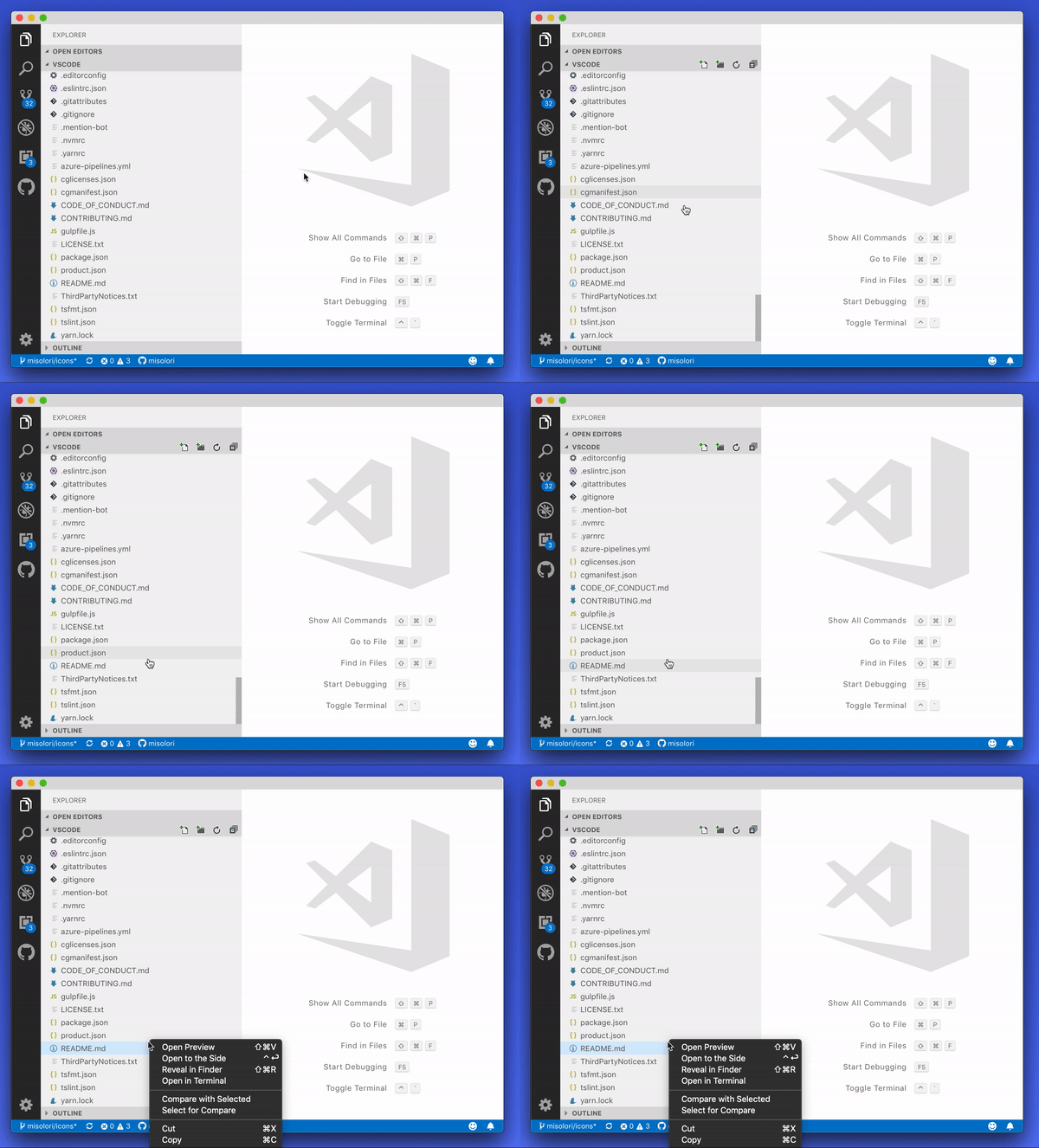
Maybe I'm missing something, but I'm able to get a highlight on a tree item when invoking the context menu?
 misolori
on 25 Mar 2019
misolori
on 25 Mar 2019
@misolori first get the focus out of the viewlet.
isidorn
on 25 Mar 2019
So it appears this happens when there is no focus on the entire application (in the background) and you attempt to right-click.
@joaomoreno is there any way to apply this highlight when the application window is inactive and not when you're in the app? In that case it makes sense to show a highlight but I also wouldn't want this when I'm in a different part of the editor.
misolori
on 25 Mar 2019
@misolori This also happens in custom menus, regardless of window focus.
joaomoreno
on 26 Mar 2019
Not sure why my issue was closed as a duplicate, but I hope that this issue can resolve it. See #72013
 jsunsawyer
on 10 Apr 2019
jsunsawyer
on 10 Apr 2019
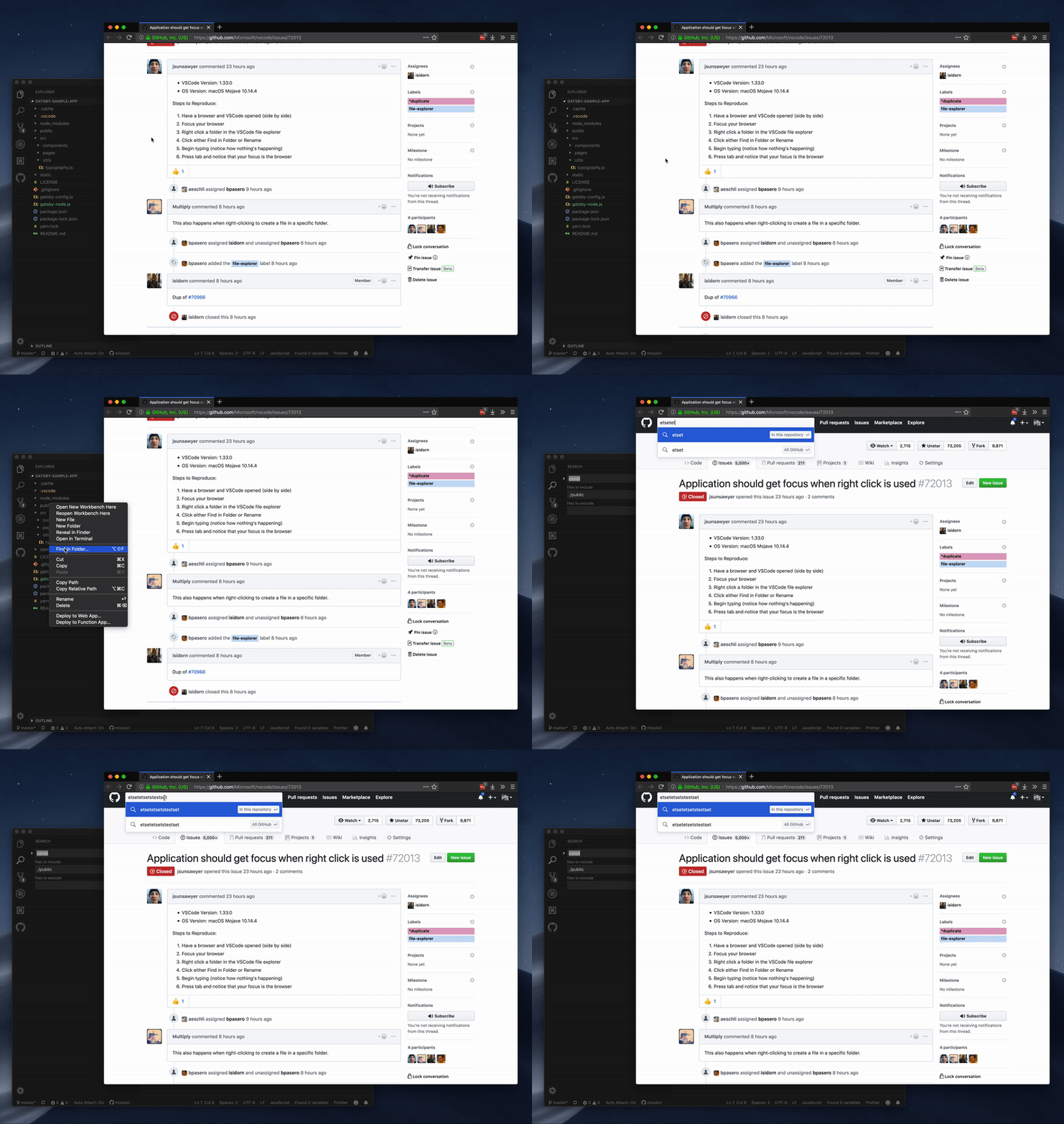
@isidorn @joaomoreno since #72013 was closed, are we planning on updating this issue to cover the overall focus of the app when it's in the background? Here's a GIF of that issue:
misolori
on 10 Apr 2019
That's more of a question for @bpasero
Though that seems to be a pattern which does not exist on macOS. Try right clicking on any other unfocused app.
joaomoreno
on 11 Apr 2019
We have a setting window.clickThroughInactive for macOS that controls that. By default we allow to click through.
 bpasero
on 11 Apr 2019
bpasero
on 11 Apr 2019
We have a setting
window.clickThroughInactivefor macOS that controls that. By default we allow to click through.
I'm pretty confident that is enabled for me, and when I rightclick (while vscode is not focused) on a folder to create a new file, it doesn't allow me to type anything, as the window didn't get focus.
 Multiply
on 11 Apr 2019
Multiply
on 11 Apr 2019
Maybe it's more that actions in the right click menu that trigger actions that require focus to interact with should trigger a focus on the app.
jsunsawyer
on 11 Apr 2019
The description of window.clickThroughInactive says, that the window will be activated and then the element under the mouse will be triggered. But that's not how it work...

If I do a right click, like @misolori showed in his gif, the window will not be activated.
Belongs this bug to this issue? Or should I create a new one?
 florianrusch
on 29 Jul 2019
florianrusch
on 29 Jul 2019
Given that this issue seems to flop based on this, I'm going to close as wont-fix.
misolori
on 5 Nov 2020
Related issues
 ryan-wong
·
3Comments
ryan-wong
·
3Comments
 chrisdias
·
3Comments
chrisdias
·
3Comments
 mrkiley
·
3Comments
mrkiley
·
3Comments
 VitorLuizC
·
3Comments
VitorLuizC
·
3Comments
 v-pavanp
·
3Comments
v-pavanp
·
3Comments
Most helpful comment
@isidorn @joaomoreno since #72013 was closed, are we planning on updating this issue to cover the overall focus of the app when it's in the background? Here's a GIF of that issue: