Vscode: Show Exploer with CTRL+SHIRT+E Fail went a file is open
Issue Type: Bug
Showing the Explorer using CTRL+SHIFT+E only works when no files are open in the editor. I am able to toggle between Show Explorer, Show Debug, Hide Sidebar.
When I have a file open and I press CTRL+SHIFT+E, I see the character 'E' typed into the edit window and the Explorer is not shown.
VS Code version: Code - Insiders 1.33.0-insider (d77d8d561143cc021a82664efc056755c075d070, 2019-03-11T08:42:16.804Z)
OS version: Linux x64 4.15.0-46-generic
System Info
|Item|Value|
|---|---|
|CPUs|AMD Phenom(tm) II X4 940 Processor (4 x 800)|
|GPU Status|2d_canvas: enabled
checker_imaging: disabled_off
flash_3d: enabled
flash_stage3d: enabled
flash_stage3d_baseline: enabled
gpu_compositing: enabled
multiple_raster_threads: enabled_on
native_gpu_memory_buffers: disabled_software
rasterization: disabled_software
surface_synchronization: enabled_on
video_decode: unavailable_off
webgl: enabled
webgl2: enabled|
|Load (avg)|2, 1, 1|
|Memory (System)|15.66GB (3.88GB free)|
|Process Argv|/home/yadav/dev/docs/guides|
|Screen Reader|no|
|VM|0%|
Extensions (27)
Extension|Author (truncated)|Version
---|---|---
markdown-navigation|Ala|1.0.3
markdown-toc|Ala|1.5.6
Bookmarks|ale|10.2.2
dep|car|0.1.0
npm-intellisense|chr|1.3.0
vscode-eslint|dba|1.8.2
java-debug|DSn|0.0.2
EditorConfig|Edi|0.13.0
tslint|eg2|1.0.43
markdown-preview-bitbucket|hbr|1.0.0
Scala|itr|0.1.7
solidity|Jua|0.0.49
sort-typescript-imports|mic|1.4.1
Angular-BeastCode|Mik|7.2.5
cpptools|ms-|0.21.0
debugger-for-chrome|msj|4.11.3
angular2-inline|nat|0.0.17
java|red|0.40.0
language-stylus|sys|1.11.0
sort-lines|Tyr|1.8.0
vscodeintellicode|Vis|1.1.4
vscode-java-debug|vsc|0.17.0
vscode-java-dependency|vsc|0.3.0
vscode-java-pack|vsc|0.6.0
vscode-java-test|vsc|0.15.0
vscode-maven|vsc|0.15.0
better-align|wwm|1.1.6
(2 theme extensions excluded)
 rajinder-yadav
All 25 comments
(Experimental duplicate detection)
Thanks for submitting this issue. Please also check if it is already covered by an existing one, like:
![vscodebot[bot] picture](https://avatars2.githubusercontent.com/in/2406?v=4&s=40) vscodebot[bot]
on 12 Mar 2019
vscodebot[bot]
on 12 Mar 2019
/duplicate of #70285
 usernamehw
on 12 Mar 2019
usernamehw
on 12 Mar 2019
Thanks for creating this issue! We figured it's covering the same as another one we already have. Thus, we closed this one as a duplicate. You can search for existing issues here. See also our issue reporting guidelines.
Happy Coding!
vscodebot[bot]
on 12 Mar 2019
This is not the same bug #70285, KDE does not use IBUS.
I am using Linux Kubuntu, it uses Qt, not IBUS or GTK.
I even checked and ibus is not installed:
yadav@source$ ibus

Command 'ibus' not found, but can be installed with:
sudo apt install ibus

yadav@source$ which ibus
yadav@source$
Also as I stated, this key combo works when there is no file open in the editor window, so clearly this key combination is getting delivered to vscode. It is only when there is a file open in the editor does this issue show up and the letter "E" is typed out.
rajinder-yadav
on 13 Mar 2019
@chrmarti
usernamehw
on 13 Mar 2019
Same issue here, ibus is installed but I confirmed the daemon is not running. The shortcut works when no file is open in the editor window as @rajinder-yadav mentioned.
Interestingly, other VScode keyboard shortcuts stop working after using CTRL+SHIFT+E, until I click/focus something on screen (click text, change tabs, whatever).
I believe this problem appeared after upgrading to the most recent release (a day or two ago).
 benjaminwood
on 21 Mar 2019
benjaminwood
on 21 Mar 2019
This issue has existed for much longer, I say weeks. Last time it also was closed off prematurely as a dup and I didn't bother contesting.
rajinder-yadav
on 22 Mar 2019
@lesha1201 see the above comment from @rajinder-yadav: https://github.com/Microsoft/vscode/issues/70277#issuecomment-472259922
This is not the same bug #70285, KDE does not use IBUS.
I am using Linux Kubuntu, it uses Qt, not IBUS or GTK.
I even checked and ibus is not installed:
yadav@source$ ibus

Command 'ibus' not found, but can be installed with:
sudo apt install ibus

yadav@source$ which ibus
yadav@source$
Also as I stated, this key combo works when there is no file open in the editor window, so clearly this key combination is getting delivered to vscode. It is only when there is a file open in the editor does this issue show up and the letter "E" is typed out.
benjaminwood
on 9 Apr 2019
@lesha1201 thanks for trying to help. I can confirm that pressing the key combination outside of VScode (browser for example) does nothing at all. Did you read the following?
Also as I stated, this key combo works when there is no file open in the editor window, so clearly this key combination is getting delivered to vscode. It is only when there is a file open in the editor does this issue show up and the letter "E" is typed out.
The key combination works inside of VScode if there is no open file in the editor window. Clearly this is a different issue that what you experienced (and was documented in #70285 & #48480).
benjaminwood
on 10 Apr 2019
To reiterate CTRL+SHIFT+E works inside VSCode when there is no editor open, once a file is open for editing this shortcut stops working. I don't want the thread to get hijacked with something unrelated other than on the system I specified.
rajinder-yadav
on 10 Apr 2019
@rajinder-yadav
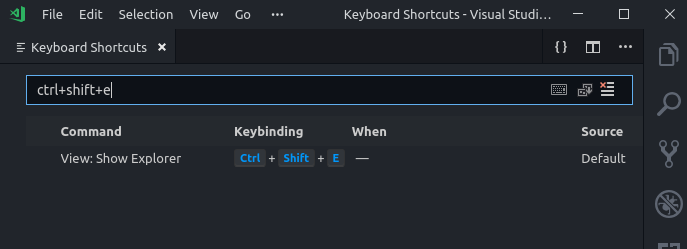
Which commands are bound to the desired key combination?

 alexdima
on 6 May 2019
alexdima
on 6 May 2019
Could this be helpful? --- https://stackoverflow.com/questions/52032340/ctrlshifte-inerts-special-characters-into-file-instead-of-showing-explore-pane
alexdima
on 6 May 2019
@alexandrudima the "View: Show Explorer" command is bound for me:
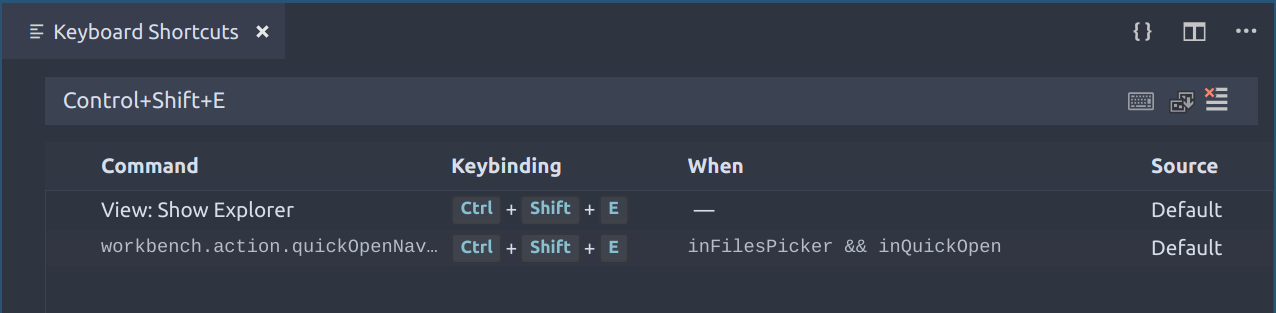
The shortcut worked for me until recently when I upgraded VS-Code. My GTK version has not changed. I'd upgrade GTK to confirm, but I believe it'd be a can of warms unless I upgrade my distro beyond the latest LTS.
EDIT: Also, I should note that the shortcut does not enter a special character. Instead, nothing happens at all.
benjaminwood
on 6 May 2019
rajinder-yadav
on 7 May 2019
To anyone who is experiencing this in Linux,
This is because ctrl + shift + E is assigned to emoji input.
TO disable that go to terminal & type
$ ibus-setup
window will open third tab will be emojis tab. change the shortcut key ctrl + shift + e to anything you like. then explorer shortcut key will perfectly.
 hardikdangar
on 10 May 2019
hardikdangar
on 10 May 2019
@hardikdangar this is not related to that bug, see my 2nd reply, but thanks for sharing.
rajinder-yadav
on 12 May 2019
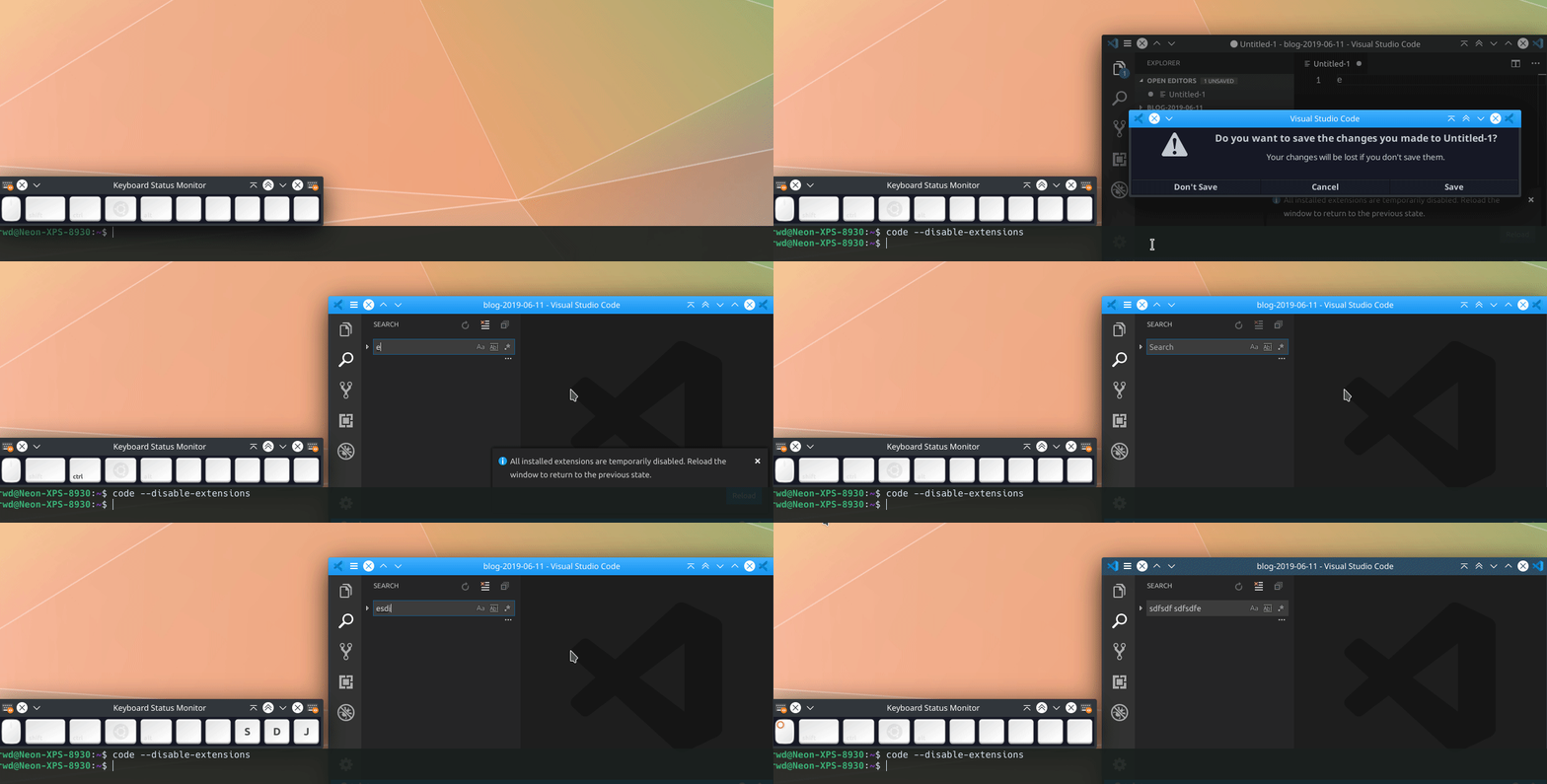
I'm using KDE neon and KDE doesn't use ibus and as U see in gif, code is being run while disabling all extensions.
 Qussayyon
on 28 Jun 2019
Qussayyon
on 28 Jun 2019
Does Ctrl+Shift+E reach VS Code?

alexdima
on 6 Aug 2019
Thanks for the tip. For me it appears not to be reaching VS code.
I haven't figured out how to resolve the problem, but I'm suspicious my conflict is with i3 (window manager). Anyone else having this problem using i3?
If it is helpful to anyone else, you may be able to track down what is intercepting the key using XF86LogGrabInfo.
First tail the system journal to see the result: journalctl -f. Then in another terminal window/tab:
xdotool keydown "ctrl+shift+e"; xdotool key "XF86LogGrabInfo"; xdotool keyup "ctrl"; sleep 1; xdotool keyup "shift"; xdotool keyup "e";
FYI, I'm on Ubuntu, the above may be different on other distros.
benjaminwood
on 7 Aug 2019
Thanks for the tip. For me it appears not to be reaching VS code.
I haven't figured out how to resolve the problem, but I'm suspicious my conflict is with i3 (window manager). Anyone else having this problem using i3?
If it is helpful to anyone else, you may be able to track down what is intercepting the key using
XF86LogGrabInfo.First tail the system journal to see the result:
journalctl -f. Then in another terminal window/tab:xdotool keydown "ctrl+shift+e"; xdotool key "XF86LogGrabInfo"; xdotool keyup "ctrl"; sleep 1; xdotool keyup "shift"; xdotool keyup "e";FYI, I'm on Ubuntu, the above may be different on other distros.
What is the correct output and wrong output?
Qussayyon
on 7 Aug 2019
@Qussayyon
What is the correct output and wrong output?
Not sure that there is right/wrong output, it just shows you what applications are intercepting keystrokes. In my case, I only saw i3 mentioned in the output. So, I assume that i3 is grabbing the key command (but I'm not 100% sure). Like I said, "I'm suspicious my conflict is with i3".
benjaminwood
on 8 Aug 2019
There isn't anything we can do on our side if we don't receive the keybinding... My recommendation is to rebind the action to another keybinding, which is trivial using the keybindings editor (ctrl+k ctrl+s)
alexdima
on 8 Aug 2019
Thanks @alexandrudima, I agree (for my situation, anyways!).
benjaminwood
on 8 Aug 2019
@benjaminwood, I use a similiar Ubuntu + i3 setup.
I can confirm this issue has been driving me crazy as well.
A recent workaround I found is simply turning on the ibus-daemon (and turning off the global emoji selector shortcut). I've done absolutely no digging into how or why this works, especially seeing as other editors have no problem capturing the ctrl+shift+e combination without ibus, but a workaround is a workaround.
Hope this helps! :pray:
 grooveygr
on 12 Aug 2019
grooveygr
on 12 Aug 2019
Thanks for the tip @grooveygr, I can confirm your workaround, uhh, works for me too. :-)
Perhaps it'll work for others, too.
benjaminwood
on 30 Aug 2019
Related issues
 VitorLuizC
·
3Comments
VitorLuizC
·
3Comments
 biij5698
·
3Comments
biij5698
·
3Comments
 sirius1024
·
3Comments
sirius1024
·
3Comments
 borekb
·
3Comments
borekb
·
3Comments
 mrkiley
·
3Comments
mrkiley
·
3Comments
Most helpful comment
To reiterate CTRL+SHIFT+E works inside VSCode when there is no editor open, once a file is open for editing this shortcut stops working. I don't want the thread to get hijacked with something unrelated other than on the system I specified.