Vscode: [themes] [syntax highlighting] allow theme to change font size, line height, negative indent
What
Code should allow custom themes to
- specify
font-size,line-height,text-variantand etc. for every line - specify
font-size,font-stretchand etc. for inline elements
Why
When you write markdown in current's VS code, the h1-h6 lines are the same size as the body text. This is not very helpful in terms of writing.
This is editing Markdown in Code (for now):
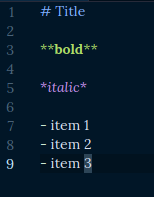
note that the title is less prominent than the bold text.
In contrast, this is editing Markdown in Bear:
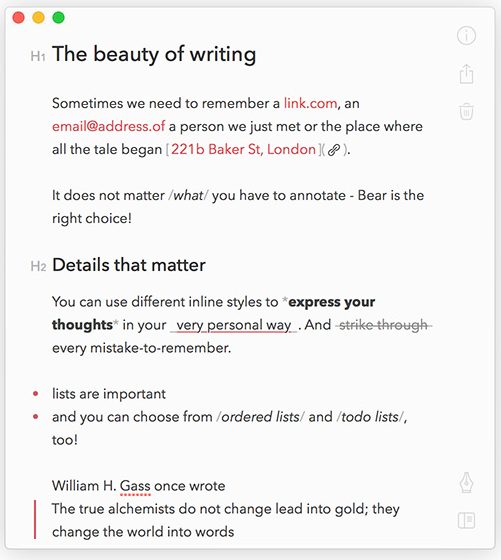
We also need to resolve #20652 for this to work.
 buckle2000
All 4 comments
(Experimental duplicate detection)
Thanks for submitting this issue. Please also check if it is already covered by an existing one, like:
![vscodebot[bot] picture](https://avatars2.githubusercontent.com/in/2406?v=4&s=40) vscodebot[bot]
on 6 Mar 2019
vscodebot[bot]
on 6 Mar 2019
No, @vscodebot, this is not about auto-indent.
buckle2000
on 6 Mar 2019
We closed this issue because we don't plan to address it in the foreseeable future. You can find more detailed information about our decision-making process here. If you disagree and feel that this issue is crucial: We are happy to listen and to reconsider.
If you wonder what we are up to, please see our roadmap and issue reporting guidelines.
Thanks for your understanding and happy coding!
vscodebot[bot]
on 25 Oct 2019
This may be closed but it would be very useful and not particularly hard to implement considering it's all just html and CSS rendering.
The justification that it is out of vscode design spec is silly. Vscode is steadily evolving into a platform for many different extensions much like Emacs. It is already far beyond a text editor and arbitrarily saying some things are and are not within its scope is silly.
 faldor20
on 26 Jun 2020
faldor20
on 26 Jun 2020
Related issues
 trstringer
·
3Comments
trstringer
·
3Comments
 mrkiley
·
3Comments
mrkiley
·
3Comments
 v-pavanp
·
3Comments
v-pavanp
·
3Comments
 borekb
·
3Comments
borekb
·
3Comments
 sijad
·
3Comments
sijad
·
3Comments
Most helpful comment
This may be closed but it would be very useful and not particularly hard to implement considering it's all just html and CSS rendering.
The justification that it is out of vscode design spec is silly. Vscode is steadily evolving into a platform for many different extensions much like Emacs. It is already far beyond a text editor and arbitrarily saying some things are and are not within its scope is silly.