Vscode: Terminal strange background color
- VSCode Version: 1.31.1
- OS Version: Windows 10
Steps to Reproduce:
- Open VSCode.
- Toggle view on the terminal.
Does this issue occur when all extensions are disabled?: Yes
How does it look?
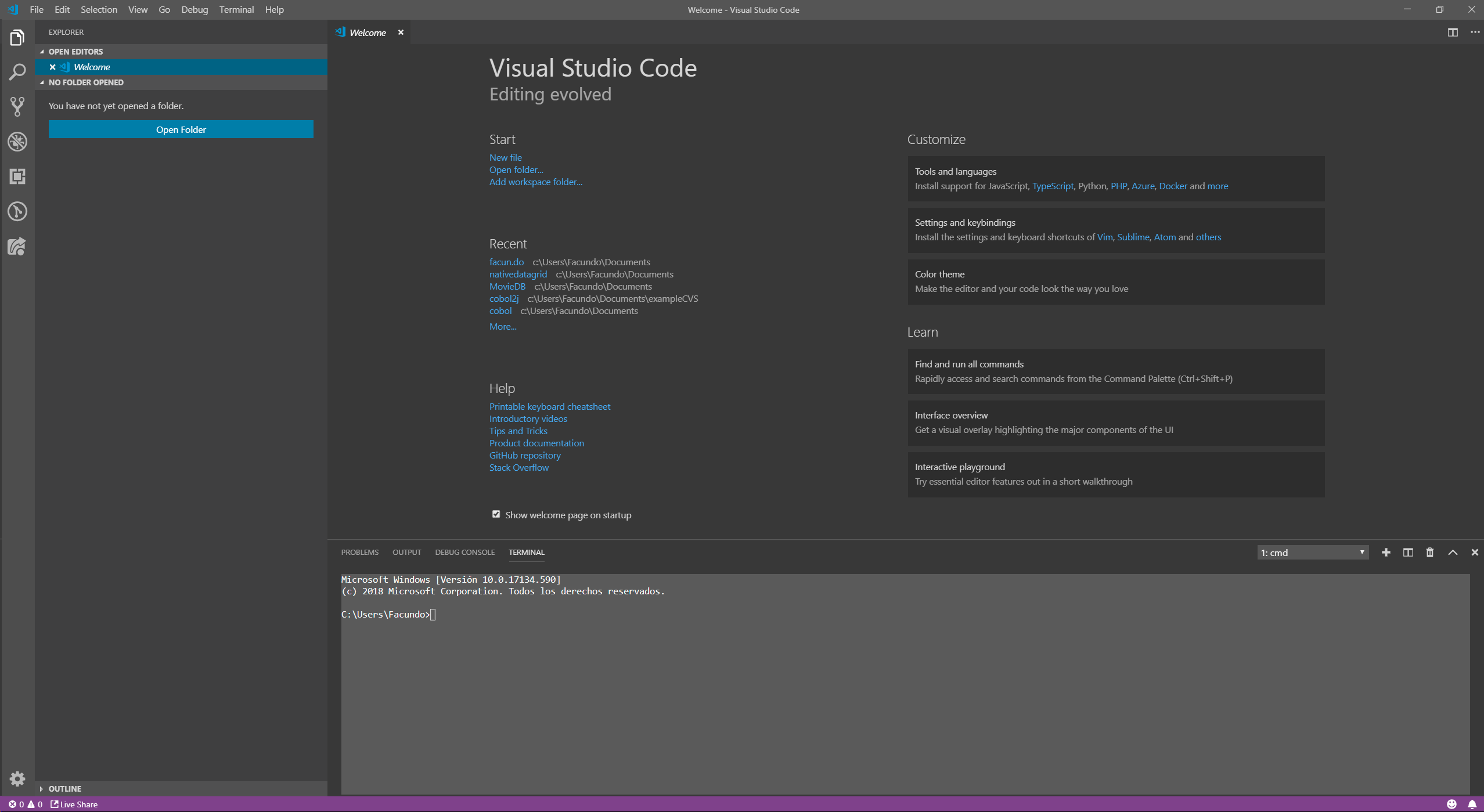
I've tried using terminal.background under customization to see if that was the problem. It wasn't.
My current user config:
{
    "terminal.integrated.shell.windows": "C:\\Windows\\System32\\cmd.exe",
    "git.autofetch": true,
    "window.titleBarStyle": "custom",
    "window.zoomLevel": 1,
    "php.validate.executablePath": "C:\\xampp\\php\\php.exe",
    "explorer.confirmDelete": false,
    "python.linting.enabled": false,
    "python.linting.flake8Enabled": true,
    "workbench.colorTheme": "Visual Studio Dark"
}
Edit: Apparently the terminal changes color and go even brighter after some usage.
 farebord
All 10 comments
I can't reproduce, what happens with different themes? Does it work if you switch themes and go back?
 Tyriar
on 26 Feb 2019
Tyriar
on 26 Feb 2019
Nop. Its the same for all themes except Light version. I've tried running withoud extensions and reinstalling it.
farebord
on 26 Feb 2019
@farebord Have you customized the background color or other colors inside cmd.exe or powershell.exe? https://github.com/Microsoft/vscode/issues/68865#issuecomment-467309670
Tyriar
on 1 Mar 2019
@farebord Have you customized the background color or other colors inside cmd.exe or powershell.exe? #68865 (comment)
Nop. Btw I use cmd.exe without any changes on the background color.
farebord
on 1 Mar 2019
Unfortunately we probably can't action this, however in the next version of Windows 10 (190*) we are moving over to a new backend which should fix most issues like this.
Tyriar
on 2 Mar 2019
@Tyriar this issue is fix when change "terminal.integrated.rendererType": "canvas" to "terminal.integrated.rendererType": "dom".
Hope that helps you find the bug. I'm out.
farebord
on 8 Mar 2019
@farebord it's interesting that's the fix. I'll keep a lookout for other reports, thanks.
Tyriar
on 8 Mar 2019
@farebord this was driving me nuts! thanks for the fix
 stephendeo
on 9 Mar 2019
stephendeo
on 9 Mar 2019
@Tyriar I get the same issue in Ubuntu. The solution above fixes it for me too.
 dylanparry
on 26 Mar 2019
dylanparry
on 26 Mar 2019
If anyone can still reproduce this I need better steps and a setting.json file to try reproduce myself, please comment in https://github.com/Microsoft/vscode/issues/71568 to help out 🙂
Tyriar
on 29 Apr 2019
Related issues
 villiv
·
3Comments
villiv
·
3Comments
 ryan-wong
·
3Comments
ryan-wong
·
3Comments
 lukehoban
·
3Comments
lukehoban
·
3Comments
 omidgolparvar
·
3Comments
omidgolparvar
·
3Comments
 NikosEfthias
·
3Comments
NikosEfthias
·
3Comments
Most helpful comment
@Tyriar this issue is fix when change
"terminal.integrated.rendererType": "canvas"to"terminal.integrated.rendererType": "dom".Hope that helps you find the bug. I'm out.