Vscode: Blurred files in explorer due to translate3d usage
Issue Type: Bug
After update to the latest version, I've seen blurred files in explorer.
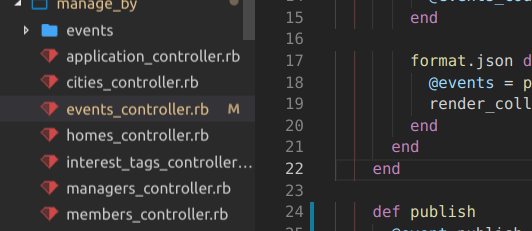
I'm using Ubuntu 18.04 Unity Wayland with text scaling factor 1.25
I've experienced the same blurring effect in Chrome two or three versions ago. It was fixed with the next version.
VS Code version: Code 1.31.0 (7c66f58312b48ed8ca4e387ebd9ffe9605332caa, 2019-02-06T08:51:24.856Z)
OS version: Linux x64 4.15.0-45-generic
System Info
|Item|Value|
|---|---|
|CPUs|Intel(R) Core(TM) i5-8250U CPU @ 1.60GHz (8 x 2744)|
|GPU Status|2d_canvas: enabled
checker_imaging: disabled_off
flash_3d: enabled
flash_stage3d: enabled
flash_stage3d_baseline: enabled
gpu_compositing: enabled
multiple_raster_threads: enabled_on
native_gpu_memory_buffers: disabled_software
rasterization: disabled_software
surface_synchronization: enabled_on
video_decode: unavailable_off
webgl: enabled
webgl2: enabled|
|Load (avg)|2, 2, 2|
|Memory (System)|15.53GB (1.21GB free)|
|Process Argv|--unity-launch|
|Screen Reader|no|
|VM|0%|
Extensions (17)
Extension|Author (truncated)|Version
---|---|---
markdown-preview-github-styles|bie|0.1.4
pgsql|dou|0.1.3
gitlens|eam|9.5.0
vscode-great-icons|emm|2.1.46
rails-snippets|Hri|1.0.8
endwise|kai|1.4.2
ruby-symbols|mig|0.1.7
dotenv|mik|1.0.1
atom-keybindings|ms-|3.0.6
vetur|oct|0.15.0
vscode-docker|Pet|0.5.2
ruby|reb|0.21.0
sass-indented|rob|1.5.1
slim|sia|0.1.2
rails-go-to-spec|spo|0.0.1
guides|spy|0.9.3
haml|vay|1.0.1
(1 theme extensions excluded)
 bibendi
All 27 comments
(Experimental duplicate detection)
Thanks for submitting this issue. Please also check if it is already covered by an existing one, like:
![vscodebot[bot] picture](https://avatars2.githubusercontent.com/in/2406?v=4&s=40) vscodebot[bot]
on 12 Feb 2019
vscodebot[bot]
on 12 Feb 2019
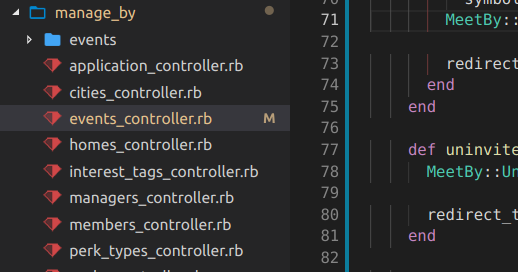
I've downgraded to 1.30.2. Now I see not blurred files. And I've discovered that the main text area was also a little bit blurred.
bibendi
on 12 Feb 2019
I've experienced the same blurring effect in Chrome two or three versions ago. It was fixed with the next version.
 joaomoreno
on 18 Feb 2019
joaomoreno
on 18 Feb 2019
We are building exploration builds that use a much newer version of our UI framework (Electron version 4.0.x). I wonder if this issue reproduces with one of these builds, could you try? Download:
 bpasero
on 18 Feb 2019
bpasero
on 18 Feb 2019
I tried this exploration build today. The blur has disappeared now!
bibendi
on 19 Feb 2019
When vscode with electron 4 will be released?
bibendi
on 20 Feb 2019
Hi @bpasero
Today I've upgraded my exploration build code-exploration_1.31.0-1544686921_amd64.deb
so I've got
Version: 1.35.0-exploration
Commit: 1158b7573b3444493ff5ee8355ad23350d76596a
Date: 2019-05-31T05:12:16.034Z
Electron: 4.2.2
Chrome: 69.0.3497.128
Node.js: 10.11.0
V8: 6.9.427.31-electron.0
OS: Linux x64 4.15.0-51-generic
It looks like the bug come back. :crying_cat_face: I again see blurred files tree when I scroll it down.
https://pasteboard.co/IiJNGS3.png
Maybe it is not because of the Electron?
bibendi
on 10 Jun 2019
@bibendi do you also see this in our insiders version? That one updated to Electron 4 meanwhile.
bpasero
on 11 Jun 2019
I've just installed the insiders' version. Yes, I see the same effect.
bibendi
on 11 Jun 2019
Ok too bad, not sure what this is then.
bpasero
on 11 Jun 2019
The blurred effect is definitely related to the fractional font scale factor. It isn't appear when I run VSCode with --force-device-scale-factor=2 or --force-device-scale-factor=1.
bibendi
on 11 Jun 2019
@bpasero Maybe is it related to this issue? https://github.com/Microsoft/vscode/issues/24483
Also, I found this effect on the Settings tab.
bibendi
on 13 Jun 2019
We are building exploration builds that use a much newer version of our UI framework (Electron version 6.0.x). I wonder if this issue reproduces with one of these builds, could you try? Download:
bpasero
on 8 Oct 2019
I've installed the exploration build for Linux (deb). The issue still exists.
bibendi
on 8 Oct 2019
@bibendi I wonder if this issue is reproducible when running VSCode in a browser or bare Electron. For that purpose, can you please:
git clone https://github.com/bpasero/vscode-runner.gityarn- Web (Chrome only):
yarn web - Electron:
yarn electron
And report back if you still reproduce the issue in either or both web and Electron?
bpasero
on 15 Oct 2019
I've reproduced the issue only for Web. You can get a screencast here https://drive.google.com/open?id=1zu1lWsJ5v42dKbSEQbZbl96bYPyroIOm
Please, download the video file for the best quality. I'm scrolling the files explorer back and forth, and the blurring is appearing and disappearing.
As for Electron, I've only seen a white window and nothing more ¯\_(ツ)_/¯
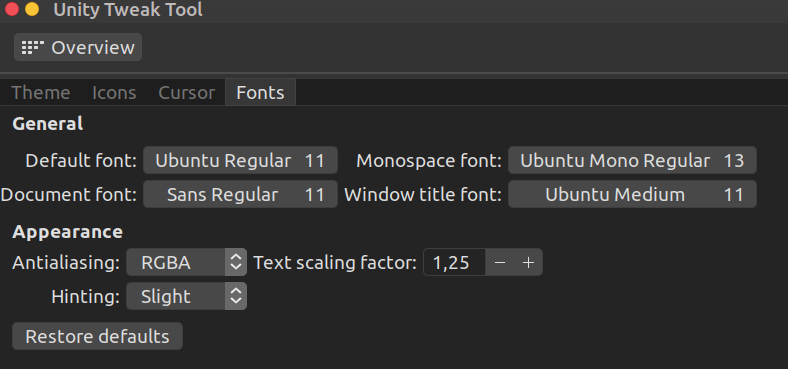
Maybe it is essential; I have a system-wide fractional text scale at 1.25.
bibendi
on 17 Oct 2019
@bibendi awesome to hear that, would you be willing to report this as issue to https://bugs.chromium.org/p/chromium/issues/list and we go on from there?
bpasero
on 17 Oct 2019
to report this as issue
I think it is a similar problem.
I go a little bit deeper. :slightly_smiling_face:
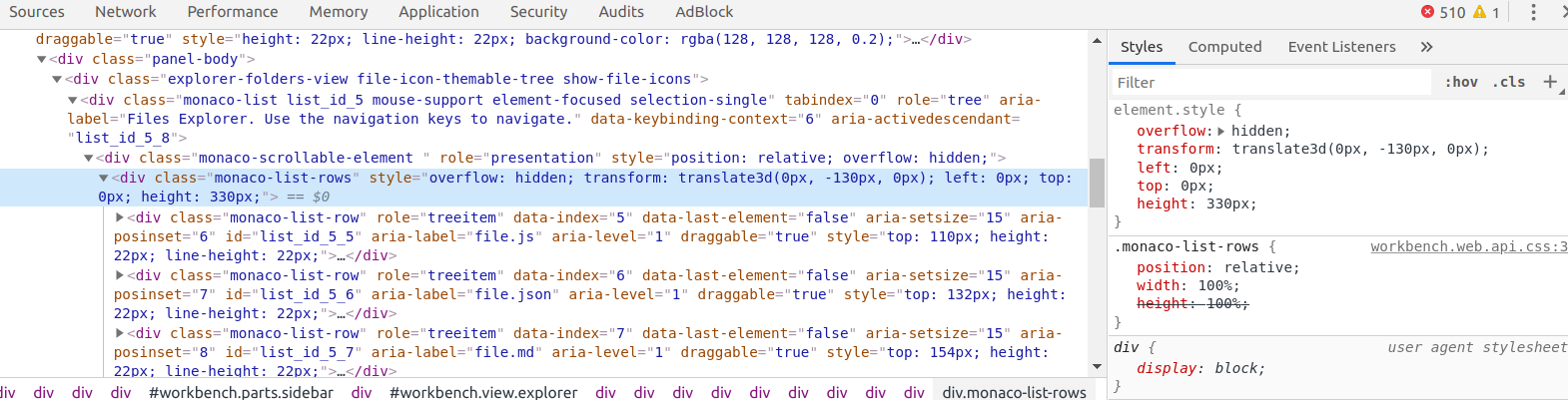
I've found out the reason. It's because of transform: translate3d(). When I manually change the value of y axis then the blurring is blinking.
As I understand, the editor-container has implemented a different scrolling approach. It has the will-change: transform.
Maybe I can somehow disable using of translate3d? As I see here and here the option can be a problem.
bibendi
on 17 Oct 2019
@bibendi sorry, but where exactly are we using translate3d() can you show me in code?
bpasero
on 17 Oct 2019
bibendi
on 17 Oct 2019
Ok thanks, moving to @joaomoreno and @isidorn to decide what to do here. We can still report this to Chrome, given that you can reproduce in the web version.
bpasero
on 17 Oct 2019
As I understand, the editor-container has implemented a different scrolling approach. It has the will-change: transform.
Will do this.
Related: https://github.com/microsoft/monaco-editor/issues/426
joaomoreno
on 17 Oct 2019
@joaomoreno Could you provide steps to verify?
 chrmarti
on 31 Oct 2019
chrmarti
on 31 Oct 2019
I am not seeing a change (latest insiders, Ubuntu 18 Linux, Parallels VM):
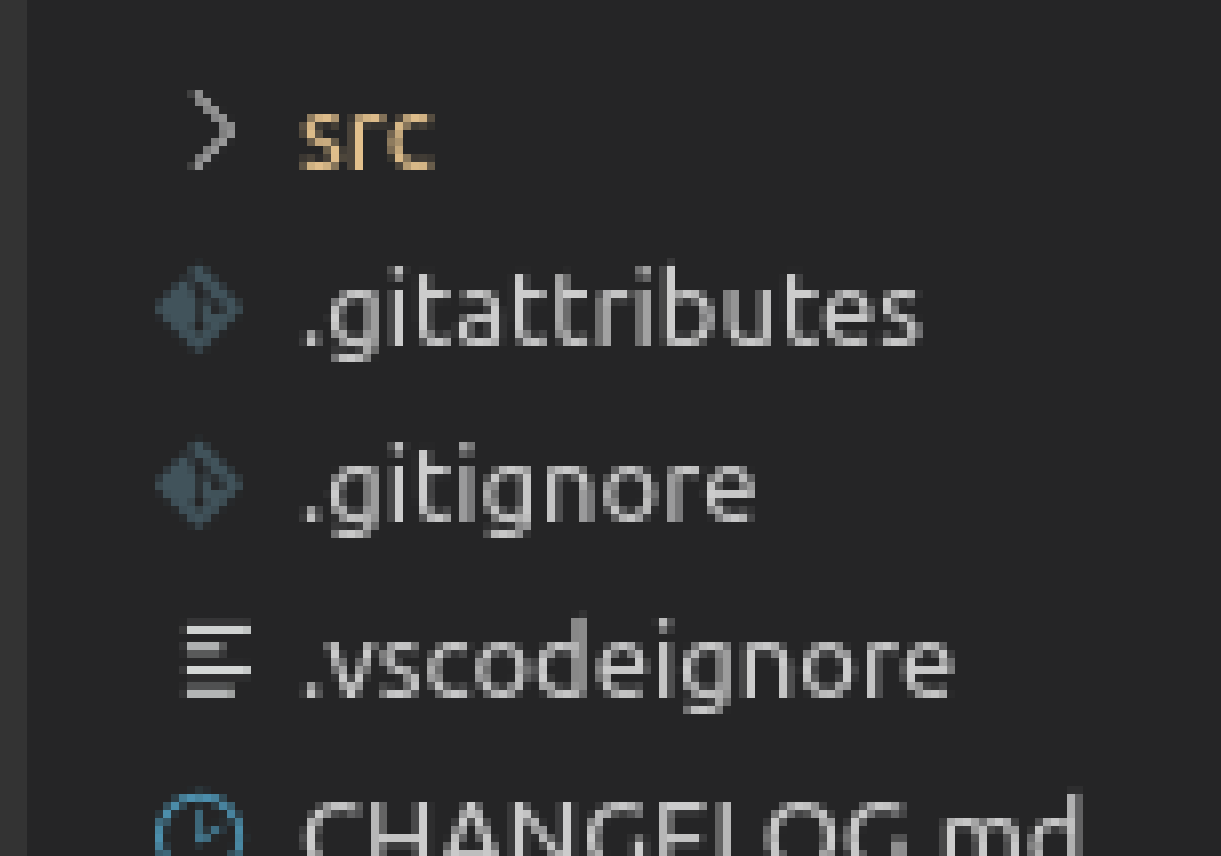
bpasero
on 31 Oct 2019
@bpasero I removed the translate3d, so whatever was affecting the tree shouldn't be any longer.
In your screenshot, you seem to be looking for subpixel antialiasing. You should also notice that there is no antialiasing on the y axis, so the issue is indeed fixed. I don't think the lack of subpixel antialiasing was the reason behind this issue, but rather rounding errors in using translate3d.
But look at my screenshot below, it seems subpixel antialiasing is disabled across the whole workbench on my Linux box, which seems to be another problem altogether.
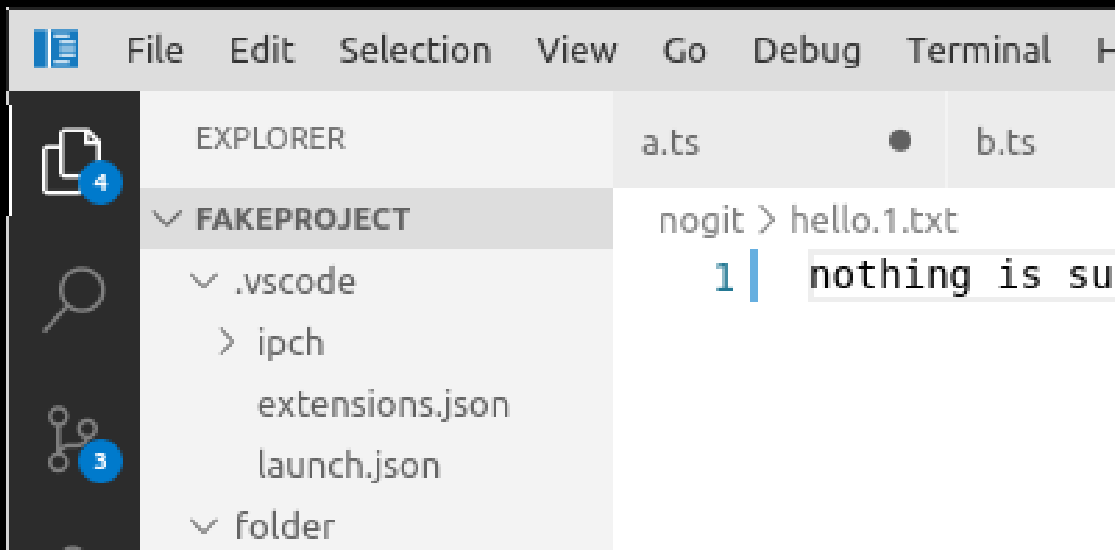
@chrmarti As for this issue, I don't have repro steps, unfortunately. Maybe @bibendi can give the latest Insiders a try and let us know if removing translate3d helped.
joaomoreno
on 31 Oct 2019
@bibendi how about you verify this is fixed for you by trying our insiders build? I think then we have the best feedback on this issue: You can give our preview releases a try from: https://code.visualstudio.com/insiders/
bpasero
on 31 Oct 2019
Awesome! It works! Thank you, guys!
bibendi
on 31 Oct 2019
Related issues
 shanalikhan
·
3Comments
shanalikhan
·
3Comments
 villiv
·
3Comments
villiv
·
3Comments
 omidgolparvar
·
3Comments
omidgolparvar
·
3Comments
 borekb
·
3Comments
borekb
·
3Comments
 trstringer
·
3Comments
trstringer
·
3Comments
Most helpful comment
Awesome! It works! Thank you, guys!